

編輯:關於 Android 程式設計
圖片是大多數應用的效能大戶,而快取策略則是成敗關鍵。本文分享一個可直接落地的圖片載入類,它從網路下載圖片,並以「一級記憶體快取 + 二級軟引用快取 + SD 卡檔案快取」三層結構進行管理。
import java.io.File;
import java.io.FileInputStream;
import java.io.FileNotFoundException;
import java.io.FileOutputStream;
import java.io.IOException;
import java.io.InputStream;
import java.lang.ref.SoftReference;
import java.net.HttpURLConnection;
import java.net.URL;
import java.util.LinkedHashMap;
import java.util.concurrent.ConcurrentHashMap;
import java.util.concurrent.ExecutorService;
import java.util.concurrent.Executors;
import android.graphics.Bitmap;
import android.graphics.BitmapFactory;
import android.os.Build;
import android.os.Handler;
import android.text.TextUtils;
/**
* 圖片載入引擎,主要功能是從網路下載圖片並快取。
* 之所以另寫一個輕量級版本,是因為舊的圖片載入邏輯過於複雜。
*/
public class ImageLoaderEngine {
public static final int LOAD_IMG_SUCCESS = 2010;
private final int MAX_CAPACITY = Build.VERSION.SDK_INT > Build.VERSION_CODES.GINGERBREAD_MR1 ? 50 : 10;
private static ImageLoaderEngine instance;
private static Handler mHandler;
private ExecutorService pool; // 背景執行緒池
// 用 LinkedHashMap 而非 LruCache:後者直接申請記憶體大小而非圖片張數,
// 本 App 已有一個全域 LruCache,重複申請記憶體大小對應用不利
private LinkedHashMap<String, Bitmap> mFirstLevelCache;
private ConcurrentHashMap<String, SoftReference<Bitmap>> mSecondLevelCache;
public static ImageLoaderEngine getInstance(Handler handler) {
if (instance == null) {
instance = new ImageLoaderEngine();
}
if (handler != null) {
mHandler = handler;
}
return instance;
}
private ImageLoaderEngine() {
pool = Executors.newFixedThreadPool(4);
initCache();
}
private void initCache() {
mFirstLevelCache = new LinkedHashMap<String, Bitmap>(MAX_CAPACITY / 2, 0.75f, true) {
private static final long serialVersionUID = 1L;
protected boolean removeEldestEntry(Entry<String, Bitmap> eldest) {
if (size() > MAX_CAPACITY) {
// 超過一級快取大小後挪到二級快取
mSecondLevelCache.put(eldest.getKey(), new SoftReference<Bitmap>(eldest.getValue()));
return true;
}
return false;
}
};
mSecondLevelCache = new ConcurrentHashMap<String, SoftReference<Bitmap>>();
}
/** 依 key 移除快取 */
public void deleteCacheByKey(String key) {
String sdCacheingPath = IOHelper.getCachedPicturePath(Global.packageName, key);
String sdCacheedPath = sdCacheingPath + ".png";
File file = new File(sdCacheingPath);
if (file.exists()) {
file.delete();
}
file = new File(sdCacheedPath);
if (file.exists()) {
file.delete();
}
mFirstLevelCache.remove(key);
mSecondLevelCache.remove(key);
}
/** 釋放資源 */
public void recycleImageLoader() {
new Thread(new Runnable() {
@Override
public void run() {
if (pool != null) {
pool.shutdownNow();
}
if (mFirstLevelCache != null) {
for (Bitmap bmp : mFirstLevelCache.values()) {
if (bmp != null) {
bmp.recycle();
bmp = null;
}
}
mFirstLevelCache.clear();
mFirstLevelCache = null;
}
if (mSecondLevelCache != null) {
mSecondLevelCache.clear();
}
mHandler = null;
}
}).start();
}
/** 背景請求圖片 */
public void loadImageByMoment(final NMoment moment, String photoTag) {
if (moment.isPicture() || moment.isVideo()) {
String id = moment.id + photoTag;
loadImageByUrl(id + "", moment.getPicture(Global.widthPixels / 3 * 2), moment.orientation);
}
}
/** 背景請求圖片 */
public void loadImageByUrl(final String key, final String url, final int orientation) {
pool.submit(new Runnable() {
public void run() {
// 記憶體中已有則跳過
if (mFirstLevelCache.get(key) != null || mSecondLevelCache.get(key) != null) {
return;
}
// SD 卡中若存在下載中的暫存檔
final String sdCacheingPath = IOHelper.getCachedPicturePath(Global.packageName, key);
File cacheingFile = new File(sdCacheingPath);
if (cacheingFile.exists()) {
long currentTime = System.currentTimeMillis();
if ((currentTime - cacheingFile.lastModified()) > 2 * 60 * 1000) {
// 超過 2 分鐘仍未下載完成,視為殘留檔並刪除
cacheingFile.delete();
} else {
getBitmapFromNetworkAndAddToMemory(url, key, orientation);
return;
}
}
// 完成後檔案會改名為 .png,否則會導致快取錯誤、圖片變黑
String sdCacheedPath = sdCacheingPath + ".png";
File cacheedFile = new File(sdCacheedPath);
if (cacheedFile.exists()) {
return;
}
getBitmapFromNetworkAndAddToMemory(url, key, orientation);
}
});
}
private void getBitmapFromNetworkAndAddToMemory(String url, String key, int orientation) {
Bitmap bmp = getBitmapFromUrl(url);
if (bmp != null) {
if (key.endsWith("_DetailDaily")) {
bmp = scaledBitmap(bmp, Global.getThumbWidth());
}
if (orientation != 0) {
mFirstLevelCache.put(key, ViewHelper.rotateBitmap(orientation, bmp));
} else {
mFirstLevelCache.put(key, bmp);
}
if (mHandler != null) {
mHandler.removeMessages(LOAD_IMG_SUCCESS);
mHandler.sendEmptyMessageDelayed(LOAD_IMG_SUCCESS, 600);
}
final String sdCacheingPath = IOHelper.getCachedPicturePath(Global.packageName, key);
saveBitmapToFile(sdCacheingPath, bmp);
}
}
/** 直接從網路取得圖片 */
public Bitmap getBitmapFromUrl(String url) {
URL myFileUrl = null;
Bitmap bitmap = null;
InputStream is = null;
try {
if (!UIUtils.isNetworkAvailable(MyApplication.getInstance())) {
return null;
}
myFileUrl = new URL(url);
HttpURLConnection conn = (HttpURLConnection) myFileUrl.openConnection();
conn.setDoInput(true);
conn.connect();
is = conn.getInputStream();
bitmap = BitmapFactory.decodeStream(is);
} catch (Exception e) {
try {
if (is != null) {
is.close();
}
} catch (IOException e1) {
e1.printStackTrace();
}
e.printStackTrace();
}
return bitmap;
}
public Bitmap getImageInMemory(NMoment moment) {
return getImageInMemory(moment, "");
}
/**
* 新增介面,可依 tag 重新標識 Moment,擴展應用場景。
* 例如首頁需要大圖,進入相集頁需要小圖。
*/
public Bitmap getImageInMemory(NMoment moment, String photoTag) {
String id = moment.id + photoTag;
Bitmap bmp = getFromFirstLevelCache(id);
if (bmp != null && !bmp.isRecycled()) {
return bmp;
}
bmp = getFromSecondLevelCache(id);
if (bmp != null && !bmp.isRecycled()) {
return bmp;
}
if (bmp != null && bmp.isRecycled()) {
return null;
}
return bmp;
}
public void setImage(String key, Bitmap picture) {
mFirstLevelCache.put(key, picture);
}
public Bitmap getImage(NMoment moment) {
return getImage(moment, "");
}
/** 完整取圖流程:一級 → 二級 → SD 卡 → 網路 */
public Bitmap getImage(NMoment moment, String photoTag) {
String id = moment.id + photoTag;
Bitmap bmp = getFromFirstLevelCache(id);
if (bmp != null && !bmp.isRecycled()) {
return bmp;
}
bmp = getFromSecondLevelCache(id);
if (bmp != null && !bmp.isRecycled()) {
return bmp;
}
bmp = getFromSDCache(moment, photoTag);
if (bmp != null && !bmp.isRecycled()) {
return bmp;
}
loadImageByMoment(moment, photoTag);
if (bmp != null && bmp.isRecycled()) {
return null;
}
return bmp;
}
public Bitmap getImage(String key, String url) {
Bitmap bmp = getFromFirstLevelCache(key);
if (bmp != null && !bmp.isRecycled()) {
return bmp;
}
bmp = getFromSecondLevelCache(key);
if (bmp != null && !bmp.isRecycled()) {
return bmp;
}
bmp = getFromSDCacheByKey(key, 0);
if (bmp != null && !bmp.isRecycled()) {
return bmp;
}
loadImageByUrl(key, url, 0);
if (bmp != null && bmp.isRecycled()) {
return null;
}
return bmp;
}
/** 一級快取取圖,命中後移到鏈尾以維持 LRU 順序 */
private Bitmap getFromFirstLevelCache(String imgId) {
Bitmap bitmap = null;
synchronized (mFirstLevelCache) {
bitmap = mFirstLevelCache.get(imgId);
if (bitmap != null) {
mFirstLevelCache.remove(imgId);
mFirstLevelCache.put(imgId, bitmap);
}
}
return bitmap;
}
/** 二級快取取圖,順手清理已被回收的軟引用 */
private Bitmap getFromSecondLevelCache(String imgId) {
Bitmap bitmap = null;
SoftReference<Bitmap> softReference = mSecondLevelCache.get(imgId);
if (softReference != null) {
bitmap = softReference.get();
if (bitmap == null) {
mSecondLevelCache.remove(imgId);
}
}
return bitmap;
}
/** 從 SD 卡快取取圖,並回填一級快取 */
private Bitmap getFromSDCache(final NMoment moment, final String photoTag) {
Bitmap drawable = null;
String id = moment.id + photoTag;
String sdCacheingPath = IOHelper.getCachedPicturePath(Global.packageName, id);
String sdCacheedPath = sdCacheingPath + ".png";
if (moment.isLocal) {
if (moment.isVideo()) {
sdCacheedPath = moment.getPicture(Global.widthPixels / 3 * 2);
} else {
sdCacheedPath = moment.local_res_path;
}
}
File cacheFile = new File(sdCacheedPath);
if (!cacheFile.exists()) {
if (!TextUtils.isEmpty(moment.local_res_path)) {
// 若本地有圖片,先用本地圖代替
sdCacheedPath = moment.local_res_path;
cacheFile = new File(sdCacheedPath);
if (cacheFile.exists()
&& !GlobalData.PHONE_MANUFACTURER.equalsIgnoreCase("samsung")) {
new Thread(new Runnable() {
@Override
public void run() {
loadImageByMoment(moment, photoTag);
}
}).start();
return getFitPhoto(sdCacheedPath, moment, cacheFile);
} else {
return null;
}
} else {
return null;
}
}
drawable = getFitPhoto(sdCacheedPath, moment, cacheFile);
if (drawable != null) {
if (moment.orientation != 0) {
drawable = ViewHelper.rotateBitmap(moment.orientation, drawable);
}
if (mFirstLevelCache != null) {
mFirstLevelCache.put(id, drawable);
}
} else {
cacheFile.delete();
}
return drawable;
}
/** 依目標尺寸計算 inSampleSize,避免不必要的記憶體浪費 */
private Bitmap getFitPhoto(String sdCacheedPath, NMoment moment, File cacheFile) {
FileInputStream fs = null;
Bitmap result;
try {
BitmapFactory.Options options = new BitmapFactory.Options();
options.inJustDecodeBounds = true;
BitmapFactory.decodeFile(sdCacheedPath, options);
int hRatio = (int) Math.ceil(options.outHeight / (float) moment.picture_height);
int wRatio = (int) Math.ceil(options.outWidth / (float) Global.widthPixels);
if (hRatio > 1 || wRatio > 1) {
if (hRatio > wRatio) {
options.inSampleSize = hRatio;
} else {
options.inSampleSize = wRatio;
}
}
options.inPurgeable = true;
options.inInputShareable = true;
options.inDither = false;
options.inJustDecodeBounds = false;
try {
fs = new FileInputStream(cacheFile);
} catch (FileNotFoundException e) {
e.printStackTrace();
}
result = BitmapFactory.decodeFileDescriptor(fs.getFD(), null, options);
} catch (Exception e) {
throw new RuntimeException(e);
} finally {
if (fs != null) {
try {
fs.close();
} catch (IOException e) {
e.printStackTrace();
}
}
}
return result;
}
private Bitmap getFromSDCacheByKey(String key, int orientation) {
Bitmap drawable = null;
FileInputStream fs = null;
String sdCacheedPath = IOHelper.getCachedPicturePath(Global.packageName, key) + ".png";
File cacheFile = new File(sdCacheedPath);
if (!cacheFile.exists()) {
return null;
}
try {
BitmapFactory.Options options = new BitmapFactory.Options();
options.inJustDecodeBounds = true;
BitmapFactory.decodeFile(sdCacheedPath, options);
int wRatio = (int) Math.ceil(options.outWidth / (float) Global.widthPixels);
options.inSampleSize = wRatio;
options.inPurgeable = true;
options.inInputShareable = true;
options.inDither = false;
options.inJustDecodeBounds = false;
try {
fs = new FileInputStream(cacheFile);
} catch (FileNotFoundException e) {
e.printStackTrace();
}
drawable = BitmapFactory.decodeFileDescriptor(fs.getFD(), null, options);
if (drawable != null) {
if (orientation != 0) {
drawable = ViewHelper.rotateBitmap(orientation, drawable);
}
mFirstLevelCache.put(key, drawable);
} else {
cacheFile.delete();
}
} catch (Exception e) {
throw new RuntimeException(e);
} finally {
if (fs != null) {
try {
fs.close();
} catch (IOException e) {
e.printStackTrace();
}
}
}
return drawable;
}
/** 建立一個灰色的預設圖 */
public Bitmap getDefaultBitmap(NMoment moment) {
return ImageHelper.createBitmap(moment.picture_width, moment.picture_height,
R.color.image_bg_daily);
}
/** 將 Bitmap 存為檔案,傳入以 jpg 結尾的路徑 */
public void saveBitmapToFile(String filePath, Bitmap mBitmap) {
try {
File file = new File(filePath);
if (!file.getParentFile().exists()) {
file.getParentFile().mkdirs();
}
if (file.exists() && file.length() > 0) {
long currentTime = System.currentTimeMillis();
if ((currentTime - file.lastModified()) > 2 * 60 * 1000) {
file.delete();
} else {
return;
}
} else {
file.createNewFile();
}
FileOutputStream fOut = new FileOutputStream(file);
mBitmap.compress(Bitmap.CompressFormat.JPEG, 80, fOut);
fOut.flush();
fOut.close();
file.renameTo(new File(filePath + ".png"));
} catch (Exception e) {
e.printStackTrace();
}
}
/** 將遠端圖片直接寫入快取檔案 */
public boolean saveUrlBitmapToFile(String url, String filePath) {
if (TextUtils.isEmpty(filePath)) {
return false;
}
File iconFile = new File(filePath);
if (iconFile.getParentFile() == null) {
return false;
}
if (!iconFile.getParentFile().exists()) {
iconFile.getParentFile().mkdirs();
}
if (iconFile.exists() && iconFile.length() > 0) {
long currentTime = System.currentTimeMillis();
if ((currentTime - iconFile.lastModified()) > 2 * 60 * 1000) {
iconFile.delete();
} else {
return true;
}
}
FileOutputStream fos = null;
InputStream is = null;
try {
fos = new FileOutputStream(filePath);
is = new URL(url).openStream();
int data = is.read();
while (data != -1) {
fos.write(data);
data = is.read();
}
} catch (IOException e) {
iconFile.delete();
e.printStackTrace();
return false;
} finally {
try {
if (is != null) {
is.close();
}
if (fos != null) {
fos.close();
}
} catch (IOException e) {
e.printStackTrace();
}
}
iconFile.renameTo(new File(filePath + ".png"));
return true;
}
/** 等比縮放 bitmap */
public Bitmap scaledBitmap(Bitmap bmp, int scaledValue) {
int bmpWidth = bmp.getWidth();
int bmpHeight = bmp.getHeight();
if (bmpWidth >= bmpHeight) { // 橫圖
bmpWidth = (bmpWidth * scaledValue / bmpHeight);
bmpHeight = scaledValue;
} else {
bmpHeight = (bmpHeight * scaledValue / bmpWidth);
bmpWidth = scaledValue;
}
Bitmap scaledBmp = Bitmap.createScaledBitmap(bmp, bmpWidth, bmpHeight, true);
bmp.recycle();
bmp = null;
return scaledBmp;
}
}
整體來說,這個引擎把圖片載入最容易踩的坑都堵住了:暫存檔與完成檔分離、兩分鐘超時清理、取圖時的回收狀態檢查、依目標尺寸做 inSampleSize 縮放,以及一級/二級快取之間的自然降級。雖是以 NMoment 為主體寫成的業務向實作,但把快取分層與檔案命名策略抽離出來,稍加改寫即可套用到任何圖片列表場景。
 Android 生成 keystore 的兩種方式:Eclipse 圖形化與命令行
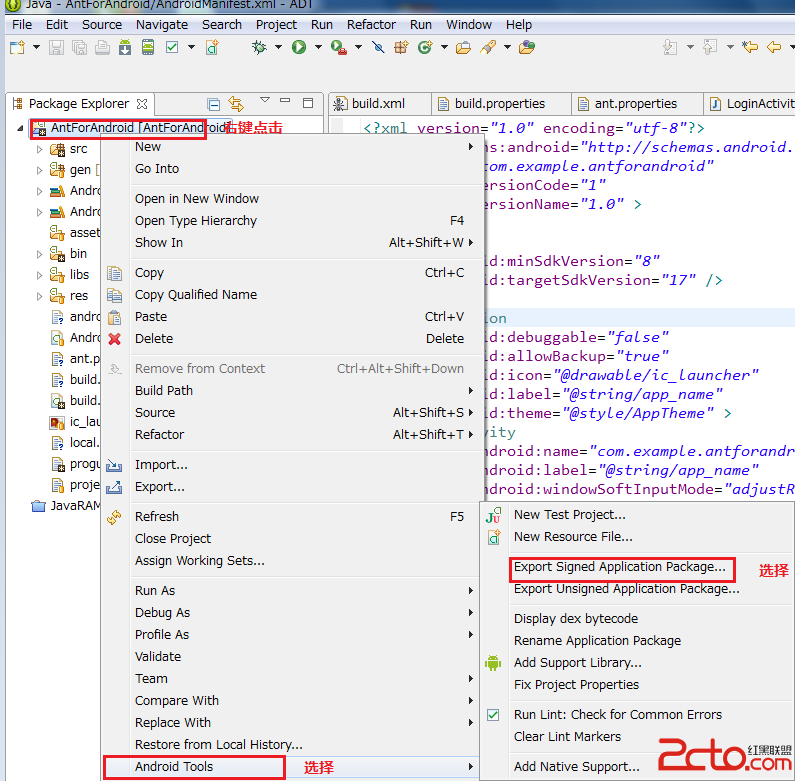
發布前必須準備好簽名文件。這裡整理兩條路徑:一條是在 Eclipse 裡用向導點完就好,另一條是用 keytool 命令直接生成。 一、在 Eclipse 中生成 先打開
 Android 群英傳筆記(九):系統信息獲取與安全機制
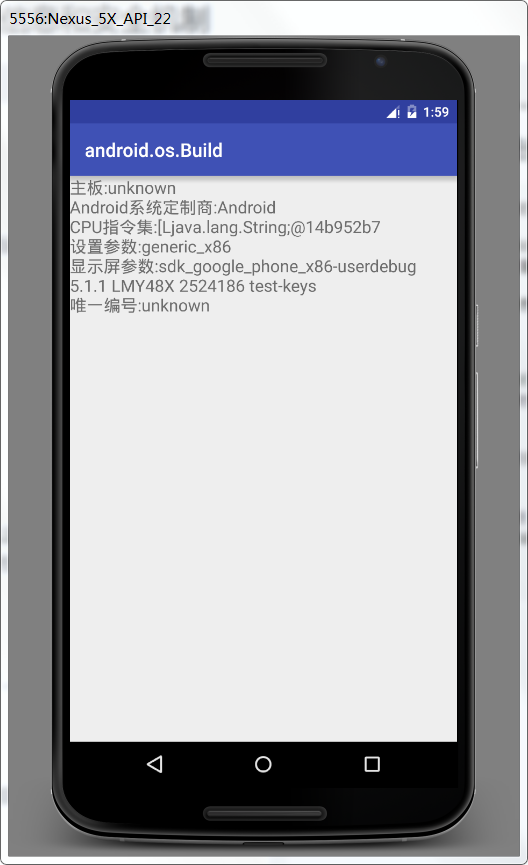
本書也正式進入尾聲。在 Android 的世界裡,不同的軟硬件信息就像一個國家的經濟與軍事水平,各種配置參數代表著一個 Android 帝國的強弱,所以廠商們才熱衷於打「
 自製 Android 日曆控制項:月份/週雙模式與無限滑動
無聊時想動手做点小工具,於是花了一天多寫出一個堪用的日曆 View。它支援兩種檢視模式:整月與單週,並可左右滑動翻頁。先看成果:上圖為月份模式;下圖則是週模式:設計思路核
 Android 應用開發中的單元測試分析
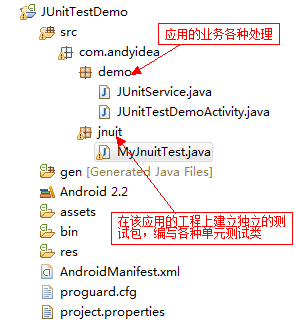
單元測試是確保程式品質的重要方法。在 Android 開發中,適當的單元測試可以幫助開發者及早發現問題,也能降低後期維護成本。本文說明單元測試的基本概念,以及 Andro