

編輯:關於 Android 程式設計
逆向工程在 Android 開發者的技能樹上佔有一個微妙的位置。它可以是理解大型 App 架構的窗口,也可以是排查相容性問題的手段。本文以一個舊版手機 QQ 的「口令紅包」功能為靶子,完整記錄一次靜態分析的過程——包括走了哪些彎路、為什麼換路,以及最後如何定位到關鍵邏輯。
工具選用 Apktool 與 jadx。前者擅長把資源與 smali 還原成可讀結構,後者則能直接把 dex 反編譯成接近原始的 Java 程式碼。測試標的是手機 QQ 6.2.3,環境為 Windows(作者手邊沒有 Mac 可用)。
先確認已安裝 Java 7 以上版本並能在命令列直接呼叫:
Apktool v2.0.3 - a tool for reengineering Android apk files with smali v2.1.0 and baksmali v2.1.0 usage: apktool -advance,--advanced prints advance information. -version,--version prints the version then exits usage: apktool if|install-framework [options] <framework.apk> -p,--frame-path <dir> Stores framework files into <dir>. -t,--tag <tag> Tag frameworks using <tag>. usage: apktool d[ecode] [options] <file_apk> -f,--force Force delete destination directory. -o,--output <dir> The name of folder that gets written. Default is apk.out -p,--frame-path <dir> Uses framework files located in <dir>. -r,--no-res Do not decode resources. -s,--no-src Do not decode sources. -t,--frame-tag <tag> Uses framework files tagged by <tag>. usage: apktool b[build] [options] <app_path> -f,--force-all Skip changes detection and build all files. -o,--output <dir> The name of apk that gets written. Default is dist/name.apk -p,--frame-path <dir> Uses framework files located in <dir>.
雖然 jadx 能傻瓜式地直接打開 APK,但為了理解反編譯的實際過程(日後遇到加固時才知道如何應對),先試著用 Apktool 拆解。
D:\dev\reverse>apktool d -o qq mobileqq_android_6.2.3.apk I: Using Apktool 2.0.3 on mobileqq_android_6.2.3.apk I: Loading resource table... Exception in thread "main" brut.androlib.AndrolibException: Multiple res specs: attr/name at brut.androlib.res.data.ResTypeSpec.addResSpec(ResTypeSpec.java:78) at brut.androlib.res.decoder.ARSCDecoder.readEntry(ARSCDecoder.java:248) at brut.androlib.res.decoder.ARSCDecoder.readTableType(ARSCDecoder.java:212) at brut.androlib.res.decoder.ARSCDecoder.readTableTypeSpec(ARSCDecoder.java:154) at brut.androlib.res.decoder.ARSCDecoder.readTablePackage(ARSCDecoder.java:116) at brut.androlib.res.decoder.ARSCDecoder.readTableHeader(ARSCDecoder.java:78) at brut.androlib.res.decoder.ARSCDecoder.decode(ARSCDecoder.java:47) at brut.androlib.res.AndrolibResources.getResPackagesFromApk(AndrolibResources.java:544) at brut.androlib.res.AndrolibResources.loadMainPkg(AndrolibResources.java:63) at brut.androlib.res.AndrolibResources.getResTable(AndrolibResources.java:55) at brut.androlib.Androlib.getResTable(Androlib.java:66) at brut.androlib.ApkDecoder.setTargetSdkVersion(ApkDecoder.java:198) at brut.androlib.ApkDecoder.decode(ApkDecoder.java:96) at brut.apktool.Main.cmdDecode(Main.java:165) at brut.apktool.Main.main(Main.java:81)
錯誤訊息是 Multiple res specs: attr/name。查了資料後判斷,對方在資源表裡刻意放入同名的 attr id,讓 Apktool 在解析ARSС 時直接失敗。這正是加固常見的一手。既然此路不通,換 jadx。
直接用 jadx-gui 打開 QQ 的 APK,結果是——卡死。原因很直白:太大了。解法也很直白:多給點記憶體。編輯 jadx-gui 啟動腳本,加入:
set JAVA_OPTS=-server -Xms1024m -Xmx8192m -XX:PermSize=256m -XX:MaxPermSize=1024m
原理和替 Android Studio 調 VM 參數一樣。等候一段時間後,順利打開。
直覺做法是從資源檔下手。在 resources.arsc 的 values/strings.xml 中找到:
<string name="qb_hbdetail_command_word">口令紅包</string>
接著用 Ctrl+Shift+F 全域搜尋「口令紅包」……沒有結果。改用資源 id 再試:
0x7f0a0e5a (2131365466) = string.qb_hbdetail_command_word: 口令紅包
仍然一無所獲。合理推測:對方把字串做了加密或改為執行期組裝。
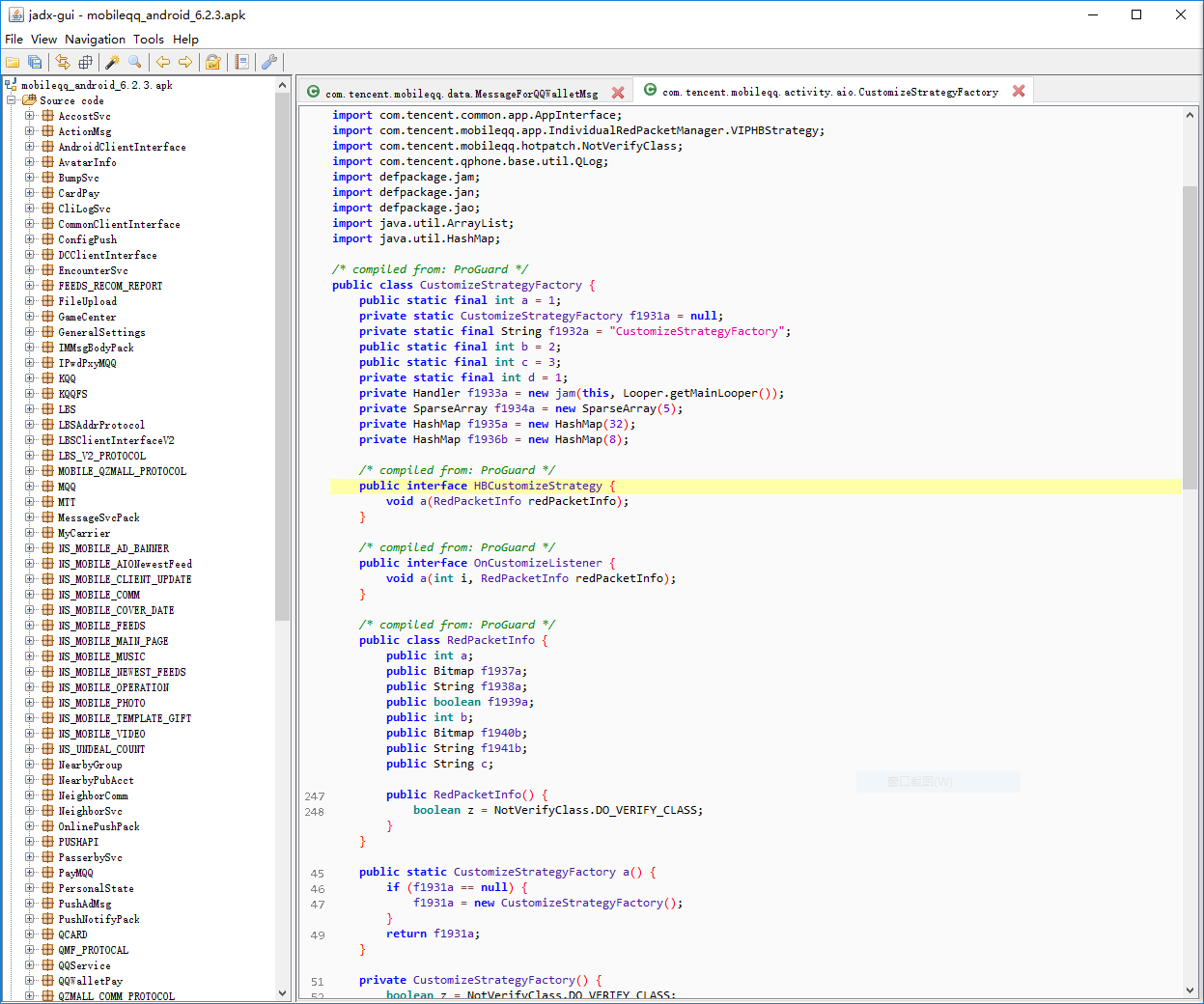
換個思路,用英文命名去搜。紅包的英文是 RedPacket,類名慣例首字母大寫,於是搜 RedPacket,命中十幾條。逐一排查後,第一個 RedPacketInfo 是 UI 用的 VO,跳過;下一個從套件名 com.tencent.mobileqq.data 看起來很有希望:
package com.tencent.mobileqq.data; import android.text.TextUtils; import com.tencent.mobileqq.hotpatch.NotVerifyClass; import cooperation.qzone.util.WiFiDash; import java.io.IOException; import java.io.ObjectInput; import java.io.ObjectOutput; import tencent.im.msg.im_msg_body.QQWalletAioBody; /* compiled from: ProGuard */ public class QQWalletRedPacketMsg { public String authkey; private int channelId; public int conftype; public QQWalletTransferMsgElem elem; public String envelopeName; public int envelopeid; public boolean isOpened; public int msgFrom; public String redPacketId; public int redtype; private int resend; public int templateId;
序列化、讀寫、建構方法可以先跳過。從 field 命名看,redtype 很可能描述紅包類型,於是搜 redtype,但命中的字串是「查看詳情」,顯然屬於領取狀態,方向不對。
回頭抓住 QQWalletRedPacketMsg 不放,改搜「誰參照了這個類」,範圍限定 Field,排除自身後只剩唯一結果 MessageForQQWalletMsg:
public class MessageForQQWalletMsg extends ChatMessage { // COMMAND_REDPACKET?口令紅包 public static final int MSG_TYPE_COMMAND_REDPACKET = 6; public static final int MSG_TYPE_COMMON_REDPACKET = 2; public static final int MSG_TYPE_COMMON_THEME_REDPACKET = 4; public static final int MSG_TYPE_INDIVIDUAL_REDPACKET = 2001; public static final int MSG_TYPE_LUCY_REDPACKET = 3; public static final int MSG_TYPE_LUCY_THEME_REDPACKET = 5; public static final int MSG_TYPE_PUBLIC_ACCOUNT_REDPACKET = 2002; public static final int MSG_TYPE_TRANSFER = 1; ...
MSG_TYPE_COMMAND_REDPACKET = 6 這個常量的命名,幾乎可以確定就是口令紅包的類型標識。在同類中繼續搜,找到:
public static boolean isCommandRedPacketMsg(MessageRecord messageRecord) { if (messageRecord != null && (messageRecord instanceof MessageForQQWalletMsg) && ((MessageForQQWalletMsg) messageRecord).messageType == MSG_TYPE_COMMAND_REDPACKET) { return true; } return false; }
接著搜這兩個識別符,只在 TroopMessageManager 中找到一處引用,而且該段程式碼反編譯失敗,只剩下 smali:
L_0x0100: r2 = com.tencent.mobileqq.data.MessageForQQWalletMsg.isCommandRedPacketMsg(r25); if (r2 == 0) goto L_0x011e;
意思很清楚:若是口令紅包就繼續往下走,否則跳到 L_0x011e。TroopMessageManager 從命名看是群訊息管理者,紅包屬於群訊息的一種,吻合。硬啃完這段滿是 goto 的程式碼後,大致看出它在做各種條件判斷,並呼叫 MsgProxyUtils 處理訊息邏輯與快取——然後就斷了。
既然直接搜中文無效,就把中文轉成 Unicode 再搜。「口令紅包」對應:
\u53e3\u4ee4\u7ea2\u5305
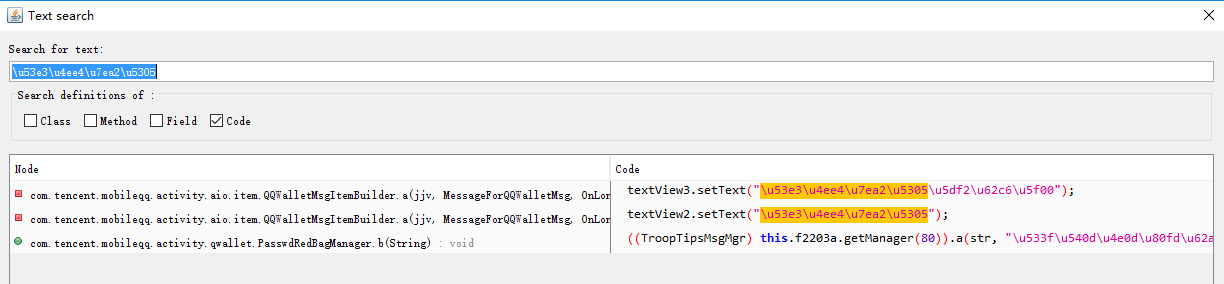
這次命中 2 個類、共 3 處引用。其中一個類名格外有意思:PasswdRedBagManager——「密碼紅包管理器」。
public void b(String str) { ((TroopTipsMsgMgr) this.f2203a.getManager(80)).a(str, "\u533f\u540d\u4e0d\u80fd\u62a2\u53e3\u4ee4\u7ea2\u5305\u54e6", NetConnInfoCenter.getServerTime(), BaseConstants.DEFAULT_QUICK_HEARTBEAT_TIMEOUT, f);
把這串 Unicode 還原:「匿名不能搶口令紅包哦」。原來匿名聊天室裡還擋了一層。
接著從類的頂端往下掃,onDestroy 下方有個方法的 log 很關鍵:
public long[] m883a(SessionInfo sessionInfo, String str) { if (QLog.isColorLevel()) { QLog.d(f2197a, (int) h, "openPasswdRedBagByPassword, passwd = " + str); } long[] jArr = new long[]{0, 0}; if (sessionInfo == null) { return jArr; } if (TextUtils.isEmpty(str)) { return jArr; } c(); List<String> list = (List) this.f2206a.get(str); if (list == null || list.isEmpty()) { return jArr; } PasswdRedBagInfo passwdRedBagInfo; String str2 = a(sessionInfo.a) + "_" + sessionInfo.f1757a; for (String str3 : list) { HashMap hashMap = (HashMap) this.f2209b.get(str3); if (hashMap != null) { passwdRedBagInfo = (PasswdRedBagInfo) hashMap.get(str2); if (!(passwdRedBagInfo == null || a(str3))) { jArr[g] = passwdRedBagInfo.a.uint64_creator_uin.get(); if (!b(str3)) { if (!c(str3)) { hashMap.put(str2, passwdRedBagInfo); jArr[f] = 1; break; } jArr[f] = 3; } else { jArr[f] = 2; } } } } passwdRedBagInfo = null; if (passwdRedBagInfo == null) { return jArr; } b(sessionInfo.a, sessionInfo.f1757a, passwdRedBagInfo.a.string_redbag_id.get().toStringUtf8()); a(sessionInfo, passwdRedBagInfo); return jArr; }
isColorLevel 應該是某種除錯等級開關。而從 log 字串反推,這個被混淆成 m883a 的方法原名就是 openPasswdRedBagByPassword,第二個參數正是 password。終於找到了。
往下還有個姊妹方法:
public long[] b(SessionInfo sessionInfo, String str) { if (QLog.isColorLevel()) { QLog.d(f2197a, (int) h, "openPasswdRedBagById, id = " + str);
openPasswdRedBagById 用 id 直接開紅包,推測這個 id 就是最早那個結構裡的 redPacketId。它同樣呼叫了:
b(sessionInfo.a, sessionInfo.f1757a, str); a(sessionInfo, passwdRedBagInfo);
這兩個方法的內容:
public void a(SessionInfo sessionInfo, PasswdRedBagInfo passwdRedBagInfo) { if (sessionInfo != null && passwdRedBagInfo != null) { Object obj = (sessionInfo.a == 0 || sessionInfo.a == h || sessionInfo.a == Action.ACTION_REGISTNEWACCOUNT_COMMITSMS || sessionInfo.a == Action.ACTION_LOGIN) ? g : null; String str = sessionInfo.f1757a; String valueOf = String.valueOf(passwdRedBagInfo.a.uint64_creator_uin.get()); if (obj != null) { str = valueOf.equals(this.f2213d) ? sessionInfo.f1757a : this.f2213d; } JSONObject a = QQWalletMsgItemBuilder.a(this.f2203a, sessionInfo, passwdRedBagInfo.a.string_redbag_id.get().toStringUtf8(), passwdRedBagInfo.a.string_authkey.get().toStringUtf8(), str, "appid#1344242394|bargainor_id#1000030201|channel#msg", "graphb", null); Bundle bundle = new Bundle(); bundle.putString("json", a.toString()); bundle.putString("callbackSn", jbi.a); Intent intent = new Intent(this.f2200a, PayBridgeActivity.class); intent.putExtras(bundle); intent.addFlags(268435456); intent.putExtra("pay_requestcode", 5); this.f2200a.startActivity(intent); } } public void b(int i, String str, String str2) { if (!TextUtils.isEmpty(str2)) { HashMap hashMap = (HashMap) this.f2209b.get(str2); if (hashMap != null) { PasswdRedBagInfo passwdRedBagInfo = (PasswdRedBagInfo) hashMap.get(a(i) + "_" + str); if (passwdRedBagInfo != null && !passwdRedBagInfo.f4810a) { passwdRedBagInfo.f4810a = true; ThreadManager.a(new kmr(this, str2), h, null, true); } } } }
第一個方法直接組出 JSONObject 並跳轉 PayBridgeActivity,也就是說流程走到這裡就等於完成領取。第二個方法則負責非同步請求,並用 f4810a 這個旗標避免重複發送。
那麼最初是誰把流程帶到這裡的?搜尋這兩個方法的呼叫點,找到 BaseChatPie.java:
public PasswdRedBagManager f25190a; ... public class EnterForSend implements OnKeyListener, OnEditorActionListener { ... // 從方法名判斷,每次輸入並點擊發送後呼叫 public boolean onEditorAction(TextView textView, int i, KeyEvent keyEvent) { if (i != BaseChatPie.dr) { return false; } String obj = this.a.f25220a.getText().toString(); if (obj.length() > 0) { // 呼叫外部類的方法 long[] a = this.a.a(obj); // 接著進行訊息發送 SendMsgParams sendMsgParams = new SendMsgParams(); sendMsgParams.b = this.a.dL; sendMsgParams.a = this.a.dJ; sendMsgParams.c = this.a.dN; sendMsgParams.f26863c = this.a.dL; ... } return true; } } // 這裡呼叫 openPasswdRedBagxxx public long[] m5613a(String str) { long[] jArr = null; // 非匿名模式才會嘗試匹配口令紅包 if (!AnonymousChatHelper.a().a(this.f25174a.a)) { if (TextUtils.isEmpty(this.f25269d) || !str.equals(this.f25278e)) { // 使用密碼打開 jArr = this.f25190a.a(this.f25174a, str); } else { // 使用 redPacketId 直接打開 jArr = this.f25190a.b(this.f25174a, this.f25269d); } if (jArr != null && jArr[s] == 1) { this.f25269d = QunUppUploadTask.QunUppAppId; this.f25278e = QunUppAppId; this.f25228a.sendEmptyMessage(dz); } } else if (QLog.isColorLevel()) { QLog.d(PasswdRedBagManager.a, u, "current is in Anonymous, dont search passwdredbags"); } return jArr; }
整條鏈路至此完整:使用者每次按發送,App 都會先比對文字是否為口令紅包;若命中且處於非匿名模式,就直接呼叫 PasswdRedBagManager 的開啟方法發請求,否則當一般訊息送出。這也解釋了為什麼口令紅包的體感總比普通訊息快——它在發訊之前就把紅包處理完了。
順帶一個觀察:紅包彈窗是獨立 Activity,且請求是導向手 Q 紅包的服務端,可見這塊業務在架構上是獨立的一條線。
靜態分析本質上是「試錯的藝術」。字串搜尋失敗、類名搜尋走到死胡同、smali 反編譯不完全,這些都不是白工,而是逐步縮小範圍的過程。真正的關鍵在於:當一條線索明顯變窄時要果斷換路,而不是沿著單一入口越鑽越深。這次之所以能快速定位,靠的就是在坑還小的時候跳出來。
若繼續往下走,還有幾條路可試:用 Activity 名稱搜尋、透過 hierarchy viewer 檢視 View id、或動態 hook 觀察執行期行為。靜態分析拼不出全貌時,動態分析往往是最後一塊拼圖。
 Android 高仿 2048 小遊戲的實作拆解
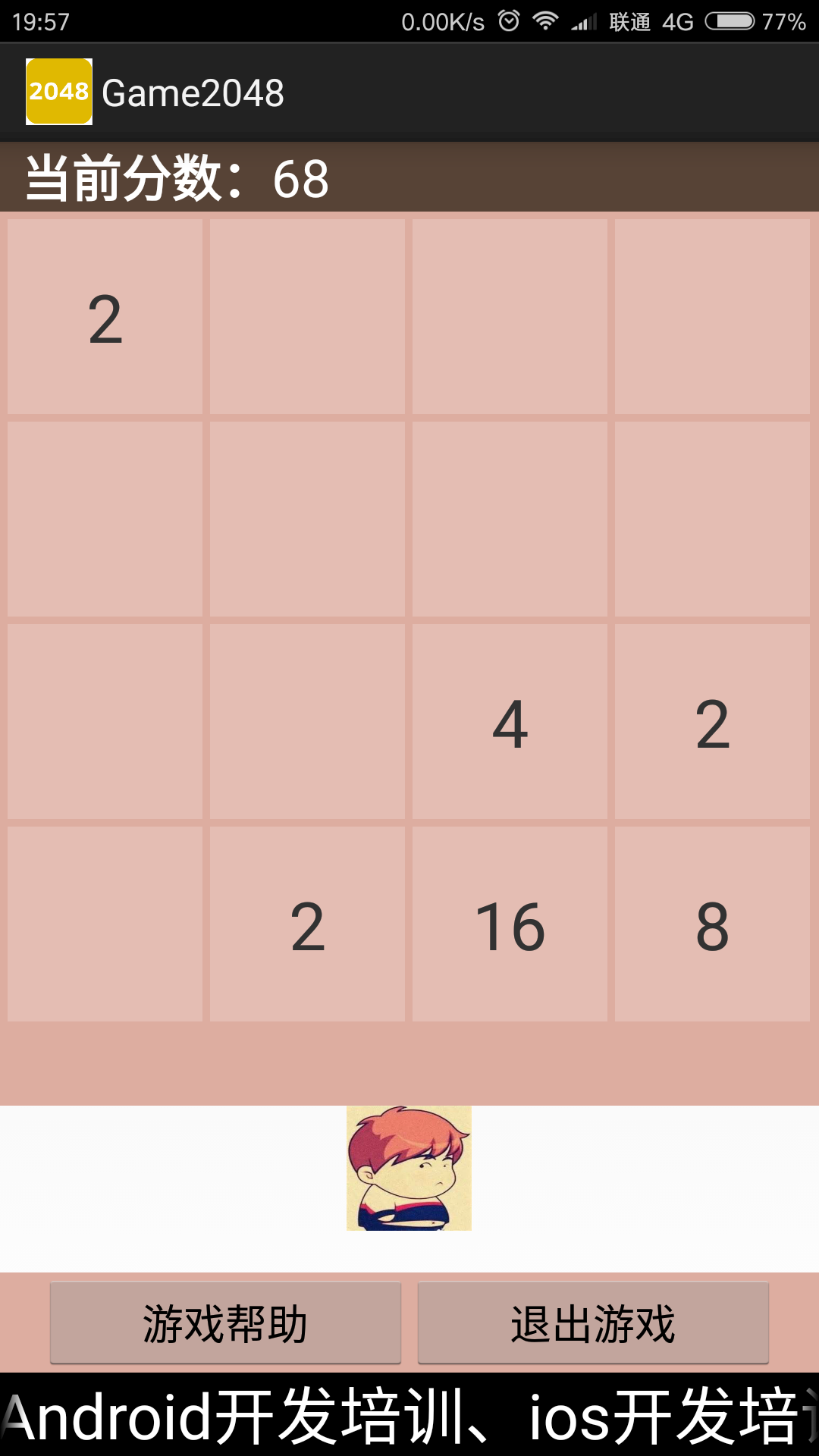
專案結構概覽這個 2048 小遊戲主要由啟動頁、登入頁、主遊戲頁與遊戲核心邏輯組成。啟動頁負責短暫展示,登入頁處理帳號與密碼,主遊戲頁則呈現分數、棋盤與功能按鈕。整體結構
 Android 多種方式實現主介面 Tab:Fragment、ViewPager 與框架方案
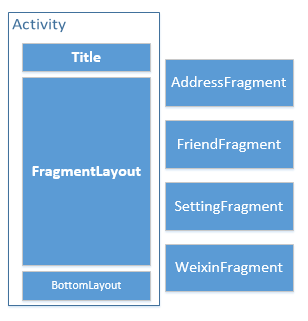
前言 本文系統性地介紹實現主介面 Tab 的四種常見方式: 使用 Fragment 實現 使用 ViewPager 實現 使用 ViewPager + Fragment
 CoordinatorLayout 與 AppBarLayout 嵌套滑動解析
嵌套滑動的基本效果 在 CoordinatorLayout 中,AppBarLayout 可以與可滾動內容形成嵌套滑動。向上滑動時,通常會先滑動 AppBarLayout
 Android AIDL 入門:理解跨進程通訊的基本流程
AIDL 是什麼AIDL 全名為 Android Interface Definition Language,主要用於支援不同進程之間的通訊。當 Service 需要與其