

編輯:關於 Android 程式設計
看了幾個淘寶風格的購物車 demo 之後,自己也動手做了一個。購物車看似簡單,實際上把 ListView 客製化裡最麻煩的幾個問題一次全碰上了:清單項狀態保存、跨項目的全選聯動、數量增減即時更新、以及總金額計算。本文把完整實作拆成五個部分來看。
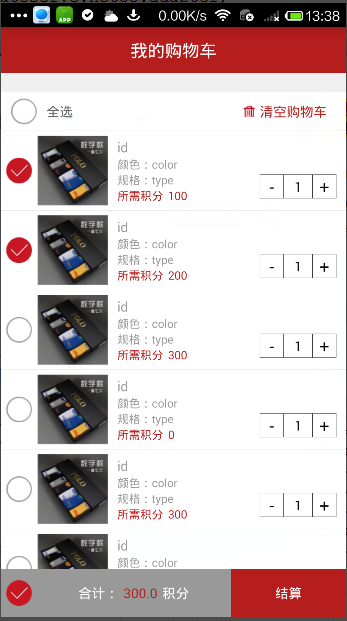
效果圖如下:
public class ShoppingCartActivity extends BaseActivity {

    private List<Test> data;
    private ListView mListView;
    private ShoppingCartAdapter adapter;
    private RelativeLayout rlRefresh;
    private TextView tvRefresh;
    private ProgressBar barRefresh;
    private LinearLayout clear;
    private CheckBox checkBox_select_all;
    private CheckBox checkBox_add;
    private TextView integral_sum;
    private int sum = 0;
    private int[] sumIntegral;
    private Context context;

    @Override
    protected void onCreate(Bundle bundle) {
        super.onCreate(bundle);
        setContentView(R.layout.activity_shopping_cart);
        initView();
    }

    private void initView() {
        context = this;
        showpage = 1;
        isPermitFlag = true;

        // 測試資料
        data = new ArrayList<Test>();
        data.add(new Test("id", "color", "type", "100"));
        data.add(new Test("id", "color", "type", "200"));
        data.add(new Test("id", "color", "type", "300"));
        data.add(new Test("id", "color", "type", "0"));
        data.add(new Test("id", "color", "type", "300"));
        data.add(new Test("id", "color", "type", "100"));
        data.add(new Test("id", "color", "type", "500"));
        data.add(new Test("id", "color", "type", "0"));
        data.add(new Test("id", "color", "type", "900"));

        adapter = new ShoppingCartAdapter(context, handler, data);
        sumIntegral = new int[data.size() + 1];

        checkBox_add = (CheckBox) findViewById(R.id.checkbox_add);
        integral_sum = (TextView) findViewById(R.id.integral_sum);
        clear = (LinearLayout) findViewById(R.id.clear);

        // 清空購物車
        clear.setOnClickListener(new OnClickListener() {
            @Override
            public void onClick(View v) {
                data.clear();
                adapter.notifyDataSetChanged();
                integral_sum.setText(0 + "");
                checkBox_select_all.setChecked(false);
                checkBox_add.setClickable(false);
            }
        });

        // 全選 / 取消全選
        checkBox_select_all = (CheckBox) findViewById(R.id.checkbox_select);
        checkBox_select_all.setOnClickListener(new OnClickListener() {
            @Override
            public void onClick(View v) {
                HashMap<Integer, Boolean> isSelected = ShoppingCartAdapter.getIsSelected();
                Iterator iterator = isSelected.entrySet().iterator();
                List<Boolean> array = new ArrayList<Boolean>();   // 各項勾選狀態
                List<Integer> nums = new ArrayList<Integer>();    // 各項商品數量

                while (iterator.hasNext()) {
                    HashMap.Entry entry = (HashMap.Entry) iterator.next();
                    Boolean val = (Boolean) entry.getValue();
                    array.add(val);
                }
                for (int i = 0; i < data.size(); i++) {
                    nums.add(data.get(i).getNum());
                }

                if (checkBox_select_all.isChecked()) {
                    for (int i = 0; i < data.size(); i++) {
                        ShoppingCartAdapter.getIsSelected().put(i, true);
                    }
                    checkBox_add.setChecked(true);
                } else {
                    for (int i = 0; i < data.size(); i++) {
                        ShoppingCartAdapter.getIsSelected().put(i, false);
                    }
                    checkBox_add.setChecked(false);
                    integral_sum.setText(0 + "");
                }
                adapter.notifyDataSetChanged();
            }
        });

        mListView = (ListView) findViewById(R.id.finance_list);
        mListView.setAdapter(adapter);
        mListView.setOnItemClickListener(new OnItemClickListener() {
            @Override
            public void onItemClick(AdapterView<?> parent, View view, int position, long id) {
                Toast.makeText(context, position + "", Toast.LENGTH_LONG).show();
                int pos = position - 1;   // 首項是表頭,需偏移
                int num = data.get(pos).getNum();
                if (num == 0) {
                    Toast.makeText(context, "請選擇商品數量", Toast.LENGTH_LONG).show();
                } else {
                    boolean cu = !ShoppingCartAdapter.getIsSelected().get(pos);
                    ShoppingCartAdapter.getIsSelected().put(pos, cu);
                    adapter.notifyDataSetChanged();
                    // 重新彙整各項狀態,決定全選框該顯示什麼
                    HashMap<Integer, Boolean> isSelected = ShoppingCartAdapter.getIsSelected();
                    Iterator iterator = isSelected.entrySet().iterator();
                    List<Boolean> array = new ArrayList<Boolean>();
                    while (iterator.hasNext()) {
                        HashMap.Entry entry = (HashMap.Entry) iterator.next();
                        array.add((Boolean) entry.getValue());
                    }
                    if (Test.isAllFalse(array)) {
                        checkBox_select_all.setChecked(false);
                        checkBox_add.setChecked(false);
                    }
                    if (Test.isAllTrue(array)) {
                        checkBox_select_all.setChecked(true);
                        checkBox_add.setChecked(true);
                    }
                    if (Test.isHaveOneFasle(array)) {
                        checkBox_select_all.setChecked(false);
                    }
                    if (Test.isHaveOneTrue(array)) {
                        checkBox_add.setChecked(true);
                    }
                }
            }
        });
    }

    @SuppressLint("HandlerLeak")
    private Handler handler = new Handler() {
        @Override
        public void handleMessage(Message msg) {
            super.handleMessage(msg);
            if (msg.what == 10) {
                // 更新選取商品的總計
                float price = (Float) msg.obj;
                integral_sum.setText(price > 0 ? price + "" : "0");
            } else if (msg.what == 11) {
                // 更新全選狀態
                List<Boolean> array = (List<Boolean>) msg.obj;
                if (Test.isAllFalse(array)) {
                    checkBox_select_all.setChecked(false);
                    checkBox_add.setChecked(false);
                }
                if (Test.isAllTrue(array)) {
                    checkBox_select_all.setChecked(true);
                    checkBox_add.setChecked(true);
                }
                if (Test.isHaveOneFasle(array)) {
                    checkBox_select_all.setChecked(false);
                }
                if (Test.isHaveOneTrue(array)) {
                    checkBox_add.setChecked(true);
                }
            }
        }
    };
}
<?xml version="1.0" encoding="utf-8"?>
<RelativeLayout xmlns:android="https://schemas.android.com/apk/res/android"
    xmlns:header="https://schemas.android.com/apk/res/com.sxc.test"
    android:layout_width="match_parent"
    android:layout_height="match_parent"
    android:background="@color/app_background"
    android:orientation="vertical">

    <com.autoserve.core.widget.HeaderWidget
        android:id="@+id/header"
        android:layout_width="match_parent"
        android:layout_height="wrap_content"
        android:layout_alignParentTop="true"
        header:text="我的購物車" />

    <!-- 全選 + 清空 -->
    <LinearLayout
        android:id="@+id/layout1"
        android:layout_width="match_parent"
        android:layout_height="40dp"
        android:layout_below="@id/header"
        android:layout_gravity="center"
        android:layout_marginTop="20dp"
        android:background="@color/white"
        android:orientation="horizontal">

        <LinearLayout
            android:layout_width="0dp"
            android:layout_height="match_parent"
            android:layout_marginLeft="10dp"
            android:layout_weight="1"
            android:gravity="center_vertical"
            android:orientation="horizontal">

            <CheckBox
                android:id="@+id/checkbox_select"
                android:layout_width="wrap_content"
                android:layout_height="wrap_content" />

            <TextView
                android:layout_width="wrap_content"
                android:layout_height="wrap_content"
                android:layout_marginLeft="10dp"
                android:text="全選"
                android:textColor="@color/gry_666666"
                android:textSize="@dimen/small_size" />
        </LinearLayout>

        <LinearLayout
            android:id="@+id/clear"
            android:layout_width="wrap_content"
            android:layout_height="match_parent"
            android:layout_marginRight="20dp"
            android:gravity="center_vertical|right"
            android:orientation="horizontal">

            <CheckBox
                android:layout_width="12dp"
                android:layout_height="12dp"
                android:background="@drawable/clear" />

            <TextView
                android:layout_width="wrap_content"
                android:layout_height="wrap_content"
                android:layout_marginLeft="5dp"
                android:text="清空購物車"
                android:textColor="#b61d1d"
                android:textSize="@dimen/small_size" />
        </LinearLayout>
    </LinearLayout>

    <!-- 商品清單 -->
    <LinearLayout
        android:layout_width="match_parent"
        android:layout_height="match_parent"
        android:layout_below="@id/layout1"
        android:layout_marginBottom="50dp"
        android:orientation="vertical">

        <View
            android:layout_width="match_parent"
            android:layout_height="0.1dp"
            android:background="@color/divider_color" />

        <ListView
            android:id="@+id/finance_list"
            android:layout_width="match_parent"
            android:layout_height="match_parent"
            android:clickable="false"
            android:divider="@color/lucency" />

        <include layout="@layout/include_refresh" android:visibility="gone" />
    </LinearLayout>

    <!-- 底部結算列 -->
    <LinearLayout
        android:layout_width="match_parent"
        android:layout_height="50dp"
        android:layout_alignParentBottom="true"
        android:orientation="horizontal">

        <LinearLayout
            android:layout_width="0dp"
            android:layout_height="match_parent"
            android:layout_weight="2"
            android:background="@color/gry_999999"
            android:gravity="center_vertical"
            android:orientation="horizontal">

            <LinearLayout
                android:layout_width="wrap_content"
                android:layout_height="match_parent"
                android:layout_marginLeft="5dp"
                android:layout_marginRight="5dp"
                android:gravity="center"
                android:orientation="horizontal">

                <CheckBox
                    android:id="@+id/checkbox_add"
                    android:layout_width="wrap_content"
                    android:layout_height="wrap_content"
                    android:clickable="false" />
            </LinearLayout>

            <LinearLayout
                android:layout_width="0dp"
                android:layout_height="match_parent"
                android:layout_weight="1"
                android:gravity="center"
                android:orientation="horizontal">

                <TextView
                    android:layout_width="wrap_content"
                    android:layout_height="wrap_content"
                    android:text="合計:"
                    android:textColor="@color/white"
                    android:textSize="@dimen/small_size" />

                <TextView
                    android:id="@+id/integral_sum"
                    android:layout_width="wrap_content"
                    android:layout_height="wrap_content"
                    android:layout_marginLeft="5dp"
                    android:layout_marginRight="5dp"
                    android:text="0"
                    android:textColor="@color/theme_color"
                    android:textSize="@dimen/small_size" />

                <TextView
                    android:layout_width="wrap_content"
                    android:layout_height="wrap_content"
                    android:text="積分"
                    android:textColor="@color/white"
                    android:textSize="@dimen/small_size" />
            </LinearLayout>
        </LinearLayout>

        <TextView
            android:layout_width="0dp"
            android:layout_height="match_parent"
            android:layout_weight="1"
            android:background="@color/theme_color"
            android:gravity="center"
            android:text="結算"
            android:textColor="@color/white"
            android:textSize="@dimen/small_size" />
    </LinearLayout>
</RelativeLayout>
XML 中的頭部元件(HeaderWidget)網路上有很多現成實作,這裡不多贅述;checkbox 與 button 的樣式可依個人喜好替換成 selector。
public class ShoppingCartAdapter extends BaseAdapter {

    private Context context;
    private List<Test> loans;
    private LayoutInflater inflater;
    private static HashMap<Integer, Boolean> isSelected;   // 各項勾選狀態
    private static HashMap<Integer, Integer> numbers;      // 各項數量
    private Handler handler;
    int num;   // 目前操作的商品數量

    // 控制項集合,用 ViewHolder 模式減少 findViewById 次數
    static class ViewHolder {
        public CheckBox ck_select;
        public ImageView pic_goods;
        public TextView id_goods;
        public TextView color_goods;
        public TextView type_goods;
        public TextView integral_goods;
        public LinearLayout layout;
        public TextView number;
        public Button minus;
        public Button plus;
    }

    public ShoppingCartAdapter(Context context, Handler handler, List<Test> data) {
        this.context = context;
        this.inflater = LayoutInflater.from(context);
        this.loans = data;
        this.handler = handler;
        isSelected = new HashMap<Integer, Boolean>();
        numbers = new HashMap<Integer, Integer>();
        initDate();
    }

    // 初始狀態:全部未勾選、數量皆為 1
    private void initDate() {
        for (int i = 0; i < loans.size(); i++) {
            getIsSelected().put(i, false);
            getNumbers().put(i, 1);
        }
    }

    @Override public int getCount() { return loans.size(); }
    @Override public Object getItem(int position) { return loans.get(position); }
    @Override public long getItemId(int position) { return position; }

    @Override
    public View getView(final int position, View convertView, ViewGroup parent) {
        ViewHolder itemView = null;
        if (convertView == null) {
            itemView = new ViewHolder();
            convertView = inflater.inflate(R.layout.list_shopping_cart_item, null);
            itemView.ck_select = (CheckBox) convertView.findViewById(R.id.ck_select);
            itemView.pic_goods = (ImageView) convertView.findViewById(R.id.pic_goods);
            itemView.id_goods = (TextView) convertView.findViewById(R.id.id_goods);
            itemView.color_goods = (TextView) convertView.findViewById(R.id.color_goods);
            itemView.type_goods = (TextView) convertView.findViewById(R.id.type_goods);
            itemView.integral_goods = (TextView) convertView.findViewById(R.id.integral_goods);
            itemView.number = (TextView) convertView.findViewById(R.id.number);
            itemView.minus = (Button) convertView.findViewById(R.id.minus);
            itemView.plus = (Button) convertView.findViewById(R.id.plus);
            convertView.setTag(itemView);
        } else {
            itemView = (ViewHolder) convertView.getTag();
        }

        init(itemView, position);

        itemView.ck_select.setChecked(getIsSelected().get(position));
        itemView.number.setText(getNumbers().get(position).toString());

        String a = itemView.number.getText().toString();
        loans.get(position).setNum(Integer.valueOf(a));

        Test test = loans.get(position);
        itemView.id_goods.setText((CharSequence) test.getId());
        itemView.color_goods.setText((CharSequence) test.getColor());
        itemView.type_goods.setText((CharSequence) test.getType());
        itemView.integral_goods.setText((CharSequence) test.getIntegral());
        itemView.pic_goods.setImageResource(R.drawable.shopping);
        return convertView;
    }

    private void init(final ViewHolder itemView, final int position) {
        itemView.ck_select.setOnCheckedChangeListener(new OnCheckedChangeListener() {
            @Override
            public void onCheckedChanged(CompoundButton buttonView, boolean isChecked) {
                getIsSelected().put(position, isChecked);
                // 通知 Activity 更新總計(what = 10)
                handler.sendMessage(handler.obtainMessage(10, getTotalPrice()));

                // 彙整狀態,通知 Activity 更新全選框(what = 11)
                Iterator iterator = isSelected.entrySet().iterator();
                List<Boolean> array = new ArrayList<Boolean>();
                while (iterator.hasNext()) {
                    HashMap.Entry entry = (HashMap.Entry) iterator.next();
                    array.add((Boolean) entry.getValue());
                }
                handler.sendMessage(handler.obtainMessage(11, array));
            }
        });

        itemView.plus.setOnClickListener(new OnClickListener() {
            @Override
            public void onClick(View v) {
                String numString = itemView.number.getText().toString();
                num = TextUtils.isEmpty(numString) ? 1 : Integer.parseInt(numString);
                num++;
                itemView.number.setText(String.valueOf(num));
                loans.get(position).setNum(num);
                numbers.put(position, num);
                handler.sendMessage(handler.obtainMessage(10, getTotalPrice()));
            }
        });

        itemView.minus.setOnClickListener(new OnClickListener() {
            @Override
            public void onClick(View v) {
                String numString = itemView.number.getText().toString();
                num = TextUtils.isEmpty(numString) ? 1 : Integer.parseInt(numString);
                if (num <= 1) {
                    Toast.makeText(context, "商品數量不可小於 1", Toast.LENGTH_SHORT).show();
                    return;
                }
                num--;
                itemView.number.setText(String.valueOf(num));
                loans.get(position).setNum(num);
                numbers.put(position, num);
                handler.sendMessage(handler.obtainMessage(10, getTotalPrice()));
            }
        });
    }

    /**
     * 計算已勾選商品的總積分
     */
    private float getTotalPrice() {
        float totalPrice = 0;
        for (int i = 0; i < loans.size(); i++) {
            Test bean = loans.get(i);
            if (ShoppingCartAdapter.getIsSelected().get(i)) {
                totalPrice += bean.getNum() * Integer.valueOf(bean.getIntegral());
            }
        }
        return totalPrice;
    }

    public static HashMap<Integer, Boolean> getIsSelected() { return isSelected; }
    public static void setIsSelected(HashMap<Integer, Boolean> isSelected) {
        ShoppingCartAdapter.isSelected = isSelected;
    }
    public static HashMap<Integer, Integer> getNumbers() { return numbers; }
    public static void setNumbers(HashMap<Integer, Integer> numbers) {
        ShoppingCartAdapter.numbers = numbers;
    }
}
<?xml version="1.0" encoding="utf-8"?>
<LinearLayout xmlns:android="https://schemas.android.com/apk/res/android"
    android:layout_width="match_parent"
    android:layout_height="wrap_content"
    android:descendantFocusability="blocksDescendants"
    android:background="@color/white"
    android:orientation="vertical">

    <View
        android:layout_width="match_parent"
        android:layout_height="0.1dp"
        android:background="@color/divider_color" />

    <LinearLayout
        android:id="@+id/layout5"
        android:layout_width="match_parent"
        android:layout_height="wrap_content"
        android:gravity="center_vertical"
        android:orientation="horizontal"
        android:padding="5dp">

        <CheckBox
            android:id="@+id/ck_select"
            android:layout_width="wrap_content"
            android:layout_height="wrap_content"
            android:layout_marginRight="5dp"
            android:focusable="false" />

        <ImageView
            android:id="@+id/pic_goods"
            android:layout_width="wrap_content"
            android:layout_height="wrap_content"
            android:scaleType="fitCenter"
            android:src="@drawable/shopping" />

        <LinearLayout
            android:layout_width="match_parent"
            android:layout_height="wrap_content"
            android:layout_marginLeft="10dp"
            android:orientation="vertical">

            <TextView
                android:id="@+id/id_goods"
                android:layout_width="wrap_content"
                android:layout_height="wrap_content"
                android:text="短襪男士星期 POLO 棉襪潮男秋冬款禮盒裝"
                android:textColor="@color/gry_999999"
                android:textSize="@dimen/small_size" />

            <LinearLayout
                android:layout_width="wrap_content"
                android:layout_height="wrap_content"
                android:orientation="vertical">

                <LinearLayout
                    android:layout_width="wrap_content"
                    android:layout_height="wrap_content"
                    android:orientation="horizontal">
                    <TextView android:layout_width="wrap_content" android:layout_height="wrap_content"
                        android:text="顏色:" android:textColor="@color/gry_999999" android:textSize="12sp" />
                    <TextView android:id="@+id/color_goods" android:layout_width="wrap_content"
                        android:layout_height="wrap_content" android:text="黑色"
                        android:textColor="@color/gry_999999" android:textSize="12sp" />
                </LinearLayout>

                <LinearLayout
                    android:layout_width="wrap_content"
                    android:layout_height="wrap_content"
                    android:orientation="horizontal">
                    <TextView android:layout_width="wrap_content" android:layout_height="wrap_content"
                        android:text="規格:" android:textColor="@color/gry_999999" android:textSize="12sp" />
                    <TextView android:id="@+id/type_goods" android:layout_width="wrap_content"
                        android:layout_height="wrap_content" android:text="普通"
                        android:textColor="@color/gry_999999" android:textSize="12sp" />
                </LinearLayout>

                <LinearLayout
                    android:layout_width="wrap_content"
                    android:layout_height="wrap_content"
                    android:orientation="horizontal">
                    <TextView android:layout_width="wrap_content" android:layout_height="wrap_content"
                        android:text="所需積分" android:textColor="@color/theme_color" android:textSize="12sp" />
                    <TextView android:id="@+id/integral_goods" android:layout_width="wrap_content"
                        android:layout_height="wrap_content" android:layout_marginLeft="5dp" android:text="1000"
                        android:textColor="@color/theme_color" android:textSize="12sp" />
                </LinearLayout>
            </LinearLayout>

            <!-- 數量增減 -->
            <LinearLayout
                android:layout_width="match_parent"
                android:layout_height="25dp"
                android:layout_gravity="bottom"
                android:layout_marginBottom="5dp"
                android:layout_marginRight="5dp"
                android:gravity="right"
                android:orientation="horizontal">

                <LinearLayout
                    android:layout_width="80dp"
                    android:layout_height="25dp"
                    android:layout_gravity="right"
                    android:background="@color/white"
                    android:orientation="horizontal">

                    <Button
                        android:id="@+id/minus"
                        android:layout_width="25dp"
                        android:layout_height="match_parent"
                        android:background="@drawable/kuangzi1"
                        android:gravity="center"
                        android:focusable="false"
                        android:text="-"
                        android:textColor="@color/black">
                    </Button>

                    <TextView
                        android:id="@+id/number"
                        android:layout_width="30dp"
                        android:layout_height="match_parent"
                        android:background="@drawable/kuangzi1"
                        android:gravity="center"
                        android:inputType="number"
                        android:text="1"
                        android:textColor="@color/black">
                    </TextView>

                    <Button
                        android:id="@+id/plus"
                        android:layout_width="25dp"
                        android:layout_height="match_parent"
                        android:background="@drawable/kuangzi1"
                        android:gravity="center"
                        android:focusable="false"
                        android:text="+"
                        android:textColor="@color/black">
                    </Button>
                </LinearLayout>
            </LinearLayout>
        </LinearLayout>
    </LinearLayout>

    <View
        android:layout_width="match_parent"
        android:layout_height="0.1dp"
        android:background="@color/divider_color" />
</LinearLayout>
package com.autoserve.net33.model;

import java.io.Serializable;

public class Test implements Serializable {

    private String id;
    private String color;
    private String type;
    private String integral;
    private int num;              // 商品數量
    private int sumIntegral;
    private boolean isChoosed;    // 是否被選取

    public Test(String id, String color, String type, String integral) {
        this.id = id;
        this.color = color;
        this.type = type;
        this.integral = integral;
    }

    public Test() { }

    public String getId() { return id; }
    public void setId(String id) { this.id = id; }
    public String getColor() { return color; }
    public void setColor(String color) { this.color = color; }
    public String getType() { return type; }
    public void setType(String type) { this.type = type; }
    public String getIntegral() { return integral; }
    public void setIntegral(String integral) { this.integral = integral; }
    public int getNum() { return num; }
    public void setNum(int num) { this.num = num; }
    public int getSumIntegral() { return sumIntegral; }
    public void setSumIntegral(int sumIntegral) { this.sumIntegral = sumIntegral; }
    public boolean isChoosed() { return isChoosed; }
    public void setChoosed(boolean isChoosed) { this.isChoosed = isChoosed; }

    @Override
    public String toString() {
        return "test [id=" + id + ", color=" + color + ", type=" + type
                + ", integral=" + integral + "]";
    }

    /** 全為 false */
    public static boolean isAllFalse(List<Boolean> list) { return false; }
    /** 全為 true */
    public static boolean isAllTrue(List<Boolean> list) { return false; }
    /** 至少有一個 false */
    public static boolean isHaveOneFasle(List<Boolean> list) { return false; }
    /** 至少有一個 true */
    public static boolean isHaveOneTrue(List<Boolean> list) { return false; }
}
清單項的 CheckBox 與 Button 都設了 android:focusable="false",並在容器加上 android:descendantFocusability="blocksDescendants"。這兩行是為了阻止子控制項搶走 ListView 的焦點,否則整列點擊事件會失效——這是購物車最經典的坑。
因為 ListView 會回收 convertView,視圖上的勾選狀態不能當成資料來源。把 isSelected 與 numbers 提到 Adapter 層集中管理,getView() 每次重新綁定時再從 Map 讀回來,狀態才不會錯亂。
不過 static 在這裡並非好主意:它會讓狀態跨頁面殘留,也容易在 Activity 銷毀後造成記憶體洩漏。正式專案請改成實例變數,並把勾選狀態直接放進 Test 這個資料物件裡(isChoosed 欄位已經存在,只是沒被使用),這才是比較乾淨的做法。
範例刻意示範了「Adapter 透過 Handler 通知 Activity 更新 UI」的路徑。實際上更簡潔的做法是把總計計算封裝成方法,由 Activity 在合適的時機呼叫;若採 MVVM,則用 LiveData 或 Flow 讓總金額自動派生,就不需要手動發訊息了。
範例用 float 存總額,這在涉及金流時是不安全的——浮點數會產生精度誤差。正式環境請改用 BigDecimal,或以「分」為單位全程使用 long/int 運算,最後顯示時再轉回元。
以上就是本文的全部內容。如果你要沿用這份程式碼,建議至少把 static 狀態與 float 金額這兩點改掉。祝大家開發順利。
 Android 靜默安裝方案解析:秒裝與智能安裝
在 Android 中,所謂靜默安裝,通常是指不彈出系統安裝介面,讓程式在背景完成安裝。由於這類行為涉及系統安全與使用者授權,一般應用並不能直接實現。不過,部分工具型應用
 Android 實現高斯模糊效果並相容低版本的完整指南
一、效果預覽專案中需要用到高斯模糊效果。查閱了一些資料、權衡效能之後,最終選擇採用 Android 自帶的 RenderScript 函式庫來實作。網上關於用 Rende
 Android Studio 實戰:從零開始寫一個 Fragment 小 Demo(上)
一、先搞清楚 Fragment 到底是什麼 做 Android 開發的人大概都遇過這種尷尬:同一套功能,手機上一屏放不下,平板上卻能整整齊齊攤開。早期的做法很粗暴——先做
 使用 PullToRefresh 實作 ListView 下拉更新與左滑刪除
PullToRefresh 是 Android 早期常見的下拉更新實作方案,除了內建的重新整理手勢外,也能搭配自訂擴充完成更豐富的列表互動。本文以精簡後的 PullToR