

編輯:關於 Android 程式設計
你大概也有過這樣的經驗:揣著一張金融卡在街頭找 ATM。在這個場景裡,ATM 就是我們的「興趣點」(Point of Interest)——我們想知道附近有哪些 ATM,而不是附近有哪些超市或酒吧,因為後者沒辦法領錢。
這個例子說明了 POI 檢索的本質:它不是找地址,而是找「符合條件的地點」。理論先擱著,直接看實作。
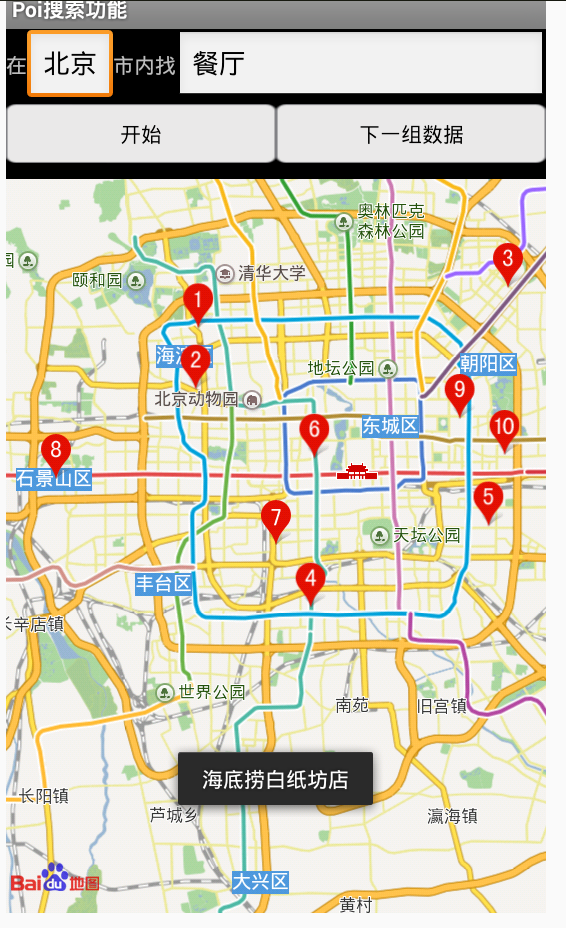
先欣賞一下成果:
詳細頁面:
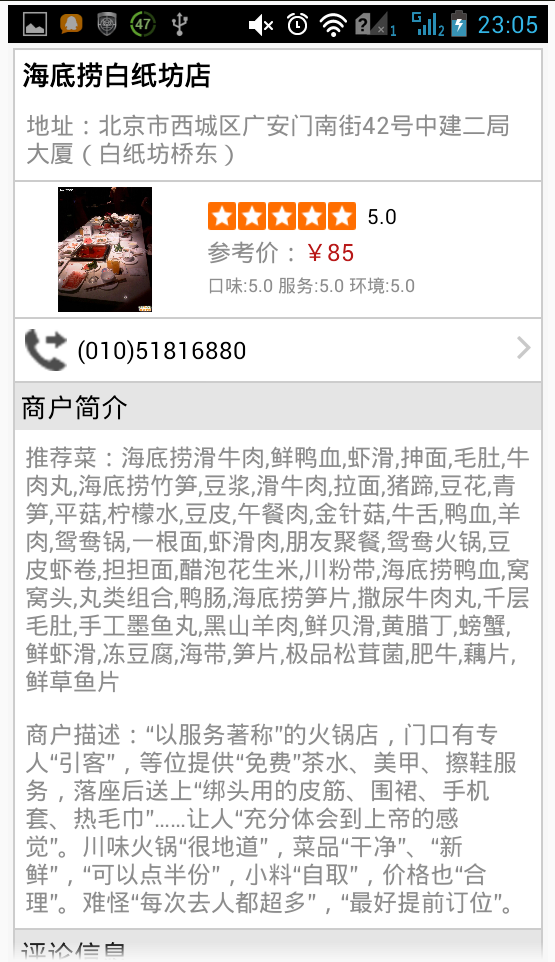
本範例示範三件事:關鍵詞查詢、suggestion 建議查詢、以及查看餐飲類 Place 詳情頁。搜尋某地的餐廳、理髮店等,是相當有實用價值的功能。
package com.home;

import android.app.Activity;
import android.os.Bundle;
import android.text.Editable;
import android.text.TextWatcher;
import android.view.View;
import android.widget.ArrayAdapter;
import android.widget.AutoCompleteTextView;
import android.widget.EditText;
import android.widget.Toast;

import com.baidu.mapapi.BMapManager;
import com.baidu.mapapi.map.MapView;
import com.baidu.mapapi.search.MKAddrInfo;
import com.baidu.mapapi.search.MKBusLineResult;
import com.baidu.mapapi.search.MKDrivingRouteResult;
import com.baidu.mapapi.search.MKPoiInfo;
import com.baidu.mapapi.search.MKPoiResult;
import com.baidu.mapapi.search.MKSearch;
import com.baidu.mapapi.search.MKSearchListener;
import com.baidu.mapapi.search.MKShareUrlResult;
import com.baidu.mapapi.search.MKSuggestionInfo;
import com.baidu.mapapi.search.MKSuggestionResult;
import com.baidu.mapapi.search.MKTransitRouteResult;
import com.baidu.mapapi.search.MKWalkingRouteResult;

/**
 * 示範 POI 搜尋功能
 */
public class PoiSearchActivity extends Activity {

    private MapView mMapView = null;
    private MKSearch mSearch = null;   // 搜尋模組,可獨立於地圖模組使用

    /** 關鍵字輸入框 */
    private AutoCompleteTextView keyWorldsView = null;
    private ArrayAdapter<String> sugAdapter = null;
    private int load_Index;

    @Override
    public void onCreate(Bundle savedInstanceState) {
        super.onCreate(savedInstanceState);
        DemoApplication app = (DemoApplication) this.getApplication();
        if (app.mBMapManager == null) {
            app.mBMapManager = new BMapManager(this);
            app.mBMapManager.init(DemoApplication.strKey, new DemoApplication.MyGeneralListener());
        }
        setContentView(R.layout.activity_poisearch);

        mMapView = (MapView) findViewById(R.id.bmapView);
        mMapView.getController().enableClick(true);
        mMapView.getController().setZoom(12);

        // 初始化搜尋模組,註冊事件監聽
        mSearch = new MKSearch();
        mSearch.init(app.mBMapManager, new MKSearchListener() {

            /** 詳情頁結果 */
            @Override
            public void onGetPoiDetailSearchResult(int type, int error) {
                if (error != 0) {
                    Toast.makeText(PoiSearchActivity.this, "抱歉,未找到結果", Toast.LENGTH_SHORT).show();
                } else {
                    Toast.makeText(PoiSearchActivity.this, "成功,查看詳情頁面", Toast.LENGTH_SHORT).show();
                }
            }

            /** POI 搜尋結果 */
            public void onGetPoiResult(MKPoiResult res, int type, int error) {
                // 錯誤碼可參考 MKEvent 中的定義
                if (error != 0 || res == null) {
                    Toast.makeText(PoiSearchActivity.this, "抱歉,未找到結果", Toast.LENGTH_LONG).show();
                    return;
                }

                if (res.getCurrentNumPois() > 0) {
                    // 將 POI 結果畫到地圖上
                    MyPoiOverlay poiOverlay = new MyPoiOverlay(
                            PoiSearchActivity.this, mMapView, mSearch);
                    poiOverlay.setData(res.getAllPoi());
                    mMapView.getOverlays().clear();
                    mMapView.getOverlays().add(poiOverlay);
                    mMapView.refresh();

                    // 把視圖移動到第一個 POI 的中心點
                    // 注意:當 ePoiType 為 2(公車路線)或 4(地鐵路線)時,座標為空
                    for (MKPoiInfo info : res.getAllPoi()) {
                        if (info.pt != null) {
                            mMapView.getController().animateTo(info.pt);
                            break;
                        }
                    }
                } else if (res.getCityListNum() > 0) {
                    // 本市查無結果,但其他城市有,回傳城市列表
                    String strInfo = "在";
                    for (int i = 0; i < res.getCityListNum(); i++) {
                        strInfo += res.getCityListInfo(i).city;
                        strInfo += ",";
                    }
                    strInfo += "找到結果";
                    Toast.makeText(PoiSearchActivity.this, strInfo, Toast.LENGTH_LONG).show();
                }
            }

            public void onGetDrivingRouteResult(MKDrivingRouteResult res, int error) { }
            public void onGetTransitRouteResult(MKTransitRouteResult res, int error) { }
            public void onGetWalkingRouteResult(MKWalkingRouteResult res, int error) { }
            public void onGetAddrResult(MKAddrInfo res, int error) { }
            public void onGetBusDetailResult(MKBusLineResult result, int iError) { }

            /** 更新建議列表 */
            @Override
            public void onGetSuggestionResult(MKSuggestionResult res, int arg1) {
                if (res == null || res.getAllSuggestions() == null) {
                    return;
                }
                sugAdapter.clear();
                for (MKSuggestionInfo info : res.getAllSuggestions()) {
                    if (info.key != null) {
                        sugAdapter.add(info.key);
                    }
                }
                sugAdapter.notifyDataSetChanged();
            }

            @Override
            public void onGetShareUrlResult(MKShareUrlResult result, int type, int error) { }
        });

        keyWorldsView = (AutoCompleteTextView) findViewById(R.id.searchkey);
        sugAdapter = new ArrayAdapter<String>(this, android.R.layout.simple_dropdown_item_1line);
        keyWorldsView.setAdapter(sugAdapter);

        /**
         * 輸入關鍵字變動時,動態更新建議列表
         * 實務建議加上 debounce,避免每次按鍵都打一次請求
         */
        keyWorldsView.addTextChangedListener(new TextWatcher() {
            @Override public void afterTextChanged(Editable arg0) { }
            @Override public void beforeTextChanged(CharSequence arg0, int a, int b, int c) { }

            @Override
            public void onTextChanged(CharSequence cs, int arg1, int arg2, int arg3) {
                if (cs.length() <= 0) {
                    return;
                }
                String city = ((EditText) findViewById(R.id.city)).getText().toString();
                // 使用建議搜尋服務,結果在 onGetSuggestionResult() 中更新
                mSearch.suggestionSearch(cs.toString(), city);
            }
        });
    }

    @Override protected void onPause() { mMapView.onPause(); super.onPause(); }
    @Override protected void onResume() { mMapView.onResume(); super.onResume(); }
    @Override protected void onDestroy() { mMapView.destroy(); super.onDestroy(); }

    @Override
    protected void onSaveInstanceState(Bundle outState) {
        super.onSaveInstanceState(outState);
        mMapView.onSaveInstanceState(outState);
    }

    @Override
    protected void onRestoreInstanceState(Bundle savedInstanceState) {
        super.onRestoreInstanceState(savedInstanceState);
        mMapView.onRestoreInstanceState(savedInstanceState);
    }

    /** 搜尋按鈕點擊事件 */
    public void searchButtonProcess(View v) {
        EditText editCity = (EditText) findViewById(R.id.city);
        EditText editSearchKey = (EditText) findViewById(R.id.searchkey);
        mSearch.poiSearchInCity(editCity.getText().toString(),
                editSearchKey.getText().toString());
    }

    /** 翻到下一組資料 */
    public void goToNextPage(View v) {
        int flag = mSearch.goToPoiPage(++load_Index);
        if (flag != 0) {
            Toast.makeText(PoiSearchActivity.this,
                    "請先執行搜尋,再翻下一組資料", Toast.LENGTH_SHORT).show();
        }
    }
}
<?xml version="1.0" encoding="utf-8"?>
<LinearLayout xmlns:android="https://schemas.android.com/apk/res/android"
    android:layout_width="fill_parent"
    android:layout_height="fill_parent"
    android:orientation="vertical">

    <LinearLayout
        android:layout_width="fill_parent"
        android:layout_height="50dip"
        android:orientation="horizontal">

        <TextView
            android:layout_width="wrap_content"
            android:layout_height="wrap_content"
            android:text="在">
        </TextView>

        <EditText
            android:id="@+id/city"
            android:layout_width="wrap_content"
            android:layout_height="match_parent"
            android:text="北京" />

        <TextView
            android:layout_width="wrap_content"
            android:layout_height="wrap_content"
            android:text="市內找">
        </TextView>

        <AutoCompleteTextView
            android:id="@+id/searchkey"
            android:layout_width="wrap_content"
            android:layout_height="wrap_content"
            android:layout_weight="0.88"
            android:text="餐廳" />
    </LinearLayout>

    <LinearLayout
        android:layout_width="fill_parent"
        android:layout_height="50dip"
        android:orientation="horizontal">

        <Button
            android:id="@+id/search"
            android:layout_width="fill_parent"
            android:layout_height="wrap_content"
            android:layout_weight="12"
            android:background="@drawable/button_style"
            android:onClick="searchButtonProcess"
            android:padding="10dip"
            android:text="開始" />

        <Button
            android:id="@+id/map_next_data"
            android:layout_width="fill_parent"
            android:layout_height="wrap_content"
            android:layout_weight="12"
            android:background="@drawable/button_style"
            android:onClick="goToNextPage"
            android:padding="10dip"
            android:text="下一組數據" />
    </LinearLayout>

    <com.baidu.mapapi.map.MapView
        android:id="@+id/bmapView"
        android:layout_width="fill_parent"
        android:layout_height="fill_parent"
        android:clickable="true" />
</LinearLayout>
package com.home;

import android.app.Activity;

import com.baidu.mapapi.map.MapView;
import com.baidu.mapapi.map.PoiOverlay;
import com.baidu.mapapi.search.MKPoiInfo;
import com.baidu.mapapi.search.MKSearch;

public class MyPoiOverlay extends PoiOverlay {

    MKSearch mSearch;

    public MyPoiOverlay(Activity activity, MapView mapView, MKSearch search) {
        super(activity, mapView);
        mSearch = search;
    }

    @Override
    protected boolean onTap(int i) {
        super.onTap(i);
        MKPoiInfo info = getPoi(i);
        // 只有具備餐飲詳情的 POI 才查詳情頁
        if (info.hasCaterDetails) {
            mSearch.poiDetailSearch(info.uid);
        }
        return true;
    }
}
若少了這一段,點擊標記後會因為找不到 Activity 而閃退。這個類別由百度 SDK 的 jar 提供:
<activity
    android:name="com.baidu.mapapi.search.PlaceCaterActivity"
    android:configChanges="orientation|keyboardHidden"
    android:theme="@android:style/Theme.NoTitleBar">
</activity>
Application 類別的寫法與前一篇相同。
TextWatcher 時,使用者每按一個鍵就會觸發一次。實務上可加上 300ms 左右的 debounce,或只在輸入暫停時才發請求。getCityListNum() > 0 這個分支要記得處理,否則使用者會看到一片空白。MKSearch 系列;百度地圖 SDK 3.x 之後已改為 PoiSearch、SuggestionSearch 搭配 OnGetPoiSearchResultListener 的寫法。新專案請直接參考官方最新文件。以上就是本文的全部內容,希望對你的 Android 開發有所幫助。
 Android 動畫完全解析(一):View 動畫與源碼剖析
一、View 動畫 1. 常見的四種 View 動畫 Android 提供了 AlphaAnimation(透明度)、ScaleAnimation(縮放)、Transl
 Android Matrix 矩陣轉換解析
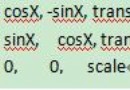
Matrix 在 Android 圖形處理中很重要,常用於縮放、平移、旋轉與傾斜。它本質上是一個 3x3 矩陣,可理解為座標轉換工具。 矩陣結構 矩陣中的值可對應平移量
 Android 開源自選(二):用 BaseRecyclerViewAdapterHelper 打造萬能 RecyclerView 適配器
一句話前言 RecyclerView 面世已經有一段時間,只要引入 support-v7 依賴就能使用。官方對它的定位是「在有限的視窗中展示大量資料集」,換句話說,Lis
 Android Studio 入門實用技巧整理
當初裝 Android Studio 只是為了看一份專案的原始碼——公司那時還在用 Eclipse 開發。沒想到用下來,Android Studio 真的相當好用。趁這幾