

編輯:關於 Android 程式設計
圓形進度條做熟之後,把外框換成多邊形其實只是換一套座標計算。這次我們來做一個六邊形版本:外框用 Path 畫出六個頂點,進度則依「目前走到第幾條邊、走了該邊的百分之幾」分段計算。
如果你還沒看過圓形版本,可以先參考這兩篇:《自定義 Android 圓形進度條(附源碼)》與《Android 帶進度的圓形進度條》。
執行結果如下:
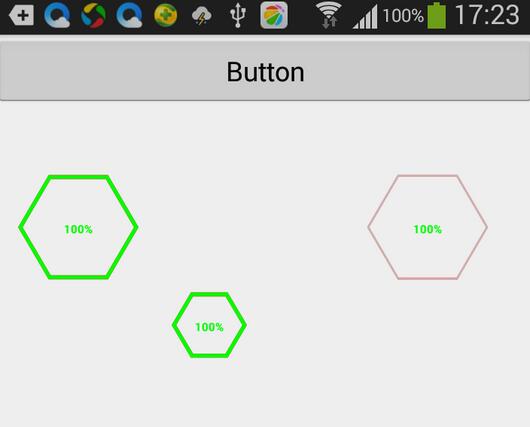
圓形進度條用 drawArc() 就能畫出任意百分比的弧線,多邊形沒有現成 API,必須自己算。做法是把進度映射到 0~6 的區間:
double k = (progress * 6) / max;
k 代表「已經走過幾條邊」:k = 2.5 就是「走完了 2 條邊,正在第 3 條邊的一半」。接著依 k 落在哪個整數區間,決定 Path 要 lineTo() 幾個頂點,最後一段則用比例去插值出 intermediate 點的座標。
以中心 (centre, centre)、外接圓半徑 radius 為基準,六個頂點(順時針從左側開始)為:
A (centre - radius,         centre)
B (centre - radius / 2,     centre - √3·radius / 2)
C (centre + radius / 2,     centre - √3·radius / 2)
D (centre + radius,         centre)
E (centre + radius / 2,     centre + √3·radius / 2)
F (centre - radius / 2,     centre + √3·radius / 2)
√3/2 來自正六邊形的幾何特性:邊長等於外接圓半徑,而頂點的垂直偏移量是 radius × sin(60°)。
package com.sxc.hexagonprogress;

import android.content.Context;
import android.content.res.TypedArray;
import android.graphics.Canvas;
import android.graphics.Color;
import android.graphics.Paint;
import android.graphics.Path;
import android.graphics.Typeface;
import android.util.AttributeSet;
import android.view.View;

/**
 * 六邊形帶進度的進度條,thread-safe,可直接在子執行緒更新進度
 */
public class HexagonProgress extends View {

    private Paint paint, mPaint;   // 畫筆:paint 畫進度,mPaint 畫外框與文字
    private Path path, mPath;      // 路徑

    private int roundColor;            // 外框顏色
    private int roundProgressColor;    // 進度顏色
    private int textColor;             // 百分比文字顏色
    private float textSize;            // 百分比文字大小
    private float roundWidth;          // 線寬
    private double max;                // 最大進度
    private double progress;           // 目前進度
    private boolean textIsDisplayable; // 是否顯示百分比
    private int style;                 // 樣式:實心或空心

    public static final int STROKE = 0;
    public static final int FILL = 1;

    public HexagonProgress(Context context) {
        this(context, null);
    }

    public HexagonProgress(Context context, AttributeSet attrs) {
        this(context, attrs, 0);
    }

    public HexagonProgress(Context context, AttributeSet attrs, int defStyle) {
        super(context, attrs, defStyle);
        paint = new Paint();
        mPaint = new Paint();
        TypedArray mTypedArray = context.obtainStyledAttributes(attrs, R.styleable.HexagonProgressBar);

        // 取得自定義屬性與預設值
        roundColor = mTypedArray.getColor(R.styleable.HexagonProgressBar_hexagonColor, Color.RED);
        roundProgressColor = mTypedArray.getColor(R.styleable.HexagonProgressBar_hexagonProgressColor, Color.GREEN);
        textColor = mTypedArray.getColor(R.styleable.HexagonProgressBar_textColor, Color.GREEN);
        textSize = mTypedArray.getDimension(R.styleable.HexagonProgressBar_textSize, 15);
        roundWidth = mTypedArray.getDimension(R.styleable.HexagonProgressBar_hexagonWidth, 5);
        max = mTypedArray.getInteger(R.styleable.HexagonProgressBar_max, 100);
        textIsDisplayable = mTypedArray.getBoolean(R.styleable.HexagonProgressBar_textIsDisplayable, true);

        mTypedArray.recycle();
    }

    @Override
    protected void onDraw(Canvas canvas) {
        super.onDraw(canvas);

        /** 畫外六邊形 */
        int centre = getWidth() / 2;                    // 中心座標
        int radius = (int) (centre - roundWidth / 2);   // 六邊形邊長(等於外接圓半徑)

        mPaint.setColor(roundColor);
        mPaint.setStyle(Paint.Style.STROKE);
        mPaint.setStrokeWidth(roundWidth);
        mPaint.setAntiAlias(true);   // 消除鋸齒

        mPath = new Path();
        mPath.moveTo(centre - radius, centre);                                          // A
        mPath.lineTo(centre - radius / 2, (float) (centre - Math.sqrt(3) * radius / 2)); // B
        mPath.lineTo(centre + radius / 2, (float) (centre - Math.sqrt(3) * radius / 2)); // C
        mPath.lineTo(centre + radius, centre);                                          // D
        mPath.lineTo(centre + radius / 2, (float) (Math.sqrt(3) * radius / 2 + centre)); // E
        mPath.lineTo(centre - radius / 2, (float) (Math.sqrt(3) * radius / 2 + centre)); // F
        mPath.close();
        canvas.drawPath(mPath, mPaint);

        /** 畫進度百分比 */
        mPaint.setStrokeWidth(0);
        mPaint.setColor(textColor);
        mPaint.setTextSize(textSize);
        mPaint.setTypeface(Typeface.DEFAULT_BOLD);

        int percent = (int) (((float) progress / (float) max) * 100);
        float textWidth = mPaint.measureText(percent + "%");   // 量文字寬度以置中

        if (textIsDisplayable && style == STROKE) {
            canvas.drawText(percent + "%", centre - textWidth / 2, centre + textSize / 2, mPaint);
        }

        /** 畫六邊形進度:k 表示已走過幾條邊(0 ~ 6) */
        path = new Path();
        paint.setStrokeWidth(roundWidth);
        paint.setColor(roundProgressColor);
        paint.setAntiAlias(true);
        paint.setStyle(Paint.Style.STROKE);

        double k = (progress * 6) / max;

        if (k <= 1 || k == 0) {
            // 停在 D → E 這一段
            path.moveTo(centre + radius, centre);
            path.lineTo((float) (centre + radius - k * radius / 2),
                    (float) (centre + k * radius * Math.sqrt(3) / 2));

        } else if (k > 1 && k <= 2) {
            // 走過 D,停在 E → F
            path.moveTo(centre + radius, centre);
            path.lineTo(centre + radius / 2, (float) (Math.sqrt(3) * radius / 2 + centre));
            path.lineTo((float) (centre + 1.5 * radius - k * radius),
                    (float) (centre + 0.5 * Math.sqrt(3) * radius));

        } else if (k > 2 && k <= 3) {
            // 走過 D、E,停在 F → A
            path.moveTo(centre + radius, centre);
            path.lineTo(centre + radius / 2, (float) (Math.sqrt(3) * radius / 2 + centre));
            path.lineTo(centre - radius / 2, (float) (Math.sqrt(3) * radius / 2 + centre));
            path.lineTo((float) (centre + 0.5 * radius - 0.5 * radius * k),
                    (float) (centre + 1.5 * Math.sqrt(3) * radius - 0.5 * k * radius * Math.sqrt(3)));

        } else if (k > 3 && k <= 4) {
            path.moveTo(centre + radius, centre);
            path.lineTo(centre + radius / 2, (float) (Math.sqrt(3) * radius / 2 + centre));
            path.lineTo(centre - radius / 2, (float) (Math.sqrt(3) * radius / 2 + centre));
            path.lineTo(centre - radius, centre);
            path.lineTo((float) (centre - radius + 0.5 * k * radius - 1.5 * radius),
                    (float) (centre - 0.5 * (k - 3) * radius * Math.sqrt(3)));

        } else if (k > 4 && k <= 5) {
            path.moveTo(centre + radius, centre);
            path.lineTo(centre + radius / 2, (float) (Math.sqrt(3) * radius / 2 + centre));
            path.lineTo(centre - radius / 2, (float) (Math.sqrt(3) * radius / 2 + centre));
            path.lineTo(centre - radius, centre);
            path.lineTo(centre - radius / 2, (float) (centre - Math.sqrt(3) * radius / 2));
            path.lineTo((float) ((k - 4) * radius + centre - 0.5 * radius),
                    (float) (centre - Math.sqrt(3) * radius / 2));

        } else if (k > 5 && k < 6) {
            path.moveTo(centre + radius, centre);
            path.lineTo(centre + radius / 2, (float) (Math.sqrt(3) * radius / 2 + centre));
            path.lineTo(centre - radius / 2, (float) (Math.sqrt(3) * radius / 2 + centre));
            path.lineTo(centre - radius, centre);
            path.lineTo(centre - radius / 2, (float) (centre - Math.sqrt(3) * radius / 2));
            path.lineTo(centre + radius / 2, (float) (centre - Math.sqrt(3) * radius / 2));
            path.lineTo((float) (centre + 0.5 * radius + 0.5 * (k - 5) * radius),
                    (float) (centre - 0.5 * Math.sqrt(3) * radius
                            + 0.5 * Math.sqrt(3) * (k - 5) * radius));

        } else {
            // k == 6,整圈完成
            path.moveTo(centre + radius, centre);
            path.lineTo(centre + radius / 2, (float) (Math.sqrt(3) * radius / 2 + centre));
            path.lineTo(centre - radius / 2, (float) (Math.sqrt(3) * radius / 2 + centre));
            path.lineTo(centre - radius, centre);
            path.lineTo(centre - radius / 2, (float) (centre - Math.sqrt(3) * radius / 2));
            path.lineTo(centre + radius / 2, (float) (centre - Math.sqrt(3) * radius / 2));
            path.lineTo(centre + radius, centre);
            path.close();
        }
        canvas.drawPath(path, paint);
    }

    public synchronized double getMax() {
        return max;
    }

    /** 設定進度上限 */
    public synchronized void setMax(int max) {
        if (max < 0) {
            throw new IllegalArgumentException("max not less than 0");
        }
        this.max = max;
    }

    public synchronized double getProgress() {
        return progress;
    }

    /**
     * 設定進度。thread-safe,考量多執行緒問題需同步;
     * 使用 postInvalidate() 可在非 UI 執行緒刷新畫面
     */
    public synchronized void setProgress(double progress) {
        if (progress < 0) {
            throw new IllegalArgumentException("progress not less than 0");
        }
        if (progress > max) {
            progress = max;
        }
        this.progress = progress;
        postInvalidate();
    }

    public int getCricleColor() { return roundColor; }
    public void setCricleColor(int cricleColor) { this.roundColor = cricleColor; }

    public int getCricleProgressColor() { return roundProgressColor; }
    public void setCricleProgressColor(int cricleProgressColor) {
        this.roundProgressColor = cricleProgressColor;
    }

    public int getTextColor() { return textColor; }
    public void setTextColor(int textColor) { this.textColor = textColor; }

    public float getTextSize() { return textSize; }
    public void setTextSize(float textSize) { this.textSize = textSize; }

    public float getRoundWidth() { return roundWidth; }
    public void setRoundWidth(float roundWidth) { this.roundWidth = roundWidth; }
}
在 values 下新增一個 attrs.xml:
<?xml version="1.0" encoding="UTF-8"?>
<resources>
    <declare-styleable name="HexagonProgressBar">
        <attr name="hexagonColor" format="color"/>
        <attr name="hexagonProgressColor" format="color"/>
        <attr name="hexagonWidth" format="dimension"></attr>
        <attr name="textColor" format="color" />
        <attr name="textSize" format="dimension" />
        <attr name="max" format="integer"></attr>
        <attr name="textIsDisplayable" format="boolean"></attr>
    </declare-styleable>
</resources>
lineTo()。實務上可以把六個頂點存成陣列,再用 int segment = (int) k 與 float ratio = (float) (k - segment) 做通用插值,程式碼會短很多也更好維護。onDraw 都 new Path() 會造成 GC 壓力;正確做法是宣告成成員變數,每次重繪前呼叫 path.reset()。style 屬性。attrs.xml 裡 style(STROKE / FILL)的宣告被註解掉了,但程式碼中仍在使用,若要支援實心樣式記得把它開回來。onMeasure() 讓寬高一致,避免變形。項目免費下載:《Android 六邊形進度條》
希望本文對你的 Android 程式設計學習有所幫助。
 Android 音樂播放器實作:MediaPlayer 與播放列表控制
本文整理一個以 MediaPlayer 為核心的簡易音樂播放器範例,重點包含播放、暫停、停止、上下曲切換,以及透過清單點選歌曲。 核心元件 MediaPlayer:負責
 初識 Android:作業系統特性、SDK 版本與 App 部署全解析
在動手寫 App 之前,先搞懂 Android 這塊地基總沒錯。本文從 Android 的由來談起,帶你看懂它的安全模型、SDK 與 API 版本的概念,以及如何在模擬器
 Android 中的行為型設計模式實戰解析
行為型設計模式關注物件之間的職責分配與溝通方式。Android 系統作為一個龐大的工程,其內部到處可見這些模式的應用。本文將梳理十一種常見的行為模式,並對照 Androi
 Android 通知中的進度顯示:確定型與不確定型進度條
通知中的進度指示器,可以用來向使用者展示一項正在進行的工作。若任務耗時可預估,且能隨時掌握完成比例,就適合用確定型進度條;若無法確定需要多久,則適合用不確定型活動指示器。