

編輯:關於 Android 程式設計
在 Android 中,ListView 是使用頻率最高的控制項之一(GridView 與它是兄弟,同樣繼承自 AbsListView)。而 ListView 最有效的優化手段,無非就是透過 ViewHolder 減少頻繁的 view 查詢與更新、快取圖片以加快解碼,以及縮小圖片尺寸。
關於 ListView 的異步載入,網路上的範例其實不少,核心思想也都大同小異,只是有些版本存在 bug,有些則在性能上仍有優化空間。基於此,我在網上找到一個相對理想的版本並加以改造,下面就把它的原理梳理清楚,與大家一同探討。在 App 中,ListView 的異步載入能帶來良好的使用者體驗,同時也是衡量程式性能的重要指標。
1. 先從記憶體快取中取得圖片顯示(記憶體緩衝)。
2. 若取不到,則從 SD 卡讀取(SD 卡緩衝)。
3. 若仍取不到,則從網路下載,同時存到 SD 卡並加入記憶體顯示(視情況決定是否顯示)。
先來看 Adapter 的程式碼:
public class LoaderAdapter extends BaseAdapter{ private static final String TAG = "LoaderAdapter"; private boolean mBusy = false; public void setFlagBusy(boolean busy) { this.mBusy = busy; } private ImageLoader mImageLoader; private int mCount; private Context mContext; private String[] urlArrays; public LoaderAdapter(int count, Context context, String []url) { this.mCount = count; this.mContext = context; urlArrays = url; mImageLoader = new ImageLoader(context); } public ImageLoader getImageLoader(){ return mImageLoader; } @Override public int getCount() { return mCount; } @Override public Object getItem(int position) { return position; } @Override public long getItemId(int position) { return position; } @Override public View getView(int position, View convertView, ViewGroup parent) { ViewHolder viewHolder = null; if (convertView == null) { convertView = LayoutInflater.from(mContext).inflate( R.layout.list_item, null); viewHolder = new ViewHolder(); viewHolder.mTextView = (TextView) convertView .findViewById(R.id.tv_tips); viewHolder.mImageView = (ImageView) convertView .findViewById(R.id.iv_image); convertView.setTag(viewHolder); } else { viewHolder = (ViewHolder) convertView.getTag(); } String url = ""; url = urlArrays[position % urlArrays.length]; viewHolder.mImageView.setImageResource(R.drawable.ic_launcher); if (!mBusy) { mImageLoader.DisplayImage(url, viewHolder.mImageView, false); viewHolder.mTextView.setText("--" + position + "--IDLE ||TOUCH_SCROLL"); } else { mImageLoader.DisplayImage(url, viewHolder.mImageView, true); viewHolder.mTextView.setText("--" + position + "--FLING"); } return convertView; } static class ViewHolder { TextView mTextView; ImageView mImageView; } }
關鍵在於 ImageLoader 的 DisplayImage 方法,接著看 ImageLoader 的實作。
public class ImageLoader { private MemoryCache memoryCache = new MemoryCache(); private AbstractFileCache fileCache; private Map<ImageView, String> imageViews = Collections .synchronizedMap(new WeakHashMap<ImageView, String>()); // 線程池 private ExecutorService executorService; public ImageLoader(Context context) { fileCache = new FileCache(context); executorService = Executors.newFixedThreadPool(5); } // 最主要的方法 public void DisplayImage(String url, ImageView imageView, boolean isLoadOnlyFromCache) { imageViews.put(imageView, url); // 先從內存緩存中查找 Bitmap bitmap = memoryCache.get(url); if (bitmap != null) imageView.setImageBitmap(bitmap); else if (!isLoadOnlyFromCache){ // 若沒有的話則開啟新線程加載圖片 queuePhoto(url, imageView); } } private void queuePhoto(String url, ImageView imageView) { PhotoToLoad p = new PhotoToLoad(url, imageView); executorService.submit(new PhotosLoader(p)); } private Bitmap getBitmap(String url) { File f = fileCache.getFile(url); // 先從文件緩存中查找是否有 Bitmap b = null; if (f != null && f.exists()){ b = decodeFile(f); } if (b != null){ return b; } // 最後從指定的url中下載圖片 try { Bitmap bitmap = null; URL imageUrl = new URL(url); HttpURLConnection conn = (HttpURLConnection) imageUrl .openConnection(); conn.setConnectTimeout(30000); conn.setReadTimeout(30000); conn.setInstanceFollowRedirects(true); InputStream is = conn.getInputStream(); OutputStream os = new FileOutputStream(f); CopyStream(is, os); os.close(); bitmap = decodeFile(f); return bitmap; } catch (Exception ex) { Log.e("", "getBitmap catch Exception...\nmessage = " + ex.getMessage()); return null; } } // decode這個圖片並且按比例縮放以減少內存消耗,虛擬機對每張圖片的緩存大小也是有限制的 private Bitmap decodeFile(File f) { try { // decode image size BitmapFactory.Options o = new BitmapFactory.Options(); o.inJustDecodeBounds = true; BitmapFactory.decodeStream(new FileInputStream(f), null, o); // Find the correct scale value. It should be the power of 2. final int REQUIRED_SIZE = 100; int width_tmp = o.outWidth, height_tmp = o.outHeight; int scale = 1; while (true) { if (width_tmp / 2 < REQUIRED_SIZE || height_tmp / 2 < REQUIRED_SIZE) break; width_tmp /= 2; height_tmp /= 2; scale *= 2; } // decode with inSampleSize BitmapFactory.Options o2 = new BitmapFactory.Options(); o2.inSampleSize = scale; return BitmapFactory.decodeStream(new FileInputStream(f), null, o2); } catch (FileNotFoundException e) { } return null; } // Task for the queue private class PhotoToLoad { public String url; public ImageView imageView; public PhotoToLoad(String u, ImageView i) { url = u; imageView = i; } } class PhotosLoader implements Runnable { PhotoToLoad photoToLoad; PhotosLoader(PhotoToLoad photoToLoad) { this.photoToLoad = photoToLoad; } @Override public void run() { if (imageViewReused(photoToLoad)) return; Bitmap bmp = getBitmap(photoToLoad.url); memoryCache.put(photoToLoad.url, bmp); if (imageViewReused(photoToLoad)) return; BitmapDisplayer bd = new BitmapDisplayer(bmp, photoToLoad); // 更新的操作放在UI線程中 Activity a = (Activity) photoToLoad.imageView.getContext(); a.runOnUiThread(bd); } } /** * 防止圖片錯位 * * @param photoToLoad * @return */ boolean imageViewReused(PhotoToLoad photoToLoad) { String tag = imageViews.get(photoToLoad.imageView); if (tag == null || !tag.equals(photoToLoad.url)) return true; return false; } // 用於在UI線程中更新界面 class BitmapDisplayer implements Runnable { Bitmap bitmap; PhotoToLoad photoToLoad; public BitmapDisplayer(Bitmap b, PhotoToLoad p) { bitmap = b; photoToLoad = p; } public void run() { if (imageViewReused(photoToLoad)) return; if (bitmap != null) photoToLoad.imageView.setImageBitmap(bitmap); } } public void clearCache() { memoryCache.clear(); fileCache.clear(); } public static void CopyStream(InputStream is, OutputStream os) { final int buffer_size = 1024; try { byte[] bytes = new byte[buffer_size]; for (;;) { int count = is.read(bytes, 0, buffer_size); if (count == -1) break; os.write(bytes, 0, count); } } catch (Exception ex) { Log.e("", "CopyStream catch Exception..."); } } }
整體流程是:先從記憶體載入,若沒有則開啟執行緒從 SD 卡或網路取得。這裡要注意,從 SD 卡讀取圖片同樣放在子執行緒執行,否則快速滑動時會不夠流暢,這是優化一。同時,Adapter 中有一個 busy 變數表示 ListView 是否處於滑動狀態;若是滑動中,則只從記憶體取圖,取不到就不再另開執行緒往外存或網路抓取,這是優化二。ImageLoader 中的執行緒採用執行緒池,避免頻繁建立與銷毀,有些人每次都 new 一個執行緒來執行,這非常不可取;稍好一點的用 AsyncTask,其實內部也是靠執行緒池。從網路取圖時,先存到 SD 卡再載入記憶體,這樣做的優點是載入時可以順便做壓縮處理,降低佔用的記憶體,這是優化三。
至於圖片錯位問題,本質在於 ListView 使用了 convertView 快取。舉個情境:假設一個 ListView 一屏顯示九個項目,那麼拉出第十個項目時,它其實是重複利用了第一個項目;也就是說,當第一個項目從網路下載圖片並準備顯示時,它可能早已不在當前可視區域,於是圖像就可能被錯誤地輸出到第十個項目上,造成錯位。因此解法在於「可見則顯示,不可見則不顯示」。ImageLoader 中有一個 imageViews 的 map 物件,用來保存當前可視區域圖片對應的 url 集合,顯示前判斷一下即可。
接著說明記憶體緩衝機制,本例採用 LRU 演算法,先看看 MemoryCache 的實作。
public class MemoryCache { private static final String TAG = "MemoryCache"; // 放入緩存時是個同步操作 // LinkedHashMap構造方法的最後一個參數true代表這個map裡的元素將按照最近使用次數由少到多排列,即LRU // 這樣的好處是如果要將緩存中的元素替換,則先遍歷出最近最少使用的元素來替換以提高效率 private Map<String, Bitmap> cache = Collections .synchronizedMap(new LinkedHashMap<String, Bitmap>(10, 1.5f, true)); // 緩存中圖片所占用的字節,初始0,將通過此變量嚴格控制緩存所占用的堆內存 private long size = 0;// current allocated size // 緩存只能占用的最大堆內存 private long limit = 1000000;// max memory in bytes public MemoryCache() { // use 25% of available heap size setLimit(Runtime.getRuntime().maxMemory() / 10); } public void setLimit(long new_limit) { limit = new_limit; Log.i(TAG, "MemoryCache will use up to " + limit / 1024. / 1024. + "MB"); } public Bitmap get(String id) { try { if (!cache.containsKey(id)) return null; return cache.get(id); } catch (NullPointerException ex) { return null; } } public void put(String id, Bitmap bitmap) { try { if (cache.containsKey(id)) size -= getSizeInBytes(cache.get(id)); cache.put(id, bitmap); size += getSizeInBytes(bitmap); checkSize(); } catch (Throwable th) { th.printStackTrace(); } } /** * 嚴格控制堆內存,如果超過將首先替換最近最少使用的那個圖片緩存 * */ private void checkSize() { Log.i(TAG, "cache size=" + size + " length=" + cache.size()); if (size > limit) { // 先遍歷最近最少使用的元素 Iterator<Entry<String, Bitmap>> iter = cache.entrySet().iterator(); while (iter.hasNext()) { Entry<String, Bitmap> entry = iter.next(); size -= getSizeInBytes(entry.getValue()); iter.remove(); if (size <= limit) break; } Log.i(TAG, "Clean cache. New size " + cache.size()); } } public void clear() { cache.clear(); } /** * 圖片占用的內存 * * <A href='\"https://www.eoeandroid.com/home.php?mod=space&uid=2768922\"' target='\"_blank\"'>@Param</A> bitmap * * @return */ long getSizeInBytes(Bitmap bitmap) { if (bitmap == null) return 0; return bitmap.getRowBytes() * bitmap.getHeight(); } }
首先是限制記憶體圖片緩衝的堆大小,每次有圖片加入時判斷是否超過上限,超過就從中取出最少使用的那張並移除。當然,不採用這種方式、改用軟參照(SoftReference)也行,兩者目的都是盡可能利用已存在於記憶體中的圖片快取,避免重複製造垃圾、加重 GC 負擔——OOM 往往就是因為記憶體瞬間大量增加而回收不及時所致。兩者的差別在於:LinkedHashMap 中的圖片快取在未被移除前不會被 GC 回收,而 SoftReference 中的圖片快取一旦沒有其他參照保存,隨時都可能被回收。因此採用 LRU 演算法更有利於提升圖片命中率;當然,若能兩者搭配使用效果更佳,即把從 LinkedHashMap 移除的快取再放進 SoftReference,形成記憶體的二級快取,有興趣的朋友不妨一試。
以上就是針對 ListView 異步載入性能優化的完整介紹,希望對大家有所幫助。
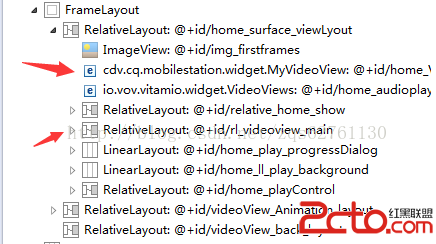 用 LayoutParams 在代碼中動態控制控件位置與尺寸
XML 布局能解決的問題不要用代碼去做,但有些場景——比如尺寸和位置來自服務端下發的配置——就必須在運行時動態設置。這時候 LayoutParams 是唯一的工具。 L
 微信小惱惱一次解決:小影片與全螢幕播放設定
微信小問題可用設定解決。Android版可到設定、通用,把朋友圈小影片設為關閉或僅Wi-Fi,避免浪費行動網路。 Windows Phone看影片無法全屏,可到設定、輔助
 深入解析 Intent Filter 的匹配規則
一、Intent 機制簡介 在 Android 中,Intent 是實現應用組件之間交互與通訊的核心機制。它用來描述一次操作要「做什麼動作」、「涉及哪些數據」以及「附帶哪
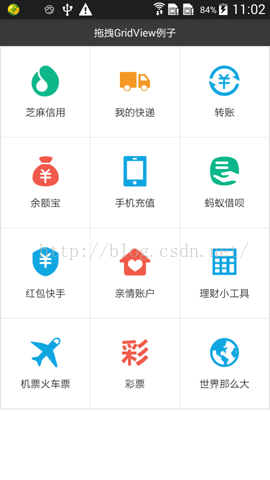 可拖動 GridView 實作解析:打造類似支付寶的桌面圖示排序
概述 在許多啟動器或工具類應用中,使用者常希望能長按圖示後拖曳調整順序。本文以類似支付寶界面的可拖動 GridView 為例,說明如何透過 Android 的觸摸事件、W