

編輯:關於 Android 程式設計
Android 客戶端模擬一個 HTTP POST 請求打到伺服器,伺服器接收後處理並回傳響應內容給客戶端。
網路上大多是上傳到 Java 伺服器的教學,找了一陣子才找到 PHP 版本。思路其實差不多,就是 POST 過去。
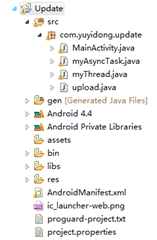
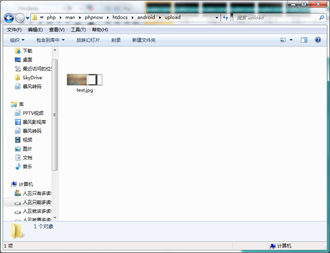
<?php $target_path = "./upload/";//接收文件目錄 $target_path = $target_path . basename( $_FILES['uploadedfile']['name']); if(move_uploaded_file($_FILES['uploadedfile']['tmp_name'], $target_path)) { echo "The file ". basename( $_FILES['uploadedfile']['name']). " has been uploaded"; } else{ echo "There was an error uploading the file, please try again!" . $_FILES['uploadedfile']['error']; } ?>
private void uploadFile(String uploadUrl) { String end = "\r\n"; String twoHyphens = "--"; String boundary = "******"; try { URL url = new URL(uploadUrl); HttpURLConnection httpURLConnection = (HttpURLConnection) url .openConnection();//http連接 // 設置每次傳輸的流大小,可以有效防止手機因為內存不足崩潰 // 此方法用於在預先不知道內容長度時啟用沒有進行內部緩沖的 HTTP 請求正文的流。 httpURLConnection.setChunkedStreamingMode(128 * 1024);// 128K // 允許輸入輸出流 httpURLConnection.setDoInput(true); httpURLConnection.setDoOutput(true); httpURLConnection.setUseCaches(false); // 使用POST方法 httpURLConnection.setRequestMethod("POST"); httpURLConnection.setRequestProperty("Connection", "Keep-Alive");//保持一直連接 httpURLConnection.setRequestProperty("Charset", "UTF-8");//編碼 httpURLConnection.setRequestProperty("Content-Type", "multipart/form-data;boundary=" + boundary);//POST傳遞過去的編碼 DataOutputStream dos = new DataOutputStream( httpURLConnection.getOutputStream());//輸出流 dos.writeBytes(twoHyphens + boundary + end); dos.writeBytes("Content-Disposition: form-data; name=\"uploadedfile\"; filename=\"" + srcPath.substring(srcPath.lastIndexOf("/") + 1) + "\"" + end); dos.writeBytes(end); FileInputStream fis = new FileInputStream(srcPath);//文件輸入流,寫入到內存中 byte[] buffer = new byte[8192]; // 8k int count = 0; // 讀取文件 while ((count = fis.read(buffer)) != -1) { dos.write(buffer, 0, count); } fis.close(); dos.writeBytes(end); dos.writeBytes(twoHyphens + boundary + twoHyphens + end); dos.flush(); InputStream is = httpURLConnection.getInputStream();//http輸入,即得到返回的結果 InputStreamReader isr = new InputStreamReader(is, "utf-8"); BufferedReader br = new BufferedReader(isr); String result = br.readLine(); Toast.makeText(this, result, Toast.LENGTH_LONG).show();//將結果輸出 dos.close(); is.close(); } catch (Exception e) { e.printStackTrace(); setTitle(e.getMessage()); } }
這裡有兩個細節值得注意:一是 setChunkedStreamingMode(128 * 1024),在事先不知道內容長度時啟用分塊串流上傳,可以有效避免大圖把記憶體吃爆導致崩潰;二是 boundary 字串必須和 Content-Type 標頭中宣告的一致,兩端才能正確解析 multipart 資料。
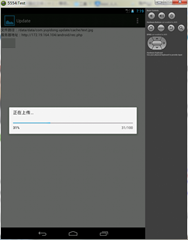
Android 4.0 之後,耗時作業都必須在非 UI 執行緒中執行,因此把上傳邏輯搬進 AsyncTask 的 doInBackground,再搭配 ProgressDialog 顯示上傳進度:
// Read file bytesRead = fileInputStream.read(buffer, 0, bufferSize); while (bytesRead > 0) { outputStream.write(buffer, 0, bufferSize); length += bufferSize; progress = (int) ((length * 100) / totalSize); publishProgress(progress); bytesAvailable = fileInputStream.available(); bufferSize = Math.min(bytesAvailable, maxBufferSize); bytesRead = fileInputStream.read(buffer, 0, bufferSize); } outputStream.writeBytes(lineEnd); outputStream.writeBytes(twoHyphens + boundary + twoHyphens + lineEnd); publishProgress(100);
<uses-permission android:name="android.permission.INTERNET" />
以上就是本文的全部內容,希望這次的分享能給大家帶來幫助。
 滴滴巴士怎麼搭?選線、購票、驗票全流程
滴滴巴士可線上預訂長途或通勤巴士。先開啟滴滴巴士,選擇我要坐車與合適路線,輸入手機與驗證碼;接著選日期並支付。 乘車前30分鐘可開啟已購車票進行自助驗票,上車時向司機出示
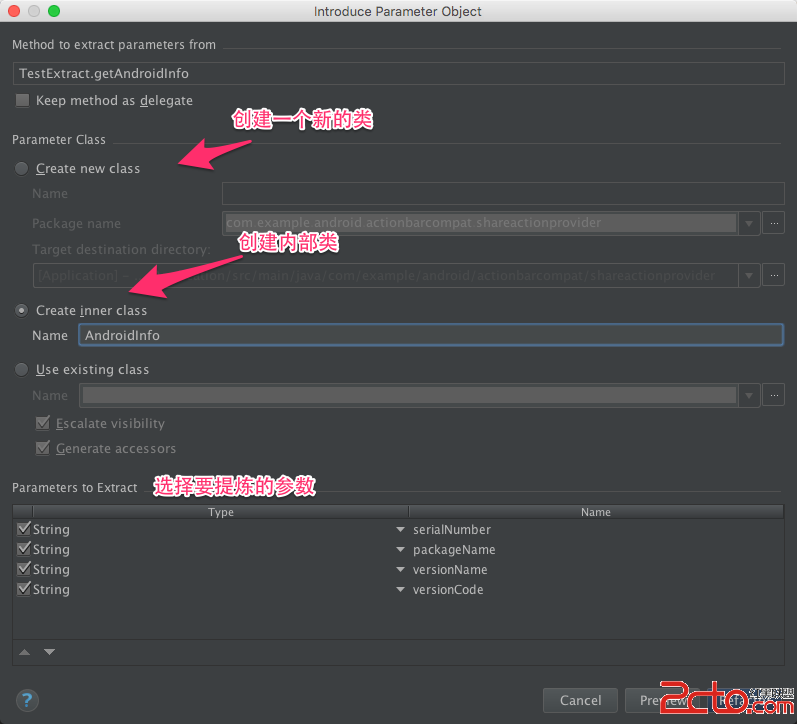 Android Studio實用指南 8.16:提煉參數物件(Extract Parameter Object)
在開發中,有些參數總是成群結隊地出現,甚至好幾個方法都會用到同一組參數。當參數列表越拉越長時,不僅可讀性變差,也容易產生重複程式碼。這時我們可以把這些參數提煉成一個「參數
 Android AsyncTask 異步任務加載圖片實戰與源碼解析
一、為什麼需要異步任務 Android 的 UI 線程如果被阻塞超過 5 秒,就會引發 ANR(Application Not Responding)異常;而如果用戶等待
 高通平台 Camera 移植實戰:以 OV8865 為例的完整落地流程
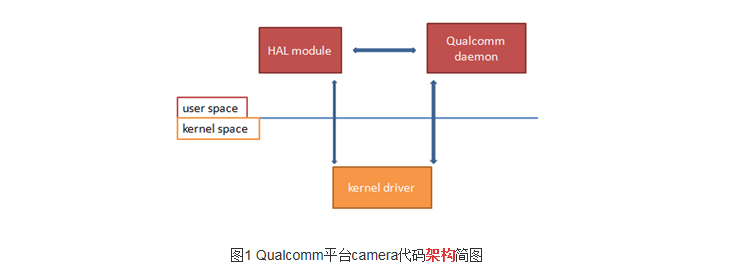
本文以 OV8865(模組型號 qtech_f8865ac)為例,記錄在高通平台上新增或移植一顆完整 camera 模組所需的全部改動,並在最後梳理高通 camera 子