

編輯:關於 Android 程式設計
本文分享一個以 Handler 訊息處理機制來操作 SeekBar 的實例,示範如何讓進度條可拖動、也能夠自動遞增,供需要的朋友參考。
這個案例很簡單,重點在於用 Handler 週期性地發送訊息,讓 SeekBar 的進度自動往前推進。下面直接看原始碼:
布局檔案:
<RelativeLayout xmlns:android="https://schemas.android.com/apk/res/android" xmlns:tools="https://schemas.android.com/tools" android:layout_width="match_parent" android:layout_height="match_parent" android:paddingBottom="@dimen/activity_vertical_margin" android:paddingLeft="@dimen/activity_horizontal_margin" android:paddingRight="@dimen/activity_horizontal_margin" android:paddingTop="@dimen/activity_vertical_margin" tools:context=".MainActivity" > <SeekBar android:id="@+id/seekBar1" android:layout_width="match_parent" android:layout_height="wrap_content" android:layout_alignParentLeft="true" android:layout_alignParentTop="true" /> </RelativeLayout>
java 檔案:
package com.example.lession16_seekbar; import android.os.Bundle; import android.os.Handler; import android.os.Message; import android.app.Activity; import android.view.Menu; import android.widget.SeekBar; public class MainActivity extends Activity { private SeekBar seekBar; private static final int MAX_PROGRESS =100; private int current_progress=10; private static final int PRO=1; private Handler handler; @Override protected void onCreate(Bundle savedInstanceState) { super.onCreate(savedInstanceState); setContentView(R.layout.activity_main); seekBar = (SeekBar) this.findViewById(R.id.seekBar1); seekBar.setMax(MAX_PROGRESS); /* new Thread(new Runnable() { @Override public void run() { while(true){ try { Thread.sleep(600); current_progress+=10; seekBar.setProgress(current_progress); } catch (InterruptedException e) { // TODO Auto-generated catch block e.printStackTrace(); } } } }).start();*/ handler = new Handler(){ @Override public void handleMessage(Message msg) { super.handleMessage(msg); switch (msg.what) { case PRO: if(current_progress>=MAX_PROGRESS){ }else{ current_progress+=1; seekBar.incrementProgressBy(1); handler.sendEmptyMessageDelayed(PRO, 600); } break; default: break; } } }; current_progress=current_progress>0?current_progress:0; seekBar.setProgress(current_progress); handler.sendEmptyMessage(PRO); } @Override public boolean onCreateOptionsMenu(Menu menu) { // Inflate the menu; this adds items to the action bar if it is present. getMenuInflater().inflate(R.menu.main, menu); return true; } }
這裡的關鍵是 sendEmptyMessageDelayed,它讓 Handler 每隔 600 毫秒延遲發送一次訊息,於是進度條就會以固定節奏自動往前跑;透過 incrementProgressBy(1) 每次遞增一格,直到達到最大值為止。相較於註解裡用子執行緒 sleep 的做法,用 Handler 定時發送訊息能更自然地與主執行緒的 UI 更新協調。
自動遞增的效果圖如下:

希望本文所述能對你的 Android 程式設計有所幫助。
 Android Service 在新進程中啟動的完整流程剖析
一、從 startService 說起 在〈Android 系統匿名共享內存(Anonymous Shared Memory)Java 調用接口分析〉一文中,Client
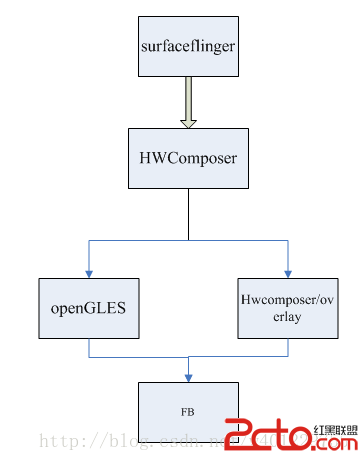 Android 4.4 Fence 機制分析:同步與緩衝區生命週期
為什麼需要 Fence在圖形系統中,生產者與消費者會反覆交換緩衝區。緩衝區的申請、填寫、排隊、顯示與釋放都需要同步機制,避免內容尚未準備完成就被讀取。Android 中的
 Android 圖像資源之狀態圖像:selector 讓按鈕自動換圖
在上一篇博文中我講解了 XML 圖像資源中的圖層資源,這篇接著談「狀態圖像資源」。後續還會陸續介紹圖像級別資源、淡入淡出資源、嵌入圖像資源、剪切圖像資源與外形資源。 問
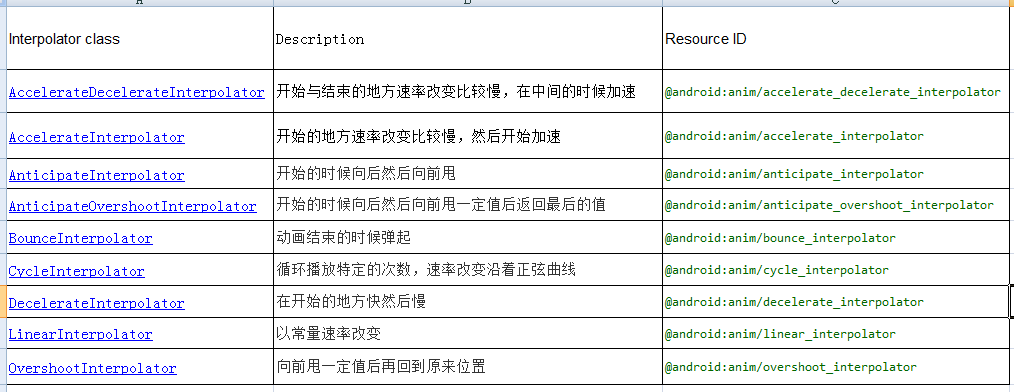 Android 動畫底層透視:TimeInterpolator 與 TypeEvaluator 完全解析
做 Android 動畫,最終都繞不開兩個概念:TimeInterpolator(插值器)決定「跑多快」,TypeEvaluator(估值器)決定「算出什麼值」。本文沿著