

編輯:關於 Android 程式設計
本文透過實例,說明 Android 開發中如何運用 FontMetrics 繪製文字,分享給大家參考。
當 Canvas 用於繪製文字時,可以搭配 FontMetrics 物件來計算文字的定位座標,其思路與 java.awt.FontMetrics 基本相同。
FontMetrics 物件
它以四個基本座標為基準,分別為:
FontMetrics.top
FontMetrics.ascent
FontMetrics.descent
FontMetrics.bottom
下圖說明了這幾個座標之間的關係:

程式碼如下:
Paint textPaint = new Paint( Paint.ANTI_ALIAS_FLAG); textPaint.setTextSize( 35); textPaint.setColor( Color.WHITE); // FontMetrics 物件 FontMetrics fontMetrics = textPaint.getFontMetrics(); String text = "abcdefghijklmnopqrstu"; // 計算每一個座標 float baseX = 0; float baseY = 100; float topY = baseY + fontMetrics.top; float ascentY = baseY + fontMetrics.ascent; float descentY = baseY + fontMetrics.descent; float bottomY = baseY + fontMetrics.bottom; // 繪製文字 canvas.drawText( text, baseX, baseY, textPaint); // BaseLine 描畫 Paint baseLinePaint = new Paint( Paint.ANTI_ALIAS_FLAG); baseLinePaint.setColor( Color.RED); canvas.drawLine(0, baseY, getWidth(), baseY, baseLinePaint); // Base 描畫 canvas.drawCircle( baseX, baseY, 5, baseLinePaint); // TopLine 描畫 Paint topLinePaint = new Paint( Paint.ANTI_ALIAS_FLAG); topLinePaint.setColor( Color.LTGRAY); canvas.drawLine(0, topY, getWidth(), topY, topLinePaint); // AscentLine 描畫 Paint ascentLinePaint = new Paint( Paint.ANTI_ALIAS_FLAG); ascentLinePaint.setColor( Color.GREEN); canvas.drawLine(0, ascentY, getWidth(), ascentY, ascentLinePaint); // DescentLine 描畫 Paint descentLinePaint = new Paint( Paint.ANTI_ALIAS_FLAG); descentLinePaint.setColor( Color.YELLOW); canvas.drawLine(0, descentY, getWidth(), descentY, descentLinePaint); // ButtomLine 描畫 Paint bottomLinePaint = new Paint( Paint.ANTI_ALIAS_FLAG); bottomLinePaint.setColor( Color.MAGENTA); canvas.drawLine(0, bottomY, getWidth(), bottomY, bottomLinePaint);
希望本文所述能對大家的 Android 程式設計有所幫助。
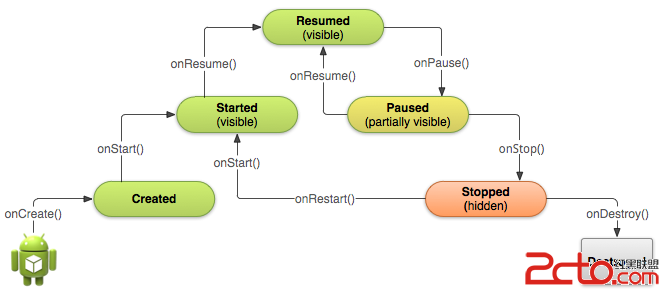 Android 官方課程十七:啟動 Activity 的起點與生命週期
從 main() 說起:Android 不一樣的程式起點 在傳統的程式設計範式裡,應用程式通常透過一個 main() 方法作為進入點;Android 則完全不同。系統並不
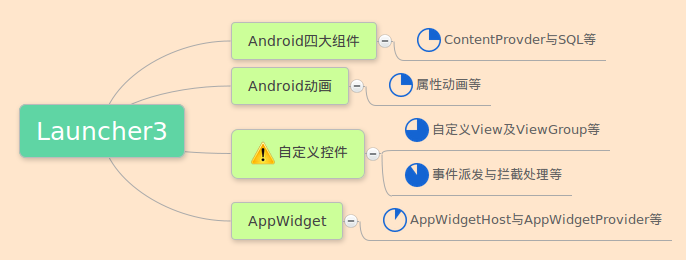 Android M Launcher3 主流程源碼淺析
背景 Launcher 是什麼,這裡就不多贅述了。近期出於工作需要必須啃一啃 Launcher3 的源碼,為了不重蹈當年研究 Settings 卻一篇筆記都沒留下的覆轍,
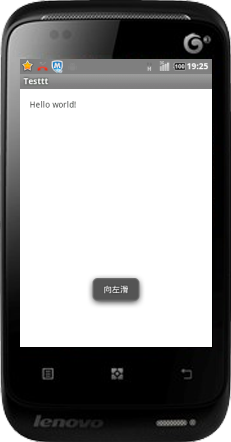 Android 用 onTouchEvent 判斷上下左右滑動
若不使用手勢類,也可以直接在 Activity 的 onTouchEvent 中判斷上下左右滑動。做法是記錄 ACTION_DOWN 時的 x、y 座標,等 ACTION
 Android 讓 Activity 以 Dialog 風格彈出的完整做法
很多時候我們希望某個 Activity 不是全屏開啟,而是像對話框一樣浮在畫面上。第一步直覺是在佈局中加上 android:layout_height=wrap_cont