

編輯:關於 Android 程式設計
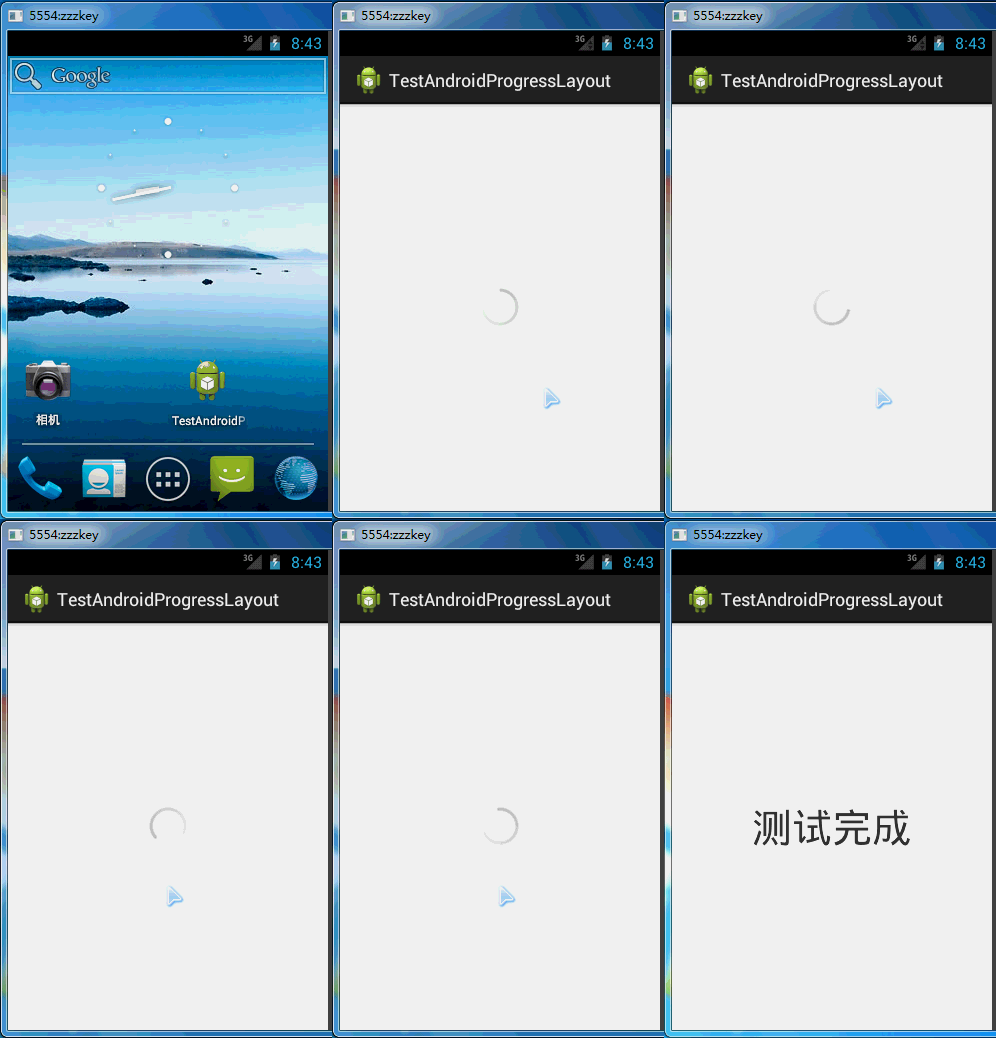
AndroidProgressLayout 能為介面加上圓形進度條,只需呼叫 setProgress() 方法即可顯示或隱藏進度條。
在 Android 開發中,經常會遇到這樣的需求:當執行某些耗時操作時——例如联网取得網路圖片或內容、進行耗時的資料庫讀寫等——開發者往往不希望使用者在這段期間進行其他操作(因為其他操作可能導致邏輯混亂)。此時,就需要一個額外的載入頁面來遮擋主邏輯的執行,待主頁面的耗時操作完成後再自動消失,恢復顯示正常的頁面。
舉個實際的例子:假設程式使用 Android WebView 開啟某個網頁連結以載入網站,但網路品質不佳、需要耗時很久,那麼在這個過程中,較好的使用者體驗做法是——先給使用者一個載入進度頁面遮擋住 WebView,待內容成功載入後再完整切換回正常的邏輯頁面。
AndroidProgressLayout 正好實現了這樣的功能。它在 GitHub 上的專案首頁為:https://github.com/antonkrasov/AndroidProgressLayout
測試程式碼如下:
activity_main.xml:
<com.github.androidprogresslayout.ProgressLayout xmlns:android="https://schemas.android.com/apk/res/android" xmlns:progressLayout="https://schemas.android.com/apk/res-auto" android:id="@+id/progressLayout" android:layout_width="match_parent" android:layout_height="match_parent" > <TextView android:id="@+id/textView" android:layout_width="wrap_content" android:layout_height="wrap_content" android:textSize="sp" android:layout_centerInParent="true" /> </com.github.androidprogresslayout.ProgressLayout>
MainActivity.java:
package com.zzw.testandroidprogresslayout; import com.github.androidprogresslayout.ProgressLayout; import android.app.Activity; import android.os.Bundle; import android.os.Handler; import android.os.Message; import android.view.animation.Animation; import android.widget.TextView; public class MainActivity extends Activity { @Override protected void onCreate(Bundle savedInstanceState) { super.onCreate(savedInstanceState); setContentView(R.layout.activity_main); final ProgressLayout progressLayout = (ProgressLayout) findViewById(R.id.progressLayout); final TextView textView = (TextView) findViewById(R.id.textView); Handler handler = new Handler() { @Override public void handleMessage(Message msg) { textView.setText("測試完成"); // 切換回正常顯示頁面 progressLayout.showContent(); } }; // 開始加載... 假設從這裡開始一個耗時的操作將開始啟動,在此啟動過程中,開發者希望用戶稍事休息,等待。。。 progressLayout.showProgress(); // 假設有一個耗時的加載業務邏輯,需要秒完成。 handler.sendEmptyMessageDelayed(, ); } }以上就是關於「使用第三方開源庫 AndroidProgressLayout 為耗時操作加上載入遮罩頁面」的分享,希望大家喜歡。
 Android 自訂縮放式側滑菜單完整實作
前言 剛接觸 Android 時,我對側滑菜單非常感興趣,也很好奇它的實作原理。隨著技術不斷精進,我也能自己封裝側滑菜單了。網路上雖有眾多現成方案,但本著學習與分享的精神
 Android新建Activity的三個步驟詳解
在一個Android專案裡,究竟該怎麼新增一個Activity?其實只要掌握三個步驟即可,本文就為大家完整示範。 第一,新建一個類(*.class),讓它繼承自andro
 電商 App 常見的「Hot」角標:開源 LabelView 元件實戰
先看成果,是不是跟你預期的一樣? 電商類 App 的商品圖上,幾乎都會掛一個「Hot」、「新品」、「限時」之類的角標。自己用 Canvas 畫一個三角形再加文字不算
 Android 系統自帶 ActionBar 用法總結
Android 不同版本對 ActionBar 的支援存在差異,本文將常見用法整理如下。 一、在 support.v7 套件中 引入選單時,使用 onCreateOpti