

編輯:關於 Android 程式設計
本文透過實例,講解如何在 Android 中實作一個帶有跳動提示、並可上拉切換頁面的動畫效果。
先看一下效果圖:
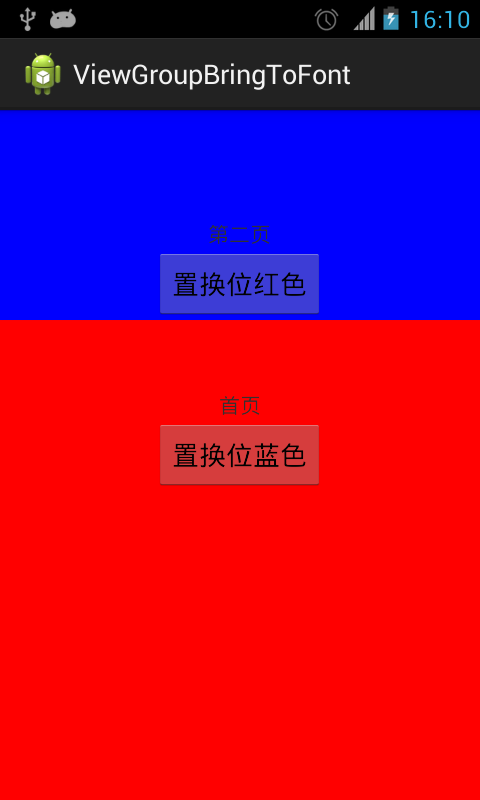
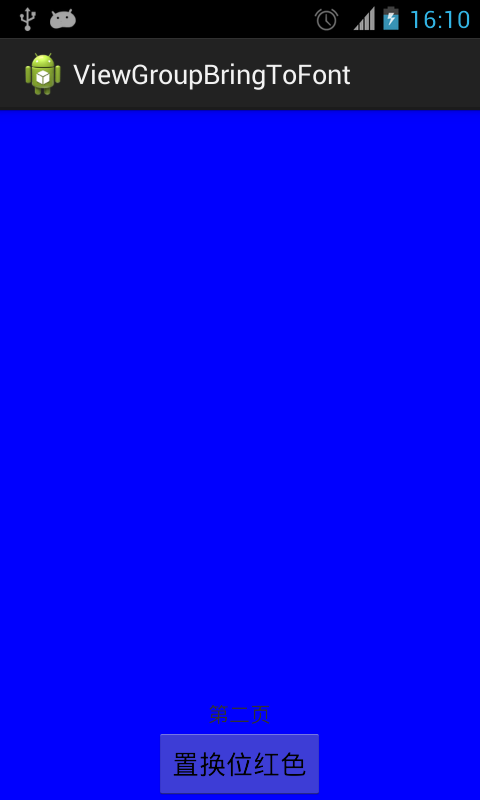
先來看布局檔,用兩個重疊的 RelativeLayout 分別代表紅色與藍色兩個頁面:
<RelativeLayout xmlns:android="https://schemas.android.com/apk/res/android" xmlns:tools="https://schemas.android.com/tools" android:layout_width="match_parent" android:layout_height="match_parent" > <RelativeLayout android:id="@+id/red" android:layout_width="match_parent" android:layout_height="match_parent" android:background="#ff0000" > <TextView android:layout_width="wrap_content" android:layout_height="wrap_content" android:layout_above="@+id/switch2blue" android:layout_centerHorizontal="true" android:text="首頁" /> <Button android:id="@+id/switch2blue" android:layout_width="wrap_content" android:layout_height="wrap_content" android:layout_centerInParent="true" android:text="置換位藍色" /> </RelativeLayout> <RelativeLayout android:id="@+id/blue" android:layout_width="match_parent" android:layout_height="match_parent" android:background="#0000ff" > <TextView android:layout_width="wrap_content" android:layout_height="wrap_content" android:layout_above="@+id/switch2red" android:layout_centerHorizontal="true" android:text="第二頁" /> <Button android:id="@+id/switch2red" android:layout_width="wrap_content" android:layout_height="wrap_content" android:layout_alignParentBottom="true" android:layout_centerHorizontal="true" android:text="置換位紅色" /> </RelativeLayout> </RelativeLayout>
程式碼如下:
import java.lang.reflect.Field; import android.app.Activity; import android.os.Bundle; import android.os.Handler; import android.util.DisplayMetrics; import android.view.GestureDetector; import android.view.MotionEvent; import android.view.View; import android.view.GestureDetector.OnGestureListener; import android.view.View.OnClickListener; import android.view.View.OnTouchListener; import android.view.animation.AccelerateDecelerateInterpolator; import android.view.animation.AccelerateInterpolator; import android.view.animation.Animation; import android.view.animation.AnimationSet; import android.view.animation.TranslateAnimation; import android.view.animation.Animation.AnimationListener; import android.widget.Button; import android.widget.RelativeLayout; public class MainActivity extends Activity implements OnClickListener, OnTouchListener, OnGestureListener { private RelativeLayout red, blue; private Button switch2blue, switch2red; private float thisDelta = 0.05f; private static boolean hasEverPulled = false; private boolean pulled = false; private static int height; private GestureDetector gestureDetector; private static int statusHeight = 0; @Override protected void onCreate(Bundle savedInstanceState) { super.onCreate(savedInstanceState); setContentView(R.layout.activity_main); DisplayMetrics metrics = getResources().getDisplayMetrics(); height = metrics.heightPixels; statusHeight = getStatusHeight(); initView(); // 跳動提示可以上拉 final Handler handler = new Handler(); handler.postDelayed(new Runnable() { @Override public void run() { jump(thisDelta); // handler.postDelayed(this, 3000); } }, 3000); } private void initView() { red = (RelativeLayout) findViewById(R.id.red); blue = (RelativeLayout) findViewById(R.id.blue); switch2blue = (Button) findViewById(R.id.switch2blue); switch2red = (Button) findViewById(R.id.switch2red); switch2blue.setOnClickListener(this); switch2red.setOnClickListener(this); blue.setOnTouchListener(this); blue.setLongClickable(true); gestureDetector = new GestureDetector(this, this); } @Override public void onClick(View arg0) { // TODO Auto-generated method stub switch (arg0.getId()) { case R.id.switch2blue: red2BlueUI(); break; case R.id.switch2red: blue2RedUI(); break; } } // 從紅頁面轉到藍頁面 private void red2BlueUI() { blue.bringToFront(); blue.requestLayout(); blue.invalidate(); } // 從藍頁面轉到紅頁面 private void blue2RedUI() { red.bringToFront(); red.requestLayout(); red.invalidate(); } // 獲取狀態欄的高度 private int getStatusHeight() { Class<?> c = null; Object obj = null; Field field = null; int x = 0; int height = 0; try { c = Class.forName("com.android.internal.R$dimen"); obj = c.newInstance(); field = c.getField("status_bar_height"); x = Integer.parseInt(field.get(obj).toString()); height = getResources().getDimensionPixelSize(x); } catch (Exception e) { e.printStackTrace(); } return height; } // 主頁面跳動 private void jump(float delta) { if (thisDelta - 0.03f < 0.001f) { thisDelta = 0.05f; return; } thisDelta = delta; if (hasEverPulled) { return; } playJumpAnimation(thisDelta); } // 上拉/下拉主頁面 private void pull(boolean upward) { if (upward && pulled) { return; } if (!upward && !pulled) { return; } float originalY; float finalY; if (!pulled) { originalY = 0; finalY = (float) (0 - height + 0.4 * height); } else { originalY = (float) (0 - height + 0.4 * height); finalY = 0; } pulled = !pulled; AnimationSet animationSet = new AnimationSet(true); animationSet.addAnimation(new TranslateAnimation(0, 0, originalY, finalY)); animationSet.setDuration(300); animationSet.setInterpolator(new AccelerateDecelerateInterpolator()); animationSet.setFillAfter(true); animationSet.setAnimationListener(new AnimationListener() { @Override public void onAnimationStart(Animation animation) { if (!pulled) { red2BlueUI(); } } @Override public void onAnimationRepeat(Animation animation) { } @Override public void onAnimationEnd(Animation animation) { // if (pulled) { // blue2RedUI(); // } } }); blue.startAnimation(animationSet); hasEverPulled = true; } // 跳起動畫 private void playJumpAnimation(final float delta) { float originalY = 0; float finalY = 0 - height * delta; AnimationSet animationSet = new AnimationSet(true); animationSet.addAnimation(new TranslateAnimation(0, 0, originalY, finalY)); animationSet.setDuration(300); animationSet.setInterpolator(new AccelerateDecelerateInterpolator()); animationSet.setFillAfter(true); animationSet.setAnimationListener(new AnimationListener() { @Override public void onAnimationStart(Animation animation) { } @Override public void onAnimationRepeat(Animation animation) { } @Override public void onAnimationEnd(Animation animation) { playLandAnimation(delta); } }); blue.startAnimation(animationSet); } // 落下動畫 private void playLandAnimation(final float delta) { float originalY = 0 - height * delta; float finalY = 0; AnimationSet animationSet = new AnimationSet(true); animationSet.addAnimation(new TranslateAnimation(0, 0, originalY, finalY)); animationSet.setDuration(200); animationSet.setInterpolator(new AccelerateInterpolator()); animationSet.setFillAfter(true); animationSet.setAnimationListener(new AnimationListener() { @Override public void onAnimationStart(Animation animation) { } @Override public void onAnimationRepeat(Animation animation) { } @Override public void onAnimationEnd(Animation animation) { jump(0.03f); } }); blue.startAnimation(animationSet); } @Override public boolean onDown(MotionEvent e) { pull(false); return false; } @Override public boolean onFling(MotionEvent e1, MotionEvent e2, float velocityX, float velocityY) { // 手勢滑動達到100才觸發 if (e1.getY() - e2.getY() > 100) { pull(true); } else if (e2.getY() >= e1.getY()) { pull(false); } return false; } @Override public void onLongPress(MotionEvent e) { } @Override public boolean onScroll(MotionEvent e1, MotionEvent e2, float distanceX, float distanceY) { return false; } @Override public void onShowPress(MotionEvent e) { } @Override public boolean onSingleTapUp(MotionEvent e) { return false; } @Override public boolean onTouch(View v, MotionEvent event) { if (pulled) { // 首張頁可觸控點 if (event.getY() > height * 0.4 - statusHeight) { return false; } } return gestureDetector.onTouchEvent(event); } }
這個效果巧妙之處在於:先用跳起與落下兩個 TranslateAnimation 做出輕微的上下跳動提示,吸引使用者注意;再透過 GestureDetector 偵測上拉手勢,切換到下方頁面。使用反射取得狀態欄高度,則是為了在判斷觸控範圍時能正確扣除狀態欄,讓互動更精準。希望本文所述能對大家的 Android 程式設計有所幫助。
 Android 線上 Bug 熱修復深度解析:從 ClassLoader 到 dexElements
App 線上修復目前已有好幾種方案,開源社群裡同一個思路往往有多種實作。重複造輪子看似浪費,但把每個方案背後的技術演變梳理清楚,這些「輪子」其實很值得研究。 什麼是 H
 Android 多螢幕適配完整指南:一次掌握尺寸、密度與資源策略
Android 多螢幕適配完整指南 Android 裝置的螢幕尺寸與像素密度差異很大。系統雖然會自動縮放,但開發者仍應針對不同配置進行優化,才能讓使用者感受到應用是為裝置
 Android Scroll 詳解(一):mScrollX、scrollTo 與 invalidate 的底層真相
先前的文章已經討論過 Android 的觸摸事件處理與 MotionEvent 用法。今天我們把視角轉向另一個主題:畫面捲動效果的背後機制。本篇先建立觀念基礎,後續文章才
 Android 開發問題匯總:環境、Gradle、UI 與打包實務
Android Studio 與 Gradle常見問題包括 Subversion 外掛消失、dexDebug 失敗、Gradle 版本與 plugin 不相容、65K 方