

編輯:關於 Android 程式設計
輸入框幾乎每個 App 都有,配套的驗證需求也層出不窮:只能輸入數字、限制字數、屏蔽特定字符。這些需求可以分成兩類,實現方式截然不同。
格式類的限制不必寫代碼,布局裡一行屬性就夠了:
<EditText
    android:id="@+id/editor_input"
    android:layout_width="match_parent"
    android:layout_height="wrap_content"
    android:numeric="integer"
    android:maxLength="20"
    android:singleLine="true" />
android:numeric="integer" 只允許輸入整數,改成 "decimal" 則允許小數,也可寫成 "integer|decimal" 組合。android:maxLength 限制最大字符數。這類聲明式配置優先級高、性能好,能用就用。
但有些需求無法用屬性表達,比如「不允許輸入井號,輸入了要給提示」。這就需要主動監聽文本變化。Android 提供了 TextWatcher 接口,有三個方法需要實現:
public void beforeTextChanged(CharSequence s, int start, int count, int after);
public void onTextChanged(CharSequence s, int start, int before, int count);
public void afterTextChanged(Editable s);
從命名就能看出時序:beforeTextChanged 在文本變更前調用,能拿到變更前的內容;onTextChanged 在變更後調用;afterTextChanged 同樣在變更後調用,但參數是可讀寫的 Editable。做字符過濾選 afterTextChanged 最合適,因為此時可以直接改動內容。
private final TextWatcher mTextWatcher = new TextWatcher() {

    @Override
    public void beforeTextChanged(CharSequence s, int start, int count, int after) { }

    @Override
    public void onTextChanged(CharSequence s, int start, int before, int count) { }

    @Override
    public void afterTextChanged(Editable s) {
        if (s.length() > 0) {
            // 只檢查剛追加進來的最後一個字符
            int pos = s.length() - 1;
            char c = s.charAt(pos);
            if (c == '#') {
                s.delete(pos, pos + 1); // 刪掉它,用戶就看不到
                Toast.makeText(MyActivity.this, "不能輸入 # 號", Toast.LENGTH_SHORT).show();
            }
        }
    }
};
然後掛上監聽:
EditText mEditor = (EditText) findViewById(R.id.editor_input);
mEditor.addTextChangedListener(mTextWatcher);
只檢查最後一個字符並不總是夠用。如果用戶粘貼一段含多個非法字符的文本,或在中間插入字符,只處理末尾就會漏掉。健壯的做法是遍歷整個 Editable 刪除所有匹配字符,或者用 replace 配合正則一次性替換。
在 afterTextChanged 中修改 Editable 可能觸發連鎖回調。刪除操作本身又會引起文本變化,再次進入 afterTextChanged。本例中因為刪掉的是非法字符,第二次進入時已無非法內容,不會死循環;但若邏輯複雜,建議加一個 boolean 標記位做重入保護。
如果需求是「限制只能輸入某組字符」,還有更省事的做法:使用 android:digits 屬性直接聲明允許的字符,例如 android:digits="0123456789.",系統會在輸入層面攔下其他字符,不必自己寫 TextWatcher。
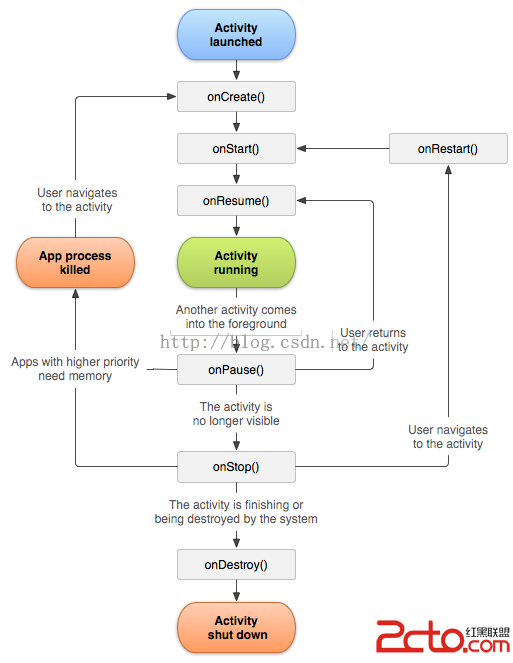 Android 基礎:Activity 生命週期全解析
面試時常被問到這樣的問題:Activity A 被 Activity B 覆蓋時,A 的生命週期中哪幾個方法被呼叫?若改成 Dialog 對話框覆蓋 A,又會呼叫哪些方法
 用 ExpandableListView 打造時間軸效果
先看效果圖,直觀感受一下: 這裡利用 ExpandableListView 實現了時間軸效果,原理並不複雜:以月份作為第一級(group),以日期作為第二級(child
 Android odex 檔案反編譯流程
Android 為加快內建應用啟動速度,會將 APK 中的 dex 最佳化為 odex。因此,直接反編譯某些 ROM 中的 APK 時,可能無法取得原始碼,需要先把 od
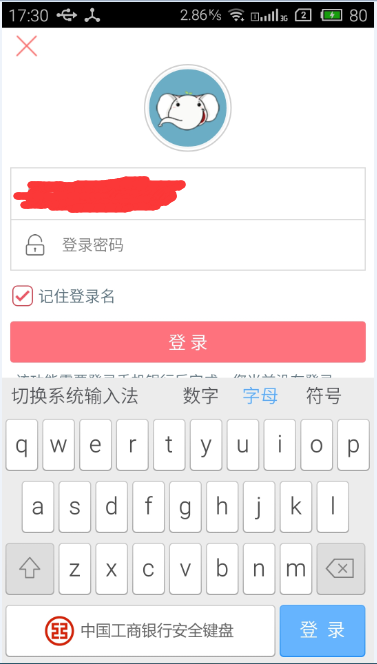 自製安全鍵盤:用 KeyboardView 打造字母、數字、符號三合一輸入盤
一直知道 Android 有 KeyboardView 這個元件可以做自訂鍵盤,只是過去沒派上用場。某天看到某銀行 App 的密碼輸入鍵盤,配色與排版都很講究,於是決定動