

編輯:關於 Android 程式設計
Android提供了幾種典型的本地資料儲存方式,其中SharedPreferences以文件格式保存在本機,而SQL資料庫則適合儲存結構化資料。本文將著重講解如何使用 FileInputStream 與 FileOutputStream 進行檔案操作,並將其封裝成方便重複使用的工具類。
學習這個主題時,特別要釐清一個常見誤區:內部儲存空間(data 目錄下、以套件名稱命名的 file 資料夾)與外部儲存空間(SD 卡等)是兩完全不同的概念。混淆兩者往往會浪費大量除錯時間。以下採用模組化的分離寫法,將檔案操作封裝成獨立工具類別:
import android.content.Context; import android.util.Log; import java.io.FileInputStream; import java.io.FileOutputStream; /** * Created by zhizhao on 2015/11/1 0001 in 16:00. */ public class UsingFileInputStream { private Context fileContext; private String fileName; private String fileUserName; private String filePassword; public UsingFileInputStream(String name, Context context, String userName, String password) { this.fileName = name; this.fileContext = context; this.fileUserName = userName; this.filePassword = password; } //保存的時候是在文件內容中連續寫入,也就是在之前保存的數據基礎上再次寫入。 public void writeFileInputStream() { try { FileOutputStream fileOutputStream = fileContext.openFileOutput(fileName, fileContext.MODE_PRIVATE); byte[] byteUserName = fileUserName.getBytes(); byte[] bytePassword = filePassword.getBytes(); fileOutputStream.write(byteUserName); fileOutputStream.write(bytePassword); Log.v("FileInputStream保存結果 ", "UserName = " + fileUserName + " Password = " + filePassword); fileOutputStream.flush(); fileOutputStream.close(); } catch (Exception e) { e.printStackTrace(); } } //讀取文件是把整個文件的內容進行讀取。如果要加入解析,則保存的時候保存為特殊格式。 public void readFileInputStream() { try { FileInputStream fileInputStream = fileContext.openFileInput(fileName); int len = fileInputStream.available(); byte[] buffer = new byte[len]; fileInputStream.read(buffer); Log.v("讀取到的文件為:", ""+new String(buffer)); fileInputStream.close(); } catch (Exception e) { e.printStackTrace(); } } }
使用方式如下:
private void writeFile(){ UsingFileInputStream fileInputStream = new UsingFileInputStream("account", MySaveDataActivity.this, userName, userPass); fileInputStream.writeFileInputStream(); tvReadInformation.setText("保存成功!" + "\n UserName = " + userName + "\n UserPass = " + userPass); } private void readFile(){ UsingFileInputStream fileInputStream = new UsingFileInputStream("account", MySaveDataActivity.this, userName, userPass); fileInputStream.readFileInputStream(); tvReadInformation.setText("讀取成功!"+"\n UserName = "+userName+"\n UserPass = "+userPass); }
這個封裝仍有改進空間,例如呼叫時需重複傳入檔名與數值、難以直接得知成功或失敗,且並未妥善捕捉檔案不存在時的空指標例外。不過作為練習已相當足夠,實際專案時只要在 try-catch 區塊中加入合適的處理即可。
1. 類別概述
繼承關係:java.io.FileInputStream → java.io.InputStream → java.lang.Object,並實作 Closeable 介面。FileInputStream 用於從檔案系統取得輸入位元組,適合讀取圖片等原始位元組流;若要讀取字元流,則應考慮使用 FileReader。
2. 常用方法
(1) public void close() throws IOException:關閉此檔案輸入流並釋放所有相關系統資源。
(2) public int read() throws IOException:讀取一個資料位元組,若無輸入可用則會阻塞;到達檔案結尾時回傳 -1。
(3) public int read(byte[] b) throws IOException:將最多 b.length 個位元組讀入位元組陣列。
(4) public int read(byte[] b, int off, int len) throws IOException:從中讀取最多 len 個位元組,存入以 off 為起始偏移的緩衝區。
3. 常見錯誤
在Eclipse下使用 FileInputStream 時,可能會出現「系統找不到指定的檔案」的 FileNotFoundException:
java.io.FileNotFoundException: dbconfig.properties (系統找不到指定的文件。) at java.io.FileInputStream.open(Native Method) at java.io.FileInputStream.<init>(FileInputStream.java:106) at java.io.FileInputStream.<init>(FileInputStream.java:66)
解決方法:因為Eclipse執行時會自動將發布目錄作為根目錄,所以使用相對路徑會找不到檔案,將檔名改為絕對路徑即可,例如 filename = "/sdcard/.../abc.txt"。
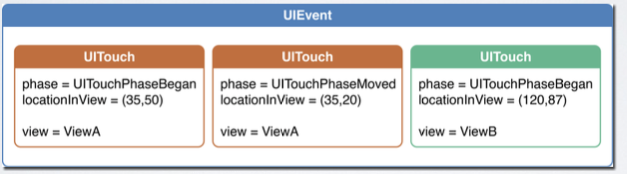 iOS UI 進階:觸摸事件與手勢識別完全梳理
一、觸摸事件的處理方式 iOS 上的事件大致分三類:觸摸事件(手指觸碰屏幕)、運動事件(如微信搖一搖)、遠程控制事件(如藍牙耳機的按鍵)。本文聚焦第一類。 響應者對象通過
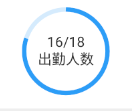 Android 自定義環形進度條實作
自定義屬性在 attrs.xml 宣告 radius、strokeWidth、circleColor、ringColor、textColor、textSize,方便在布局
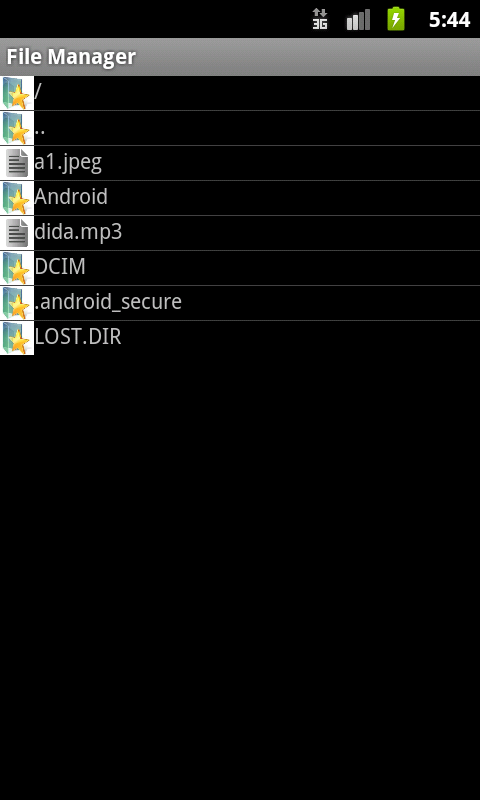 Android 簡單文件管理器實作教學
想動手做一個自己的文件管理器嗎?本文將運用 Java I/O、ListActivity、Dialog、Bitmap 等技術,實作一個簡單的文件管理器,支援查看目錄文件、修
 Android 多語言切換要點整理
一、切換為英文的程式碼 只要在切換時透過 Locale 與 Configuration 更新資源的語言設定,後續開啟的子視窗就會自動改從 values-en 目錄下的 s