

編輯:關於 Android 程式設計
一、問題描述
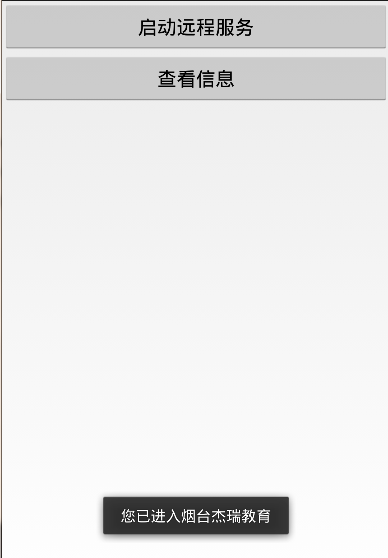
Android 應用程式的四大組件——Activity、BroadcastReceiver、ContentProvider、Service,都可以進行跨進程。上一篇我們透過 ContentProvider 實現了不同應用之間的跨進程調用,但 ContentProvider 主要用於資料共享(如 SQLite 資料庫)。那麼,如果我們想跨進程調用服務(Service)呢?Android 系統採用遠端程序呼叫(RPC)方式來實現。與許多基於 RPC 的方案一樣,Android 使用一種介面定義語言(Interface Definition Language,IDL)來公開服務的介面。Service 的跨進程調用需要透過 AIDL 來實現,AIDL 服務應用非常廣泛,例如百度地圖 API 就提供了跨進程的服務。以下就來看看如何實現 AIDL Service,案例如下圖:
二、實現 AIDL 服務的步驟
1. 編寫 AIDL 檔;
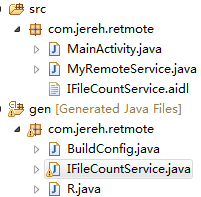
2. 若 aidl 檔內容正確,會自動產生一個 Java 介面檔(*.java);
3. 建立一個服務類別(Service 的子類);
4. 實作由 aidl 檔產生的 Java 介面;
5. 在 AndroidManifest.xml 中配置 AIDL 服務,為 <action> 標籤加上 android:name,以便客戶端使用隱式 Intent 啟動服務;
6. 撰寫客戶端。
三、編寫 AIDL 檔
Android 介面定義語言——LocalService.aidl:
package com.jereh.remote; interface LocalService{ String getLocal(); }
IDE 會自動產生 LocalService.java 檔,如下圖所示:
四、Remote 應用實作
1、編寫 MyRemoteService
這裡關鍵在於 onBind 回傳一個繼承自 LocalService.Stub 的 Binder 實作,並在其中覆寫 getLocal 方法。
public class MyRemoteService extends Service { @Override public IBinder onBind(Intent arg0) { // TODO Auto-generated method stub return new MyRemoteServiceImpl(); } private class MyRemoteServiceImpl extends LocalService.Stub{ @Override public String getLocal() throws RemoteException { // TODO Auto-generated method stub return "煙台傑瑞教育"; } } }
2、AndroidManifest.xml 配置
這裡透過 android:process="remote" 讓 Service 運行在獨立進程,並以 intent-filter 的 action 供客戶端隱式 Intent 綁定。
<service android:name="com.jereh.retmote.MyRemoteService" android:process="remote" > <intent-filter> <action android:name="com.jereh.remote_service"/> </intent-filter> </service>
五、客戶端實作
1、在客戶端應用中加入 LocalService.aidl
注意包名要與服務端定義的相同,如下圖:
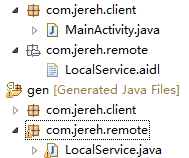
同樣會自動產生 LocalService.java 程式碼。
2、MainActivity 程式碼:
客戶端透過 bindService 綁定遠端服務,並在 onServiceConnected 回呼中以 LocalService.Stub.asInterface(binder) 取得遠端介面代理,之後即可像呼叫本地方法一樣調用 getLocal。
public class MainActivity extends Activity { @Override protected void onCreate(Bundle savedInstanceState) { super.onCreate(savedInstanceState); setContentView(R.layout.activity_main); } public void startService(View view){ Intent service=new Intent("com.jereh.remote_service"); super.bindService(service, conn, Context.BIND_AUTO_CREATE); } public void showInfo(View view){ try { local=service.getLocal(); Log.d("jereh", local); Toast.makeText(this, "您已進入"+local,Toast.LENGTH_LONG).show(); } catch (RemoteException e) { // TODO Auto-generated catch block e.printStackTrace(); } } private LocalService service; private String local; private ServiceConnection conn=new ServiceConnection() { @Override public void onServiceDisconnected(ComponentName arg0) { } @Override public void onServiceConnected(ComponentName name, IBinder binder) { // TODO Auto-generated method stub // 獲取遠程Service的onBinder方法返回的對象代理 service=LocalService.Stub.asInterface(binder); } }; @Override public boolean onCreateOptionsMenu(Menu menu) { // Inflate the menu; this adds items to the action bar if it is present. getMenuInflater().inflate(R.menu.main, menu); return true; } }
xml 檔:
<LinearLayout xmlns:android="https://schemas.android.com/apk/res/android" xmlns:tools="https://schemas.android.com/tools" android:layout_width="match_parent" android:layout_height="match_parent" android:orientation="vertical" tools:context=".MainActivity" > <Button android:layout_width="match_parent" android:layout_height="wrap_content" android:text="啟動遠程服務" android:onClick="startService" /> <Button android:layout_width="match_parent" android:layout_height="wrap_content" android:text="查看信息" android:onClick="showInfo" /> </LinearLayout>
以上所述就是本文介紹的「Android 應用程式四大組件之使用 AIDL 實現跨進程調用 Service」。透過 AIDL 檔定義介面、Stub 實作 Binder、再以 bindService 綁定,即可在不同進程之間安全地溝通,希望大家喜歡。
 Android 自訂 ViewPager 指示器:打造可重複使用的頁籤元件
ViewPager 指示器是常見的 UI 元件,通常用來表示目前頁籤位置。若把它做成可重複使用的自訂 View,就能在多個頁面中直接引用,而不需要每次重寫邏輯。 設計目標
 Android 影像處理實作:用 Options Menu 完成懷舊、浮雕、模糊、光照與素描效果
「隨手拍」這個專案想做成類似美圖秀秀那樣、底部一排效果按鈕的樣式。在動手做自訂 UI 之前,先用系統原生的 Options Menu 把幾種基本的影像處理效果跑起來,是個
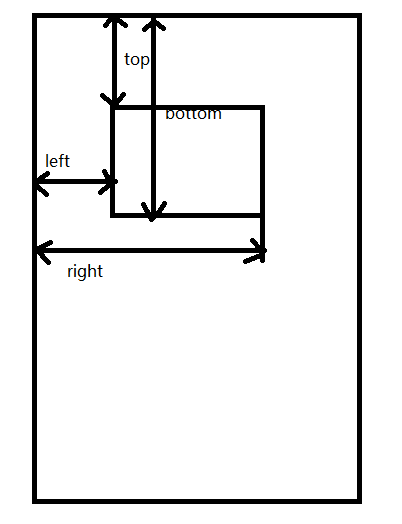 Android View 滑動的四種實作:scrollTo、屬性動畫、LayoutParams 與 Scroller 彈性滾動
一、先認識 View (1)View 是什麼? View 是 Android 所有 UI 控制項的基類。Button、ImageView 等控制項都繼承自 View;Li
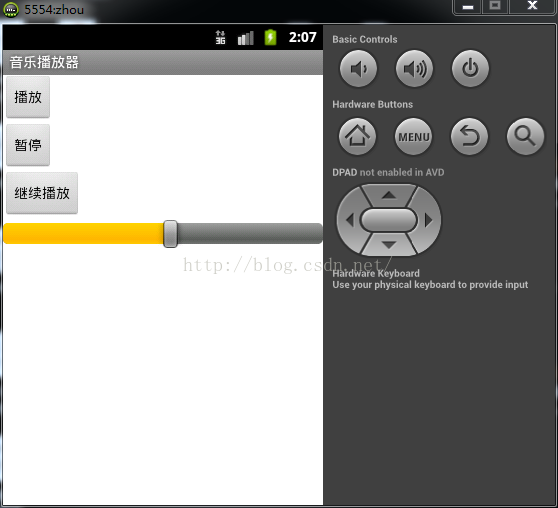 手把手实现一个 Android 音乐播放器
一、整体框架 在动手写代码之前,先把整个播放器的骨架梳理清楚,思路理顺了写起来才不会乱: (1)搭建界面布局,包含播放、暂停、继续三个按钮,以及一个进度条。 (2)创建一