

編輯:關於 Android 程式設計
本文整理兩個實務上很常用、但細節容易出錯的小工具方法。
有時候我們需要在啟動服務前先確認它是否已在背景運行,避免重複啟動。做法是自己實作一個工具方法:
/**
 * 判斷服務是否正在運行
 *
 * @param context  Context 物件
 * @param className 判斷的服務名字:套件名 + 類別名
 * @return true 表示在運行,false 表示不在運行
 */
public static boolean isServiceRunning(Context context, String className) {
    boolean isRunning = false;
    ActivityManager activityManager =
            (ActivityManager) context.getSystemService(Context.ACTIVITY_SERVICE);

    // 取得所有正在執行的服務
    List<ActivityManager.RunningServiceInfo> services =
            activityManager.getRunningServices(Integer.MAX_VALUE);

    if (services != null && services.size() > 0) {
        for (ActivityManager.RunningServiceInfo service : services) {
            if (className.equals(service.service.getClassName())) {
                isRunning = true;
                break;
            }
        }
    }
    return isRunning;
}
關鍵在於比對欄位要用 service.service.getClassName(),傳入的 className 必須是完整的「套件名.類別名」,例如 com.example.MyService。只寫類別名稱不會匹配成功,這是最常見的誤用。
需要提醒的是,getRunningServices() 從 Android 5.0 起基於隱私考量已不再回傳其他應用的服務,只會列出自己的。此外官方也不建議用這個方式做流程控制,更恰當的做法是把「是否已啟動」的狀態記錄下來(例如搭配 startService() 的 START_STICKY 回傳值或 SharedPreferences),或直接查詢自己的服務狀態。
開發中經常需要透過 LocationManager 取得經緯度。實測時會發現,不同機型上使用 getLastKnownLocation() 的結果不一致——有的手機能取到,有的卻回傳 null。這是因為各家裝置的 GPS 與網路定位可用性不同。
解法是先嘗試 GPS,取不到再退回網路定位:
public static Location getLocation(LocationManager locationManager,
                                   LocationListener locationListener) {
    Location location = null;

    location = locationManager.getLastKnownLocation(LocationManager.GPS_PROVIDER);
    locationManager.requestLocationUpdates(LocationManager.GPS_PROVIDER, 0, 0, locationListener);

    if (location == null) {
        location = locationManager.getLastKnownLocation(LocationManager.NETWORK_PROVIDER);
        locationManager.requestLocationUpdates(LocationManager.NETWORK_PROVIDER, 0, 0, locationListener);
    }
    return location;
}
兩種提供者的特性互補:GPS 精度高(可達數公尺)但耗電、且在室內或遮蔽環境下常無訊號;網路定位依據基地台與 Wi-Fi 訊號推算,精度較低(數十至數百公尺)但幾乎隨時可用。先高後低的順序,能在回應速度與精度之間取得平衡。
使用時別忘了兩件事:清單檔需宣告 ACCESS_FINE_LOCATION 或 ACCESS_COARSE_LOCATION,且 Android 6.0 以上必須執行期動態請求;另外 getLastKnownLocation() 取到的是「最後一次已知位置」,可能相當舊甚至為 null,若需要即時位置,仍需依賴 requestLocationUpdates() 的回呼。現行專案建議改用 FusedLocationProviderClient(Google Play 服務),它能智慧切換定位來源,省下自行判斷的工夫。
 踩坑實錄:新版 Android Studio 導入微信支付與支付寶 Demo 的那些問題
項目需要接入支付寶支付和微信支付。本來想用第三方聚合支付框架(ping++、BeeCloud 之類),但他們的收費模式讓我望而卻步;加上公司已經提供了完整的公鑰、私鑰和
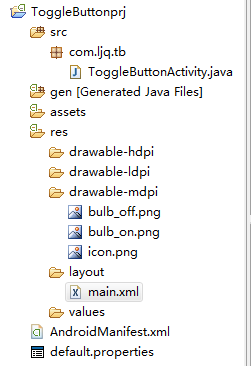 Android 基本控件 ToggleButton 與 Switch 使用指南
ToggleButton(開關按鈕)與 Switch(開關)講解: 一、核心屬性講解: (1)ToggleButton textOn:按鈕被選中時顯示的文字 textOf
 Android SlidingDrawer 滑動式抽屜詳解:屬性、方法與完整範例
SlidingDrawer 的效果其實大家都看過——早期 Android 1.5 模擬器進入應用程式列表時,從畫面下方拉出抽屜的那個互動,就是它。 一、基本概念 Sl
 Android 網絡通信專題(一):用 HttpURLConnection 實現 GET 與 POST 請求
做 Android 應用,網絡通信幾乎是繞不開的一環。日常場景裡最常見的仍然是 HTTP 請求,至於 Socket 這類更底層的通信方式,留給後續專題再談。本文先把最基礎