

編輯:關於 Android 程式設計
除了 JSON,XML 也是常見的資料交換格式,特別是在對接較舊的企業系統時。以 XML 溝通的關鍵有兩點:送出時要正確宣告 Content-Type,接收時要依編碼正確還原字串。
public static void main(String[] args) throws Exception {
    String xml = "<?xml version=\"1.0\" encoding=\"UTF-8\"?>"
               + "<videos><video><title>中國</title></video></videos>";
    String path = "https://localhost:8083/videoweb/video/manage.do?method=getXML";

    byte[] entity = xml.getBytes("UTF-8");

    HttpURLConnection conn = (HttpURLConnection) new URL(path).openConnection();
    conn.setConnectTimeout(5000);
    conn.setRequestMethod("POST");
    conn.setDoOutput(true);

    // 指定內容類型為 XML,並標明編碼
    conn.setRequestProperty("Content-Type", "text/xml; charset=UTF-8");
    conn.setRequestProperty("Content-Length", String.valueOf(entity.length));

    OutputStream outStream = conn.getOutputStream();
    outStream.write(entity);

    if (conn.getResponseCode() == 200) {
        System.out.println("發送成功");
    } else {
        System.out.println("發送失敗");
    }
}
public ActionForward getXML(ActionMapping mapping, ActionForm form,
                            HttpServletRequest request, HttpServletResponse response)
                            throws Exception {
    InputStream inStream = request.getInputStream();
    byte[] data = StreamTool.read(inStream);
    String xml = new String(data, "UTF-8");
    System.out.println(xml);
    return mapping.findForward("result");
}
編碼必須全程一致。XML 宣告中的 encoding="UTF-8"、getBytes("UTF-8")、new String(data, "UTF-8") 三處必須完全相同。任何一處寫成預設編碼,中文就會變成亂碼——這是 XML 資料交換最常見的問題。
先用 byte 陣列算長度。Content-Length 要的是位元組數而非字元數。範例先轉成 byte[] 再取 length,順序是對的。若直接對含中文的字串取 length(),數值會偏小,導致伺服器端接收到截斷的內容。
別忘了釋放串流。範例中 OutputStream 沒有關閉,實務上應改用 try-with-resources 確保關閉,否則連線會殘留。
伺服器端的寫法有年代性。範例中的 ActionMapping、ActionForm、ActionForward 都屬於已停止維護的 Struts 1 框架。若你在維護舊專案,這段程式碼可直接參考;若是新專案,Spring MVC 中用 @RequestBody 搭配 JAXB 就能輕鬆完成 XML 綁定。
最後補充一點趨勢判斷:XML 的語法冗長、解析成本較高,在目前的新專案中已大量被 JSON 取代。若還是選擇 XML,通常的理由是要對接既有系統、需要 XML Schema 驗證,或涉及 SOAP WebService 協定。若沒有這些限制,JSON 搭配 Gson 或 Jackson 會是更省力的選擇。
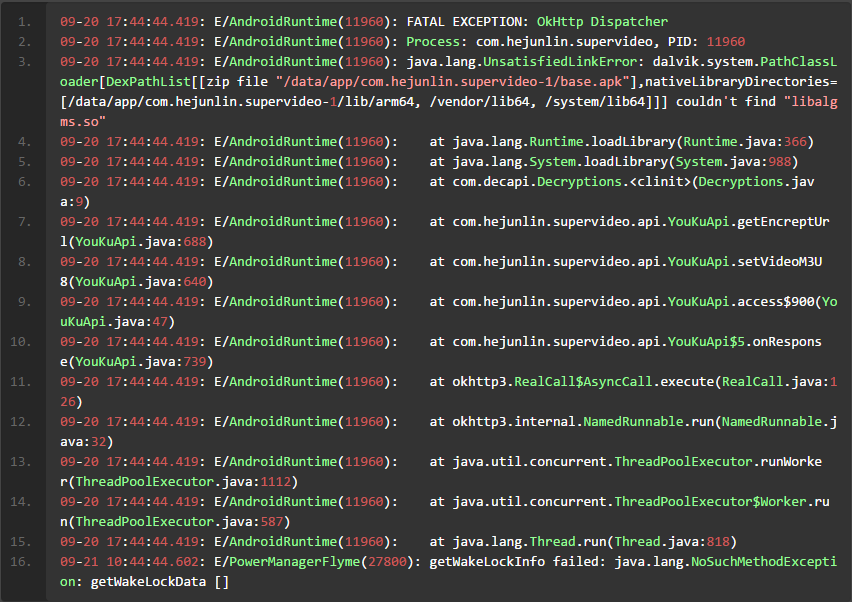 Android Studio 中的 UnsatisfiedLinkError:兩個真正容易忽略的原因
最近在處理一個需要解析影片位址的專案,其中一段解密邏輯是以 JNI 實作、透過对应的 key 才能還原資料。以前用 Eclipse 時,把 .so 放進 libs/arm
 Android 應用信息中「存儲」與「緩存」是怎麼算出來的
路徑:設置 → 應用 → 選一個應用 → 應用信息這個界面會列出應用的磁盤占用:應用、數據、緩存、SD 卡資源、SD 卡緩存,總計一行。這些數字是怎麼算出來的?本文從 J
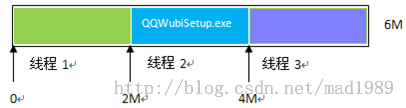 Android 多線程網絡文件下載實現
用多線程提升下載效率 大文件下載若只使用單一連線,速度容易受限。多線程下載會先取得檔案總長度,再把檔案切分成多個區段,由不同線程同時下載,最後合併成完整檔案。 實現原理
 樂 2 Pro 有幾個版本?X20 與 X25 差異評測
樂 2 Pro 依處理器分為 Helio X20 與 Helio X25 兩個版本,售價相差 100 元。 版本差異 X20 版搭載聯發科 Helio X20,X25