

編輯:關於 Android 程式設計
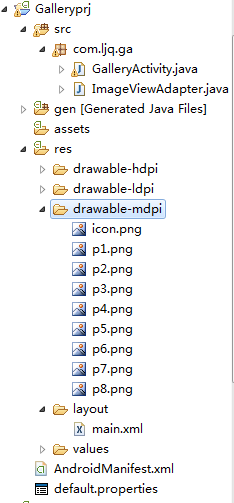
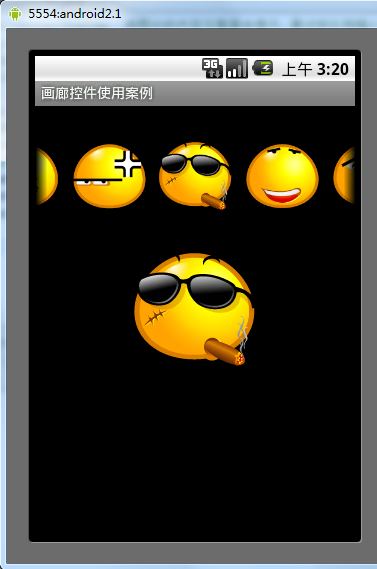
Gallery 主要用於橫向顯示圖片列表。若要讓圖片循環顯示,可透過自訂 Adapter 並搭配取餘運算來實現。
<Gallery android:id="@+id/gallery"
    android:layout_width="fill_parent"
    android:layout_height="wrap_content"
    android:spacing="10dip"
    android:unselectedAlpha="1.2" />

<ImageSwitcher android:id="@+id/imageSwitcher"
    android:layout_width="fill_parent"
    android:layout_height="wrap_content" />
public int getCount() {
    return Integer.MAX_VALUE;
}

public View getView(int position, View convertView, ViewGroup parent) {
    ImageView iv = new ImageView(context);
    iv.setImageResource(imageIDs[position % imageIDs.length]);
    iv.setScaleType(ImageView.ScaleType.CENTER_INSIDE);
    iv.setLayoutParams(new LinearLayout.LayoutParams(77, 77));
    return iv;
}
當使用者選擇 Gallery 中的圖片時,可透過 OnItemSelectedListener 更新 ImageSwitcher,顯示放大後的圖片。
 自製 launch 命令:在 adb shell 中直接啟動指定 APK
為了調試方便,常常希望能直接知道 APK 的路徑就把它啟動起來,不必每次手打 am start -n 包名/類名。於是寫了這支命令。 使用方法 先把編出的檔案推到裝置:
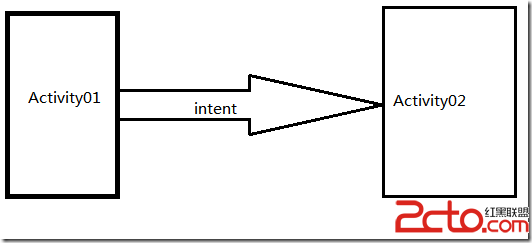 Android 菜鳥筆記(3):Activity 之間的切換與數據傳遞
在 Android 中,每個 Activity 通常對應屏幕上的的一個界面(窗口級別的 Activity 除外),因此手機上兩個界面之間的切換,本質上就是 Activit
 Android Matrix 用法總結:平移、旋轉、縮放與錯切
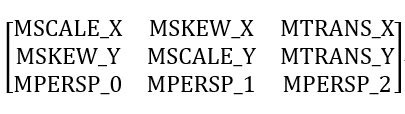
Matrix 是 Android 圖像處理中常見的 3x3 矩陣。它主要用於平面上的平移、旋轉、縮放與錯切等變換。本文從概念出發,整理 Matrix 的常見用法與背後的座
 Android Camera實時預覽與人臉識別示例
本文分享一個Android Camera實時預覽、實時處理並做人臉識別的示例。 預覽功能來自網友共享的代碼,我在繼承SurfaceView的CameraSurfaceVi