

編輯:關於 Android 程式設計
想讓使用者在桌面一鍵進入 App 的某個特定頁面?可以透過系統廣播要求 Launcher 建立捷徑,反過來也能要求它移除。
送出 com.android.launcher.action.INSTALL_SHORTCUT 廣播,並附上名稱、圖示與目標 Intent。這裡的 Intent 指向 WebViewActivity,並把網址等參數一併帶過去,做到「點捷徑直接開指定網頁」的效果。
 /**
* 創建快捷方式
*
* @param map 快捷方式圖標
* @param appName 快捷方式標題
* @param appUrl 快捷方式打開的地址
* @param iconUrl 快捷方式圖標地址
*/
public static void createShortcut(Context activity, Bitmap map, String appName,
String appUrl, String iconUrl){

Intent shortcut = new Intent("com.android.launcher.action.INSTALL_SHORTCUT");

shortcut.putExtra(Intent.EXTRA_SHORTCUT_NAME, appName);
shortcut.putExtra("duplicate", false);// 設置是否重復創建

Intent intent = new Intent();
intent.setAction(Intent.ACTION_VIEW);
// intent.addCategory(Intent.CATEGORY_LAUNCHER);
intent.addFlags(Intent.FLAG_ACTIVITY_NEW_TASK);
intent.addFlags(Intent.FLAG_ACTIVITY_CLEAR_TASK);
intent.setClass(activity, WebViewActivity.class);// 設置第一個頁面

intent.putExtra("keyword", appUrl);
intent.putExtra("appName", appName);
intent.putExtra("iconUrl", iconUrl);

shortcut.putExtra(Intent.EXTRA_SHORTCUT_INTENT, intent);
shortcut.putExtra(Intent.EXTRA_SHORTCUT_ICON, map);

activity.sendBroadcast(shortcut);
}
刪除時送出 UNINSTALL_SHORTCUT 廣播,關鍵是 Intent 中的 className 必須與建立時完全一致,系統才能對上同一個捷徑。
 /**
* 刪除快捷方式
*
* @param shortcutName app 名字
* @param className 絕對路徑如:getPackageName() + ".WebViewActivity"
*/
public static void removeShortcut(Context cxt, String shortcutName, String className) {
Intent shortcutIntent = new Intent(Intent.ACTION_VIEW);
shortcutIntent.setClassName(cxt, className);

Intent intent = new Intent("com.android.launcher.action.UNINSTALL_SHORTCUT");
intent.putExtra(Intent.EXTRA_SHORTCUT_INTENT, shortcutIntent);
intent.putExtra(Intent.EXTRA_SHORTCUT_NAME, shortcutName);

cxt.sendBroadcast(intent);
}
各家 Launcher(包括各家客製化桌面)對這兩個廣播的支援程度不一,部分廠商已限制第三方 App 建立捷徑,因此務必把這當成「加分功能」而非核心依賴。另外,EXTRA_SHORTCUT_ICON 直接傳 Bitmap 在跨程序時有大小限制,建議改用 EXTRA_SHORTCUT_ICON_RESOURCE 傳遞資源,會更穩定。
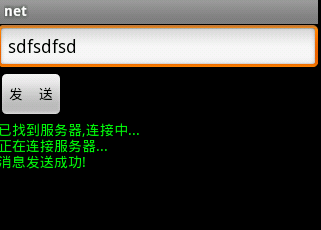 Android 網路編程:UDP 通信模型實作範例
什麼是 Android UDP? UDP 是 User Datagram Protocol 的簡稱,中文名為使用者資料包協定,是 OSI 參考模型中一種無連線的傳輸層協定
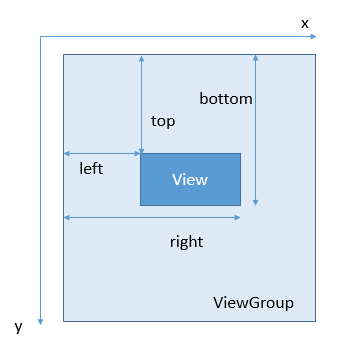 《Android 開發藝術探索》讀書筆記:第三章 View 的事件體系
一、View 的基礎知識 什麼是 View View 是 Android 所有控件的基類,是界面層控件的一種抽象,代表一個具體控件。所有控件要麼是 View 的子公司,要
 Andrew Stankevich's Contest 題解彙編
本文整理自 Andrew Stankevichs Contest 的一系列補題題解,涵蓋數學規律、上下界網絡流、LIS、線段樹與 DFS 剪枝等經典算法,每題附上思路與參
 Android 仿 QQ 頭像裁剪:自定義 View 實現移動、縮放與摳圖
用過手機 QQ 的更換頭像功能就知道,那種「拖動 + 縮放 + 圓形預覽」的交互體驗相當順手。本文自己動手實現一個,順帶把 Canvas 繪製與圖片矩陣變換這塊知識梳理一