

編輯:關於 Android 程式設計
本文以實例說明 Android 開發中 BroadcastReceiver 的用法,供需要的朋友參考,分析如下。
在 Android 系統中,廣播(Broadcast)是一種在元件之間傳遞資料(Intent)的機制。
Broadcast Receiver 顧名思義就是廣播接收器,它與事件處理機制類似,但事件處理機制屬於程式元件層級(例如按鈕的單擊事件),而廣播事件處理機制則是系統層級的。我們可以用 Intent 啟動一個元件,也可以用 sendBroadcast() 方法發起一個系統層級的事件廣播來傳遞訊息,同樣也能在自己的應用程式中實作 Broadcast Receiver 來監聽並回應廣播的 Intent。
事件的廣播,是透過建立 Intent 物件並呼叫 sendBroadcast() 方法發出的;事件的接收,則是透過定義一個繼承 BroadcastReceiver 的類別來實現,繼承後覆寫其 onReceive() 方法,在其中回應事件。
Android 系統中定義了許多標準的 Broadcast Action,用來回應系統的廣播事件:
①ACTION_TIME_CHANGED(時間改變時觸發)
②ACTION_BOOT_COMPLETED(系統啟動完成後觸發)——例如某些程式開機自啟就是用這種方式實作的
③ACTION_PACKAGE_ADDED(新增套件時觸發)
④ACTION_BATTERY_CHANGED(電量低時觸發)
接著看一個例子:我們在一個按鈕上綁定事件,透過發送廣播來觸發 logcat 印出一筆 log。
先看 manifest 檔。
<?xml version="1.0" encoding="utf-8"?> <manifest xmlns:android="https://schemas.android.com/apk/res/android" package="com.example.test" android:versionCode="1" android:versionName="1.0" > <uses-sdk android:minSdkVersion="8" android:targetSdkVersion="16" /> <application android:allowBackup="true" android:icon="@drawable/ic_launcher" android:label="@string/app_name" android:theme="@style/AppTheme" > <activity android:name="com.example.broadcast.BroadcastReceiverActivity" android:label="@string/app_name_bc" > <intent-filter> <action android:name="android.intent.action.MAIN" > </action> <category android:name="android.intent.category.LAUNCHER" > </category> </intent-filter> </activity> <receiver android:name="com.example.broadcast.HelloBroadReciever" > <intent-filter> <action android:name="comz.test.printlog" > </action> </intent-filter> </receiver> </application> </manifest>
上面宣告了一個 receiver,用來接收名為 comz.test.printlog 的訊息。
接著看 activity:
package com.example.broadcast; import android.app.Activity; import android.content.Intent; import android.os.Bundle; import android.util.Log; import android.view.View; import android.widget.Button; import com.example.test.R; public class BroadcastReceiverActivity extends Activity { @Override public void onCreate(Bundle savedInstanceState) { super.onCreate(savedInstanceState); setContentView(R.layout.activity_main); Button b1 = (Button) findViewById(R.id.broadcastBtn); b1.setOnClickListener(new View.OnClickListener() { @Override public void onClick(View v) { Log.e("mason", "here"); // 定義一個intent Intent intent = new Intent().setAction("comz.test.printlog") .putExtra("info", "here is your info."); // 廣播出去 sendBroadcast(intent); } }); } }
在這段程式碼中,定義一個 intent 並把廣播發送出去。
接著看 BroadcastReceiver 的程式碼:
package com.example.broadcast; import android.content.BroadcastReceiver; import android.content.Context; import android.content.Intent; import android.util.Log; public class HelloBroadReciever extends BroadcastReceiver { // 如果接收的事件發生 @Override public void onReceive(Context context, Intent intent) { Log.e("mason", "on receive"); if (intent.getAction().equals("comz.test.printlog")) { Log.e("mason", intent.getStringExtra("info")); } } }
這就是 BroadcastReceiver 的程式碼。收到訊息後,若 action 為 comz.test.printlog,就把訊息印出來。
希望本文所述能對大家的 Android 開發有所幫助。
 實作可拖曳排序的評論圖片選擇器
進公司實習期間對照了 iOS 版的專案,發現其中一個「長按可拖曳換序」的圖片選擇器在 Android 端還沒做。閒著沒事就把這個控件補了出來。 成品對照 擷取的
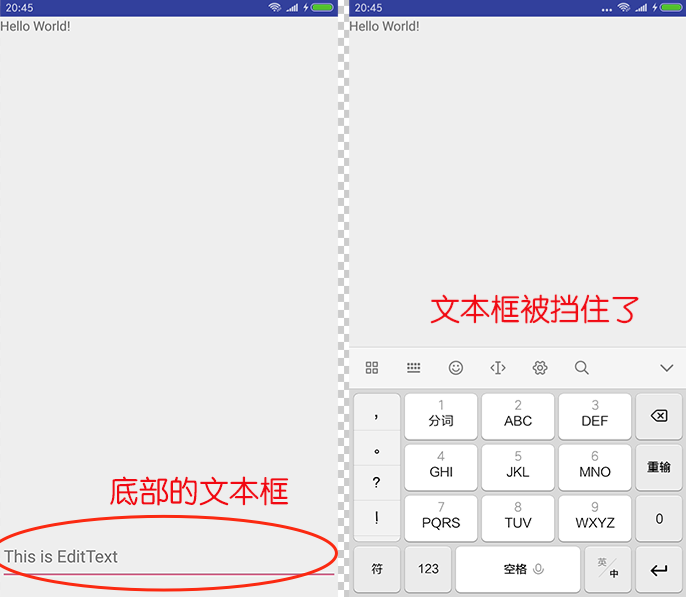 Android 軟鍵盤擋住輸入框的解決方案
在 Android 開發中,軟鍵盤彈出時遮住輸入框是常見問題。若頁面包含 WebView、全屏模式或沉浸式狀態列,處理方式會更複雜。本文整理常見情境與解法。 基本情境 若
 AngularJS 進階(二十八):修正頁面刷新後顯示異常的問題
問題現場 常言道細節決定成敗,寫程式更是如此。開發過程中我們很容易忽略一些看似微不足道的小地方,而頁面顯示出錯往往就出在這些細節上。這裡舉一個實際案例。 頁面正常載入時,
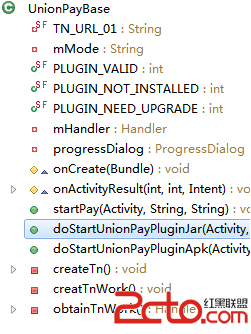 Android 銀聯支付接入全流程解析
銀聯支付(UnionPay)在國內移動互聯網場景中佔有相當份額,尤其對客單價較高的電商、票務、充值類業務而言,支持銀聯的在線支付幾乎是必備能力。相比需要申請與反覆調試的第