

編輯:關於 Android 程式設計
在 Android 中讀取聯絡人資料,主要會使用 ContactsContract 提供的內容提供者介面。透過 ContentResolver,開發者可以查詢聯絡人清單,也能依名稱或號碼進行搜尋。
讀取聯絡人
常見做法是查詢 ContactsContract.Contacts.CONTENT_URI,並指定需要的欄位,例如聯絡人 ID 與顯示名稱。
String[] projections = new String[] {
    ContactsContract.Contacts._ID,
    ContactsContract.Contacts.DISPLAY_NAME
};
Cursor cursor = context.getContentResolver()
    .query(ContactsContract.Contacts.CONTENT_URI, projections, null, null, null);
while (cursor.moveToNext()) {
    String id = cursor.getString(0);
    String name = cursor.getString(1);
}
cursor.close();
依名稱搜尋聯絡人
若要以名稱搜尋,可利用 CONTENT_FILTER_URI 搭配搜尋字串。
Uri uri = Uri.withAppendedPath(
    ContactsContract.Contacts.CONTENT_FILTER_URI,
    "Wang"
);
Cursor cursor = context.getContentResolver()
    .query(uri, new String[] { ContactsContract.Contacts._ID }, null, null, null);
取得聯絡人 ID 後,再查詢 ContactsContract.Data.CONTENT_URI,即可取得姓名與電話等詳細資料。
實作提醒
Cursor 時,記得妥善關閉。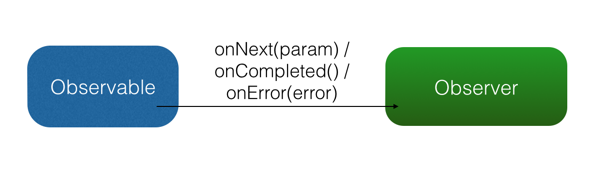 RxJava 菜鳥驛站(一):核心概念與執行緒控制
RxJava 是以可觀察序列組建異步與事件式程式的 Java 函式庫。它的核心概念是 Observable、Observer、subscribe 與事件流,並透過 Sch
 Android Studio添加URL與App索引支援的實用指南
簡介 Android Studio可以協助開發者為應用加入URL支援與App索引能力。透過這些機制,使用者能更容易從搜尋結果進入應用內的特定內容,也有助于提升應用被發現與
 Android 自訂數字鍵盤:高仿微信支付密碼鍵盤實作教學
現在很多 App 的付款、輸入密碼環節,都換成了自訂的數字鍵盤。除了更好控制輸入行為,視覺上也確實比系統鍵盤精緻得多。 下面帶大家一起做一個高仿微信的數字鍵盤,完成後可以
 Android 事件分發機制與流程詳解
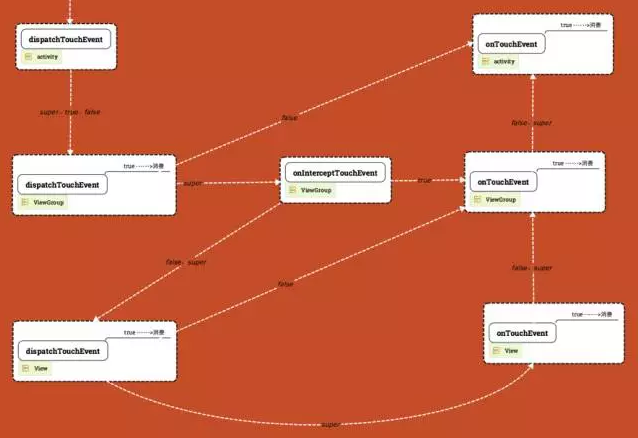
在 Android 開發中,事件分發機制是一塊重要的知識體系。熟悉整套機制,有助於分析各種點擊、滑動失效問題,更好地擴展控件事件功能與開發自定義控件,同時它也是面試的高頻