

編輯:關於 Android 程式設計
上一篇講的是 Android 上的 SQLite 分頁讀取,但那個例子只是把資料倒進文字框裡,看起來實在算不上表格。這次我們往前推一步,做一個真正可複用的分頁表格控件——既能翻頁,又能以表格形式呈現資料。
先看執行效果:
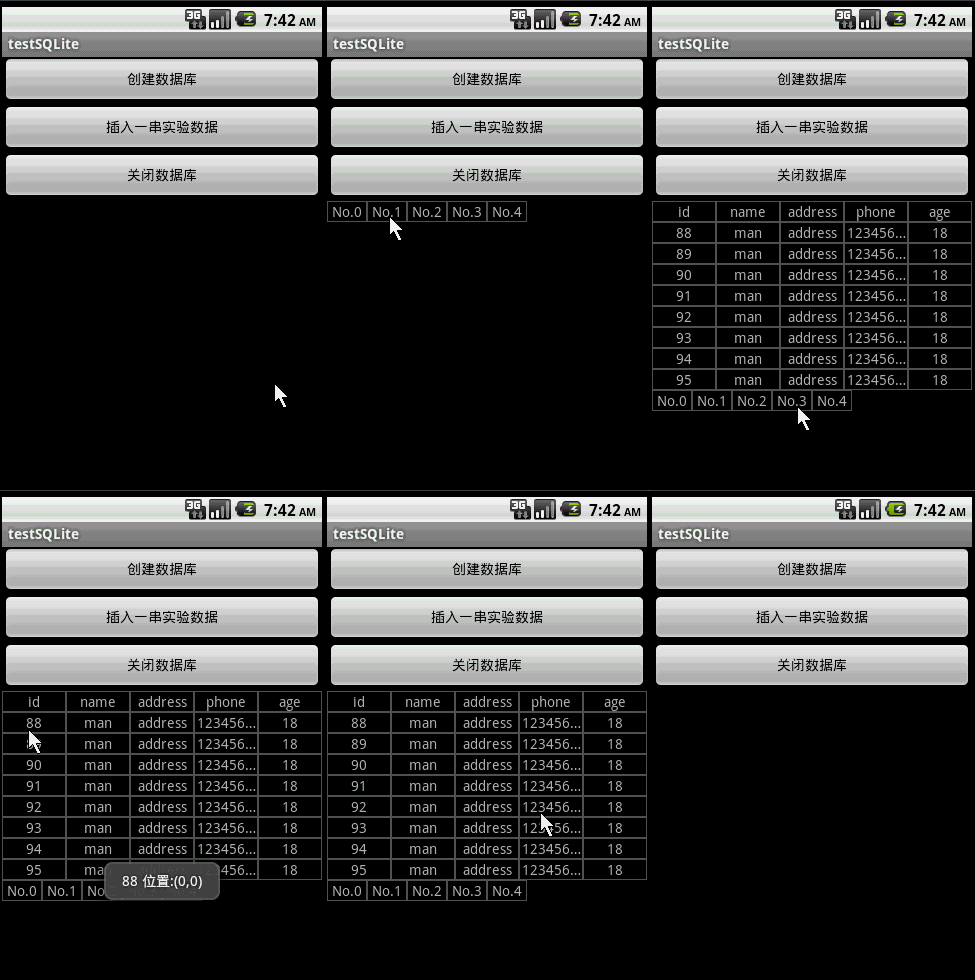
整個控件分成「表格區」與「分頁欄」兩塊,兩者都建立在 GridView 之上。網上大部分 Android 表格的範例都用 ListView,這裡不妨比較一下:ListView 的長處在於每一格可以自訂大小,長短不一是它的特色,但正因如此,要讓它去適應結構多變的資料表反而費力;GridView 剛好相反,格子大小統一,卻天生就能貼合表格的行列結構。所以面對欄位數不固定的資料表,GridView 是更省事的选择。
這個控件具備三個特點:
1. 能自動適配資料表的欄位結構,代價是格子大小統一;
2. 支援分頁;
3. 表格區提供點擊回調,分頁欄提供翻頁回調,兩個事件各自獨立。
程式碼不少,完整工程可到這裡下載:https://xiazai.jb51.net/201408/yuanma/testSQLite(jb51.bet).rar
items.xml 是表格區與分頁欄共用的格子樣式:
<?xml version="1.0" encoding="utf-8"?> <LinearLayout android:id="@+id/LinearLayout01" xmlns:android="https://schemas.android.com/apk/res/android" android:layout_width="fill_parent" android:background="#555555" android:layout_height="wrap_content"> <TextView android:layout_below="@+id/ItemImage" android:text="TextView01" android:id="@+id/ItemText" android:bufferType="normal" android:singleLine="true" android:background="#000000" android:layout_width="fill_parent" android:gravity="center" android:layout_margin="1dip" android:layout_gravity="center" android:layout_height="wrap_content"> </TextView> </LinearLayout>
main.xml:
<?xml version="1.0" encoding="utf-8"?> <LinearLayout xmlns:android="https://schemas.android.com/apk/res/android" android:orientation="vertical" android:layout_width="fill_parent" android:layout_height="fill_parent" android:id="@+id/MainLinearLayout"> <Button android:layout_height="wrap_content" android:layout_width="fill_parent" android:id="@+id/btnCreateDB" android:text="創建數據庫"></Button> <Button android:layout_height="wrap_content" android:layout_width="fill_parent" android:text="插入一串實驗數據" android:id="@+id/btnInsertRec"></Button> <Button android:layout_height="wrap_content" android:id="@+id/btnClose" android:text="關閉數據庫" android:layout_width="fill_parent"></Button> </LinearLayout>
演示程式 testSQLite.java:
package com.testSQLite; import android.app.Activity; import android.database.Cursor; import android.database.SQLException; import android.database.sqlite.SQLiteDatabase; import android.os.Bundle; import android.util.Log; import android.view.View; import android.widget.Button; import android.widget.LinearLayout; import android.widget.Toast; public class testSQLite extends Activity { GVTable table; Button btnCreateDB, btnInsert, btnClose; SQLiteDatabase db; int id;//添加記錄時的id累加標記,必須全局 private static final String TABLE_NAME = "stu"; private static final String ID = "id"; private static final String NAME = "name"; private static final String PHONE = "phone"; private static final String ADDRESS = "address"; private static final String AGE = "age"; @Override public void onCreate(Bundle savedInstanceState) { super.onCreate(savedInstanceState); setContentView(R.layout.main); btnCreateDB = (Button) this.findViewById(R.id.btnCreateDB); btnCreateDB.setOnClickListener(new ClickEvent()); btnInsert = (Button) this.findViewById(R.id.btnInsertRec); btnInsert.setOnClickListener(new ClickEvent()); btnClose = (Button) this.findViewById(R.id.btnClose); btnClose.setOnClickListener(new ClickEvent()); table=new GVTable(this); table.gvSetTableRowCount(8);//設置每個分頁的ROW總數 LinearLayout ly = (LinearLayout) findViewById(R.id.MainLinearLayout); table.setTableOnClickListener(new GVTable.OnTableClickListener() { @Override public void onTableClickListener(int x,int y,Cursor c) { c.moveToPosition(y); String str=c.getString(x)+" 位置:("+String.valueOf(x)+","+String.valueOf(y)+")"; Toast.makeText(testSQLite.this, str, 1000).show(); } }); table.setOnPageSwitchListener(new GVTable.OnPageSwitchListener() { @Override public void onPageSwitchListener(int pageID,int pageCount) { String str="共有"+String.valueOf(pageCount)+ " 當前第"+String.valueOf(pageID)+"頁"; Toast.makeText(testSQLite.this, str, 1000).show(); } }); ly.addView(table); } class ClickEvent implements View.OnClickListener { @Override public void onClick(View v) { if (v == btnCreateDB) { CreateDB(); } else if (v == btnInsert) { InsertRecord(16);//插入16條記錄 table.gvUpdatePageBar("select count(*) from " + TABLE_NAME,db); table.gvReadyTable("select * from " + TABLE_NAME,db); }else if (v == btnClose) { table.gvRemoveAll(); db.close(); } } } /** * 在內存創建數據庫和數據表 */ void CreateDB() { db = SQLiteDatabase.create(null); Log.e("DB Path", db.getPath()); String amount = String.valueOf(databaseList().length); Log.e("DB amount", amount); String sql = "CREATE TABLE " + TABLE_NAME + " (" + ID + " text not null, " + NAME + " text not null," + ADDRESS + " text not null, " + PHONE + " text not null," + AGE + " text not null "+");"; try { db.execSQL("DROP TABLE IF EXISTS " + TABLE_NAME); db.execSQL(sql); } catch (SQLException e) {} } /** * 插入N條數據 */ void InsertRecord(int n) { int total = id + n; for (; id < total; id++) { String sql = "insert into " + TABLE_NAME + " (" + ID + ", " + NAME+", " + ADDRESS+", " + PHONE+", "+AGE + ") values('" + String.valueOf(id) + "', 'man','address','123456789','18');"; try { db.execSQL(sql); } catch (SQLException e) { } } } }
分頁表格控件 GVTable.java:
package com.testSQLite; import java.util.ArrayList; import java.util.HashMap; import android.content.Context; import android.database.Cursor; import android.database.sqlite.SQLiteDatabase; import android.view.View; import android.widget.AdapterView; import android.widget.GridView; import android.widget.LinearLayout; import android.widget.SimpleAdapter; import android.widget.AdapterView.OnItemClickListener; public class GVTable extends LinearLayout { protected GridView gvTable,gvPage; protected SimpleAdapter saPageID,saTable;// 適配器 protected ArrayList<HashMap<String, String>> srcPageID,srcTable;// 數據源 protected int TableRowCount=10;//分頁時,每頁的Row總數 protected int TableColCount=0;//每頁col的數量 protected SQLiteDatabase db; protected String rawSQL=""; protected Cursor curTable;//分頁時使用的Cursor protected OnTableClickListener clickListener;//整個分頁控件被點擊時的回調函數 protected OnPageSwitchListener switchListener;//分頁切換時的回調函數 public GVTable(Context context) { super(context); this.setOrientation(VERTICAL);//垂直 //---------------------------------------- gvTable=new GridView(context); addView(gvTable, new LinearLayout.LayoutParams(LayoutParams.FILL_PARENT, LayoutParams.WRAP_CONTENT)); srcTable = new ArrayList<HashMap<String, String>>(); saTable = new SimpleAdapter(context, srcTable, R.layout.items, new String[] { "ItemText" }, new int[] { R.id.ItemText }); gvTable.setAdapter(saTable); gvTable.setOnItemClickListener(new OnItemClickListener(){ @Override public void onItemClick(AdapterView<?> arg0, View arg1, int arg2, long arg3) { int y=arg2/curTable.getColumnCount()-1;//標題欄的不算 int x=arg2 % curTable.getColumnCount(); if (clickListener != null && y!=-1) {//點中的不是標題欄時 clickListener.onTableClickListener(x,y,curTable); } } }); //---------------------------------------- gvPage=new GridView(context); gvPage.setColumnWidth(40);//設置每個分頁按鈕的寬度 gvPage.setNumColumns(GridView.AUTO_FIT);//分頁按鈕數量自動設置 addView(gvPage, new LinearLayout.LayoutParams(LayoutParams.FILL_PARENT, LayoutParams.WRAP_CONTENT)); srcPageID = new ArrayList<HashMap<String, String>>(); saPageID = new SimpleAdapter(context, srcPageID, R.layout.items, new String[] { "ItemText" }, new int[] { R.id.ItemText }); gvPage.setAdapter(saPageID); gvPage.setOnItemClickListener(new OnItemClickListener(){ @Override public void onItemClick(AdapterView<?> arg0, View arg1, int arg2, long arg3) { LoadTable(arg2);//根據所選分頁讀取對應的數據 if(switchListener!=null){ switchListener.onPageSwitchListener(arg2,srcPageID.size()); } } }); } /** * 清除所有數據 */ public void gvRemoveAll() { if(this.curTable!=null) curTable.close(); srcTable.clear(); saTable.notifyDataSetChanged(); srcPageID.clear(); saPageID.notifyDataSetChanged(); } /** * 讀取指定ID的分頁數據 * SQL:Select * From TABLE_NAME Limit 9 Offset 10; * 跳過10行,取9行 * @param pageID 指定的分頁ID */ protected void LoadTable(int pageID) { if(curTable!=null)//釋放上次的數據 curTable.close(); String sql= rawSQL+" Limit "+String.valueOf(TableRowCount)+ " Offset " +String.valueOf(pageID*TableRowCount); curTable = db.rawQuery(sql, null); gvTable.setNumColumns(curTable.getColumnCount());//表現為表格的關鍵點! TableColCount=curTable.getColumnCount(); srcTable.clear(); int colCount = curTable.getColumnCount(); for (int i = 0; i < colCount; i++) { HashMap<String, String> map = new HashMap<String, String>(); map.put("ItemText", curTable.getColumnName(i)); srcTable.add(map); } int recCount=curTable.getCount(); for (int i = 0; i < recCount; i++) { curTable.moveToPosition(i); for(int ii=0;ii<colCount;ii++) { HashMap<String, String> map = new HashMap<String, String>(); map.put("ItemText", curTable.getString(ii)); srcTable.add(map); } } saTable.notifyDataSetChanged(); } /** * 設置表格的最多顯示的行數 */ public void gvSetTableRowCount(int row) { TableRowCount=row; } /** * 取得表格的最大行數 */ public int gvGetTableRowCount() { return TableRowCount; } /** * 取得當前分頁的Cursor */ public Cursor gvGetCurrentTable() { return curTable; } /** * 准備分頁顯示數據 */ public void gvReadyTable(String rawSQL,SQLiteDatabase db) { this.rawSQL=rawSQL; this.db=db; } /** * 刷新分頁欄,更新按鈕數量 */ public void gvUpdatePageBar(String sql,SQLiteDatabase db) { Cursor rec = db.rawQuery(sql, null); rec.moveToLast(); long recSize=rec.getLong(0);//取得總數 rec.close(); int pageNum=(int)(recSize/TableRowCount) + 1;//取得分頁數 srcPageID.clear(); for (int i = 0; i < pageNum; i++) { HashMap<String, String> map = new HashMap<String, String>(); map.put("ItemText", "No." + String.valueOf(i)); srcPageID.add(map); } saPageID.notifyDataSetChanged(); } //--------------------------------------------------------- /** * 表格被點擊時的回調函數 */ public void setTableOnClickListener(OnTableClickListener click) { this.clickListener = click; } public interface OnTableClickListener { public void onTableClickListener(int x,int y,Cursor c); } //--------------------------------------------------------- /** * 分頁欄被點擊時的回調函數 */ public void setOnPageSwitchListener(OnPageSwitchListener pageSwitch) { this.switchListener = pageSwitch; } public interface OnPageSwitchListener { public void onPageSwitchListener(int pageID,int pageCount); } }
關鍵其實就兩處:用 Limit ... Offset ... 做分頁查詢,再用 gvTable.setNumColumns(curTable.getColumnCount()) 讓 GridView 的欄數跟隨資料表變化。掌握這兩點,表格就成型了。希望這個控件對大家的 Android 開發有幫助。
 Android Service 深入解析:啟動、綁定、生命週期與後台限制
Service 是什麼 在 Android 中,Service 是四大元件之一。它可以在背景執行較長時間的工作,但不提供使用者介面。開發者常用它處理下載、播放、檔案同步等
 CXF 發布 WebService 實戰,搭配 Ant 建置工具完整整理
Ant 建置工具:為什麼還要認識它 在 Maven、Gradle 大行其道的今天,Ant 依然是許多老專案與教學範例裡的常客。它歷史悠久、語法直觀,最大的特色是「用
 Android 實作:相冊圖片的上傳與下載(Bmob 雲端儲存)
目標效果: 打開相冊選擇一張圖片後,會顯示在上方的 ImageView 中,並上傳儲存到 Bmob 雲端。上傳完成後進入 Bmob 後台,複製剛才新增資料的 obj
 Android ViewPager 深入解析:從基礎滑動到 Fragment 實作
一、ViewPager 的含義 ViewPager 的核心功能,就是讓視圖可以左右滑動切換,就像我們在 Launcher 桌面左右滑動頁面那樣。它主要用來實現多頁面的切換