

編輯:關於 Android 程式設計
把預先准备好的 SQLite 資料庫放進 assets,是 App 首次啟動時快速灌入大量初始資料的常見手法。但 assets 裡的檔案是唯讀的,SQLite 也無法直接跨過 AssetManager 去開啟,所以必須先把它複製到可寫的儲存空間,之後才能用 SQLiteDatabase 正常操作。
這個示例的邏輯很單純:啟動時先檢查目標檔案在不在,不在就從 assets 讀出來、寫進 SD 卡。
import java.io.File;
import java.io.FileOutputStream;
import java.io.IOException;
import java.io.InputStream;

import android.content.Context;

/** 將 assets 文件夾下的數據庫寫入 SD 卡 */
public class WriteToSD {

    private Context context;
    String filePath = android.os.Environment.getExternalStorageDirectory() + "/weather";

    public WriteToSD(Context context) {
        this.context = context;
        if (!isExist()) {
            write();
        }
    }

    private void write() {
        InputStream inputStream;
        try {
            inputStream = context.getResources().getAssets().open("addressId.db");

            File dir = new File(filePath);
            if (!dir.exists()) {
                dir.mkdirs();
            }

            FileOutputStream fileOutputStream =
                    new FileOutputStream(filePath + "/database.db");

            byte[] buffer = new byte[512];
            int count = 0;
            while ((count = inputStream.read(buffer)) > 0) {
                fileOutputStream.write(buffer, 0, count);
            }

            fileOutputStream.flush();
            fileOutputStream.close();
            inputStream.close();
            System.out.println("success");
        } catch (IOException e) {
            e.printStackTrace();
        }
    }

    private boolean isExist() {
        File file = new File(filePath + "/database.db");
        return file.exists();
    }
}
緩衝區太小。示範中用的是 512 位元組,資料庫通常動輒數百 KB 到數 MB,這樣讀寫會產生大量迴圈與系統呼叫。改成 4KB 甚至 8KB(new byte[4096])通常就有明顯改善。
寫入失敗會留下半截檔案。目前的實作沒有例外處理與清理,若中途失敗,下次啟動時 isExist() 會回傳 true,於是這個壞掉的資料庫就被永久沿用。建議寫入暫存檔,成功後再改名,並把檔案大小或版本號一併驗證。
路徑選擇。getExternalStorageDirectory() 需要 WRITE_EXTERNAL_STORAGE 權限,Android 4.4 以後還會面臨分区儲存限制。更穩妥的做法是改用 getFilesDir() 或 getDatabasePath("database.db")——它們屬於 App 私有空間,不需要任何權限,卸載時也會自動清除,其實更適合放資料庫。
版面配置(layout)與資源(resource)的區別。順帶一提,如果這個資料庫是隨 App 一起打包的,Android 從 2.3 起對 assets 中單一檔案有 1MB 左右的壓縮上限,超過時 open() 會失敗,解法是以 ".db" 之外不壓縮的副檔名存放,或在 aapt 參數中排除壓縮。
整體來說,這段程式把「複製」這件事講清楚了,把它套進正式專案前,把緩衝區、錯誤處理與儲存路徑這三處補強,就能用得更安心。
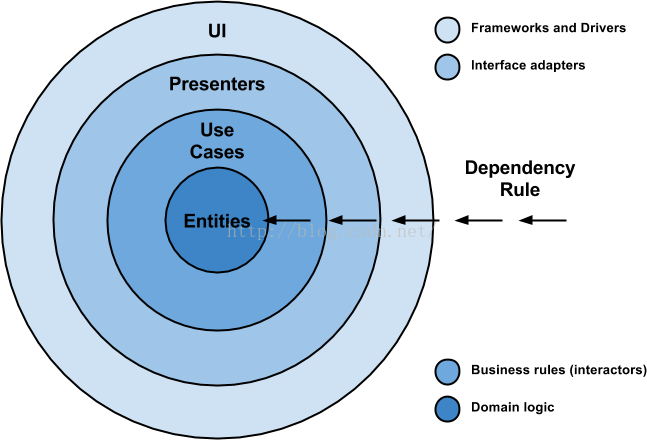 安卓架構:怎樣才算清晰?聊聊 Clean Architecture 的三層落地
前言 寫出高質量的軟件向來是件又難又復雜的事:它不只需要滿足全部業務需求,還得健壯、易維護、好測試,並且保持足夠的靈活性——模塊能隨意增減而不牽一發動全身。Clean A
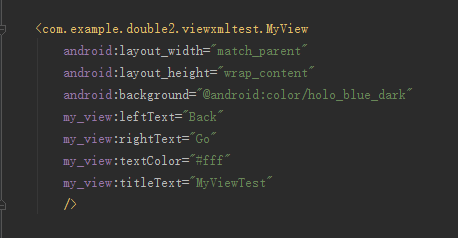 為自訂 View 加上 XML 屬性:三個步驟完整說明
前面已經寫過幾篇關於自訂 View 的文章,這裡就不再從頭談起,有興趣的讀者可以回頭看看之前的內容。先前的文章主要在說明「如何使用自訂 View」以及「為什麼要用自訂 V
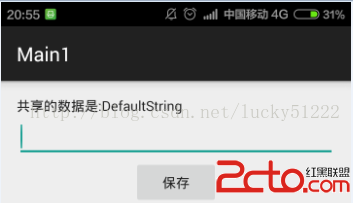 Android Studio 開發基礎:Context 的用途與用法詳解
一、什麼是 Context Context 可以說是 Android 中最常被使用、卻也最容易被忽略的核心類別之一。它提供了一個存取應用程式全域資訊的介面,例如圖片、字串
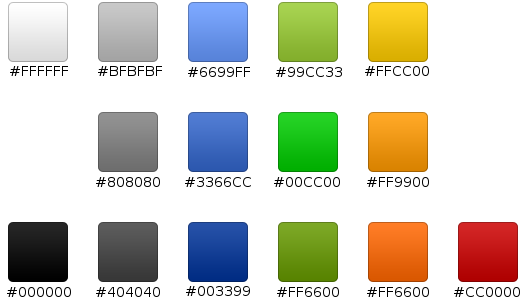 Android 界面開發配色參考:官方色板與常用色值表
好的配色是界面設計的基礎。以下先列出 Android 幫助文件中關於界面開發的推薦色值,再補上一份可直接複製使用的常用顏色對照表。 一、官方推薦色值 Material