

編輯:關於 Android 程式設計
從 Android 4.0 起,主線程(UI 執行緒)被明確禁止進行網路請求,直接呼叫會拋出 NetworkOnMainThreadException。這個限制有其道理:網路延遲動輒數百毫秒,放在 UI 執行緒上畫面就會卡住甚至 ANR。所以唯一正解是把請求丟到背景執行緒。
thread1 = new Thread(){
    @Override
    public void run() {
        try {
            URL url = new URL(WebUrlManager.CARSEVER_GetCarsServlet);
            HttpURLConnection conn = (HttpURLConnection) url.openConnection();

            BufferedInputStream bis = new BufferedInputStream(conn.getInputStream());
            // 緩衝讀取
            byte[] data = new byte[1024];
            int len = 0;
            String bufferString = "";
            while ((len = bis.read(data)) != -1) {
                bufferString += new String(data, 0, len);
            }
            carList = new JSONArray(bufferString.trim());
        } catch (Exception e) {
            e.printStackTrace();
        }
    }
};
thread1.start();
新線程一啟動就往下跑,主執行緒卻立刻要拿 carList,於是得到空指標例外。有兩種常見解法:
做法一:輪詢線程是否還活著
// 等待 thread1 執行完畢
while (true) {
    if (thread1.isAlive()) {
        try {
            Thread.sleep(500);
        } catch (InterruptedException e) {
            e.printStackTrace();
        }
    } else {
        break;
    }
}
做法二:用旗標標記狀態
// 當線程還沒結束,就睡 500 毫秒
while (!flag) {
    try {
        Thread.sleep(500);
    } catch (InterruptedException e) {
        e.printStackTrace();
    }
}
兩種做法都能動,但都在主執行緒上空轉等待,並不是好設計。真正推薦的方式是改用 AsyncTask,在 onPostExecute() 中接收結果,讓「取得資料」與「使用資料」自然串接,完全不需要等待迴圈。
請求與解析的關鍵片段:
URL url = new URL(WebUrlManager.CARSEVER_GetCarsServlet);
HttpURLConnection conn = (HttpURLConnection) url.openConnection();

BufferedInputStream bis = new BufferedInputStream(conn.getInputStream());
byte[] data = new byte[1024];
int len = 0;
String bufferString = "";
while ((len = bis.read(data)) != -1) {
    bufferString += new String(data, 0, len);
}
carList = new JSONArray(bufferString.trim());
在清單的元件中取出欄位並填入畫面:
JSONObject car = (JSONObject) getItem(position);
try {
    this.title.setText(car.getString("title"));
    this.describe.setText(car.getString("describe"));
    this.updateTime.setText(car.getString("updateTime"));
    this.price.setText(String.format("%.1f", car.getDouble("price")) + "萬");
    this.pic.setTag(WebUrlManager.CARSERVER_CAR_IMAGE + car.getString("image"));
    new AsyncViewTask().execute(this.pic);
} catch (JSONException e1) {
    e1.printStackTrace();
}
清單捲動時每格都去抓圖,若同步執行會讓整個列表卡死。下面的 AsyncViewTask 用 SoftReference 做一層記憶體快取,並同時支援網路與本機路徑。
import java.io.InputStream;
import java.lang.ref.SoftReference;
import java.net.HttpURLConnection;
import java.net.URL;
import java.util.HashMap;
import android.graphics.drawable.Drawable;
import android.os.AsyncTask;
import android.util.Log;
import android.view.View;
import android.webkit.URLUtil;
import android.widget.ImageView;

public class AsyncViewTask extends AsyncTask<View, Void, Drawable> {

    private View mView;
    private HashMap<String, SoftReference<Drawable>> imageCache;

    public AsyncViewTask() {
        imageCache = new HashMap<String, SoftReference<Drawable>>();
    }

    protected Drawable doInBackground(View... views) {
        Drawable drawable = null;
        View view = views[0];

        if (view.getTag() != null) {
            // 先查快取
            if (imageCache.containsKey(view.getTag())) {
                SoftReference cache = imageCache.get(view.getTag().toString());
                drawable = cache.get();
                if (drawable != null) {
                    return drawable;
                }
            }

            try {
                if (URLUtil.isHttpUrl(view.getTag().toString())) {
                    // 網路地址:連線下載
                    URL url = new URL(view.getTag().toString());
                    HttpURLConnection conn = (HttpURLConnection) url.openConnection();
                    conn.setDoInput(true);
                    conn.connect();
                    InputStream stream = conn.getInputStream();
                    drawable = Drawable.createFromStream(stream, "src");
                    stream.close();
                } else {
                    // 本機路徑:直接解析
                    drawable = Drawable.createFromPath(view.getTag().toString());
                }
            } catch (Exception e) {
                Log.v("img", e.getMessage());
                return null;
            }
        }

        this.mView = view;
        return drawable;
    }

    protected void onPostExecute(Drawable drawable) {
        if (drawable != null) {
            ImageView view = (ImageView) this.mView;
            view.setImageDrawable(drawable);
            this.mView = null;
        }
    }
}
AsyncTask 的 onPostExecute() 回呼。SoftReference 或 LruCache)能大幅減少重複下載。getString() 這類操作包在 try-catch 裡,避免欄位缺失造成閃退。HttpURLConnection 搭配 useCaches,或直接使用成熟網路庫,並記得在背景執行緒關閉串流。 Android 模擬器啟動失敗的排查與解法
一、錯誤訊息 錯誤大意:連線到 adb(Android Debug Bridge)時發生嚴重錯誤,必須重新啟動 adb 與 Eclipse,並確認指定位置的 adb
 Android Studio 如何查看快捷鍵衝突
看了《Android Studio 如何查看資源或者函數在哪些類中被引用》這篇文章後,我了解到快捷鍵失效的一個常見原因就是「快捷鍵衝突」。那麼問題來了:如何查看某個快捷鍵
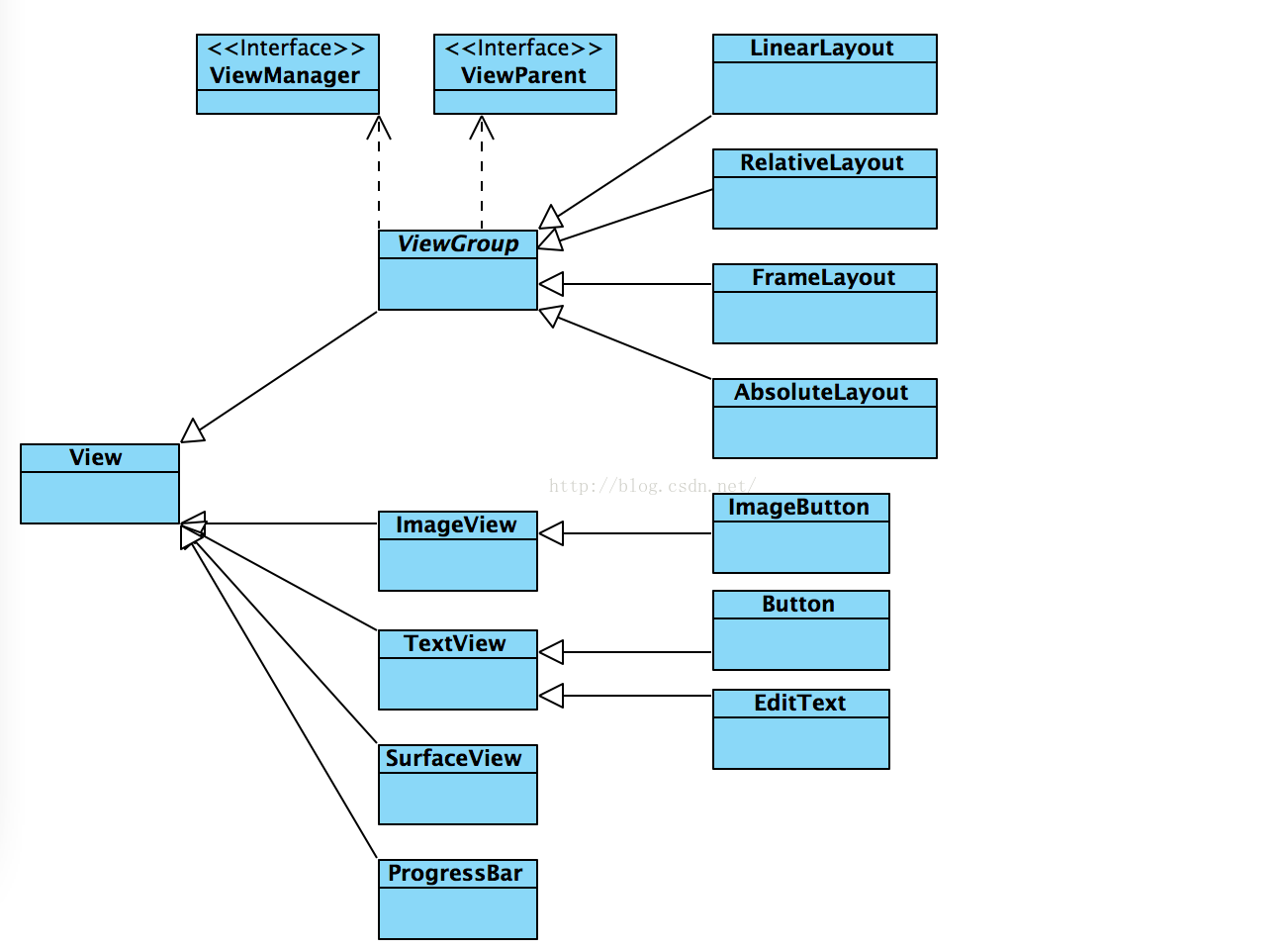 Android 自定義控件:View 體系與滑動機制知識全景
寫自定義控件之前,先把地基打牢:View 到底是什麼、位置參數怎麼算、觸摸事件如何流轉、滑動有哪幾種實現方式。這一整套知識貫通之後,自定義控件就不再靠猜。 一、View
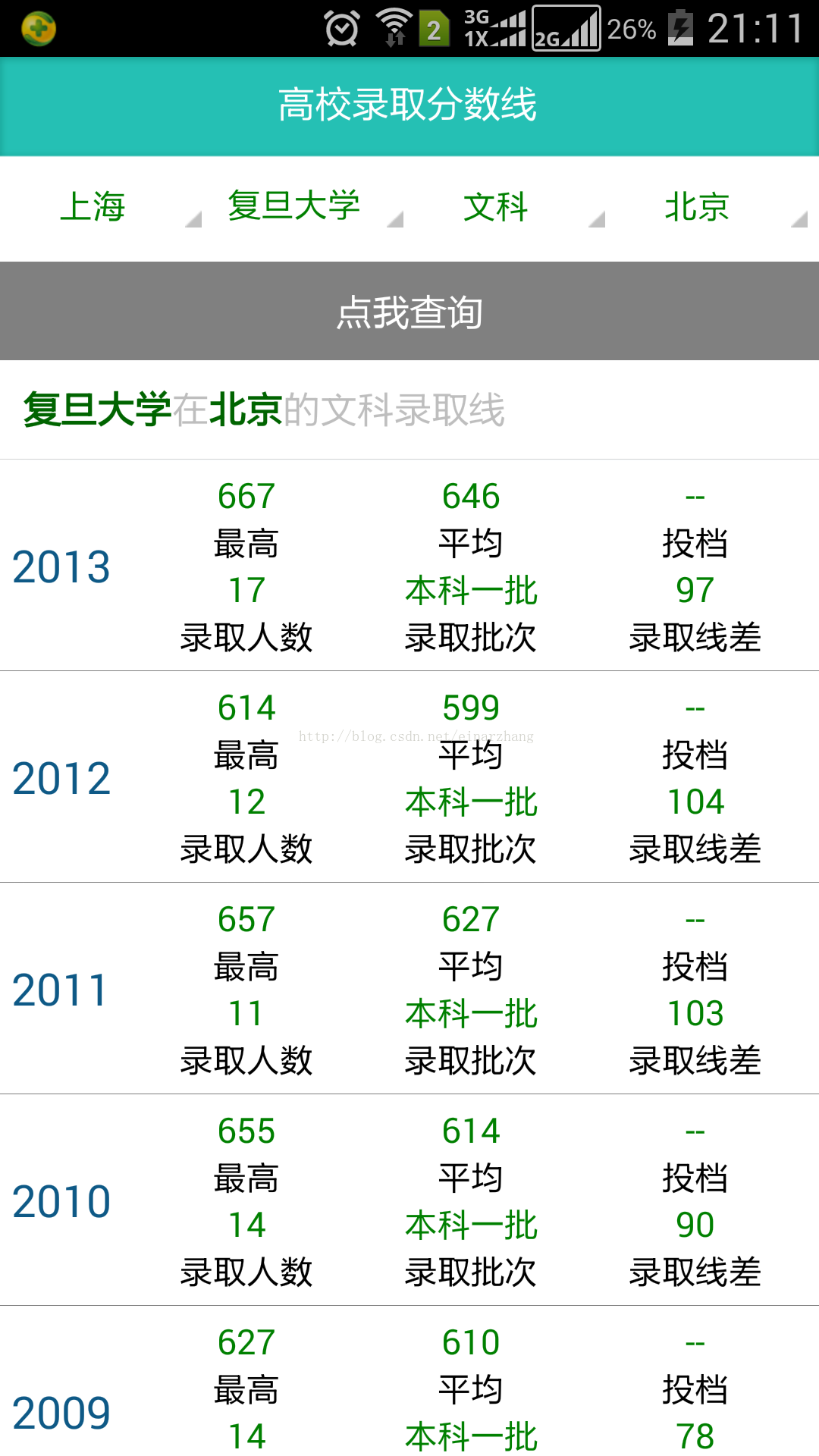 Android 開發實例:高校錄取分數線查詢應用
本系列文章提供簡單的 Android 應用開發實例,開發步驟大致如下: 1 取得應用所需的資料源——通常來自網際網路、個人蒐集或其他方式;2 進行 UI 設計——先畫一個