

編輯:關於 Android 程式設計
聯絡人同樣是透過 ContentProvider 對外開放。查詢 ContactsContract.CommonDataKinds.Phone.CONTENT_URI 就能一次取得姓名與號碼,再包成 SimpleAdapter 需要的 Map 清單,交給 ListView 顯示即可。
package com.homer.phone;

import java.util.ArrayList;
import java.util.HashMap;

import android.app.Activity;
import android.database.Cursor;
import android.os.Bundle;
import android.provider.ContactsContract;
import android.provider.ContactsContract.CommonDataKinds.Phone;
import android.widget.ListView;
import android.widget.SimpleAdapter;

public class phoneRead extends Activity {

    @Override
    public void onCreate(Bundle savedInstanceState) {
        super.onCreate(savedInstanceState);

        showListView();
    }

    private void showListView() {
        ListView listView = new ListView(this);

        ArrayList<HashMap<String, String>> list = getPeopleInPhone2();

        SimpleAdapter adapter = new SimpleAdapter(
                this,
                list,
                android.R.layout.simple_list_item_2,
                new String[] {"peopleName", "phoneNum"},
                new int[] { android.R.id.text1, android.R.id.text2 }
        );
        listView.setAdapter(adapter);

        setContentView(listView);
    }

    private ArrayList<HashMap<String, String>> getPeopleInPhone2() {
        ArrayList<HashMap<String, String>> list =
                new ArrayList<HashMap<String, String>>();

        // 取得手機聯絡人
        Cursor cursor = getContentResolver().query(
                ContactsContract.CommonDataKinds.Phone.CONTENT_URI, null, null, null, null);

        while (cursor.moveToNext()) {
            HashMap<String, String> map = new HashMap<String, String>();

            int indexPeopleName = cursor.getColumnIndex(Phone.DISPLAY_NAME);   // 姓名
            int indexPhoneNum   = cursor.getColumnIndex(Phone.NUMBER);        // 號碼

            String strPeopleName = cursor.getString(indexPeopleName);
            String strPhoneNum   = cursor.getString(indexPhoneNum);

            map.put("peopleName", strPeopleName);
            map.put("phoneNum", strPhoneNum);
            list.add(map);
        }

        if (!cursor.isClosed()) {
            cursor.close();
            cursor = null;
        }

        return list;
    }
}
<uses-permission android:name="android.permission.READ_CONTACTS" />
getColumnIndex(),聯絡人一多就會有明顯負擔。while (cursor.moveToNext()) 已經處理好空結果的情況,不需要先 moveToFirst() 再 do-while。ContactsContract.Contacts 並以 HAS_PHONE_NUMBER 過濾。CursorLoader 或 ContactsContract 的 Contacts 2.0 查詢,避免在主執行緒上做完整表掃描。READ_CONTACTS 需要在執行期向使用者請求,僅在 Manifest 宣告是不夠的。 Android 實戰:手把手做一個簡易模糊查詢
這篇小案例來做一個最樸素的模糊查詢:在輸入框裡敲入一段關鍵字,點擊搜索,就把手機裡路徑包含該關鍵字的結果列出來。 一、佈局 界面很簡單:一個提示文本、一個輸入框、一個搜
 Android Fragment 完全解析:生命週期、靜態與動態加載、元件間通訊
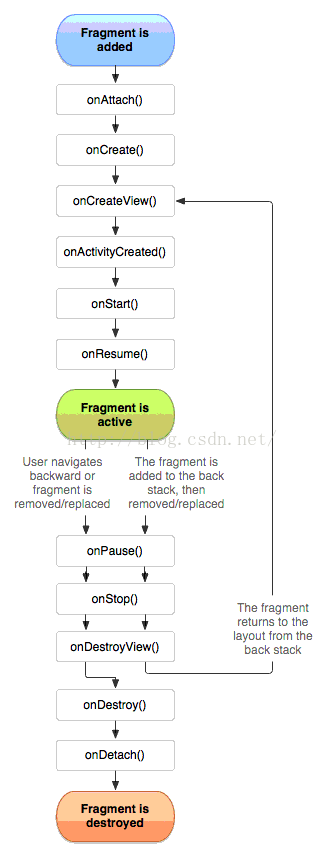
本文以「先看結論、再看程式碼」的方式,把 Fragment 這個元件從概念一路講到實戰,涵蓋以下重點: Fragment 是什麼、為何而出現 Fragment 的生命週
 Android 自定義折線圖控件
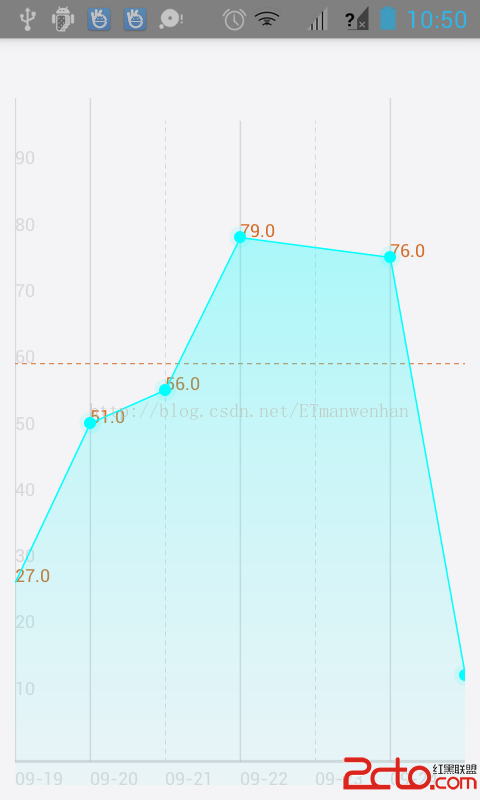
折線圖是數據可視化中非常常見的一種圖表。下面通過一個自定義的 BrokenLine 控件,展示如何繪製帶網格線、虛線標示、漸變填充和數據點的折線圖。 BrokenLine
 Android 多執行緒:Thread、Runnable、Handler、AsyncTask 的關係
Android 的多執行緒其實就是 Java 的多執行緒,而 Android 的 UI 執行緒又稱為主執行緒。以下釐清 Thread、Runnable、Handler、A