

編輯:關於 Android 程式設計
這篇小案例來做一個最樸素的模糊查詢:在輸入框裡敲入一段關鍵字,點擊搜索,就把手機裡路徑包含該關鍵字的結果列出來。
界面很簡單:一個提示文本、一個輸入框、一個搜索按鈕,再加一個用來展示結果的 TextView。
<?xml version="1.0" encoding="utf-8"?>
<LinearLayout xmlns:android="https://schemas.android.com/apk/res/android"
    android:layout_width="fill_parent"
    android:layout_height="fill_parent"
    android:orientation="vertical">

    <TextView
        android:layout_width="wrap_content"
        android:layout_height="wrap_content"
        android:text="請輸入要搜索的關鍵字:" />

    <EditText
        android:id="@+id/edit"
        android:layout_width="120px"
        android:layout_height="wrap_content" />

    <Button
        android:id="@+id/btn_search"
        android:layout_width="fill_parent"
        android:layout_height="wrap_content"
        android:text="搜索" />

    <TextView
        android:id="@+id/result"
        android:layout_width="fill_parent"
        android:layout_height="wrap_content" />
</LinearLayout>
核心思路只有三步:取輸入框內容 → 遍歷目標路徑 → 用 indexOf 判斷是否包含關鍵字。
package com.example.csdn1;

import java.io.File;
import android.app.Activity;
import android.os.Bundle;
import android.view.View;
import android.view.View.OnClickListener;
import android.widget.Button;
import android.widget.EditText;
import android.widget.TextView;

public class MainActivity extends Activity {
    private Button search = null;
    private TextView info = null;
    private EditText edit = null;

    public void onCreate(Bundle savedInstanceState) {
        super.onCreate(savedInstanceState);
        super.setContentView(R.layout.activity_main);
        edit = (EditText) super.findViewById(R.id.edit);
        info = (TextView) super.findViewById(R.id.result);
        search = (Button) super.findViewById(R.id.btn_search);
        search.setOnClickListener(new OnClick());
    }

    private class OnClick implements OnClickListener {
        public void onClick(View arg0) {
            String keyWords = edit.getText().toString();
            if (keyWords.equals("")) {
                info.setText("請輸入關鍵字!");
            } else {
                info.setText(searchFile(keyWords));
            }
        }

        /** 搜索手機內文件,並返回匹配的文件 */
        private CharSequence searchFile(String keyWords) {
            String result = "";
            File[] listFiles = new File("/").listFiles();
            for (File file : listFiles) {
                // 判斷 file 名稱是否包含輸入的關鍵字
                if (file.toString().indexOf(keyWords) >= 0) {
                    result += file.toString() + "\n";
                }
            }
            if (result.equals("")) {
                result = "未找到任何匹配的文件";
            }
            return result;
        }
    }
}
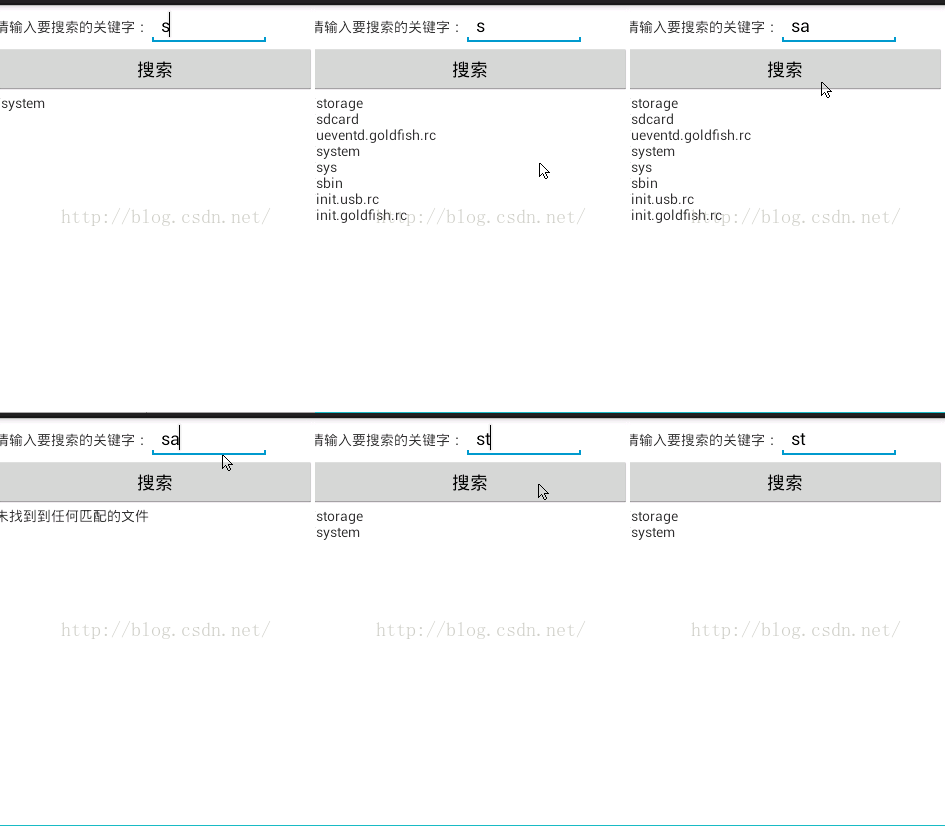
這個例子能用,但離「能用於生產」還有一段距離,有幾處需要自覺升級:
遍歷目錄要在子線程做。示例直接在點擊事件裡遍歷根目錄,真机上很容易造成界面卡頓甚至 ANR。實際項目裡應放到線程池或配合異步任務。
權限問題。Android 6.0 以後訪問外部存儲需要動態申請 READ_EXTERNAL_STORAGE,否則 listFiles() 會拿到 null 直接空指針。
字符串拼接。用 += 在循環裡拼結果會產生大量臨時對象,改用 StringBuilder 更合適。
匹配規則。indexOf 區分不了大小寫以外的語義,若要更接近用戶預期,可以統一轉小寫再比較,並考慮是否要遞歸遍歷子目錄。
 百度語音識別 SDK 實作教學(中):打造自訂的語音互動介面
本文承接上一篇,直接跳過「跑通官方 Demo」的階段,改用 SDK 提供的 API 自己搭一套語音識別互動畫面:兩個按鈕控制開始與結束,一個文字區顯示狀態與結果,再來一條
 Android ViewPager 使用整理
ViewPager 是 Android 中常見的橫向切頁元件,常用於新聞、社群與工具類 App 的首頁導覽。它的使用方式與 ListView 類似,都需要準備資料源、Ad
 在 Android Studio 中接入 OpenCV(macOS / Linux 通用流程)
對於工程師來說,配環境這件事永遠比寫代碼更耗神。這篇記錄我在 macOS 上把 OpenCV 3.1 接進 Android Studio 的完整過程,步驟在 Linux
 用 HttpClient 自動登入 Discuz 論壇的完整拆解
想用程式自動登入論壇,第一步不是寫程式,而是先搞清楚瀏覽器到底做了什麼。 一、觀察瀏覽器的行為 用 Firefox 打開 Hi-PDA 的登入頁,輸入帳號密碼按下登入,