

編輯:關於 Android 程式設計
Android 把簡訊內容存在系統的 ContentProvider 中,因此讀取本機簡訊其實就是一次資料庫查詢。只要透過 ContentResolver 對 content://sms/ 下查詢,就能拿到寄件者、內容、時間與類型等欄位。
除了全部的 content://sms/,系統還提供了幾個常用分類:
content://sms/inbox 收件匣content://sms/sent 已寄出content://sms/draft 草稿content://sms/outbox 待寄出content://sms/failed 寄送失敗content://sms/queued 排隊中
package com.homer.sms;

import java.sql.Date;
import java.text.SimpleDateFormat;

import android.app.Activity;
import android.database.Cursor;
import android.database.sqlite.SQLiteException;
import android.net.Uri;
import android.os.Bundle;
import android.util.Log;
import android.widget.ScrollView;
import android.widget.TextView;

public class smsRead extends Activity {

    @Override
    public void onCreate(Bundle savedInstanceState) {
        super.onCreate(savedInstanceState);

        TextView tv = new TextView(this);
        tv.setText(getSmsInPhone());

        ScrollView sv = new ScrollView(this);
        sv.addView(tv);

        setContentView(sv);
    }

    public String getSmsInPhone() {
        final String SMS_URI_ALL = "content://sms/";
        final String SMS_URI_INBOX = "content://sms/inbox";
        final String SMS_URI_SEND = "content://sms/sent";
        final String SMS_URI_DRAFT = "content://sms/draft";
        final String SMS_URI_OUTBOX = "content://sms/outbox";
        final String SMS_URI_FAILED = "content://sms/failed";
        final String SMS_URI_QUEUED = "content://sms/queued";

        StringBuilder smsBuilder = new StringBuilder();

        try {
            Uri uri = Uri.parse(SMS_URI_ALL);
            String[] projection = new String[] {
                    "_id", "address", "person", "body", "date", "type"
            };
            // 依時間倒序排列
            Cursor cur = getContentResolver().query(uri, projection, null, null, "date desc");

            if (cur.moveToFirst()) {
                int index_Address = cur.getColumnIndex("address");
                int index_Person  = cur.getColumnIndex("person");
                int index_Body    = cur.getColumnIndex("body");
                int index_Date    = cur.getColumnIndex("date");
                int index_Type    = cur.getColumnIndex("type");

                do {
                    String strAddress = cur.getString(index_Address);
                    int    intPerson  = cur.getInt(index_Person);
                    String strbody    = cur.getString(index_Body);
                    long   longDate   = cur.getLong(index_Date);
                    int    intType    = cur.getInt(index_Type);

                    SimpleDateFormat dateFormat = new SimpleDateFormat("yyyy-MM-dd hh:mm:ss");
                    Date d = new Date(longDate);
                    String strDate = dateFormat.format(d);

                    String strType;
                    if (intType == 1) {
                        strType = "接收";
                    } else if (intType == 2) {
                        strType = "發送";
                    } else {
                        strType = "null";
                    }

                    smsBuilder.append("[ ");
                    smsBuilder.append(strAddress + ", ");
                    smsBuilder.append(intPerson + ", ");
                    smsBuilder.append(strbody + ", ");
                    smsBuilder.append(strDate + ", ");
                    smsBuilder.append(strType);
                    smsBuilder.append(" ]\n\n");
                } while (cur.moveToNext());

                if (!cur.isClosed()) {
                    cur.close();
                    cur = null;
                }
            } else {
                smsBuilder.append("no result!");
            }
            smsBuilder.append("getSmsInPhone has executed!");
        } catch (SQLiteException ex) {
            Log.d("SQLiteException in getSmsInPhone", ex.getMessage());
        }

        return smsBuilder.toString();
    }
}
<uses-permission android:name="android.permission.READ_SMS" />
type 欄位:1 代表接收,2 代表發送,其他值代表草稿或狀態不明。date 是毫秒時間戳,必須用 SimpleDateFormat 格式化後才適合顯示。getColumnIndex() 是常見的效能浪費。Cursor 一定要關閉,建議改用 try-with-resources 或 useAfterClosingCursor 相關寫法。READ_SMS 屬於危險權限,除了宣告之外還必須在執行期動態向使用者請求;且基於隱私政策,一般應用幾乎無法上架這類功能,實作前請先確認用途正當性。 Android 自訂驗證碼倒數計時按鈕元件
先看效果: 設計思路 原理並不複雜:把倒數邏輯封裝進一個自訂檢視中,並對外暴露回呼介面,讓使用方決定「按下時要做什麼」與「計時中如何反應」。這樣一來,任何頁面要加驗證碼
 仿「英語流利說」取詞放大控件:原理拆解與實作
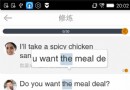
英語流利說是個很不錯的口語學習 App。在它的修煉頁面長按螢幕,會彈出一個放大鏡;手指移到某個單字附近,該單字就會被選中並變色。這個互動細節做得相當漂亮,值得拆解。 實
 Android 遊戲開發入門:一個小球彈跳的完整實例
能在 Android 上寫出遊戲,是很多開發者入門時的動力所在。本文從零做一個極簡示例:一顆小球在屏幕內四壁反彈。麻雀雖小,SurfaceView、雙緩衝、線程與幀率控制
 Android 氣泡提示視窗的實作方法
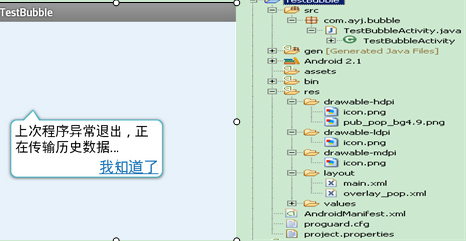
本文整理一個氣泡視窗的實作:一個帶背景插圖的小視窗,裡面有一段說明文字與一個「我知道了」的連結,點擊後關閉。這種效果常用於新手指引或異常提示。 版面結構 氣泡由一個背景