

編輯:關於 Android 程式設計
清單裡的標題、作者名、檔名常常長度不可控,若不處理就會被硬性截斷或直接撐破版面。Android 的 TextView 內建了省略號支援,兩個屬性就能解決。
<TextView
    android:layout_width="fill_parent"
    android:layout_height="wrap_content"
    android:id="@+id/hello"
    android:ellipsize="end"
    android:singleLine="true" />
兩個屬性缺一不可:
android:singleLine="true":限制只顯示一行。少了這個,ellipsize 不會有效果,因為文字會換行而不是被截斷。android:ellipsize="end":在結尾放省略號,也就是最常見的「某某某某…」效果。none:不顯示省略號,預設值。start:在開頭省略,變成「…某某某某」。適合路徑、URL 這類結尾才重要的內容。middle:在中間省略,變成「某某…某某」。適合檔名,能同時保留副檔名與開頭。end:在結尾省略,最常用於標題、人名。marquee:跑馬燈效果,文字會水平捲動。它需要 TextView 取得焦點才會啟動,且对视覺與電池都不友善,正式產品不建議使用。singleLine 已被標記為不建議使用,比較現代的等價寫法是:
<TextView
    android:layout_width="0dp"
    android:layout_height="wrap_content"
    android:layout_weight="1"
    android:ellipsize="end"
    android:maxLines="1" />
用 maxLines="1" 搭配 ellipsize 可以達到相同效果,而且行為更可控。layout_width="0dp" 加上 layout_weight 則是為了讓它在 LinearLayout 中正確分配剩餘寬度——若寫成 wrap_content,長文字會先主張自己的完整寬度,反而把兄弟 View 擠出去,省略號也就永遠不會出現。這是在 ListView 樣式中最常看到省略號失效的原因。
TextView tv = findViewById(R.id.hello);
tv.setSingleLine(true);
tv.setEllipsize(TextUtils.TruncateAt.END);
或者在 XML 中一次指定多行時,可用 android:maxLines="2" 搭配 ellipsize="end",讓文字最多兩行、超出部分在最後一行結尾省略,這在卡片式版面中很常用。
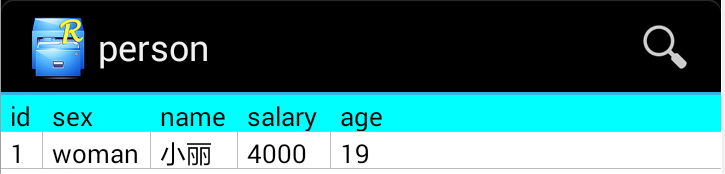 XUtils3 數據庫模塊詳解:建表、增刪改查與表結構演進
上一篇講完了 XUtils3 的注解、網絡與圖片模塊,這次來啃數據庫。目前主流的 ORM 方案不少——OrmLite、GreenDao、ActiveAndroid、Rea
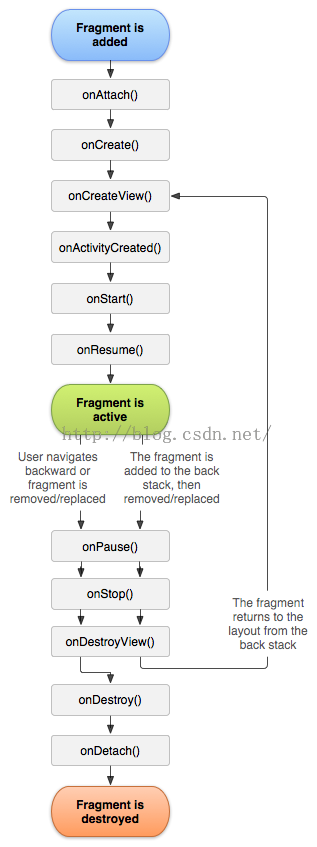 Android Fragment 完整入門:建立、加載、生命週期與 Activity 通信
Android Fragment 完整入門 Fragment 自 Android 3.0 起被引入,主要是為了讓開發者在大型螢幕裝置上打造更動態、更靈活的 UI。與 Ac
 Android 呼叫系統 Gallery 選圖:Action、回傳值與完整 Demo
前言 App 裡常有需要用到裝置既有圖片的場景——換大頭貼、選擇分享素材、設定背景。若自己從檔案路徑硬撈,不但要處理權限與掃描,還得自己做一套瀏覽介面。更省事的做法是直接
 Android 開發基礎:Main 執行緒向 Worker 執行緒發送訊息
Android 中 UI 更新只能在主執行緒進行,而耗時工作要放在背景。兩者之間靠 Handler 與 Message 溝通。本文示範的是較少見但觀念上很關鍵的方向:由