

編輯:關於 Android 程式設計
通知的用途,是在有事件發生時,以便利的方式將訊息呈現給使用者,讓他們能在自己方便的時候再與通知互動。如果你想了解如何設計有效且時機得宜的通知,可以參考 Notifications design guide 課程。本文則聚焦於實作層面,教你如何打造一則通用的通知。
本節的實作主要建立在 NotificationCompat.Builder 類別之上,它屬於支援庫的一部分。開發者應優先採用 NotificationCompat 及其子類別,特別是 NotificationCompat.Builder,如此才能相容於更廣泛的裝置版本。
建立通知時,你需要指定通知的使用者介面內容,以及它的點擊行為。一個 Builder 物件至少應包含以下要素:
一張小圖示,透過 setSmallIcon() 設定。 通知標題,透過 setContentTitle() 設定。 詳細文字,透過 setContentText() 設定。舉例來說:
NotificationCompat.Builder mBuilder = new NotificationCompat.Builder(this) .setSmallIcon(R.drawable.notification_icon) .setContentTitle("My notification") .setContentText("Hello World!");
建立通知時,應至少為它加上一個行為。這個行為會在使用者點擊時,將他們帶往一個 Activity,其中詳細呈現發生了什麼事,或讓使用者能採取進一步行動。在通知內部,行為由 PendingIntent 所包含的 Intent 指定,它可用來啟動 Activity。
PendingIntent 的建構方式,取決於你要啟動的 Activity 類型。當通知要啟動 Activity 時,開發者必須考量使用者期待的導覽體驗。在以下程式碼中,點擊通知會啟動一個新的 Activity,它承接了通知所引發的行為脈絡。在這種情況下,就不需要刻意建立回退堆疊。
Intent resultIntent = new Intent(this, ResultActivity.class); ... // Because clicking the notification opens a new ("special") activity, there's // no need to create an artificial back stack. PendingIntent resultPendingIntent = PendingIntent.getActivity( this, 0, resultIntent, PendingIntent.FLAG_UPDATE_CURRENT );
要讓 PendingIntent 與手勢產生關聯,需呼叫 NotificationCompat.Builder 的對應方法。例如,若要啟動一個 Activity,只要呼叫 setContentIntent() 並傳入 PendingIntent 即可。
發布通知需要執行以下步驟:
取得 NotificationManager 的實例。 呼叫 notify() 方法發布通知;呼叫時需指定通知的 ID,這個 ID 可供日後更新同一則通知時使用。 呼叫 build() 方法,它會回傳一個 Notification 物件。 NotificationCompat.Builder mBuilder; ... // Sets an ID for the notification int mNotificationId = 001; // Gets an instance of the NotificationManager service NotificationManager mNotifyMgr = (NotificationManager) getSystemService(NOTIFICATION_SERVICE); // Builds the notification and issues it. mNotifyMgr.notify(mNotificationId, mBuilder.build());
 Android pullToRefresh 下拉刷新庫的導入與使用心得
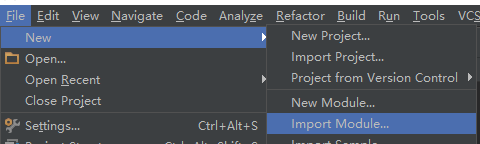
pullToRefresh 的導入首先點擊 New 按鈕,選擇 Import Module。接著在 New Module 介面中,選擇本機已含源碼的 pullToRefr
 Android Adapter 使用教學(中):用 SimpleAdapter 打造圖文並茂的 ListView
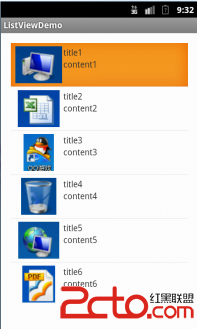
前面幾篇談的是 ArrayAdapter。用它在 ListView 裡擺純文字確實夠用,但實 projects 裡我們往往還想放圖片——這就是 SimpleAdapter
 Android 5.0 Material Design(三):使用 Material 主題
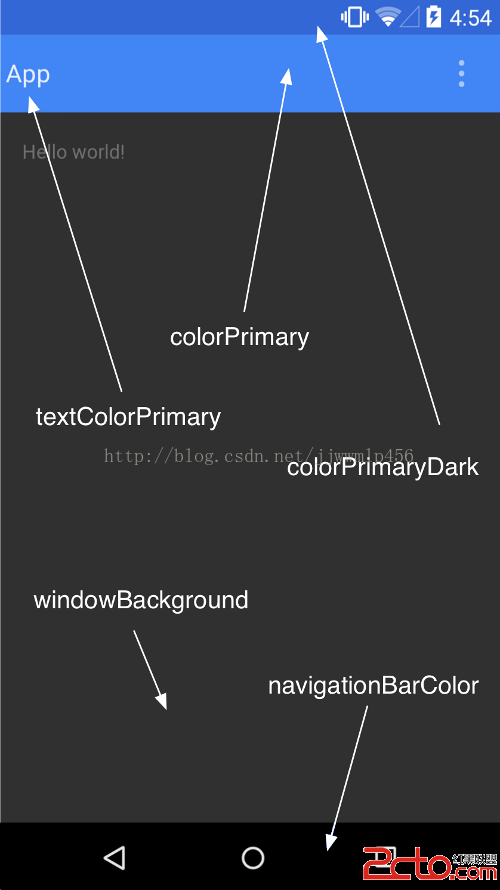
官方文件:https://developer.android.com/training/material/theme.html Material 主題帶來什麼 系統控
 安卓架構:怎樣才算清晰?聊聊 Clean Architecture 的三層落地
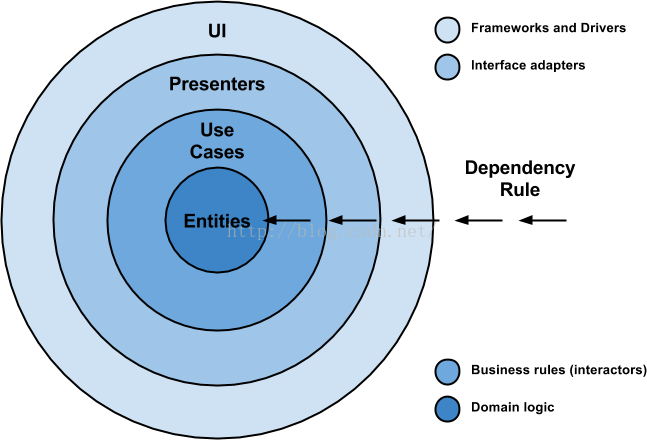
前言 寫出高質量的軟件向來是件又難又復雜的事:它不只需要滿足全部業務需求,還得健壯、易維護、好測試,並且保持足夠的靈活性——模塊能隨意增減而不牽一發動全身。Clean A