

編輯:關於 Android 程式設計
想讓使用者在相冊或瀏覽器中按下「分享」時,你的 App 也能出現在清單裡,只需要在 Manifest 中為某個 Activity 加上適合的 intent-filter。
<intent-filter>
    <action android:name="android.intent.action.SEND" />
    <data android:mimeType="image/*" />
    <category android:name="android.intent.category.DEFAULT" />
</intent-filter>
三個元素各有作用:action 宣告「我能處理 ACTION_SEND」;data 用 MIME 類型限定「只收圖片」;category DEFAULT 則是讓這個 Activity 能出現在間接意圖(implicit intent)的候選清單中——少了它,系統的分享對話框不會列出你的 App。
若同時要收文字與圖片,可以寫多組 <data>:
<intent-filter>
    <action android:name="android.intent.action.SEND" />
    <category android:name="android.intent.category.DEFAULT" />
    <data android:mimeType="text/plain" />
    <data android:mimeType="image/*" />
</intent-filter>
@Override
protected void onCreate(Bundle savedInstanceState) {
    super.onCreate(savedInstanceState);
    setContentView(R.layout.activity_main);

    Intent intent = getIntent();
    String action = intent.getAction();
    String type = intent.getType();

    if (Intent.ACTION_SEND.equals(action) && type != null) {
        if ("text/plain".equals(type)) {
            String sharedText = intent.getStringExtra(Intent.EXTRA_TEXT);
            handleSharedText(sharedText);
        } else if (type.startsWith("image/")) {
            Uri imageUri = intent.getParcelableExtra(Intent.EXTRA_STREAM);
            if (imageUri != null) {
                handleSharedImage(imageUri);
            }
        }
    }
}
文字用 EXTRA_TEXT,圖片則用 EXTRA_STREAM 取得 Uri。讀取圖片時記得要在 Manifest 中加上 android:grantUriPermissions 相關設定,或使用 ContentResolver.openInputStream() 直接讀——分享而來的 Uri 是臨時授權,不能長期保存。
ACTION_SEND:分享一筆內容,最常用。ACTION_SENDTO / ACTION_SEND_MULTIPLE:分享多筆內容(多張圖片)。ACTION_VIEW:開啟指定內容,例如 <data android:scheme="http" android:host="example.com" /> 可攔下該網域的連結。ACTION_MAIN + category.LAUNCHER:應用列表中的啟動圖示。
Intent sendIntent = new Intent();
sendIntent.setAction(Intent.ACTION_SEND);
sendIntent.putExtra(Intent.EXTRA_TEXT, "分享的內容");
sendIntent.setType("text/plain");
startActivity(Intent.createChooser(sendIntent, "分享到"));
1. 為分享入口自訂圖示與標籤。在 Activity 上設定 android:label 與 android:icon,分享選單中顯示的就是這組值,而不是 App 的預設圖示。多個分享入口時務必區分清楚,否則使用者會看到好幾個一模一樣的選項。
2. 留意 Android 12 之後的設計指引。分享選單的外觀由系統掌控,App 無法自訂樣式;若需要更豐富的分享體驗(例如直接分享給某個聯絡人),應改用 Intent.createChooser() 搭配 ChooserTargetService,或使用 AndroidX 的 ShareCompat 簡化程式碼。另外,新版系統對 intent-filter 中過於寬泛的設定審查更嚴格,宣告 image/* 這類範圍是恰當的,但盡量不要寫成 */*。
 讓 select2 搜尋框支援拼音輸入:改寫 matcher 並掛上拼音對照表
select2 的下拉搜尋預設只比對選項文字本身,中文選項 therefore 只能打中文字才有反應。對使用者來說很不友善——誰會記得每個選項的完整用字?只要加一層拼音映
 Android 向伺服器發送 JSON 資料的實作教學
本文講解如何從 Android 端把 JSON 資料送到伺服器,內容偏向基礎入門。核心步驟包括:使用 Gson 將物件序列化為 JSON、透過 HttpClient 送出
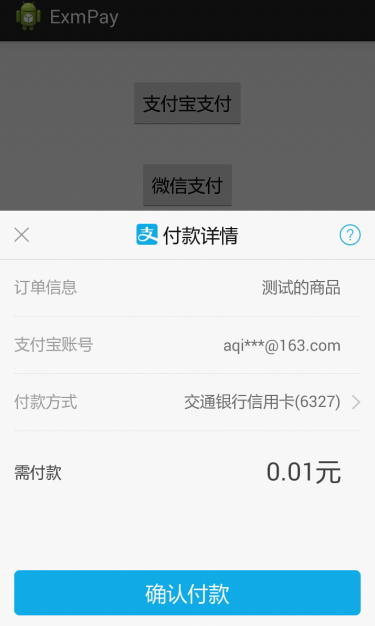 Android 開發筆記(一百零六):支付繳費 SDK 集成實踐
第三方支付概述 第三方支付指的是第三方平台與各大銀行簽約,在買方與賣方之間充當中介擔保,從而增強交易的安全性。國內常用的支付平台以支付寶和微信支付為主,二者合計佔據了約八
 Android 開發入門實戰:打造一個拼圖遊戲
為學習 Android 應用開發,筆者嘗試實現了一個簡單的拼圖遊戲。本文記錄了核心的實現流程,希望能為其他入門開發者提供參考。 一、界面設計 首先要規劃各界面(Activ