

編輯:關於 Android 程式設計
想在自己的 App 裡做「安裝」與「卸載」按鈕,靠的是 Intent 加上正確的 action 與 data。核心關鍵在這一行:
intent.setDataAndType(Uri.fromFile(file), "application/vnd.android.package-archive");
第一個參數是要安裝的 apk 檔案路徑,第二個參數則是 apk 對應的 MIME 類型。這個類型字串可以在 Tomcat 安裝目錄下 conf 資料夾的 web.xml 中找到。
程式執行結果如下:
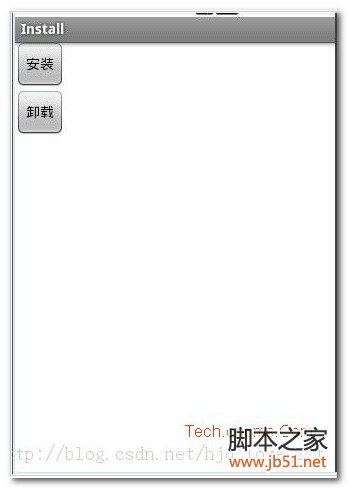
用 android:onClick 直接把按鈕綁到 Activity 的方法上,省去 findViewById 的麻煩:
<?xml version="1.0" encoding="utf-8"?>
<LinearLayout xmlns:android="https://schemas.android.com/apk/res/android"
    android:layout_width="match_parent"
    android:layout_height="match_parent"
    android:orientation="vertical" >
    <Button
        android:layout_width="wrap_content"
        android:layout_height="wrap_content"
        android:text="安裝"
        android:onClick="install"
        />
    <Button
        android:layout_width="wrap_content"
        android:layout_height="wrap_content"
        android:text="卸載"
        android:onClick="uninstall"
        />
</LinearLayout>
package com.njupt.install;

import java.io.File;
import android.net.Uri;
import android.os.Bundle;
import android.os.Environment;
import android.app.Activity;
import android.content.Intent;
import android.view.Menu;
import android.view.View;

public class MainActivity extends Activity {

    @Override
    protected void onCreate(Bundle savedInstanceState) {
        super.onCreate(savedInstanceState);
        setContentView(R.layout.main);
    }

    public void install(View v) {
        Intent intent = new Intent();
        intent.setAction(Intent.ACTION_VIEW);
        File file = new File(Environment.getExternalStorageDirectory(), "HtmlUI1.apk");
        intent.setDataAndType(Uri.fromFile(file), "application/vnd.android.package-archive");
        startActivity(intent);
    }

    public void uninstall(View v) {
        Intent intent = new Intent();
        intent.setAction(Intent.ACTION_DELETE);
        intent.setData(Uri.parse("package:com.njupt.htmlui1"));
        startActivity(intent);
    }

    @Override
    public boolean onCreateOptionsMenu(Menu menu) {
        getMenuInflater().inflate(R.menu.main, menu);
        return true;
    }
}
Intent.ACTION_VIEW,搭配 apk 檔案的 Uri 與 application/vnd.android.package-archive 類型,系統會跳出安裝確認畫面。Intent.ACTION_DELETE,data 是 package: 開頭加上「套件名稱」的 Uri,注意這裡要填的是 package name,不是 apk 檔名。實務提醒: apk 檔要放在應用程式可讀的位置(例如外部儲存空間),並在 AndroidManifest.xml 註冊 READ_EXTERNAL_STORAGE 權限;在 Android 7.0 以上,透過 Uri.fromFile() 會引發 FileUriExposedException,需改用 FileProvider 產生 content:// 類型的 Uri 才行。
 Android產品研發(十六):那些容易被忽視的開發者選項
上一篇文章我們講解了Android中內存對象的序列化方式。由於Android開發常涉及不同Activity間的數據傳遞,基本數據類型的傳遞沒有問題,但一旦涉及複雜數據類型
 Android 自定義 ViewGroup:打造絢麗的仿支付寶咻一咻雷達脈衝動畫
記得春節期間支付寶的集五福與春晚「咻一咻」活動火遍全城,集齊五福即可平分大紅包。當時支付寶咻一咻頁面有一個雷達擴散的動畫效果,視覺上非常出色,於是便嘗試自行實作類似效果。
 Android 自訂 Dialog 樣式與進度更新實作
客製化 Dialog 常用於提示、載入或進度回饋。下圖為本文要呈現的效果。 核心思路 自訂 Dialog 繼承 android.app.Dialog,透過建構子傳入 l
 Android 圖片加載庫 Glide 全面解析與 Picasso 對比
Glide 是什麼 Glide 是一個圖片加載庫,作者為 bumptech,最早在 Google 於泰國舉辦的開發者論壇上被介紹,此後被廣泛應用於 Google 的多個開