

編輯:關於 Android 程式設計
Android 自帶的 RadioGroup 繼承自 LinearLayout,這帶來一個限制:它只能管理「直接子節點」中的 RadioButton。一旦你在 RadioButton 外面包了一層容器(例如為了疊加一個未讀數量的小紅點而使用 FrameLayout),分組就會失效——因為 RadioGroup 找不到那些 RadioButton。
要突破這個限制,只能從源碼下手。問題出在兩處:addView() 與內部的 PassThroughHierarchyChangeListener。前者負責在子檢視加入時同步選中狀態,後者負責為 RadioButton 掛上監聽器。只要讓這兩處能穿透一層容器去找到真正的 RadioButton,其餘邏輯都能沿用。
先複製一份 RadioGroup 的源碼,然後加入一個方法,用來在任意 ViewGroup 中找出 RadioButton:
/** 查找 radioButton 控制項 */
public RadioButton findRadioButton(ViewGroup group) {
    RadioButton resBtn = null;
    int len = group.getChildCount();
    for (int i = 0; i < len; i++) {
        if (group.getChildAt(i) instanceof RadioButton) {
            resBtn = (RadioButton) group.getChildAt(i);
        } else if (group.getChildAt(i) instanceof ViewGroup) {
            findRadioButton((ViewGroup) group.getChildAt(i));
        }
    }
    return resBtn;
}
原本的邏輯只處理 child instanceof RadioButton,我們為 ViewGroup 補上一個分支:
@Override
public void addView(View child, int index, ViewGroup.LayoutParams params) {
    if (child instanceof RadioButton) {
        final RadioButton button = (RadioButton) child;
        if (button.isChecked()) {
            mProtectFromCheckedChange = true;
            if (mCheckedId != -1) {
                setCheckedStateForView(mCheckedId, false);
            }
            mProtectFromCheckedChange = false;
            setCheckedId(button.getId());
        }
    } else if (child instanceof ViewGroup) {   // 此處為新增的程式碼
        final RadioButton button = findRadioButton((ViewGroup) child);
        if (button.isChecked()) {
            mProtectFromCheckedChange = true;
            if (mCheckedId != -1) {
                setCheckedStateForView(mCheckedId, false);
            }
            mProtectFromCheckedChange = false;
            setCheckedId(button.getId());
        }
    }

    super.addView(child, index, params);
}
同樣在 onChildViewAdded 與 onChildViewRemoved 中補上容器分支:
private class PassThroughHierarchyChangeListener implements
        ViewGroup.OnHierarchyChangeListener {

    private ViewGroup.OnHierarchyChangeListener mOnHierarchyChangeListener;

    public void onChildViewAdded(View parent, View child) {
        if (parent == MyRadioGroup.this && child instanceof RadioButton) {
            int id = child.getId();
            // 若缺少 id 則自動產生一個
            if (id == View.NO_ID) {
                id = child.hashCode();
                child.setId(id);
            }
            ((RadioButton) child).setOnCheckedChangeListener(mChildOnCheckedChangeListener);
        } else if (parent == MyRadioGroup.this   // 此處為新增的程式碼
                && child instanceof ViewGroup) {
            RadioButton btn = findRadioButton((ViewGroup) child);
            int id = btn.getId();
            if (id == View.NO_ID) {
                id = btn.hashCode();
                btn.setId(id);
            }
            btn.setOnCheckedChangeListener(mChildOnCheckedChangeListener);
        }

        if (mOnHierarchyChangeListener != null) {
            mOnHierarchyChangeListener.onChildViewAdded(parent, child);
        }
    }

    public void onChildViewRemoved(View parent, View child) {
        if (parent == MyRadioGroup.this && child instanceof RadioButton) {
            ((RadioButton) child).setOnCheckedChangeListener(null);
        } else if (parent == MyRadioGroup.this
                && child instanceof ViewGroup) {
            findRadioButton((ViewGroup) child).setOnCheckedChangeListener(null);
        }
        if (mOnHierarchyChangeListener != null) {
            mOnHierarchyChangeListener.onChildViewRemoved(parent, child);
        }
    }
}
完成上述修改後,就能自由地把 RadioButton 包進任何容器。以下是一個底部導覽列的寫法,其中「首頁」項被包在 FrameLayout 裡,以便右上角疊一個未讀提示:
<com.huaheng.wy.view.MyRadioGroup
    android:id="@+id/rg"
    android:layout_width="fill_parent"
    android:layout_height="65dp"
    android:layout_alignParentBottom="true"
    android:background="@drawable/yst_i_bottom"
    android:orientation="horizontal" >

    <!-- 首頁 -->
    <FrameLayout
        android:id="@+id/left"
        android:layout_width="wrap_content"
        android:layout_height="wrap_content"
        android:layout_gravity="center_vertical"
        android:layout_marginBottom="2dp"
        android:layout_marginTop="3dp"
        android:layout_weight="1" >

        <RadioButton
            android:id="@+id/rbtn_home"
            android:layout_width="wrap_content"
            android:layout_height="wrap_content"
            android:layout_gravity="center"
            android:background="@null"
            android:button="@null"
            android:drawableTop="@drawable/yst_i_bottomhome_selector"
            android:gravity="center_horizontal"
            android:text="首頁"
            android:textColor="@color/white"
            android:textSize="@dimen/font_5" />

        <Button
            android:id="@+id/btn_home_point"
            android:layout_width="21dp"
            android:layout_height="20dp"
            android:layout_gravity="top|right"
            android:layout_marginRight="10dp"
            android:layout_marginTop="0dp"
            android:background="@drawable/notice_bg"
            android:text="1"
            android:textColor="@color/white"
            android:textSize="@dimen/font_6"
            android:visibility="gone" />
    </FrameLayout>

    <!-- 其餘項目為直接的 RadioButton,此處省略 -->

</com.huaheng.wy.view.MyRadioGroup>
/*
 * Copyright (C) 2006 The Android Open Source Project
 *
 * Licensed under the Apache License, Version 2.0 (the "License");
 * you may not use this file except in compliance with the License.
 * You may obtain a copy of the License at
 *
 *      https://www.apache.org/licenses/LICENSE-2.0
 *
 * Unless required by applicable law or agreed to in writing, software
 * distributed under the License is distributed on an "AS IS" BASIS,
 * WITHOUT WARRANTIES OR CONDITIONS OF ANY KIND, either express or implied.
 * See the License for the specific language governing permissions and
 * limitations under the License.
 */

package com.huaheng.wy.view;

import android.content.Context;
import android.content.res.TypedArray;
import android.util.AttributeSet;
import android.view.View;
import android.view.ViewGroup;
import android.widget.CompoundButton;
import android.widget.LinearLayout;
import android.widget.RadioButton;

public class MyRadioGroup extends LinearLayout {

    // 目前選中的 id,預設為 -1 表示無選項
    private int mCheckedId = -1;
    // 追蹤子 RadioButton 的選中狀態
    private CompoundButton.OnCheckedChangeListener mChildOnCheckedChangeListener;
    // 為 true 時,忽略選中狀態變動事件,避免無限遞迴
    private boolean mProtectFromCheckedChange = false;
    private OnCheckedChangeListener mOnCheckedChangeListener;
    private PassThroughHierarchyChangeListener mPassThroughListener;

    public MyRadioGroup(Context context) {
        super(context);
        setOrientation(VERTICAL);
        init();
    }

    public MyRadioGroup(Context context, AttributeSet attrs) {
        super(context, attrs);
        init();
    }

    private void init() {
        mChildOnCheckedChangeListener = new CheckedStateTracker();
        mPassThroughListener = new PassThroughHierarchyChangeListener();
        super.setOnHierarchyChangeListener(mPassThroughListener);
    }

    @Override
    public void setOnHierarchyChangeListener(OnHierarchyChangeListener listener) {
        // 使用者的監聽器交由 pass-through 監聽器代理
        mPassThroughListener.mOnHierarchyChangeListener = listener;
    }

    @Override
    protected void onFinishInflate() {
        super.onFinishInflate();
        // 依 XML 中宣告的 checked 屬性勾選對應的 RadioButton
        if (mCheckedId != -1) {
            mProtectFromCheckedChange = true;
            setCheckedStateForView(mCheckedId, true);
            mProtectFromCheckedChange = false;
            setCheckedId(mCheckedId);
        }
    }

    @Override
    public void addView(View child, int index, ViewGroup.LayoutParams params) {
        if (child instanceof RadioButton) {
            final RadioButton button = (RadioButton) child;
            if (button.isChecked()) {
                mProtectFromCheckedChange = true;
                if (mCheckedId != -1) {
                    setCheckedStateForView(mCheckedId, false);
                }
                mProtectFromCheckedChange = false;
                setCheckedId(button.getId());
            }
        } else if (child instanceof ViewGroup) {
            // 容器情況:遞迴找出內部的 RadioButton
            final RadioButton button = findRadioButton((ViewGroup) child);
            if (button != null && button.isChecked()) {
                mProtectFromCheckedChange = true;
                if (mCheckedId != -1) {
                    setCheckedStateForView(mCheckedId, false);
                }
                mProtectFromCheckedChange = false;
                setCheckedId(button.getId());
            }
        }

        super.addView(child, index, params);
    }

    /** 遞迴查找 radioButton 控制項 */
    public RadioButton findRadioButton(ViewGroup group) {
        RadioButton resBtn = null;
        int len = group.getChildCount();
        for (int i = 0; i < len; i++) {
            if (group.getChildAt(i) instanceof RadioButton) {
                resBtn = (RadioButton) group.getChildAt(i);
            } else if (group.getChildAt(i) instanceof ViewGroup) {
                findRadioButton((ViewGroup) group.getChildAt(i));
            }
        }
        return resBtn;
    }

    /**
     * 設定選中指定 id 的 RadioButton。傳入 -1 相當於呼叫 clearCheck()。
     */
    public void check(int id) {
        if (id != -1 && (id == mCheckedId)) {
            return;   // 已是選中狀態,無須處理
        }

        if (mCheckedId != -1) {
            setCheckedStateForView(mCheckedId, false);
        }

        if (id != -1) {
            setCheckedStateForView(id, true);
        }

        setCheckedId(id);
    }

    private void setCheckedId(int id) {
        mCheckedId = id;
        if (mOnCheckedChangeListener != null) {
            mOnCheckedChangeListener.onCheckedChanged(this, mCheckedId);
        }
    }

    private void setCheckedStateForView(int viewId, boolean checked) {
        View checkedView = findViewById(viewId);
        if (checkedView != null && checkedView instanceof RadioButton) {
            ((RadioButton) checkedView).setChecked(checked);
        }
    }

    /** 取得目前選中 RadioButton 的 id,無選項時回傳 -1。 */
    public int getCheckedRadioButtonId() {
        return mCheckedId;
    }

    /** 清除選項。 */
    public void clearCheck() {
        check(-1);
    }

    /** 註冊選中狀態變動的回呼。 */
    public void setOnCheckedChangeListener(OnCheckedChangeListener listener) {
        mOnCheckedChangeListener = listener;
    }

    @Override
    public LayoutParams generateLayoutParams(AttributeSet attrs) {
        return new MyRadioGroup.LayoutParams(getContext(), attrs);
    }

    @Override
    protected boolean checkLayoutParams(ViewGroup.LayoutParams p) {
        return p instanceof MyRadioGroup.LayoutParams;
    }

    @Override
    protected LinearLayout.LayoutParams generateDefaultLayoutParams() {
        return new LayoutParams(LayoutParams.WRAP_CONTENT, LayoutParams.WRAP_CONTENT);
    }

    public static class LayoutParams extends LinearLayout.LayoutParams {

        public LayoutParams(Context c, AttributeSet attrs) {
            super(c, attrs);
        }

        public LayoutParams(int w, int h) {
            super(w, h);
        }

        public LayoutParams(int w, int h, float initWeight) {
            super(w, h, initWeight);
        }

        public LayoutParams(ViewGroup.LayoutParams p) {
            super(p);
        }

        public LayoutParams(MarginLayoutParams source) {
            super(source);
        }

        @Override
        protected void setBaseAttributes(TypedArray a, int widthAttr, int heightAttr) {
            if (a.hasValue(widthAttr)) {
                width = a.getLayoutDimension(widthAttr, "layout_width");
            } else {
                width = WRAP_CONTENT;
            }

            if (a.hasValue(heightAttr)) {
                height = a.getLayoutDimension(heightAttr, "layout_height");
            } else {
                height = WRAP_CONTENT;
            }
        }
    }

    /** 選中項變動時的回呼介面。 */
    public interface OnCheckedChangeListener {
        /**
         * 當選中的 RadioButton 改變時呼叫;若選項被清除,checkedId 為 -1。
         */
        public void onCheckedChanged(MyRadioGroup group, int checkedId);
    }

    private class CheckedStateTracker implements CompoundButton.OnCheckedChangeListener {
        public void onCheckedChanged(CompoundButton buttonView, boolean isChecked) {
            // 避免無限遞迴
            if (mProtectFromCheckedChange) {
                return;
            }

            mProtectFromCheckedChange = true;
            if (mCheckedId != -1) {
                setCheckedStateForView(mCheckedId, false);
            }
            mProtectFromCheckedChange = false;

            int id = buttonView.getId();
            setCheckedId(id);
        }
    }

    /**
     * 代理型的層級變動監聽器:先處理自己的內部邏輯,再把事件轉發給使用者設定的監聽器。
     */
    private class PassThroughHierarchyChangeListener implements
            ViewGroup.OnHierarchyChangeListener {

        private ViewGroup.OnHierarchyChangeListener mOnHierarchyChangeListener;

        public void onChildViewAdded(View parent, View child) {
            if (parent == MyRadioGroup.this && child instanceof RadioButton) {
                int id = child.getId();
                if (id == View.NO_ID) {
                    id = child.hashCode();
                    child.setId(id);
                }
                ((RadioButton) child).setOnCheckedChangeListener(mChildOnCheckedChangeListener);
            } else if (parent == MyRadioGroup.this
                    && child instanceof ViewGroup) {
                RadioButton btn = findRadioButton((ViewGroup) child);
                if (btn != null) {
                    int id = btn.getId();
                    if (id == View.NO_ID) {
                        id = btn.hashCode();
                        btn.setId(id);
                    }
                    btn.setOnCheckedChangeListener(mChildOnCheckedChangeListener);
                }
            }

            if (mOnHierarchyChangeListener != null) {
                mOnHierarchyChangeListener.onChildViewAdded(parent, child);
            }
        }

        public void onChildViewRemoved(View parent, View child) {
            if (parent == MyRadioGroup.this && child instanceof RadioButton) {
                ((RadioButton) child).setOnCheckedChangeListener(null);
            } else if (parent == MyRadioGroup.this
                    && child instanceof ViewGroup) {
                RadioButton btn = findRadioButton((ViewGroup) child);
                if (btn != null) {
                    btn.setOnCheckedChangeListener(null);
                }
            }
            if (mOnHierarchyChangeListener != null) {
                mOnHierarchyChangeListener.onChildViewRemoved(parent, child);
            }
        }
    }
}
複製源碼來改寫,代價是必須自行承接後續的系統更新與潛在 bug。使用前請留意幾點:
button != null 與 btn != null 的判斷。原版的 findRadioButton() 在找不到 RadioButton 時會回傳 null,直接呼叫 isChecked() 會造成空指針——而這在「容器裡只有 Button 沒有 RadioButton」的版面中是很可能发生的。resBtn,因此多層嵌套時可能找不到深層的 RadioButton。實務上建議改寫為遇到第一個就回傳。BottomNavigationView、NavigationBarView 或 TabLayout,這些元件天生就支援「自訂 item 版面 + 單選行為」,不必再維護一份 fork 出來的 RadioGroup。這才是目前的建議路徑。 自訂 View 實作可滑動的折線圖表
先看成果(每種數值狀態用一個表情圖表示): 一、主布局 <RelativeLayout xmlns:android=https://schemas.androi
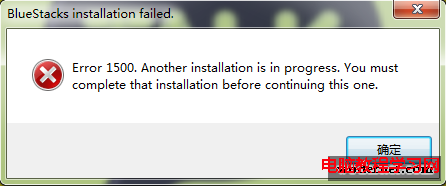 安裝安卓模擬器時出現 Error 1500「Another installation is in progress」的解法
安裝安卓模擬器時出現「Error 1500. Another installation is in progress. You must complete that in
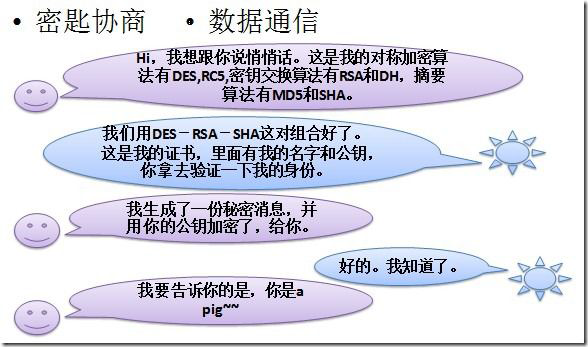 Android 安全加密系列:HTTPS 通訊與 SSL 憑證實作全解析
系列文章索引 Android 安全加密:對稱加密 Android 安全加密:非對稱加密 Android 安全加密:消息摘要 Message Digest Android
 Android 實現可多選的圖片 ListView 批量操作方案
項目裡經常會遇到這樣的需求:做一個可多選的圖片列表,用戶勾選一到多張圖片後批量上傳。網上單獨講多選列表或圖片列表的教程不少,但把兩者結合起來的完整示例卻不多見。本文就來動