

編輯:關於 Android 程式設計
layout_weight 是使用 LinearLayout 時幾乎必備的屬性,但它的行為有個反直覺之處,讓不少人第一次用時都栽了跟頭。搞懂背後的計算方式,之後排版會順手很多。
子元件可以透過 layout_weight 設定自己在 LinearLayout 中的「重要度」,也就是佔用的空間比重。若不設定,預設值為 0,代表不參與多餘空間的分配。而官方文件說「weight 值越低則元件越重要」,這句話正是最容易誤解的地方——真正決定誰佔得多,還要看你把 layout_width 設成了什麼。
放兩個 Button,Button1 的 weight 為 1、Button2 為 2,兩者的 layout_width 都設為 fill_parent:
<LinearLayout xmlns:android="https://schemas.android.com/apk/res/android"
    android:layout_width="match_parent"
    android:layout_height="wrap_content"
    android:orientation="horizontal">

    <Button
        android:layout_width="fill_parent"
        android:layout_height="wrap_content"
        android:layout_weight="1"
        android:text="Button1" />

    <Button
        android:layout_width="fill_parent"
        android:layout_height="wrap_content"
        android:layout_weight="2"
        android:text="Button2" />

</LinearLayout>
結果是 Button1 佔了螢幕寬度的三分之二,Button2 佔三分之一。
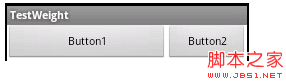
把兩者的 layout_width 都改成 wrap_content,其餘不動:
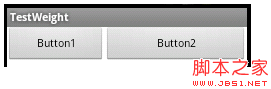
這次結果剛好相反:Button1 佔三分之一,Button2 佔三分之二。
關鍵在於 LinearLayout 分配剩餘空間的方式。它的計算大致是:先依 layout_width/layout_height 配置元件的「初始尺寸」,算出剩餘空間,再依 weight 比例去分配這塊剩餘空間。
當 width 是 fill_parent 時,兩個 Button 每個都先要佔滿整個寬度,總需求量是螢幕的兩倍,因此剩餘空間是負值(等於「超標」了一個螢幕寬)。這時 weight 的作用變成「誰該被壓縮多少」:weight 大的被壓得比較多,所以 weight 為 2 的 Button2 反而比較窄。
當 width 是 wrap_content 時,每個 Button 只先佔用自己文字所需的寬度,剩餘空間是正的。這時 weight 就是真正的「瓜分額度」:weight 為 2 的 Button2 分到兩倍的額度,自然比較寬。
所以「weight 越低越重要」這句話,嚴格說來只在 width 為 fill_parent 的情境下成立,此時 weight 是「被犧牲的程度」,數字越小損失越少。而在 wrap_content 情境下,weight 才是直覺意義上的「佔比」。
常見需求是:左側元件依內容決定寬度,右側元件吃掉所有剩餘空間。做法如下:
layout_width="wrap_content",不設 weight。layout_width="0dp",layout_weight="1"。這裡最容易被忽略的細節是右側要寫 0dp 而不是 fill_parent/match_parent。用 0dp 表示「我不預先索取任何空間,全部靠 weight 分配」,可以避免先配置再分配的兩段式計算,不僅行為更可預期,也省下一輪不必要的量測,效能更好。這是在複雜版面中調整整體效能時,值得優先檢查的一處。
另外提醒,layout_weight 只在 LinearLayout 中有效。若在 FrameLayout 上看到它被寫上去(網路上不少範例如此),那個屬性其實是被忽略的,真正生效的是 layout_gravity。理解這一點,看別人的版面檔時就不會被誤導。
 Android 開發筆記(一百一十一):用 Socket 打造聊天室
Socket 通信 基本概念 對程式開發來說,網路通信的地基就是 Socket。但正因為它是地基,用起來反而不容易上手。今天就來把 Socket 通信談清楚。 計算機網路
 Android UI 進階:活用 SlidingDrawer 抽屜控制項
最近在開發一個應用時,有個想法:把設定頁面和應用頁面放在一起,讓使用者能即時看到自己調整設定後對 UI 的影響,這樣操作起來會更方便。琢磨了好一陣子,最後發現 Slidi
 Android 自定義 View:模仿 360 刷新球的水波 SeekBar
這個範例模仿 360 刷新球,把水波效果與進度條結合。自定義 MyPathView 會畫出圓形球體、內部水波與中央百分比文字。 實作時,先在 onMeasure 取得寬
 Android 搜索功能實作:即時顯示並清除歷史搜索記錄
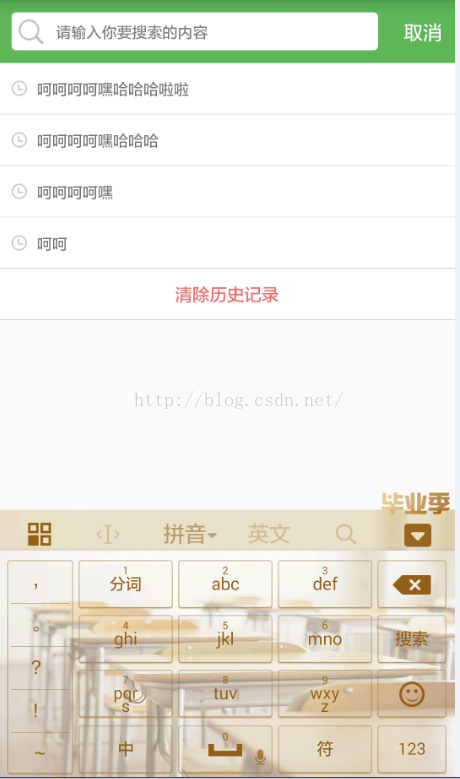
本文為大家分享如何在 Android 中實現搜索功能,並能即時顯示搜索的歷史記錄,根據輸入內容進行模糊查詢,供大家參考。界面圖如下。 本案例實現起來非常簡