

編輯:關於 Android 程式設計
layout_weight 是 LinearLayout 裡最實用也最容易被誤解的屬性。它的作用是:在扣除固定尺寸後,把剩餘空間依權重比例分配給子元素。搭配 layout_width="0dip" 使用時效果最穩定。
左側 Fragment 佔三分之一,右側 FrameLayout 佔三分之二。關鍵在於兩個子元素的寬度都設為 0dip,讓剩餘空間成為唯一依據。
<?xml version="1.0" encoding="utf-8"?>
<LinearLayout xmlns:android="https://schemas.android.com/apk/res/android"
    android:layout_width="match_parent"
    android:layout_height="match_parent"
    android:orientation="horizontal" >

    <fragment
        android:id="@+id/titles"
        android:layout_width="0dip"
        android:layout_height="match_parent"
        android:layout_weight="1"
        class="com.a2bgeek.fragmentdemo.TitlesFragment" />

    <FrameLayout
        android:id="@+id/details"
        android:layout_width="0dip"
        android:layout_height="match_parent"
        android:layout_weight="2" >
    </FrameLayout>

</LinearLayout>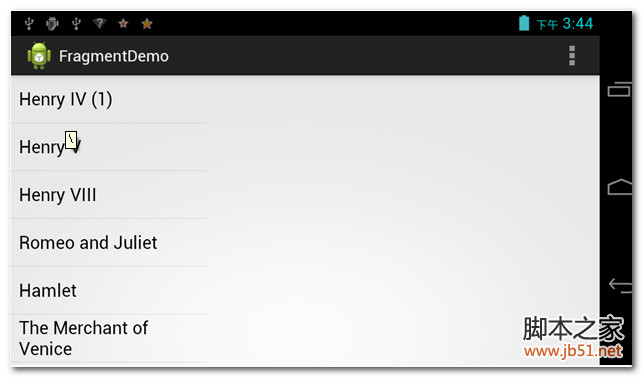
同樣是 1 比 2,但只要把 layout_width 換成 match_parent,算術就變了:每個子元素先各自要求「整個父容器」,空間不足時按比例互相「退讓」,最終比例雖仍是 1:2,但在實作細節與多子元素混排時容易出現不如預期的結果。
<?xml version="1.0" encoding="utf-8"?>
<LinearLayout xmlns:android="https://schemas.android.com/apk/res/android"
    android:layout_width="match_parent"
    android:layout_height="match_parent"
    android:orientation="horizontal" >

    <fragment
        android:id="@+id/titles"
        android:layout_width="match_parent"
        android:layout_height="match_parent"
        android:layout_weight="1"
        class="com.a2bgeek.fragmentdemo.TitlesFragment" />

    <FrameLayout
        android:id="@+id/details"
        android:layout_width="match_parent"
        android:layout_height="match_parent"
        android:layout_weight="2" >
    </FrameLayout>

</LinearLayout>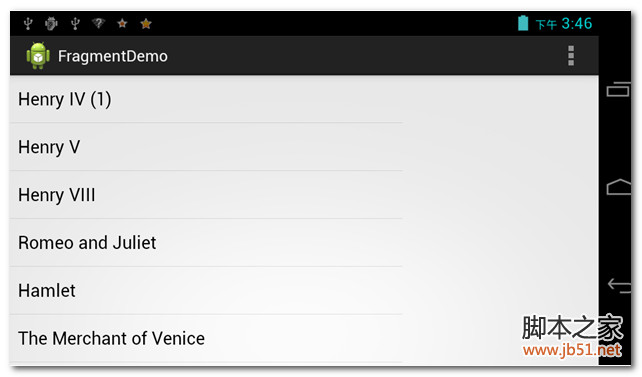
Fragment 與一般 View 不同:當它的寬高設為 wrap_content 時,並不會像 TextView 那樣依內容收縮,而是往往佔滿整個可用空間。因此在使用 Fragment 時,若非刻意要全螢幕,建議明確給 0dip + layout_weight,或直接用 match_parent 搭配權重,不要依賴 wrap_content。
layout_width="0dip";垂直排列時搭配 layout_height="0dip"。 Android 自訂 ViewPager 實現個性化的圖片切換效果
第一次見到 ViewPager 這個控件,我瞬間愛不釋手,做東西的主界面通通改用 ViewPager,圖片切換也拋棄了 ImageSwitcher 之類的方案,開始讓 V
 360 手機衛士開啟來電顯示歸屬地:圖解設定流程
想知道來電是哪個地區打來的,用 360 手機衛士開啟歸屬地顯示就能做到。設定路徑並不深,照下面三步走完即可。 1. 安裝並打開 360 手機衛士,切換到「隱私保護」,點擊
 ActionBar實現下拉式導航的兩步做法
ActionBar 除了 Tab 導航,也能做成下拉列表式的導航,適合選項較多、橫向空間不夠的場景。實現只需兩步: 1) 設定 actionBar.setNavigati
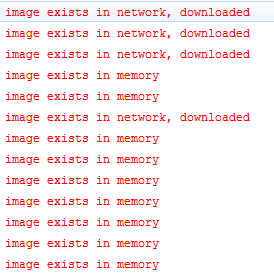 從零實現 ImageLoader:線程池、Bitmap 高效加載與二級緩存
這次要動手做一個圖片加載器,其中會用到線程池、Bitmap 高效加載、LruCache 內存緩存與 DiskLruCache 磁盤緩存。出發之前,先把這四個知識點逐一理清