

編輯:關於 Android 程式設計
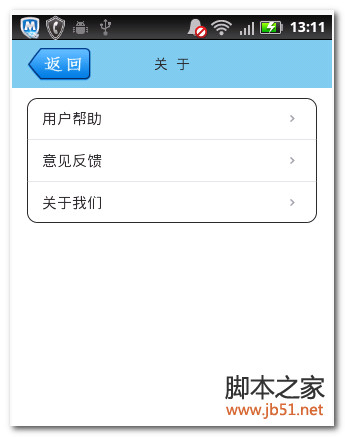
預設的 ListView 每一項都是矩形,若整體設計想要圓角外框,僅對 ListView 套用背景是不夠的——按下某項時的高亮色塊會是方的,把圓角破壞掉。解法是搭配自訂 Control,依被按下的項目位置動態切換 selector。
先看效果:
/**
 * 圓角 ListView 示例
 * @FileName: CornerListView.java
 */
public class CornerListView extends ListView {
    public CornerListView(Context context) { super(context); }

    public CornerListView(Context context, AttributeSet attrs, int defStyle) {
        super(context, attrs, defStyle);
    }

    public CornerListView(Context context, AttributeSet attrs) {
        super(context, attrs);
    }

    @Override
    public boolean onInterceptTouchEvent(MotionEvent ev) {
        switch (ev.getAction()) {
            case MotionEvent.ACTION_DOWN:
                int x = (int) ev.getX();
                int y = (int) ev.getY();
                int itemnum = pointToPosition(x, y);

                if (itemnum == AdapterView.INVALID_POSITION)
                    break;
                if (itemnum == 0) {
                    // 只有一項:四個角都要圓
                    if (itemnum == (getAdapter().getCount() - 1)) {
                        setSelector(R.drawable.app_list_corner_round);
                    } else {
                        setSelector(R.drawable.app_list_corner_round_top);
                    }
                } else if (itemnum == (getAdapter().getCount() - 1)) {
                    setSelector(R.drawable.app_list_corner_round_bottom);
                } else {
                    setSelector(R.drawable.app_list_corner_shape);
                }
                break;
            case MotionEvent.ACTION_UP:
                break;
        }
        return super.onInterceptTouchEvent(ev);
    }
}核心概念:pointToPosition 把觸摸座標換成項目索引,再依「第一項/最後一項/中間」選擇對應的 selector 資源。
app_list_corner_round:四個角都圓,用於清單只有一項時。
<?xml version="1.0" encoding="utf-8"?>
<shape xmlns:android="https://schemas.android.com/apk/res/android">
    <gradient android:startColor="#BFEEFF"
        android:endColor="#40B9FF"
        android:angle="270"/>
    <corners android:topLeftRadius="6dip"
        android:topRightRadius="6dip"
        android:bottomLeftRadius="6dip"
        android:bottomRightRadius="6dip"/>
</shape>app_list_corner_round_top:只有上方兩角圓,用於第一項。
<?xml version="1.0" encoding="utf-8"?>
<shape xmlns:android="https://schemas.android.com/apk/res/android">
    <gradient android:startColor="#BFEEFF"
        android:endColor="#40B9FF"
        android:angle="270"/>
    <corners android:topLeftRadius="6dip"
        android:topRightRadius="6dip"/>
</shape>app_list_corner_round_bottom:只有下方兩角圓,用於最後一項。
<?xml version="1.0" encoding="utf-8"?>
<shape xmlns:android="https://schemas.android.com/apk/res/android">
    <gradient android:startColor="#BFEEFF"
        android:endColor="#40B9FF"
        android:angle="270"/>
    <corners android:bottomLeftRadius="6dip"
        android:bottomRightRadius="6dip" />
</shape>app_list_corner_shape:純漸層無圓角,用於中間的一般項。
<?xml version="1.0" encoding="utf-8"?>
<shape xmlns:android="https://schemas.android.com/apk/res/android">
    <gradient android:startColor="#BFEEFF"
        android:endColor="#40B9FF"
        android:angle="270"/>
</shape>寫好之後,在版面檔中把原本的 <ListView> 換成完整的類別名稱 com.xxx.CornerListView,其餘用法與原生 ListView 完全相同,Adapter 也不用改。
另外提醒:若要外框也有圓角,建議在 ListView 外面再包一層 CardView 或加上 android:clipToOutline,效果會比只用背景圖更乾淨。
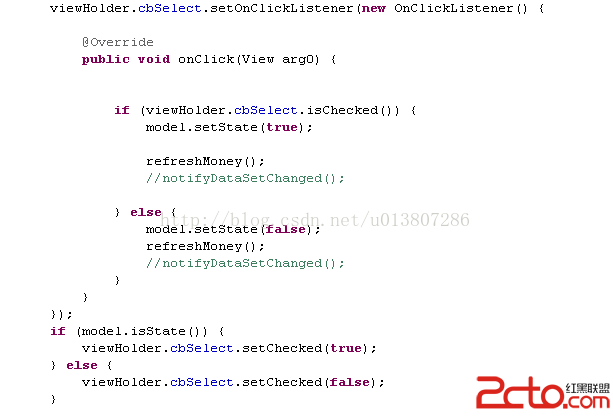 android ListView 中 CheckBox 錯位的解法:關鍵在於設定順序
已經很晚了,但還是想把這則筆記寫完,為今天做個完整的收尾。 問題是這樣的:在 ListView 的 item 裡加了 CheckBox,勾選時卻發現打勾的位置錯亂——明
 VoLTE 高清語音通話支持哪些手機?機型清單一次看
隨著蘋果向 iPhone 6 以上機型推送 VoLTE 高清語音通話的運營商配置更新,越來越多網友開始關注這項新的語音技術。那麼目前國內有哪些手機支持 VoLTE 高清語
 自定義卡尺選擇器:手勢拖動、差值器動效與 PopupWindow 封裝
前言 某個專案需要一個類似游標卡尺的選擇器,找了一圈沒有完全合用的,於是就自己刻了一個。原始碼與用法整理如下,有相同需求的人可以直接取用。 效果預覽 支援拖動與點擊兩種
 使用 PullToRefresh 實作 ListView 下拉更新與左滑刪除
PullToRefresh 是 Android 早期常見的下拉更新實作方案,除了內建的重新整理手勢外,也能搭配自訂擴充完成更豐富的列表互動。本文以精簡後的 PullToR