

編輯:關於 Android 程式設計
要在 Android 中訪問 WebService 介面,通常需要引入第三方套件 ksoap2-android-assembly-2.5.2-jar-with-dependencies.jar。有了這個工具,就能以 SOAP 協議與遠端服務溝通。
以下是呼叫的完整流程:
// WebService 的命名空間static final String namespace = "https://impl.service.suncreate.com";// 伺服器發布的 URLstatic final String url = "https://10.100.3.41/axis2/services/UploadService";final String methodName = "upload"; // 函式名final String sessionID = "111111"; // sessionID
// 建立 HttpTransportSE 物件,透過構造方法指定 WebService 的 URLHttpTransportSE transport = new HttpTransportSE(url);transport.debug = true;
// 指定 WebService 的命名空間與函式名SoapObject soapObject = new SoapObject(namespace, methodName);// 設定呼叫方法的參數值soapObject.addProperty("sessionID", sessionID);soapObject.addProperty("data", cds); // cds 為需要傳遞的物件
SoapSerializationEnvelope envelope = new SoapSerializationEnvelope(SoapEnvelope.VER10);envelope.bodyOut = transport;envelope.setOutputSoapObject(soapObject);
// 使用 call 方法呼叫 WebServicetransport.call(null, envelope);SoapObject sb = (SoapObject) envelope.bodyIn;String xmlMessage = sb.toString(); // 取得從伺服器端返回的 XML 字串
整體流程可以歸納為:建立傳輸物件、設定命名空間與函式名、加入參數、封裝成 SoapSerializationEnvelope,最後呼叫 transport.call 送出請求,並從 envelope.bodyIn 中解析伺服器回傳的結果。
 仿新聞閱讀器的菜單彈出效果:PopupWindow 實作解析
這個效果來自實際專案的開發過程。做完之後覺得它可以獨立成一個小功能,於是整理成一份 Demo 放出來,方便其他開發者直接取用。 原本打算等整個客戶端完成再一起公布,但這樣
 那些順滑手感背後的 Android 返回鍵實作解析
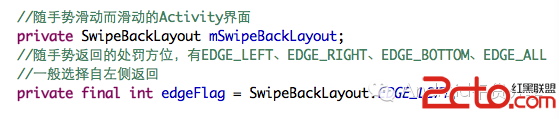
Android 手機都有返回鍵,不論實體鍵還是虛擬鍵,使用者絕大多數的頁面返回操作都靠它完成,不像 iOS 只保留一個實體按鍵那麼單一。 除了系統返回鍵,還有一種同樣常見
 Android Loading 界面:以 Shader 實現動態圖片顯示
先看效果圖(方框由左至右依序顯示): 圖片資源: 原理介紹: 第一步:把三張圖片按位置擺放妥當。此時圖片資源會全部顯示,目的是先確保位置的正確性。 第二步:撰寫 sh
 Android N 行為變更整理:這些調整可能會影響你的應用
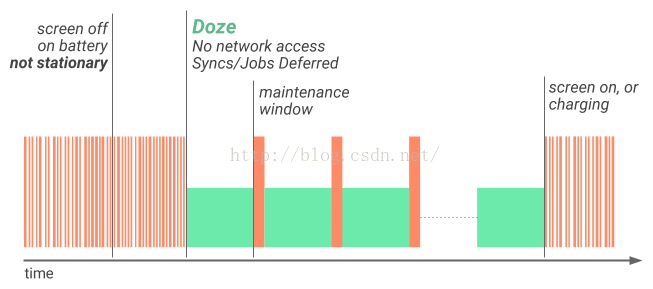
Android N 除了帶來大量新功能,也對系統與 API 的既有行為做了不少調整。以下幾項最值得留意,如果你曾經上架過應用,請務必評估影響。 效能相關調整 為了解決電