

編輯:關於 Android 程式設計
很多應用都需要提供參數設置功能,比如 QQ 裡「是否允許陌生人加我為好友」。保存這類配置參數,Windows 軟體通常用 ini 檔,J2SE 應用常用 properties 或 xml。那 Android 呢?
Android 提供了 SharedPreferences 類,它是一個輕量級的存儲類,特別適合保存軟體配置參數。它的底層其實就是 xml 檔,存放路徑為 /data/data/<package name>/shared_prefs:
SharedPreferences sharedPreferences = getSharedPreferences("ljq", Context.MODE_PRIVATE);

Editor editor = sharedPreferences.edit();   // 取得編輯器
editor.putString("name", "林計欽");
editor.putInt("age", 24);
editor.commit();                            // 提交修改
生成的 ljq.xml 內容如下:
<?xml version='1.0' encoding='utf-8' standalone='yes' ?>
<map>
    <string name="name">林計欽</string>
    <int name="age" value="24" />
</map>
getSharedPreferences(name, mode) 的第一個參數指定檔名,不需要帶副檔名,Android 會自動補上;第二個參數指定操作模式,共四種。若希望這個 xml 檔能被其他應用讀寫,可以指定 Context.MODE_WORLD_READABLE 與 Context.MODE_WORLD_WRITEABLE 權限。
另外,Activity 還提供了 getPreferences(mode) 方法,它預設以當前類不帶包名的類名作為檔名。
SharedPreferences sharedPreferences = getSharedPreferences("ljq", Context.MODE_PRIVATE);

// 第二個參數為缺省值,若 preference 中不存在該 key,則回傳缺省值
String name = sharedPreferences.getString("name", "");
int age = sharedPreferences.getInt("age", 1);
要訪問其他應用的 Preference,前提條件是該 preference 建立時指定了 MODE_WORLD_READABLE 或 MODE_WORLD_WRITEABLE 權限。
例如有個 package name 為 com.ljq.action 的應用這樣建立:
getSharedPreferences("ljq", Context.MODE_WORLD_READABLE);其他應用要訪問它,需要先建立對應的 Context,再透過 Context 取得 preference(此時會去該包下的 shared_prefs 目錄尋找):
Context otherAppsContext = createPackageContext("com.ljq.action", Context.CONTEXT_IGNORE_SECURITY);
SharedPreferences sharedPreferences =
        otherAppsContext.getSharedPreferences("ljq", Context.MODE_WORLD_READABLE);
String name = sharedPreferences.getString("name", "");
int age = sharedPreferences.getInt("age", 0);
如果不透過 Context,也可以直接以讀取 xml 檔的方式訪問:
File xmlFile = new File("/data/data/<package name>/shared_prefs/itcast.xml");<?xml version="1.0" encoding="utf-8"?>
<resources>
<string name="hello">Hello World, SpActivity!</string>
<string name="app_name">軟件配置參數</string>
<string name="name">姓名</string>
<string name="age">年齡</string>
<string name="button">保存設置</string>
<string name="showButton">顯示</string>
</resources><?xml version="1.0" encoding="utf-8"?>
<LinearLayout xmlns:android="https://schemas.android.com/apk/res/android"
android:orientation="vertical"
android:layout_width="fill_parent"
android:layout_height="fill_parent">
<RelativeLayout
android:layout_width="wrap_content"
android:layout_height="wrap_content">
<TextView android:id="@+id/nameLable"
android:layout_width="wrap_content"
android:layout_height="wrap_content"
android:text="@string/name"
android:textSize="20px" />
<EditText android:id="@+id/name"
android:layout_width="80px"
android:layout_height="wrap_content"
android:layout_toRightOf="@id/nameLable"
android:layout_alignTop="@id/nameLable"
android:layout_marginLeft="10px" />
</RelativeLayout>
<RelativeLayout
android:layout_width="wrap_content"
android:layout_height="wrap_content">
<TextView android:id="@+id/ageLable"
android:layout_width="wrap_content"
android:layout_height="wrap_content"
android:text="@string/age"
android:textSize="20px" />
<EditText android:id="@+id/age"
android:layout_width="80px"
android:layout_height="wrap_content"
android:layout_toRightOf="@id/ageLable"
android:layout_alignTop="@id/ageLable"
android:layout_marginLeft="10px" />
</RelativeLayout>
<RelativeLayout
android:layout_width="wrap_content"
android:layout_height="wrap_content">
<Button android:id="@+id/button"
android:layout_width="wrap_content"
android:layout_height="wrap_content"
android:text="@string/button" />
<Button android:id="@+id/showButton"
android:layout_width="wrap_content"
android:layout_height="wrap_content"
android:text="@string/showButton"
android:layout_toRightOf="@id/button"
android:layout_alignTop="@id/button" />
</RelativeLayout>
<TextView android:id="@+id/showText"
android:layout_width="fill_parent"
android:layout_height="wrap_content"
android:textSize="20px" />
</LinearLayout>package com.ljq.activity;
import android.app.Activity;
import android.content.Context;
import android.content.SharedPreferences;
import android.content.SharedPreferences.Editor;
import android.os.Bundle;
import android.view.View;
import android.widget.Button;
import android.widget.EditText;
import android.widget.TextView;
import android.widget.Toast;
public class SpActivity extends Activity {
private EditText nameText;
private EditText ageText;
private TextView resultText;
@Override
public void onCreate(Bundle savedInstanceState) {
super.onCreate(savedInstanceState);
setContentView(R.layout.main);
nameText = (EditText) this.findViewById(R.id.name);
ageText = (EditText) this.findViewById(R.id.age);
resultText = (TextView) this.findViewById(R.id.showText);
Button button = (Button) this.findViewById(R.id.button);
Button showButton = (Button) this.findViewById(R.id.showButton);
button.setOnClickListener(listener);
showButton.setOnClickListener(listener);
// 回顯:ljq123.xml 存放在 /data/data/<package name>/shared_prefs 下
SharedPreferences sharedPreferences = getSharedPreferences("ljq123",
Context.MODE_WORLD_READABLE + Context.MODE_WORLD_WRITEABLE);
String nameValue = sharedPreferences.getString("name", "");
int ageValue = sharedPreferences.getInt("age", 1);
nameText.setText(nameValue);
ageText.setText(String.valueOf(ageValue));
}
private View.OnClickListener listener = new View.OnClickListener() {
public void onClick(View v) {
Button button = (Button) v;
SharedPreferences sharedPreferences = getSharedPreferences("ljq123",
Context.MODE_WORLD_READABLE + Context.MODE_WORLD_WRITEABLE);
switch (button.getId()) {
case R.id.button:
String name = nameText.getText().toString();
int age = Integer.parseInt(ageText.getText().toString());
Editor editor = sharedPreferences.edit(); // 取得編輯器
editor.putString("name", name);
editor.putInt("age", age);
editor.commit(); // 提交修改
Toast.makeText(SpActivity.this, "保存成功", Toast.LENGTH_LONG).show();
break;
case R.id.showButton:
String nameValue = sharedPreferences.getString("name", "");
int ageValue = sharedPreferences.getInt("age", 1);
resultText.setText("姓名:" + nameValue + ",年齡:" + ageValue);
break;
}
}
};
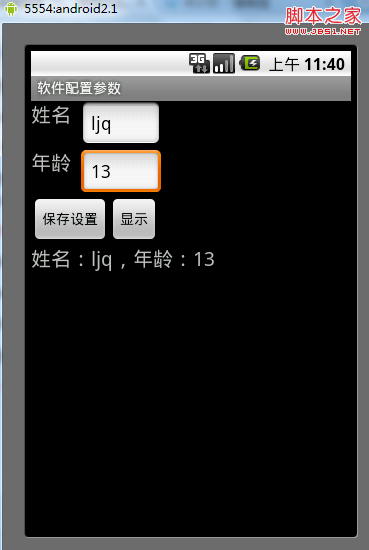
}運行結果:
package com.ljq.sp;

import java.io.File;
import java.io.FileInputStream;

import android.content.Context;
import android.content.SharedPreferences;
import android.test.AndroidTestCase;
import android.util.Log;

public class AccessSharePreferenceTest extends AndroidTestCase {
    private static final String TAG = "AccessSharePreferenceTest";

    /** 方式一:直接讀取 xml 檔(權限要足夠) */
    public void testAccessPreference() throws Exception {
        String path = "/data/data/com.ljq.activity/shared_prefs/ljq123.xml";
        File file = new File(path);
        FileInputStream inputStream = new FileInputStream(file);
        // 讀到的是一個 xml 字串
        String data = new FileService().read(inputStream);
        Log.i(TAG, data);
    }

    /** 方式二:透過 Context 訪問(權限要足夠) */
    public void testAccessPreference2() throws Exception {
        Context context = this.getContext().createPackageContext(
                "com.ljq.activity", Context.CONTEXT_IGNORE_SECURITY);
        SharedPreferences sharedPreferences = context.getSharedPreferences("ljq123",
                Context.MODE_WORLD_READABLE + Context.MODE_WORLD_WRITEABLE);
        String name = sharedPreferences.getString("name", "");
        int age = sharedPreferences.getInt("age", 1);
        Log.i(TAG, name + " : " + age);
    }
}實務提醒:MODE_WORLD_READABLE 這類開放權限會讓任意應用讀到你的資料,在真實專案中應謹慎使用,敏感資訊更不建議以 SharedPreferences 明文存放。
 Android 開發筆記:用列舉型別取代整數集合
問題從哪裡來 翻 Android API 會發現大量「以整數集合當參數」的設計。以 LinearLayout 為例,它的方向屬性是這樣設定的: LinearLayout.
 Android 向上推送式菜單實作
在百度地圖等需要保留手勢操作的應用中,側滑菜單可能與地圖手勢衝突。此時可改用向上推拉的菜單,透過按鈕觸發顯示與隱藏。 實作思路 版面配置可包含兩個主要區域:主視圖與菜
 Android ActionBar 動作欄完整解析
一、ActionBar 是什麼 ActionBar(動作欄)是一個導航控制項,用來取代傳統螢幕頂端的標題欄。它固定顯示在螢幕上方,左側擺放應用圖示,右側則是操作選單的可
 Android 樣式與主題:Style、Shape、Selector 與動畫
多語言資源 Android 可以透過不同的 values 目錄提供多語言資源。例如建立 values-en-US 目錄並放入 strings.xml,當系統語言切換為英文