

編輯:關於 Android 程式設計
Service 是 Android 四大元件之一,是一種在後台執行、不與使用者直接互動的服務。它沒有介面,卻能在應用退出後依然存活,因而廣泛應用於音樂播放、資料定時更新等場景。
舉例來說,當我們邊聽音樂邊做其他事,即使退出了播放程式,音樂仍應持續——這正是 Service 的用武之地。又比如應用需要定時從網路更新資料,就可以用 Service 在後台週期性執行,而不必每次開啟應用時才重新抓取。
相較於 Activity,Service 的生命週期單純許多,主要環繞 onCreate()、onStart()、onDestroy() 三個方法。第一次啟動 Service 時,會依序呼叫 onCreate 與 onStart;停止時則呼叫 onDestroy。需要注意的是:若 Service 已啟動,再次啟動時不會重複執行 onCreate,而是直接執行 onStart。
Service 在後端處理的資料,最終仍要呈現在前端的 Activity 上。由於啟動 Service 時系統會開啟新進程,這就涉及跨進程通訊(AIDL)。當我們想取得 Service 實例並呼叫其方法時,可使用 bindService 與 unBindService,它們分別對應 Service 中的 onBind() 與 onUnbind() 方法。
public class LService extends Service {
    private static final String TAG = "LService";
    @Override
    public IBinder onBind(Intent intent) {
        Log.i(TAG, "onbind");
        return null;
    }
    @Override
    public void onCreate() {
        Log.i(TAG, "oncreate");
        super.onCreate();
    }
    @Override
    public void onStart(Intent intent, int startId) {
        Log.i(TAG, "onstart");
        super.onStart(intent, startId);
    }
    @Override
    public void onDestroy() {
        Log.i(TAG, "ondestoty");
        super.onDestroy();
    }
    @Override
    public boolean onUnbind(Intent intent) {
        Log.i(TAG, "onubind");
        return super.onUnbind(intent);
    }
    public String getSystemTime() {
        Time t = new Time();
        t.setToNow();
        return t.toString();
    }
    public class LBinder extends Binder {
        LService getService() {
            return LService.this;
        }
    }
}<Button
android:id="@+id/startservice"
android:layout_width="fill_parent"
android:layout_height="wrap_content"
android:text="startService" />
<Button
android:id="@+id/stopservice"
android:layout_width="fill_parent"
android:layout_height="wrap_content"
android:text="stopService" />
<Button
android:id="@+id/bindservice"
android:layout_width="fill_parent"
android:layout_height="wrap_content"
android:text="bindService" />
<Button
android:id="@+id/unbindservice"
android:layout_width="fill_parent"
android:layout_height="wrap_content"
android:text="unbindService" />透過 ServiceConnection,我們能在綁定成功時取得 Service 實例並呼叫其方法:
public class MainActivity extends Activity implements OnClickListener {
    private LService mLService;
    private TextView mTextView;
    private Button startServiceButton, stopServiceButton, bindServiceButton, unbindServiceButton;
    private Context mContext;
    // ServiceConnection 用於 bindService 與 unBindService
    private ServiceConnection mServiceConnection = new ServiceConnection() {
        @Override
        public void onServiceConnected(ComponentName name, IBinder service) {
            mLService = ((LService.LBinder) service).getService();
            mTextView.setText("I am from Service :" + mLService.getSystemTime());
        }
        public void onServiceDisconnected(ComponentName name) {}
    };
    @Override
    protected void onCreate(Bundle savedInstanceState) {
        super.onCreate(savedInstanceState);
        setContentView(R.layout.activity_main);
        setupViews();
    }
    @Override
    public void onClick(View v) {
        if (v == startServiceButton) {
            mContext.startService(new Intent(MainActivity.this, LService.class));
        } else if (v == stopServiceButton) {
            mContext.stopService(new Intent(MainActivity.this, LService.class));
        } else if (v == bindServiceButton) {
            mContext.bindService(new Intent(MainActivity.this, LService.class),
                    mServiceConnection, BIND_AUTO_CREATE);
        } else {
            mContext.unbindService(mServiceConnection);
        }
    }
}別忘了在清單檔中註冊 Service:
<service
    android:name=".LService"
    android:exported="true" >
</service>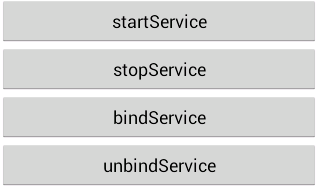 程式界面
點擊 startService  此時在系統設定中可看到 Running Service 多了一個 LService。
點擊 bindService  此時 Service 已被關閉(解除綁定)。

透過這組 startService、stopService、bindService、unbindService 的操作,你能清楚觀察到 Service 生命週期各方法的觸發時機,是理解 Service 運作機制的最佳實務範例。
 詳解 Android 7.0 新工具類 DiffUtil:告別 notifyDataSetChanged 的增量刷新
一、概述 DiffUtil 是 support-v7:24.2.0 加入的工具類,作用是比較兩個資料集,算出「舊資料集 → 新資料集」的最小變化量。說到資料集,搭檔自然
 告別 Eclipse!Android Studio 新手入門配置全攻略(一)
寫在前面 作為一個剛踏進 Android 開發大門的新手,我曾用 Eclipse 開發過兩個自我感覺還不夠成熟的商城類 App。一路折騰下來,踩了不少坑,也總結出幾個最迫
 在 Android Studio 裡讀懂 Android 5.0 Lollipop 源碼
關於 Android Studio 作為 Google 的「親兒子」,Nexus 系列的待遇大家有目共睹——Android 5.0 一發布,Nexus 5 就第一時間拿到
 Android 音樂播放器開發心得總結
從模仿開始 這是花一個星期完成、具備基本功能的音樂播放器,包含上一首、下一首、暫停,以及隨機、順序、單曲等播放模式,並能保存上次的播放狀態,唯一缺少的是歌詞顯示功能。整體