

編輯:關於 Android 程式設計
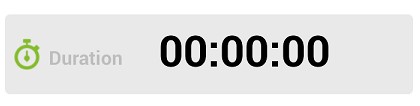
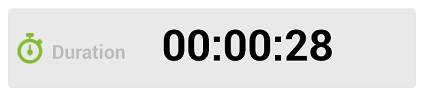
需求是這樣的:初始顯示「00:00:00」,點擊開始後歸零並開始計時,如 10:28:34;點擊停止則暫停計時。
過程中踩過一個坑:使用 Calendar、DateFormat 的方式時,不設時區抓到的是本地時區時間(東八區就是 8),設成 GMT 標準時區又會變成 12 小時制,且設 24 小時制無效;無論怎麼加減小時都達不到從 00:00:00 開始的效果,計時還會到 12 小時就跳掉。
試遍各種時間設定法都無效後,最後決定自己寫一個「依秒數轉換時間格式字串」的方法,測試後完全可行。要注意兩位數最多顯示到 99 小時,若要顯示更大時數需自行調整;小時數也不能無限大,超過 long 型別長度會變負數而發生異常。
public class TestTime {
    public static void main(String[] args) {
        TestTime tt = new TestTime();
        tt.showTimeCount(99 * 3600000 + 75 * 1000);
    }

    // 時間計數器,最多只能到 99 小時,如需更大時數需改方法
    public String showTimeCount(long time) {
        System.out.println("time=" + time);
        if (time >= 360000000) {
            return "00:00:00";
        }
        String timeCount = "";
        long hourc = time / 3600000;
        String hour = "0" + hourc;
        hour = hour.substring(hour.length() - 2, hour.length());

        long minuec = (time - hourc * 3600000) / 60000;
        String minue = "0" + minuec;
        minue = minue.substring(minue.length() - 2, minue.length());

        long secc = (time - hourc * 3600000 - minuec * 60000) / 1000;
        String sec = "0" + secc;
        sec = sec.substring(sec.length() - 2, sec.length());

        timeCount = hour + ":" + minue + ":" + sec;
        System.out.println("timeCount=" + timeCount);
        return timeCount;
    }
}// 時間計數器,最多只能到 99 小時
public String showTimeCount(long time) {
if (time >= 360000000) {
return "00:00:00";
}
String timeCount = "";
long hourc = time / 3600000;
String hour = "0" + hourc;
hour = hour.substring(hour.length() - 2, hour.length());
long minuec = (time - hourc * 3600000) / 60000;
String minue = "0" + minuec;
minue = minue.substring(minue.length() - 2, minue.length());
long secc = (time - hourc * 3600000 - minuec * 60000) / 1000;
String sec = "0" + secc;
sec = sec.substring(sec.length() - 2, sec.length());
timeCount = hour + ":" + minue + ":" + sec;
return timeCount;
}
private Handler stepTimeHandler;
private Runnable mTicker;
long startTime = 0;
// 開始按鈕
class startBtnListener implements OnClickListener {
@Override
public void onClick(View v) {
Button b = (Button) v;
String buttonText = b.getText().toString();
if ("Start".equalsIgnoreCase(buttonText)) {
b.setText("Stop");
// 清零 開始計時
stepTimeTV.setText("00:00:00");
stepTimeHandler = new Handler();
startTime = System.currentTimeMillis();
mTicker = new Runnable() {
public void run() {
String content = showTimeCount(System.currentTimeMillis() - startTime);
stepTimeTV.setText(content);
long now = SystemClock.uptimeMillis();
long next = now + (1000 - now % 1000);
stepTimeHandler.postAtTime(mTicker, next);
}
};
// 啟動計時,定時更新
mTicker.run();
} else {
b.setText("Start");
// 停止計時:移除訊息佇列中待處理的 Runnable
stepTimeHandler.removeCallbacks(mTicker);
}
}
}以下是用 Calendar 與 DateFormat 的嘗試,因時區問題無法正常顯示 00:00:00,僅供參考:
// 透過 Calendar 時間設定,無法正常顯示小時為 0
class startBtnListener implements OnClickListener {
    @Override
    public void onClick(View v) {
        Button b = (Button) v;
        String buttonText = b.getText().toString();
        if ("Start".equalsIgnoreCase(buttonText)) {
            b.setText("Stop");
            stepTimeTV.setText("00:00:00");
            if (mCalendar == null) {
                mCalendar = Calendar.getInstance();
                TimeZone tz = TimeZone.getTimeZone("GMT");
                mCalendar.setTimeZone(tz);
                mCalendar.get(Calendar.HOUR_OF_DAY); // 24 小時制
            }
            stepTimeHandler = new Handler();
            // System.currentTimeMillis() 返回自 1970 到現在的毫秒數
            // 直接取的是當地時區時間,設 GMT 後始終多 12 小時
            startTime = System.currentTimeMillis();
            mTicker = new Runnable() {
                public void run() {
                    long showTime = System.currentTimeMillis() - startTime;
                    Log.i(TAG, showTime + "");
                    mCalendar.setTimeInMillis(showTime + 13 * 3600000 + 1000);
                    String content = (String) DateFormat.format(mFormat, mCalendar);
                    stepTimeTV.setText(content);

                    long now = SystemClock.uptimeMillis();
                    long next = now + (1000 - now % 1000);
                    stepTimeHandler.postAtTime(mTicker, next);
                }
            };
            mTicker.run();
        } else {
            b.setText("Start");
            stepTimeHandler.removeCallbacks(mTicker);
        }
    }
}

private Handler stepTimeHandler;
Calendar mCalendar;
String mFormat = "yyyy-MM-dd hh:mm:ss";
long startTime = 0;
private Runnable mTicker;
結論:與其和時區、格式化纏鬥,不如自己把毫秒差值換算成時、分、秒再拼字串,反而簡單可靠。搭配 Handler 的 postAtTime 每秒更新一次,並用 removeCallbacks 停止,就能做出一個精準的碼錶計時器。
 我們為什麼要在 Android 中使用 RxJava
近來 RxJava 風生水起,不學一下都不好意思了。本人也是初學 RxJava,起初還覺得代碼好像更複雜、更難懂了,直到讀到一篇外文深有共鳴,便簡單翻譯過來分享給大家。本
 Android Volley 二次封裝實作:打造可重複使用的網路請求基層
Volley 的定位 Volley 是 Google 推出的網路通訊框架,擅長高頻、小數據量的請求,例如 JSON 介面、列表資料與圖片載入。它不適合大檔案下載。 匯入
 微信理財通怎麼買?從綁定銀行卡到收益入帳
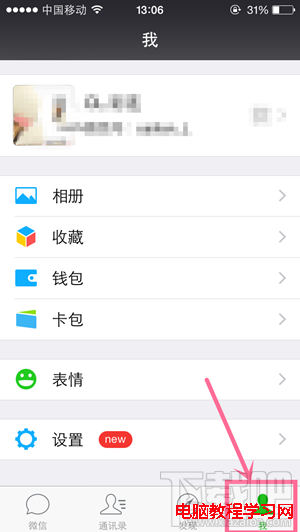
使用微信理財通前,需先在微信錢包綁定銀行卡,且零錢餘額要足夠。進入我、錢包、理財通,了解產品後選擇買入。 填寫金額並同意協議,選擇銀行卡支付。完成後可查看收益到帳時間。
 漫談 Android 系統(七):Log 系統的源碼追蹤(上)
前言 羅升陽的《Android 系統源代碼情景分析》裡講到過 log 最終是怎麼顯示出來的,但書上的描述畢竟停留在概念層面——代碼裡到底是如何落地的?這個問題值得細細追一