

編輯:關於 Android 程式設計
先奉上效果圖。
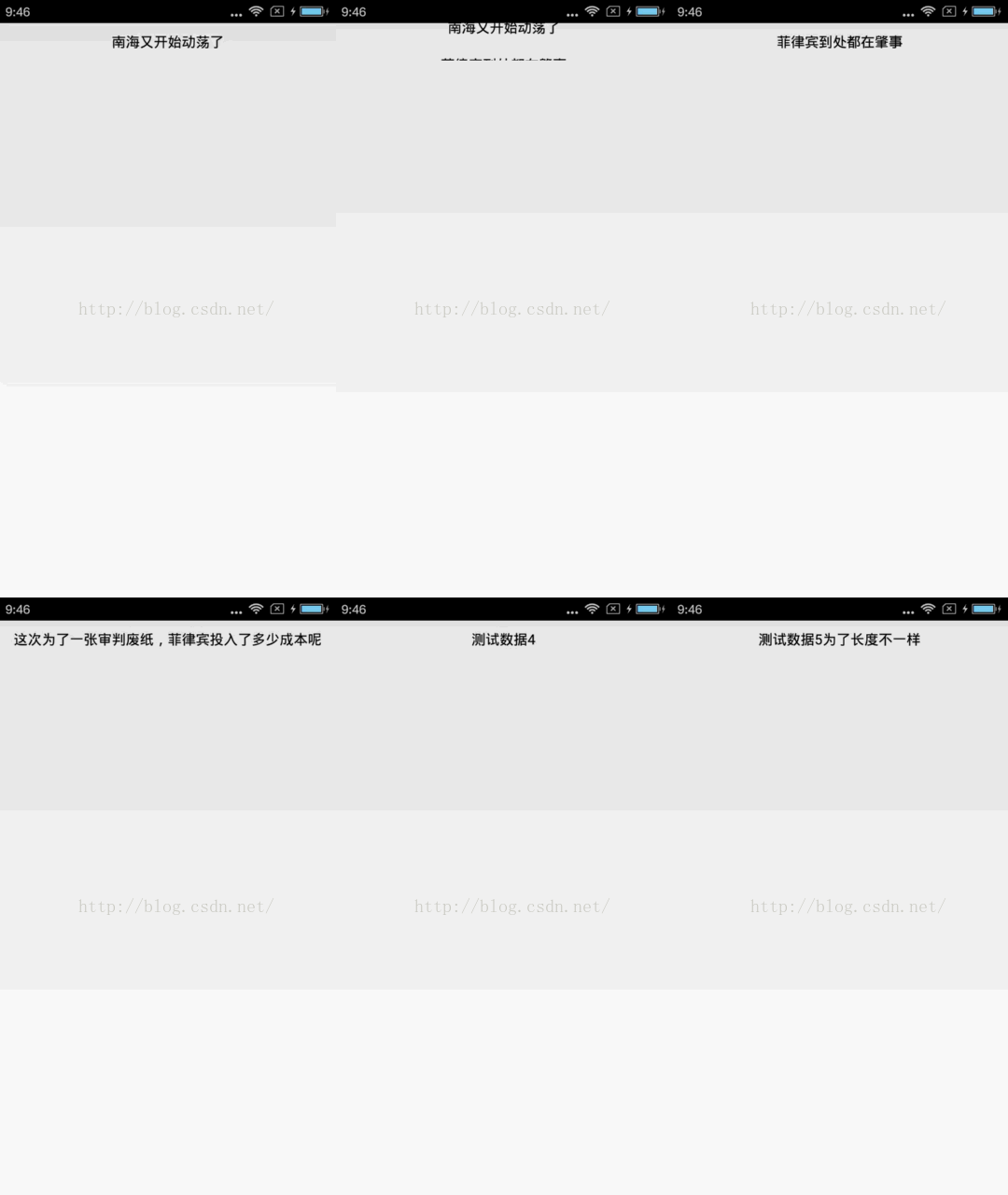
中間的色塊是影片轉 GIF 造成的失真,自動忽略即可。
大家都知道,橫向跑馬燈用 Android 自帶的 TextView 就能實現,詳情可搜尋【Android 跑馬燈效果】。但垂直跑馬燈原生 Android 並不支援。網上雖有不少人實現了自訂效果,但我向來不愛直接看別人的程式碼,所以這篇部落格的思路完全出自我自己的構想。
首先,我們要為自訂控制項梳理整體格局,如下圖:
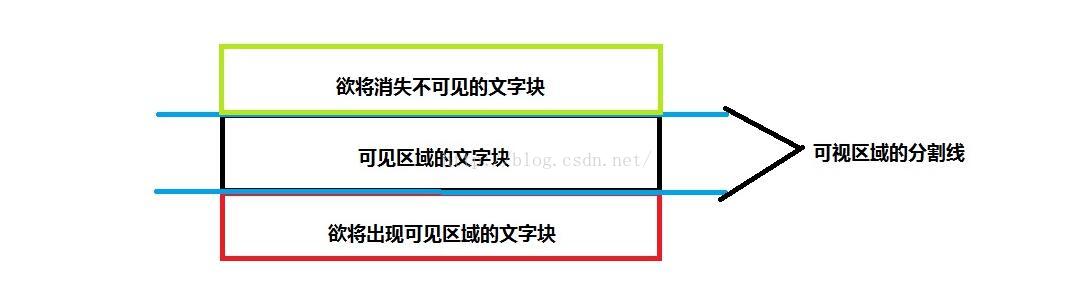
1、首先將控制項分為三個區塊:上方綠色部分為消失不可見的區塊,中間黑色部分為可見區域,下方紅色部分為欲出現但暫不可見的區域。藍線代表整個控制項的上線與下線。
2、先在記憶體中放入兩個文字塊,分別是黑色部分的可見塊與紅色部分的欲出現塊。
3、求出這些塊的寬度、高度與中心點坐標值。
4、滾動時,動態改變每個塊的中心點 y 坐標,使其向上平移。
5、當平移結束後,可見塊位於欲消失的不可見塊位置,欲出現的可見塊位於可見區域。此時將欲消失的文字塊移出 List,重新設定下一個索引的 Text 與重心坐標值,再加入 List 並刷新。
6、用一個 Handler 處理動畫的間隔時間,並以屬性動畫 ValueAnimator 實現平移動畫。
下面開始講解程式碼。首先用鏈式設定法設定一些常規屬性:
public VerticalMarqueeView color(int color){ this.color = color; return this; } public VerticalMarqueeView textSize(int textSize){ this.textSize = textSize; return this; } public VerticalMarqueeView datas(String[] datas){ this.datas = datas; return this; } public void commit(){ if(this.datas == null || datas.length == 0){ Log.e("VerticalMarqueeView", "the datas's length is illegal"); throw new IllegalStateException("may be not invoke the method named datas(String[])"); } paint.setColor(color); paint.setTextSize(textSize); }
最後一定要呼叫 commit 方法進行提交。從程式碼可以看出,這裡除了有排空措施,還有最重要的一步:設定字體大小。
接著我抽象出一個文字塊的 bean 類別:
public class TextBlock { private int width; private int height; private String text; private int drawX; private int drawY; private Paint paint; private int position; public TextBlock(int width, int height, Paint paint){ this.width = width; this.height = height; this.paint = paint; } public void reset(int centerY){ reset(text, centerX, centerY, position); } public void reset(String text, int centerY){ reset(text, centerX, centerY, position); } public void reset(String text, int centerY, int position){ reset(text, centerX, centerY, position); } public void reset(String text, int centerX, int centerY, int position){ this.text = text; this.position = position; int measureWidth = (int)paint.measureText(text); drawX = (width - measureWidth) / 2; FontMetrics metrics = paint.getFontMetrics(); drawY = (int)(centerY + (metrics.bottom - metrics.top) / 2 - metrics.bottom); } public int getPosition(){ return position; } public void draw(Canvas canvas){ canvas.drawText(text, drawX, drawY, paint); } }
這個 bean 類別最重要的方法就是幾個重載的 reset,透過改變 centerY 的值,動態調整繪製文字的起點以實現居中繪製。關於文字居中繪製,可參考搜尋【android canvas 居中繪制文本】。
接著是重寫 onMeasure 方法。
@Override protected void onMeasure(int widthMeasureSpec, int heightMeasureSpec){ super.onMeasure(widthMeasureSpec, heightMeasureSpec); if(this.datas == null || this.datas.length == 0){ Log.e("VerticalMarqueeView", "the datas's length is illegal"); return; } width = MeasureSpec.getSize(widthMeasureSpec) - getPaddingLeft() - getPaddingRight(); height = MeasureSpec.getSize(heightMeasureSpec) - getPaddingTop() - getPaddingBottom(); centerX = width / 2; centerY = height / 2; blocks.clear(); //添加顯示區域的文字塊 TextBlock block1 = new TextBlock(width, height, paint); block1.reset(datas[0], centerX, centerY, 0); blocks.add(block1); if(datas.length > 1){ TextBlock block2 = new TextBlock(width, height, paint); block2.reset(datas[1], centerX, centerY + height, 1); blocks.add(block2); } }
這個方法首先做非空判斷,以免出現致命邏輯錯誤;接著取得整個控制項的寬高與重心坐標;然後實例化兩個文字塊 TextBlock。第一個文字塊透過 reset 將中點 y 坐標設為整個控制項的中點 y 坐標;第二個則設為 centerY+height,也就是置於下一個文字塊的不可見區域內。
接著是 onDraw 方法,這個方法非常簡單,因為業務邏輯已交由 TextBlock 的 draw 方法處理了。
@Override protected void onDraw(Canvas canvas){ for(int i = 0; i < blocks.size(); i++){ blocks.get(i).draw(canvas); } }
最關鍵的就是滾動效果的實現。先給出開始滾動與結束滾動兩個方法。
public void startScroll(){ isStopScroll = false; if(datas == null || datas.length == 0 || datas.length == 1){ Log.e("VerticalMarqueeView", "the datas's length is illegal"); return; } if(!isStopScroll){ handler.postDelayed(new Runnable(){ @Override public void run(){ scroll(); if(!isStopScroll){ handler.postDelayed(this, DURATION_SCROLL); } } }, DURATION_SCROLL); } } public void stopScroll(){ this.isStopScroll = true; }
原理很簡單:先給出一個 boolean 標誌 isStopScroll,然後用 Handler 的 postDelayed 方法循環延遲呼叫 scroll 方法進行滾動。接下來是全文最重要的 scroll 方法。
private void scroll(){ ValueAnimator animator = ValueAnimator.ofPropertyValuesHolder(PropertyValuesHolder.ofInt("scrollY", centerY, centerY - height)); animator.setDuration(DURATION_ANIMATOR); animator.addUpdateListener(new AnimatorUpdateListener(){ @Override public void onAnimationUpdate(ValueAnimator animation){ int scrollY = (int)animation.getAnimatedValue("scrollY"); blocks.get(0).reset(scrollY); blocks.get(1).reset(scrollY + height); invalidate(); } }); animator.addListener(new AnimatorListener(){ @Override public void onAnimationStart(Animator animation){ } @Override public void onAnimationRepeat(Animator animation){ } @Override public void onAnimationEnd(Animator animation){ //移除第一塊 int position = blocks.get(1).getPosition(); TextBlock textBlock = blocks.remove(0); //最後一個 if(position == datas.length - 1){ position = 0; }else{ position ++; } textBlock.reset(datas[position], centerY + height, position); blocks.add(textBlock); invalidate(); } @Override public void onAnimationCancel(Animator animation){ } }); animator.start(); }
首先採用 ValueAnimator 進行屬性動畫,起始值為控制項的中點 y 坐標,結束值為 centerY-height,意味著要從下往上移動一個文字塊的距離。接著在動畫更新回調中,對文字塊呼叫 reset。當動畫結束後,取得第二個文字塊的 position 值,然後移除第一個文字塊,重新 reset 這個文字塊的索引值,再加入 List 容器中,如此循環。
最後提供一個 get 方法返回 position。
public int getCurrentPosition(){ if(datas == null || datas.length == 0){ return -1; } if(datas.length == 1 && blocks.size() == 1){ return 0; } return blocks.get(0).getPosition(); }
上述就是這個自訂控制項的全部程式碼。考慮到較為零散,這裡把完整程式碼一併列出:
/** * @FileName: VerticalMarqueeView.java * @Author * @Description: * @Date 2016年7月13日 上午9:32:27 * @CopyRight CNP Corporation */ package cc.wxf.component; import android.animation.Animator; import android.animation.Animator.AnimatorListener; import android.animation.PropertyValuesHolder; import android.animation.ValueAnimator; import android.animation.ValueAnimator.AnimatorUpdateListener; import android.content.Context; import android.graphics.Canvas; import android.graphics.Color; import android.graphics.Paint; import android.graphics.Paint.FontMetrics; import android.os.Handler; import android.util.AttributeSet; import android.util.Log; import android.view.View; import java.util.ArrayList; import java.util.List; public class VerticalMarqueeView extends View{ public static final int DURATION_SCROLL = 3000; public static final int DURATION_ANIMATOR = 1000; private int color = Color.BLACK; private int textSize = 30; private String[] datas = null; private int width; private int height; private int centerX; private int centerY; private List blocks = new ArrayList(2); private Paint paint = new Paint(Paint.ANTI_ALIAS_FLAG); private Handler handler = new Handler(); private boolean isStopScroll = false; public VerticalMarqueeView(Context context, AttributeSet attrs, int defStyleAttr){ super(context, attrs, defStyleAttr); } public VerticalMarqueeView(Context context, AttributeSet attrs){ super(context, attrs); } public VerticalMarqueeView(Context context){ super(context); } public VerticalMarqueeView color(int color){ this.color = color; return this; } public VerticalMarqueeView textSize(int textSize){ this.textSize = textSize; return this; } public VerticalMarqueeView datas(String[] datas){ this.datas = datas; return this; } public void commit(){ if(this.datas == null || datas.length == 0){ Log.e("VerticalMarqueeView", "the datas's length is illegal"); throw new IllegalStateException("may be not invoke the method named datas(String[])"); } paint.setColor(color); paint.setTextSize(textSize); } @Override protected void onMeasure(int widthMeasureSpec, int heightMeasureSpec){ super.onMeasure(widthMeasureSpec, heightMeasureSpec); if(this.datas == null || this.datas.length == 0){ Log.e("VerticalMarqueeView", "the datas's length is illegal"); return; } width = MeasureSpec.getSize(widthMeasureSpec) - getPaddingLeft() - getPaddingRight(); height = MeasureSpec.getSize(heightMeasureSpec) - getPaddingTop() - getPaddingBottom(); centerX = width / 2; centerY = height / 2; blocks.clear(); //添加顯示區域的文字塊 TextBlock block1 = new TextBlock(width, height, paint); block1.reset(datas[0], centerX, centerY, 0); blocks.add(block1); if(datas.length > 1){ TextBlock block2 = new TextBlock(width, height, paint); block2.reset(datas[1], centerX, centerY + height, 1); blocks.add(block2); } } @Override protected void onDraw(Canvas canvas){ for(int i = 0; i < blocks.size(); i++){ blocks.get(i).draw(canvas); } } public void startScroll(){ isStopScroll = false; if(datas == null || datas.length == 0 || datas.length == 1){ Log.e("VerticalMarqueeView", "the datas's length is illegal"); return; } if(!isStopScroll){ handler.postDelayed(new Runnable(){ @Override public void run(){ scroll(); if(!isStopScroll){ handler.postDelayed(this, DURATION_SCROLL); } } }, DURATION_SCROLL); } } public void stopScroll(){ this.isStopScroll = true; } private void scroll(){ ValueAnimator animator = ValueAnimator.ofPropertyValuesHolder(PropertyValuesHolder.ofInt("scrollY", centerY, centerY - height)); animator.setDuration(DURATION_ANIMATOR); animator.addUpdateListener(new AnimatorUpdateListener(){ @Override public void onAnimationUpdate(ValueAnimator animation){ int scrollY = (int)animation.getAnimatedValue("scrollY"); blocks.get(0).reset(scrollY); blocks.get(1).reset(scrollY + height); invalidate(); } }); animator.addListener(new AnimatorListener(){ @Override public void onAnimationStart(Animator animation){ } @Override public void onAnimationRepeat(Animator animation){ } @Override public void onAnimationEnd(Animator animation){ //移除第一塊 int position = blocks.get(1).getPosition(); TextBlock textBlock = blocks.remove(0); //最後一個 if(position == datas.length - 1){ position = 0; }else{ position ++; } textBlock.reset(datas[position], centerY + height, position); blocks.add(textBlock); invalidate(); } @Override public void onAnimationCancel(Animator animation){ } }); animator.start(); } public int getCurrentPosition(){ if(datas == null || datas.length == 0){ return -1; } if(datas.length == 1 && blocks.size() == 1){ return 0; } return blocks.get(0).getPosition(); } public class TextBlock { private int width; private int height; private String text; private int drawX; private int drawY; private Paint paint; private int position; public TextBlock(int width, int height, Paint paint){ this.width = width; this.height = height; this.paint = paint; } public void reset(int centerY){ reset(text, centerX, centerY, position); } public void reset(String text, int centerY){ reset(text, centerX, centerY, position); } public void reset(String text, int centerY, int position){ reset(text, centerX, centerY, position); } public void reset(String text, int centerX, int centerY, int position){ this.text = text; this.position = position; int measureWidth = (int)paint.measureText(text); drawX = (width - measureWidth) / 2; FontMetrics metrics = paint.getFontMetrics(); drawY = (int)(centerY + (metrics.bottom - metrics.top) / 2 - metrics.bottom); } public int getPosition(){ return position; } public void draw(Canvas canvas){ canvas.drawText(text, drawX, drawY, paint); } } }
最後給出使用方式,很簡單。
package cc.wxf.androiddemo; import android.app.Activity; import android.content.Context; import android.os.Bundle; import android.view.View; import android.widget.Toast; import cc.wxf.component.VerticalMarqueeView; public class MainActivity extends Activity { private VerticalMarqueeView vmView; @Override public void onCreate(Bundle savedInstanceState) { super.onCreate(savedInstanceState); setContentView(R.layout.activity_main); vmView = (VerticalMarqueeView)findViewById(R.id.vmView); String[] datas = new String[]{ "南海又開始動蕩了","菲律賓到處都在肇事","這次為了一張審判廢紙,菲律賓投入了多少成本呢","測試數據4","測試數據5為了長度不一樣","就把這條當做測試數據吧" }; vmView.color(getResources().getColor(android.R.color.black)) .textSize(sp2px(this, 15)) .datas(datas).commit(); vmView.startScroll(); vmView.setOnClickListener(new View.OnClickListener(){ @Override public void onClick(View v){ Toast.makeText(MainActivity.this, "當前的索引為:" + vmView.getCurrentPosition(), Toast.LENGTH_SHORT).show(); } }); } private int sp2px(Context context, int sp){ float density = context.getResources().getDisplayMetrics().scaledDensity; return (int) (sp * density + 0.5f); } @Override protected void onDestroy() { super.onDestroy(); //必須要調用,否則內存中會一直無限循環 vmView.stopScroll(); } }
demo 就不提供了,自訂 View 就只有上面一個檔案。另外,尊重原創,轉載請註明出處。
 Android 插件化初探:仿 QQ 一鍵換膚,思考比實作更重要
群裡有人點題,說想寫一篇關於插件化的文章。老實說我對插件化也算不上精通,於是想了個折衷辦法:先別急著上 DynamicLoadApk 那一類完整框架,而是從「換膚」這個最
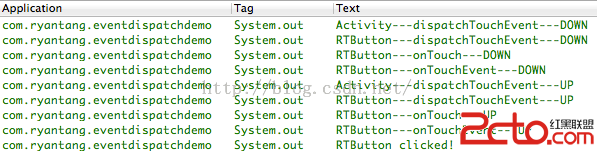 Android 事件分發機制完全解析:三個方法、單層與嵌套布局
一、Android 事件的構成 Android 中的事件包含點按、長按、拖拽、滑動等,點按又分單擊與雙擊,此外還有單指與多指操作。但無論多複雜,所有事件都以三個基本動作為
 Android Property Animation 屬性動畫入門與實作指南
屬性動畫能設定哪些元素 屬性動畫系統可以讓開發者指定 duration、時間插值、重複次數與模式、動畫集合,以及更新頻率。它最大的特色是能直接改變物件的屬性,即使該物件沒
 Android Camera2 API 深度解析(Android 5.0 新特性)
Camera2 是 Android 5.0 引入的全新相機 API,與舊有的 Camera API 相比有著根本性的差異。 Camera2 的亮點 原生支援 RAW 格式