

編輯:關於 Android 程式設計
Android 對圖片的特效處理有許多實用手法,本文整理三個常見實例:圖片縮放、圓角化,以及加上倒影效果。
// zoom 放縮
public static Bitmap zoomBitmap(Bitmap bitmap, int w, int h) {
    int width = bitmap.getWidth();
    int height = bitmap.getHeight();
    Matrix matrix = new Matrix();

    float scaleWidth = w / (float) width;
    float scaleHeight = h / (float) height;
    matrix.postScale(scaleWidth, scaleHeight);

    Bitmap bitmap2 = Bitmap.createBitmap(bitmap, 0, 0, width, height,
            matrix, true);
    return bitmap2;
}
透過 Matrix 的 postScale 指定縮放比例,就能把圖片縮放到目標寬高。
// Round Corner Bitmap 獲得圓角圖片
public static Bitmap getRoundCornerBitmap(Bitmap bitmap, float roundPX /* 圓角的半徑 */) {
    int width = bitmap.getWidth();
    int height = bitmap.getHeight();

    Bitmap bitmap2 = Bitmap.createBitmap(width, height, Config.ARGB_8888);
    Canvas canvas = new Canvas(bitmap2);

    final int color = 0xff424242;
    final Paint paint = new Paint();
    final Rect rect = new Rect(0, 0, width, height);
    final RectF rectF = new RectF(rect);

    paint.setColor(color);
    paint.setAntiAlias(true);
    canvas.drawARGB(0, 0, 0, 0);
    canvas.drawRoundRect(rectF, roundPX, roundPX, paint);

    paint.setXfermode(new PorterDuffXfermode(Mode.SRC_IN));
    canvas.drawBitmap(bitmap, rect, rect, paint);

    return bitmap2;
}
先畫出圓角矩形,再用 PorterDuffXfermode 的 SRC_IN 模式把原圖「填」進圓角範圍內,即可裁出圓角。
// Reflect Bitmap 獲得帶倒影的圖片
public static Bitmap createReflectedBitmap(Bitmap bitmap) {
    // 倒影和圖片本身的間距
    final int reflectedGap = 4;
    int width = bitmap.getWidth();
    int height = bitmap.getHeight();

    Matrix matrix = new Matrix();
    matrix.preScale(1, -1);

    Bitmap reflectedImage = Bitmap.createBitmap(bitmap, 0, height / 2,
            width, height / 2, matrix, false);
    Bitmap reflectedBitmap = Bitmap.createBitmap(width,
            (height + height / 2), Config.ARGB_8888);

    Canvas canvas = new Canvas(reflectedBitmap);
    canvas.drawBitmap(bitmap, 0, 0, null);
    Paint defaultPaint = new Paint();
    canvas.drawRect(0, height, width, height + reflectedGap, defaultPaint);
    canvas.drawBitmap(reflectedImage, 0, height + reflectedGap, null);

    Paint paint = new Paint();
    LinearGradient shader = new LinearGradient(0, bitmap.getHeight(), 0,
            reflectedBitmap.getHeight() + reflectedGap, 0x70ffffff,
            0x00ffffff, TileMode.CLAMP);
    paint.setShader(shader);
    paint.setXfermode(new PorterDuffXfermode(Mode.DST_IN));
    canvas.drawRect(0, height, width, reflectedBitmap.getHeight()
            + reflectedGap, paint);

    return reflectedBitmap;
}
倒影的做法是:先用 matrix.preScale(1, -1) 把圖片上下翻轉產生倒影,再疊上原圖,最後用 LinearGradient 搭配 DST_IN 模式做由上而下由深至淺的漸層,讓倒影自然地淡出。三個特效靈活搭配,就能讓 App 的視覺呈現更精緻動人。
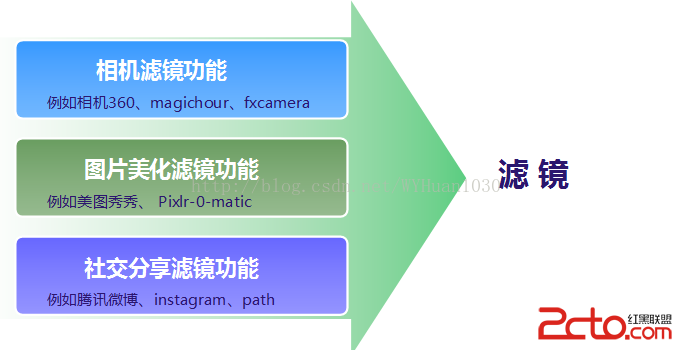 Android Camera 實時濾鏡(二):主流濾鏡應用橫評
一、Android 平台濾鏡概覽 濾鏡功能在當前市場上應用廣泛、發展迅速。歸納起來,主要有以下三類應用都內置了濾鏡功能,各有所長。 二、相機濾鏡介紹 1、相機 360
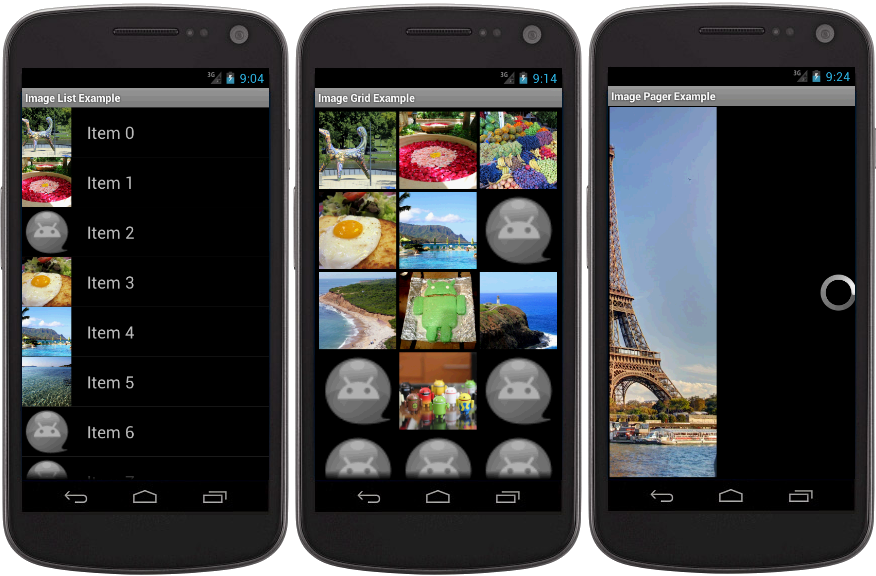 安卓 Universal-Image-Loader 圖片異步加載解析
Android-Universal-Image-Loader 曾經是最受歡迎的開源圖片加載庫之一。它能夠在列表、畫廊、信息流等場景中完成圖片的異步下載、緩存和展示,廣泛應
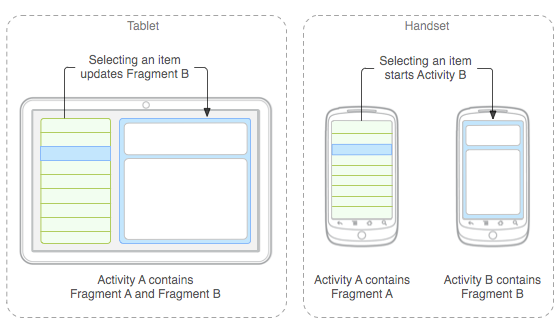 Android Fragment 深入解析:生命週期、版面配置與頁面通訊
Fragment 是 Android 中用來建立模組化介面的元件。它擁有獨立生命週期,可嵌入 Activity,也能在執行時動態新增、移除或替換。適當使用 Fragmen
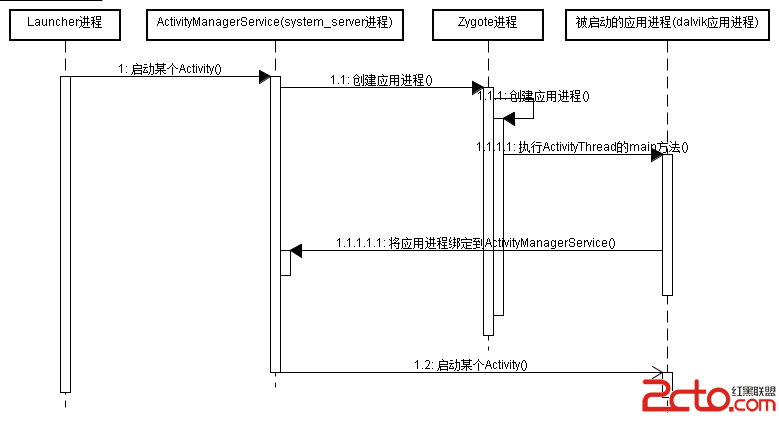 深入理解 Activity 啟動流程:從點擊圖示到 onCreate
概要:一場跨三個行程的接力 使用者在 Launcher 上點一下應用圖示,看似簡單的動作,背後其實是好幾個行程之間的精密協作。 Android 系統中有一個 zygote