

編輯:關於 Android 程式設計
要在 App 裡嵌入地圖,Android 提供了幾種不同途徑。本文比較 MapView+MapActivity、MapFragment 與 WebView 三種方案的取捨,並重點示範如何使用新版 Google Maps Android API v2 的 MapFragment。
1、MapView+MapActivity:局限在於必須繼承 MapActivity,否則無法使用 MapView,官方已棄用這套做法。
2、MapFragment:局限在於必須安裝 Google Play Service,也就是需要原生 ROM,且 SDK 要在 API 12 以上。
3、WebView:整合起來看似輕鬆,但需要實際驗證。
官方已於 2012 年底正式棄用 Google Maps Android API v1,並鼓勵開發者改用 v2。下面重點說明 MapFragment(v2)的整合流程。
首先到 Google Console 開啟 API Access 權限取得 API key:建立一個 project,在 Services 中開啟 Google Maps Android API v2,再到 API Access 中填入 keystore 的 SHA1 與包名,取得唯一的 API key。
接著打開 SDK Manager,在 Extras 中安裝 Android Support Library 與 Google Play Services,並把 lib_project 匯入作為自己專案的 library。
完成後在 manifest.xml 中加入權限與 API key。
參考程式碼 如下:
<permission
android:name="com.example.permission.MAPS_RECEIVE"
android:protectionLevel="signature"/>
(com.example 替換成自己 project 的 package)
參考程式碼 如下:
<uses-permission android:name="com.example.permission.MAPS_RECEIVE"/>
<uses-permission android:name="android.permission.WRITE_EXTERNAL_STORAGE"/>
<uses-permission android:name="android.permission.INTERNET"/>
<uses-permission android:name="com.google.android.providers.gsf.permission.READ_GSERVICES"/>
<!--My Location-->
<uses-permission android:name="android.permission.ACCESS_COARSE_LOCATION"/>
<uses-permission android:name="android.permission.ACCESS_FINE_LOCATION"/>
<!--Maps API needs OpenGL ES2.0.-->
<uses-feature
android:glEsVersion="0x00020000"
android:required="true"/>
放在 application 聲明裡:
參考程式碼 如下:
<meta-data
android:name="com.google.android.maps.v2.API_KEY"
android:value="appkey"/>
參考程式碼 如下:
<fragment xmlns:android="https://schemas.android.com/apk/res/android"
android:id="@+id/map"
android:layout_width="match_parent"
android:layout_height="match_parent"
class="com.google.android.gms.maps.MapFragment"/>
使用 MapFragment 後,Activity 只要繼承普通的 Activity 即可,不再需要繼承 MapActivity。特別注意:debug 狀態下無法顯示地圖,一定要在正式簽名(release key)下 map 才會顯示出來。若還有疑問,多參考官方文件即可,那裡介紹得很清楚。
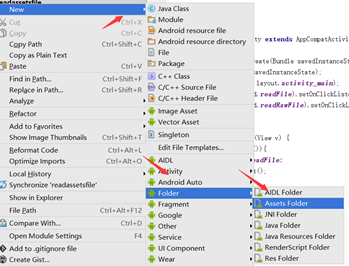 Android 讀取 assets 與 raw 資源文件的完整做法
把配置文件、初始數據這類資源打包進 APK,是很常見的做法。Android 提供兩個位置可以放:assets 目錄與 res/raw 目錄。兩者有一個共同前提——只能讀,
 自定義 View 實作側滑刪除:ViewDragHelper 的完整拆解
即時通訊與郵件 App 裡那種「往左拉出刪除按鈕」的互動,看起來簡單,自己動手做卻常卡在手勢判定與位置同步上。本文用 ViewDragHelper 一步步實作一個可重複使
 Android Bitmap 顏色替換:保留透明度的圖片處理技巧
在 Android 中製作觸控特效或圖示變化時,常需要將一張圖片重新上色。若原圖只是白色與透明度構成的遮罩,就能利用像素處理保留透明資訊,替換成不同顏色。 處理原理
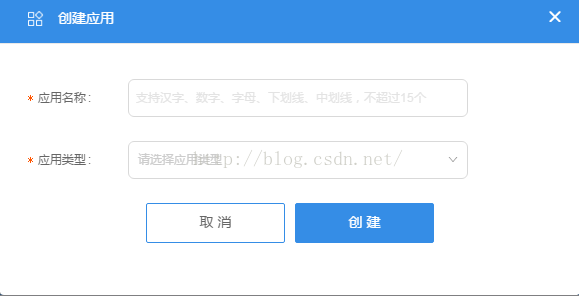 Android 快速上手高德地圖 SDK(附實戰項目)
近期的項目裡需要用到高德地圖與定位功能,學習過程中我翻了不少文檔和 Demo 代碼,也踩了一些坑(部分文檔著實讓人費解,示例代碼連註釋都欠奉,上下文還對不上)。因此乾脆把