

編輯:關於 Android 程式設計
public boolean dispatchTouchEvent(MotionEvent ev) { if (ev.getAction() == MotionEvent.ACTION_DOWN) { onUserInteraction(); } if (getWindow().superDispatchTouchEvent(ev)) { return true; } return onTouchEvent(ev); }
當使用者觸碰螢幕,或按下 Home、Back、Menu 等實體鍵時,系統都會回呼 onUserInteraction(),我們可以藉由重寫這個方法來攔截並處理特定的使用者互動行為。從原始碼不難看出,Activity 本身並不直接處理事件,而是把它轉交給 Window。若 Window 這一層無法消費該事件,才會由 Activity 呼叫 onTouchEvent() 自行兜底處理。由於 PhoneWindow 是 Window 唯一的實作類別,因此接著我們就來看看 PhoneWindow 的處理流程。
public boolean superDispatchTouchEvent(MotionEvent event) { return mDecor.superDispatchTouchEvent(event); }
這裡的 mDecor 是 DecorView 的執行個體,而 DecorView 繼承自 FrameLayout。PhoneWindow 其實什麼都沒做,只是把事件單純地往下丟給最頂層的 DecorView。由於 DecorView 一路繼承自 FrameLayout、ViewGroup,後續的事件分發邏輯就與一般的 ViewGroup 完全相同,這部分留到第二章詳細說明。
綜合以上分析,事件的整體傳遞順序是:事件最先抵達 Activity,Activity 將它交給 Window(PhoneWindow 為其實作),Window 再轉交給頂層的 DecorView 處理;一旦 Window 沒有消費事件,最後就由 Activity 的 onTouchEvent() 接手。路徑如下:
這一章聚焦於主幹流程與關鍵程式碼,不會逐行貼出完整原始碼。ViewGroup 的事件分發核心,全部集中在 dispatchTouchEvent() 方法裡。
在正式分析之前,先快速認識 MotionEvent。一個完整的事件序列以 ACTION_DOWN 開場,以 ACTION_UP 收尾。單指操作由 ACTION_DOWN、ACTION_MOVE、ACTION_UP 構成;多指操作則由 ACTION_DOWN、ACTION_POINTER_DOWN、ACTION_MOVE、ACTION_POINTER_UP、ACTION_UP 組成。這裡的 pointer 可以理解為一個觸摸點,多指手勢中每個指頭對應的 pointerId 固定不變,但 pointerIndex 會隨事件序列不斷變動。
事件序列總是由 ACTION_DOWN 揭開序幕,因此每當新序列到來,框架都要先做一次狀態清理。
// Handle an initial down. if (actionMasked == MotionEvent.ACTION_DOWN) { // Throw away all previous state when starting a new touch gesture. // The framework may have dropped the up or cancel event for the previous gesture // due to an app switch, ANR, or some other state change. /**由於一些特殊原因丟失ACTION_UP或者ACTION_CANCEL, *導致事件序列結束時mFirstTouchTarget(TouchTarget鏈表)未被清空, * 新事件序列到達時,要先清空mFirstTouchTarget */ cancelAndClearTouchTargets(ev); //主要設置 mGroupFlags &= ~FLAG_DISALLOW_INTERCEPT resetTouchState(); }
接著看看 cancelAndClearTouchTargets() 與 resetTouchState() 的實作細節。
/** * Cancels and clears all touch targets. */ private void cancelAndClearTouchTargets( MotionEvent event ) { if ( mFirstTouchTarget != null ) { boolean syntheticEvent = false; if ( event == null ) { final long now = SystemClock.uptimeMillis(); event = MotionEvent.obtain( now, now, MotionEvent.ACTION_CANCEL, 0.0f, 0.0f, 0 ); event.setSource( InputDevice.SOURCE_TOUCHSCREEN ); syntheticEvent = true; } for ( TouchTarget target = mFirstTouchTarget; target != null; target = target.next ) { resetCancelNextUpFlag( target.child ); dispatchTransformedTouchEvent( event, true, target.child, target.pointerIdBits ); } clearTouchTargets(); if ( syntheticEvent ) { event.recycle(); } } }
dispatchTransformedTouchEvent() 稍後再談,先看 clearTouchTargets() 做了什麼。
/** * Clears all touch targets. */ private void clearTouchTargets() { TouchTarget target = mFirstTouchTarget; if ( target != null ) { do { TouchTarget next = target.next; target.recycle(); target = next; } while ( target != null ); mFirstTouchTarget = null; } }
很顯然,clearTouchTargets() 就是把 mFirstTouchTarget 所指向的整條鏈表清空。再看 resetTouchState():
private void resetTouchState() { clearTouchTargets(); resetCancelNextUpFlag(this); mGroupFlags &= ~FLAG_DISALLOW_INTERCEPT; mNestedScrollAxes = SCROLL_AXIS_NONE; }
它同樣清空了 mFirstTouchTarget 鏈表,而更關鍵的一行是把 ~FLAG_DISALLOW_INTERCEPT 標誌位重新設回。由此可以推出一個重要結論:子 View 在 ACTION_DOWN 階段呼叫 ViewGroup 的 requestDisallowInterceptTouchEvent() 是无效的。
清理完畢後,ViewGroup 開始判斷是否需要攔截事件:
/* Check for interception. */ final boolean intercepted; /* ACTION_DOWN或者mFirstTouchTarget!=null時檢測是否要攔截事件 */ if ( actionMasked == MotionEvent.ACTION_DOWN || mFirstTouchTarget != null ) { final boolean disallowIntercept = (mGroupFlags & FLAG_DISALLOW_INTERCEPT) != 0; if ( !disallowIntercept ) { intercepted = onInterceptTouchEvent( ev ); /* restore action in case it was changed */ ev.setAction( action ); } else { intercepted = false; } } else { /* * There are no touch targets and this action is not an initial down * so this view group continues to intercept touches. */ intercepted = true; }
從這段程式碼可以歸納出幾點:ViewGroup 只在 ACTION_DOWN 或 mFirstTouchTarget != null 時才會去檢測攔截;當 mFirstTouchTarget 不為空時,能否攔截 ACTION_DOWN 之後的事件,取決於 FLAG_DISALLOW_INTERCEPT 標誌位;而在允許攔截的前提下,是否真的攔截,則由 onInterceptTouchEvent() 的回傳值拍板。面對滑動衝突,常見有兩種解法:方案一,單靠 onInterceptTouchEvent() 攔截;方案二,搭配 onInterceptTouchEvent() 與 requestDisallowInterceptTouchEvent() 一起攔截。就實用性而言,方案一更為簡潔。
接下來,ViewGroup 會遍歷所有子 View,尋找願意消費事件的 Child:
/* * Check for cancelation. * PFLAG_CANCEL_NEXT_UP_EVENT標記位文檔解釋是Indicates whether the view is temporarily detached */ final boolean canceled = resetCancelNextUpFlag( this ) || actionMasked == MotionEvent.ACTION_CANCEL; /* Update list of touch targets for pointer down, if needed. */ final boolean split = (mGroupFlags & FLAG_SPLIT_MOTION_EVENTS) != 0; TouchTarget newTouchTarget = null; boolean alreadyDispatchedToNewTouchTarget = false; /* View detached或者event類型為ACTION_CANCEL或者未被攔截 */ if ( !canceled && !intercepted ) { /* * If the event is targeting accessiiblity focus we give it to the * view that has accessibility focus and if it does not handle it * we clear the flag and dispatch the event to all children as usual. * We are looking up the accessibility focused host to avoid keeping * state since these events are very rare. */ View childWithAccessibilityFocus = ev.isTargetAccessibilityFocus() ? findChildWithAccessibilityFocus() : null; if ( actionMasked == MotionEvent.ACTION_DOWN || (split && actionMasked == MotionEvent.ACTION_POINTER_DOWN) || actionMasked == MotionEvent.ACTION_HOVER_MOVE ) { final int actionIndex = ev.getActionIndex(); /* always 0 for down */ /* 這裡處理多觸控情況,一個View如果有多指觸摸,用32位的int記錄不同Pointer */ final int idBitsToAssign = split ? 1 << ev.getPointerId( actionIndex ) : TouchTarget.ALL_POINTER_IDS; /* * Clean up earlier touch targets for this pointer id in case they * have become out of sync. */ removePointersFromTouchTargets( idBitsToAssign ); final int childrenCount = mChildrenCount; if ( newTouchTarget == null && childrenCount != 0 ) { final float x = ev.getX( actionIndex ); final float y = ev.getY( actionIndex ); /* * Find a child that can receive the event. * Scan children from front to back. */ final ArrayList preorderedList = buildOrderedChildList(); final boolean customOrder = preorderedList == null && isChildrenDrawingOrderEnabled(); final View[] children = mChildren; for ( int i = childrenCount - 1; i >= 0; i-- ) { final int childIndex = customOrder ? getChildDrawingOrder( childrenCount, i ) : i; final View child = (preorderedList == null) ? children[childIndex] : preorderedList.get( childIndex ); /* * If there is a view that has accessibility focus we want it * to get the event first and if not handled we will perform a * normal dispatch. We may do a double iteration but this is * safer given the timeframe. */ if ( childWithAccessibilityFocus != null ) { if ( childWithAccessibilityFocus != child ) { continue; } childWithAccessibilityFocus = null; i = childrenCount - 1; } /* Child不可見並且無動畫直接跳過,或者Point不在child范圍內 */ if ( !canViewReceivePointerEvents( child ) || !isTransformedTouchPointInView( x, y, child, null ) ) { ev.setTargetAccessibilityFocus( false ); continue; } /* mFirstTouchTarget鏈表已經存在消費該事件的Child,用於多點觸控 */ newTouchTarget = getTouchTarget( child ); if ( newTouchTarget != null ) { /* * Child is already receiving touch within its bounds. * Give it the new pointer in addition to the ones it is handling. */ newTouchTarget.pointerIdBits |= idBitsToAssign; break; } resetCancelNextUpFlag( child ); /* 如果Child能消費事件,Child加入到mFirstTouchTarget鏈表 */ if ( dispatchTransformedTouchEvent( ev, false, child, idBitsToAssign ) ) { /* Child wants to receive touch within its bounds. */ mLastTouchDownTime = ev.getDownTime(); if ( preorderedList != null ) { /* childIndex points into presorted list, find original index */ for ( int j = 0; j < childrenCount; j++ ) { if ( children[childIndex] == mChildren[j] ) { mLastTouchDownIndex = j; break; } } }else { mLastTouchDownIndex = childIndex; } mLastTouchDownX = ev.getX(); mLastTouchDownY = ev.getY(); newTouchTarget = addTouchTarget( child, idBitsToAssign ); alreadyDispatchedToNewTouchTarget = true; break; } /* * The accessibility focus didn't handle the event, so clear * the flag and do a normal dispatch to all children. */ ev.setTargetAccessibilityFocus( false ); } if ( preorderedList != null ) preorderedList.clear(); } if ( newTouchTarget == null && mFirstTouchTarget != null ) { /* * Did not find a child to receive the event. * Assign the pointer to the least recently added target. */ newTouchTarget = mFirstTouchTarget; while ( newTouchTarget.next != null ) { newTouchTarget = newTouchTarget.next; } newTouchTarget.pointerIdBits |= idBitsToAssign; } } }
在 ACTION_DOWN 或 ACTION_POINTER_DOWN 階段,ViewGroup 會遍歷子 View 尋找能消費事件的 Child。若該 Child 尚未在 TouchTarget 鏈表中,就透過 addTouchTarget(child, idBitsToAssign) 把它加進去;若已存在(也就是同一個 View 被多指觸摸),則用 newTouchTarget.pointerIdBits |= idBitsToAssign 追加指針標記。可見 ViewGroup 處理「多指觸控不同 View」靠的是鏈表,而 View 處理「多指觸控同一 View」則是靠一個 32 位整數記錄每個 Pointer。
找到能承接事件序列的 Child 之後,ACTION_DOWN、ACTION_POINTER_DOWN 後續的事件,在 ViewGroup 不攔截的前提下會直接交給 Child;但一旦被攔截,dispatchTransformedTouchEventChild() 中的 eventAction 會被改寫為 ACTION_CANCEL,對應的 Child 也會從 TouchTarget 鏈表中移除,從此再也收不到後續事件,一切都改由 ViewGroup 自己處理。實作如下:
/* * Dispatch to touch targets. * Child不能消費事件序列,交由ViewGroup處理 */ if ( mFirstTouchTarget == null ) { /* No touch targets so treat this as an ordinary view. */ handled = dispatchTransformedTouchEvent( ev, canceled, null, TouchTarget.ALL_POINTER_IDS ); } else { /* * Dispatch to touch targets, excluding the new touch target if we already * dispatched to it. Cancel touch targets if necessary. */ TouchTarget predecessor = null; TouchTarget target = mFirstTouchTarget; while ( target != null ) { final TouchTarget next = target.next; /* 除去ACTION_DOWN或ACTION_POINTER_DOWN事件,因為在尋找過程中已經處理過 */ if ( alreadyDispatchedToNewTouchTarget && target == newTouchTarget ) { handled = true; } else { final boolean cancelChild = resetCancelNextUpFlag( target.child ) || intercepted; if ( dispatchTransformedTouchEvent( ev, cancelChild, target.child, target.pointerIdBits ) ) { handled = true; } /* PFLAG_CANCEL_NEXT_UP_EVENT重置或者ViewGroup攔截ACTION_DOWN或ACTION_POINTER_DOWN 之後的事件,清除相應TouchTarget */ if ( cancelChild ) { if ( predecessor == null ) { mFirstTouchTarget = next; } else { predecessor.next = next; } target.recycle(); target = next; continue; } } predecessor = target; target = next; } }
ViewGroup 最終是透過 dispatchTransformedTouchEvent() 把事件派送給 Child 的。
/* Perform any necessary transformations and dispatch. */ if ( child == null ) { handled = super.dispatchTouchEvent( transformedEvent ); } else { /* 將event坐標轉換成Child坐標系內坐標 */ final float offsetX = mScrollX - child.mLeft; final float offsetY = mScrollY - child.mTop; transformedEvent.offsetLocation( offsetX, offsetY ); if ( !child.hasIdentityMatrix() ) { transformedEvent.transform( child.getInverseMatrix() ); } handled = child.dispatchTouchEvent( transformedEvent ); }
如果找不到願意消費事件的 Child,ViewGroup 就以一般 View 的身份自行處理整個序列;否則會先把 event 座標換算成 Child 座標系下的座標,再交給 Child 處理。
最後,ACTION_UP 會觸發整條序列的收尾並清空 TouchTarget;ACTION_POINTER_UP 則只清理對應 pointer 的 target。
/* Update list of touch targets for pointer up or cancel, if needed. */ if ( canceled || actionMasked == MotionEvent.ACTION_UP || actionMasked == MotionEvent.ACTION_HOVER_MOVE ) { resetTouchState(); } else if ( split && actionMasked == MotionEvent.ACTION_POINTER_UP ) { final int actionIndex = ev.getActionIndex(); final int idBitsToRemove = 1 << ev.getPointerId( actionIndex ); removePointersFromTouchTargets( idBitsToRemove ); }
ViewGroup 的事件分發流程整理成流程圖如下:
談完 ViewGroup,接著來看 View 的事件分發。相較之下,View 的邏輯要單純得多。
提醒:View 只處理了單指觸控的情況,並未實作多指觸控,若有需要可自行擴充。本章針對 View 的分析也僅限單指場景。View 的事件分發同樣集中在 dispatchTouchEvent() 方法中,只要吃透這個方法即可。
View 的事件分發邏輯一樣落在 dispatchTouchEvent() 裡,我們重點分析這個方法即可。
final int actionMasked = event.getActionMasked(); if (actionMasked == MotionEvent.ACTION_DOWN) { // Defensive cleanup for new gesture stopNestedScroll(); }
這段程式碼說明:ACTION_DOWN 到來時,View 會先停止巢狀滾動(如果它本身是可滾動的,例如 ListView)。
接著 View 就正式開始處理事件:
if (onFilterTouchEventForSecurity(event)) { //noinspection SimplifiableIfStatement ListenerInfo li = mListenerInfo; if (li != null && li.mOnTouchListener != null && (mViewFlags & ENABLED_MASK) == ENABLED && li.mOnTouchListener.onTouch(this, event)) { result = true; } if (!result && onTouchEvent(event)) { result = true; } }
當 View 處於 ENABLED 狀態且註冊過 setOnTouchListener() 時,事件能否被 OnTouchListener 消費,取決於 onTouch() 的回傳值;若從未呼叫 setOnTouchListener(),或 OnTouchListener 沒有消費事件,就交由 onTouchEvent() 接手,此時能否消費則取決於 onTouchEvent() 的回傳值。下面深入看 onTouchEvent() 的實作。
if ( (viewFlags & ENABLED_MASK) == DISABLED ) { if ( event.getAction() == MotionEvent.ACTION_UP && (mPrivateFlags & PFLAG_PRESSED) != 0 ) { setPressed( false ); } /* * A disabled view that is clickable still consumes the touch * events, it just doesn't respond to them. */ return( ( (viewFlags & CLICKABLE) == CLICKABLE || (viewFlags & LONG_CLICKABLE) == LONG_CLICKABLE) ); }
其實只要 View 是 CLICKABLE 或 LONG_CLICKABLE,回傳結果都是 true(細節可查原始碼),也就是說它能夠消費事件。這裡討論的是 View 處於 DISABLED 的情況:此時會在 ACTION_UP 或 (mPrivateFlags & PFLAG_PRESSED) != 0 時把 mPrivateFlags &= ~PFLAG_PRESSED。無論長按還是點擊,執行前都會先判斷這個標誌位。因此結論是:DISABLED 狀態的 View 雖然仍能消費事件,卻不會觸發單擊與長按。
if (mTouchDelegate != null) { if (mTouchDelegate.onTouchEvent(event)) { return true; } }
這段程式碼表明,我們可以為 View 設定一個代理物件(另一個 View),改由代理物件的 onTouchEvent() 來處理事件。像是擴大 View 的可觸碰範圍、讓多個 View 同步響應事件,都能用這個機制達成。
關於 View 的事件處理,我們主要挑 ACTION_DOWN 與 ACTION_UP 來看。先說 ACTION_DOWN:
/* * For views inside a scrolling container, delay the pressed feedback for * a short period in case this is a scroll. */ if ( isInScrollingContainer ) { mPrivateFlags |= PFLAG_PREPRESSED; if ( mPendingCheckForTap == null ) { mPendingCheckForTap = new CheckForTap(); } mPendingCheckForTap.x = event.getX(); mPendingCheckForTap.y = event.getY(); postDelayed( mPendingCheckForTap, ViewConfiguration.getTapTimeout() ); } else { /* Not inside a scrolling container, so show the feedback right away */ setPressed( true, x, y ); checkForLongClick( 0 ); }
若 View 位於可滾動容器內,只是多加了一個延時判斷,本質與不在容器內時並無差別。來看 checkForLongClick() 的實作:
private void checkForLongClick( int delayOffset ) { if ( (mViewFlags & LONG_CLICKABLE) == LONG_CLICKABLE ) { mHasPerformedLongPress = false; if ( mPendingCheckForLongPress == null ) { mPendingCheckForLongPress = new CheckForLongPress(); } mPendingCheckForLongPress.rememberWindowAttachCount(); postDelayed( mPendingCheckForLongPress, ViewConfiguration.getLongPressTimeout() - delayOffset ); } }
postDelayed() 會往 Handler 的消息佇列裡插入一個帶延時的 Runnable,這正是「必須按住一段時間,長按才會觸發」的原因。長按的具體邏輯都在 CheckForLongPress 裡:
private final class CheckForLongPress implements Runnable { private int mOriginalWindowAttachCount; @Override public void run() { if ( isPressed() && (mParent != null) && mOriginalWindowAttachCount == mWindowAttachCount ) { if ( performLongClick() ) { mHasPerformedLongPress = true; } } } public void rememberWindowAttachCount() { mOriginalWindowAttachCount = mWindowAttachCount; } }
重點來了:performLongClick() 會去觸發 setOnLongClickListener() 所設定的 OnLongClickListener 的 onLongClick() 方法。
最後來看 View 對 ACTION_UP 的處理:
if ( !mHasPerformedLongPress ) { /* This is a tap, so remove the longpress check */ removeLongPressCallback(); /* Only perform take click actions if we were in the pressed state */ if ( !focusTaken ) { /* * Use a Runnable and post this rather than calling * performClick directly. This lets other visual state * of the view update before click actions start. */ if ( mPerformClick == null ) { mPerformClick = new PerformClick(); } if ( !post( mPerformClick ) ) { performClick(); } } }
當 mHasPerformedLongPress 為 false(可能是 OnLongClickListener 為空,或 onLongClick() 回傳了 false),框架會先把佇列中的 CheckForLongPress 移除,然後在 OnClickListener 不為空的情況下觸發 onClick()。
提醒:若替一個 Button 同時設定 OnLongClickListener 與 OnClickListener,且 onLongClick() 回傳 false,那麼長按與點擊都會被觸發。驗證時請勿用 System.out.print() 來輸出,因為 System.out 是帶緩衝的輸出流,print() 不會立即輸出,改用 println() 才能即時看到結果。
只要 View 處於 CLICKABLE 或 LONG_CLICKABLE 狀態,就能消費事件;若是 DISABLED,則不會觸發長按與點擊。而單擊的優先級最低,因為它總是排在最後才被處理。
至此,Android 事件分發機制的源碼分析就全部完成了。
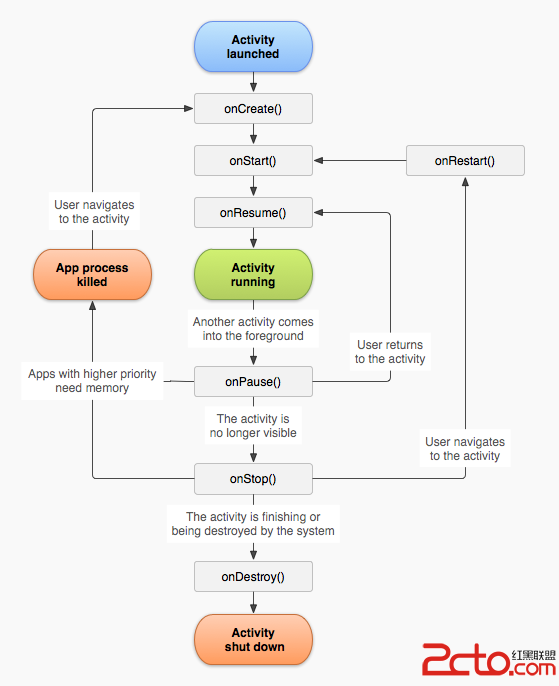 從零開始學 Android(三十九):Activity 生命週期全解
Intent 處理的是兩個 UI 介面之間的轉換,而想真正搞懂 Intent 背後發生什麼事,就必須先理解 Activity 的生命週期。 最簡單的認知是:顯示在螢幕上的
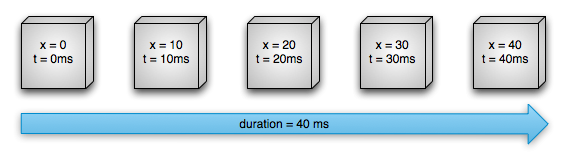 Android 動畫機制整理:屬性動畫、補間動畫與幀動畫
Android 提供了多種動畫機制,常見的有屬性動畫、補間動畫與幀動畫。三者各有適用場景,但官方普遍推薦優先使用屬性動畫,因為它更靈活,也能作用於幾乎任何物件的屬性。 屬
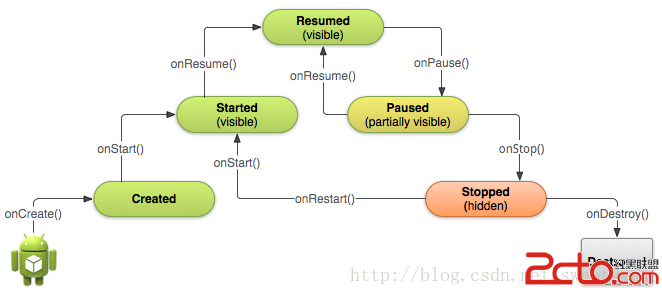 Android Activity 生命週期入門:啟動一個 Activity
在 Android 中,Activity 的啟動並不是透過 main 方法,而是由系統依據生命週期 callback 逐步建立。理解這些 callback,能幫助開發者掌
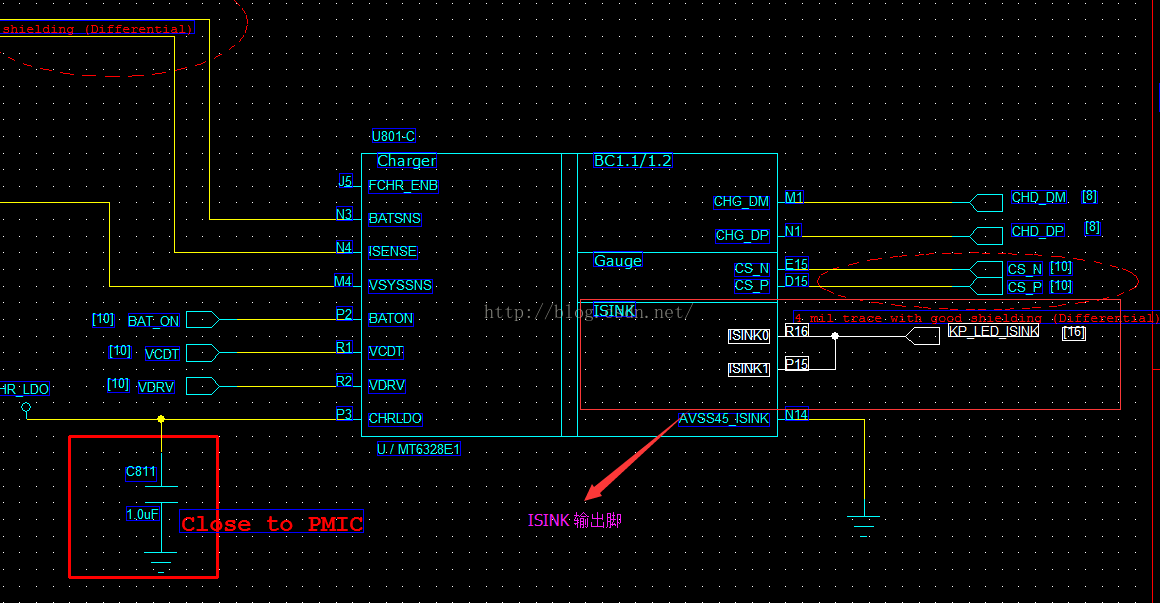 MTK 6735(Android 6.0)平台按鍵燈實現全解析
一、按鍵燈是什麼 最近剛好把按鍵燈相關的流程調了一遍,趁還有印象整理成筆記。顧名思義,按鍵燈就是一種 LED:按下按鍵時亮燈,若一段時間沒有操作則自動熄滅。 值得先建立的