

編輯:關於 Android 程式設計
一、前言
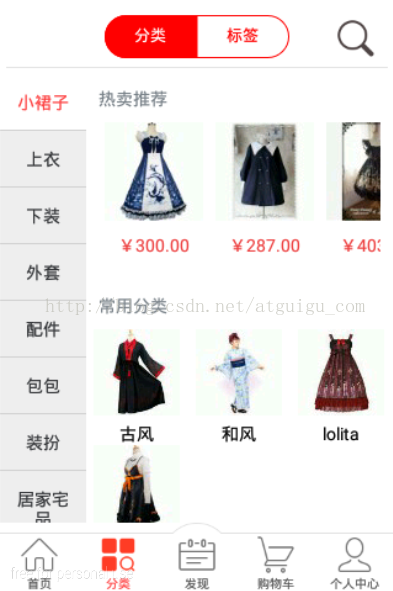
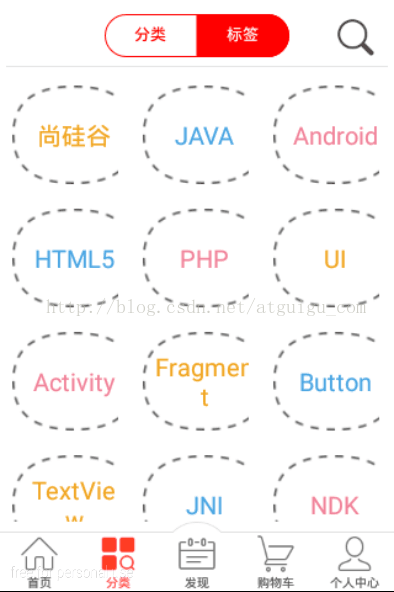
上一篇我们梳理了硅谷商城首页的关键技术点,这一篇把镜头转向分类页。分类页看起来朴素,其实集中了不少实战中高频出现的技巧:标签与分类栏的联动切换、屏幕自适应、左右联动的商品列表,以及横向滚动的热卖专区。
二、资源地址
受篇幅所限,完整的视频讲解与配套笔记可参考项目仓库:
https://github.com/atguigu01/Shopping
三、效果预览
四、技术详解
顶部标签栏与左侧分类列表的联动,靠的是 FlycoTabLayout 这个开源控件。它自带指示器、下划线、缩放动画等样式,配合 ViewPager 或 Fragment 切换都能用,省去了自己写指示器动画的功夫。
项目地址:https://github.com/H07000223/FlycoTabLayout
左侧分类固定占比、右侧商品区占剩余空间,用百分比布局比写死 dp 更稳妥,在不同分辨率设备上不容易跑版。
先引入依赖:
compile 'com.android.support:percent:23.3.0'
布局文件:
<android.support.percent.PercentRelativeLayout
    xmlns:android="https://schemas.android.com/apk/res/android"
    xmlns:app="https://schemas.android.com/apk/res-auto"
    xmlns:tools="https://schemas.android.com/tools"
    android:layout_width="match_parent"
    android:layout_height="match_parent"
    tools:context=".type.fragment.ListFragment">

    <ListView
        android:id="@+id/lv_left"
        android:layout_width="0dp"
        android:layout_height="match_parent"
        android:background="#11000000"
        android:scrollbars="none"
        app:layout_widthPercent="22%" />

    <android.support.v7.widget.RecyclerView
        android:id="@+id/rv_right"
        android:layout_width="0dp"
        android:layout_height="match_parent"
        android:layout_toRightOf="@id/lv_left"
        app:layout_widthPercent="78%" />

</android.support.percent.PercentRelativeLayout>
这里有个容易踩的坑:使用 layout_widthPercent 时,layout_width 必须写成 0dp,否则百分比不生效。
热卖专区需要在有限高度里横向排布若干入口,最省事的做法就是 HorizontalScrollView 里塞一个横向的 LinearLayout,运行时再动态往容器里加子 View。
<HorizontalScrollView
    android:id="@+id/hsl_hot_right"
    android:scrollbars="none"
    android:layout_width="match_parent"
    android:layout_height="wrap_content">

    <LinearLayout
        android:id="@+id/ll_hot_right"
        android:layout_width="match_parent"
        android:layout_height="wrap_content"
        android:orientation="horizontal" />

</HorizontalScrollView>
最终结构是经典的左右联动:左侧用 ListView 展示一级分类,右侧用 RecyclerView 以分组形式展示该分类下的商品。左侧滚动时右侧跟着切换内容,右侧分组标题吸顶,交互逻辑与主流电商 App 保持一致。
这种写法的关键在于数据源的组织方式——把「一级分类 + 二级分组 + 商品列表」整理成一个可索引的数据结构,两个列表各自只关心自己那部分渲染,维护起来清爽很多。
 Android TCP客戶端Service與廣播通信實作
在Android中,若需要長期維持TCP連線並持續接收服務端訊息,通常會把網路邏輯放在Service中。這樣即使畫面切換,連線與接收任務仍能繼續運行。 Service中的
 用 OnScrollListener 打造 ListView 的自動分頁加載
想像一下用戶打開微博客戶端,如果一上來就把所有未讀內容一次性拉回來,網絡稍慢就得乾等好幾秒,而且屏幕也放不下這麼多條目。更好的做法是「按需取貨」:滑到哪裡、加載到哪裡。這
 從安全角度理解 Android BroadcastReceiver(上)
BroadcastReceiver 的基本用法 BroadcastReceiver 是 Android 四大元件之一,常用於接收系統或應用程式內部的廣播訊息。基本流程通常
 Android Dialog 完全總結:AlertDialog 與 Dialog 的用法與選擇
對話框在 Android 開發中隨處可見。本文將結合實際項目,從 AlertDialog 的使用、Dialog 的使用,以及兩者的異同與選擇三個方面,做一個系統性的梳理。