對稱加密是最快速、最簡單的一種加密方式,它的加密(encryption)與解密(decryption)使用的是同一把密鑰(secret key)。常用的對稱加密方式有 DES 和 AES。
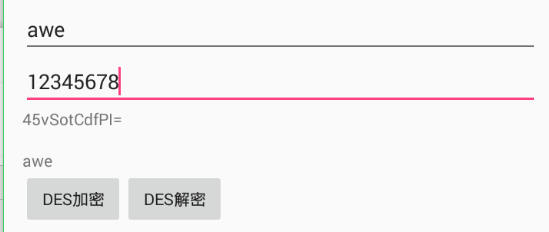
DES 加密解密實例
先看界面交互部分的 MainActivity:
- public class MainActivity extends AppCompatActivity {
- private EditText des_input;
- private EditText des_password;
- private TextView show_des_encrypt;
- private TextView show_des_decrypt;
- @Override
- protected void onCreate(Bundle savedInstanceState) {
- super.onCreate(savedInstanceState);
- setContentView(R.layout.activity_main);
- initView();
- }
- private void initView() {
- des_input = ((EditText) findViewById(R.id.des_input));
- des_password = ((EditText) findViewById(R.id.des_password));
- show_des_encrypt = ((TextView) findViewById(R.id.show_des_encrypt));
- show_des_decrypt = ((TextView) findViewById(R.id.show_des_decrypt));
- }
- /**
- * DES 加密
- * @param view
- */
- public void btnDESEncrypt(View view) {
- // 將 DES 加密寫成工具類
- // 要加密內容
- byte[] data = des_input.getText().toString().getBytes();
- byte[] password = des_password.getText().toString().getBytes();
- // 工具類 DESUtils 中 encrypt 方法返回 byte[]
- byte[] result = DESUtils.encrypt(data, password);
- // 處理加密結果
- byte[] encode = Base64.encode(result, Base64.DEFAULT);
- // 顯示加密的結果
- show_des_encrypt.setText(new String(encode));
- }
- /**
- * DES 進行解密
- * @param view
- */
- public void btnDESDecrypt(View view) {
- // 獲取解密的數據
- byte[] data = show_des_encrypt.getText().toString().getBytes();
- byte[] decode = Base64.decode(data, Base64.DEFAULT);
- // 獲取密碼
- byte[] password = des_password.getText().toString().getBytes();
- byte[] result = DESUtils.decrypt(decode, password);
- // 對解密數據進行處理
- show_des_decrypt.setText(new String(result));
- }
- }
再看 DES 工具類 DESUtils:
- public class DESUtils {
- public static byte[] encrypt(byte[] data, byte[] password) {
- byte[] ret = null;
- // 判斷參數是否符合條件
- if (data != null && data.length > 0) {
- if (password != null && password.length == 8) {
- try {
- // 1、創造加密引擎
- Cipher cipher = Cipher.getInstance("DES");
- // 2、初始化
- SecretKeySpec key = new SecretKeySpec(password, "DES");
- cipher.init(Cipher.ENCRYPT_MODE, key);
- // 3、對數據進行加密
- ret = cipher.doFinal(data);
- } catch (NoSuchAlgorithmException e) {
- e.printStackTrace();
- } catch (NoSuchPaddingException e) {
- e.printStackTrace();
- } catch (InvalidKeyException e) {
- e.printStackTrace();
- } catch (BadPaddingException e) {
- e.printStackTrace();
- } catch (IllegalBlockSizeException e) {
- e.printStackTrace();
- }
- }
- }
- return ret;
- }
- public static byte[] decrypt(byte[] data, byte[] password) {
- byte[] ret = null;
- if (data != null && data.length > 0) {
- if (password != null && password.length == 8) {
- try {
- // 1、獲取解密引擎
- Cipher cipher = Cipher.getInstance("DES");
- // 2、初始化
- SecretKeySpec key = new SecretKeySpec(password, "DES");
- cipher.init(Cipher.DECRYPT_MODE, key);
- // 3、解密
- ret = cipher.doFinal(data);
- } catch (Exception e) {
- e.printStackTrace();
- }
- }
- }
- return ret;
- }
- }
AES 加密解密實例
注意:輸入的 password 和 ivParams 為 16 位。
- public class AESUtils {
- public static byte[] encrypt(byte[] data, byte[] password) {
- byte[] ret = null;
- if (data != null && data.length > 0) {
- if (password != null && password.length == 16) {
- try {
- // 1、創造加密引擎
- Cipher cipher = Cipher.getInstance("AES");
- // 2、初始化,無法使用 SecretKeyFactory
- SecretKeySpec key = new SecretKeySpec(password, "AES");
- cipher.init(Cipher.ENCRYPT_MODE, key);
- // 3、加密
- ret = cipher.doFinal(data);
- } catch (Exception e) {
- e.printStackTrace();
- }
- }
- }
- return ret;
- }
- public static byte[] decrypt(byte[] data, byte[] password) {
- byte[] ret = null;
- if (data != null && data.length > 0) {
- if (password != null && password.length == 16) {
- try {
- // 1、創造加密引擎
- Cipher cipher = Cipher.getInstance("AES");
- // 2、初始化
- SecretKeySpec key = new SecretKeySpec(password, "AES");
- cipher.init(Cipher.DECRYPT_MODE, key);
- // 3、解密
- ret = cipher.doFinal(data);
- } catch (Exception e) {
- e.printStackTrace();
- }
- }
- }
- return ret;
- }
- /**
- * AES 第二種加密算法
- * @param data
- * @param password
- * @param ivParams
- * @return
- */
- public static byte[] encrypt2(byte[] data, byte[] password, byte[] ivParams) {
- byte[] ret = null;
- if (data != null && data.length > 0) {
- if (password != null && password.length == 16 && ivParams != null && ivParams.length == 16) {
- try {
- // 1、創造加密引擎,CBC:加密模式;PKCS5Padding:填充模式
- Cipher cipher = Cipher.getInstance("AES/CBC/PKCS5Padding");
- // 2、初始化
- SecretKeySpec key = new SecretKeySpec(password, "AES");
- // 相當於第二個密碼,向量參數,加密級別更高
- IvParameterSpec iv_params = new IvParameterSpec(ivParams);
- cipher.init(Cipher.ENCRYPT_MODE, key, iv_params);
- // 3、加密
- ret = cipher.doFinal(data);
- } catch (Exception e) {
- e.printStackTrace();
- }
- }
- }
- return ret;
- }
- }
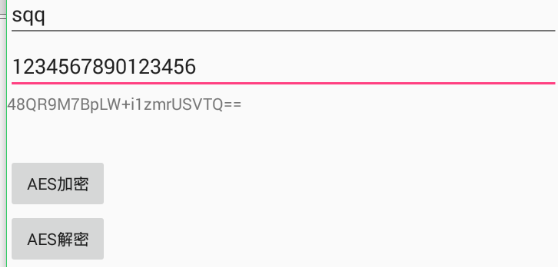
AES 的界面交互部分,這裡採用第二套加密算法,需要一個向量參數,相當於另一套密碼:
- public class MainActivity extends AppCompatActivity {
- private EditText aes_input;
- private EditText aes_password;
- private TextView show_aes_decrypt;
- private TextView show_aes_encrypt;
- private byte[] password;
- @Override
- protected void onCreate(Bundle savedInstanceState) {
- super.onCreate(savedInstanceState);
- setContentView(R.layout.activity_main);
- initView();
- }
- public void qqq(View view) {
- byte[] data = aes_input.getText().toString().getBytes();
- password = aes_password.getText().toString().getBytes();
- // 指定向量參數(密碼)
- String iv = "0123456789abcdef";
- byte[] ivParams = iv.getBytes();
- byte[] result = AESUtils.encrypt2(data, password, ivParams);
- // 對返回的結果進行處理,顯示
- byte[] encode = Base64.encode(result, Base64.DEFAULT);
- show_aes_encrypt.setText(new String(encode));
- }
- public void www(View view) {
- byte[] data = show_aes_encrypt.getText().toString().getBytes();
- // 對 data 進行處理
- data = Base64.decode(data, Base64.DEFAULT);
- byte[] result = AESUtils.decrypt(data, password);
- if (result != null) {
- show_aes_decrypt.setText(new String(result));
- } else {
- show_aes_decrypt.setText("解密失敗");
- }
- }
- }
Base64 加密與解密
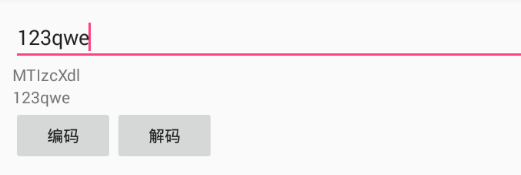
Base64 本質上是一種編碼方式,其特點是可逆、易於傳輸。使用時要注意編碼和解碼需採用一致的格式。
- public class Base64Activity extends AppCompatActivity {
- private EditText input;
- private TextView show_base64_encode;
- private TextView show_base64_decode;
- @Override
- protected void onCreate(Bundle savedInstanceState) {
- super.onCreate(savedInstanceState);
- setContentView(R.layout.activity_base64);
- initView();
- }
- /**
- * 進行 Base64 編碼
- * @param view
- */
- public void btnBase64Encode(View view) {
- String input = this.input.getText().toString();
- if (input != null) {
- byte[] bytes = input.getBytes();
- // Base64 編碼時採用什麼格式,解碼時就採用什麼格式
- String encodeToString = Base64.encodeToString(bytes, 0, bytes.length, Base64.NO_WRAP);
- // 顯示編碼的內容
- show_base64_encode.setText(encodeToString);
- }
- }
- /**
- * 進行 Base64 解密
- * @param view
- */
- public void btnBase64Decode(View view) {
- String str = show_base64_encode.getText().toString();
- byte[] decode = Base64.decode(str, Base64.DEFAULT);
- show_base64_decode.setText(new String(decode));
- }
- }
以上就是 Android 中 DES、AES 兩種對稱加密方式以及 Base64 編碼的完整實戰示例。實際開發中,AES 因其更高的安全性而被廣泛採用,而 Base64 則常用於加密結果的可讀化展示與網絡傳輸。


 ListView 點擊 Item 展開菜單實現代碼詳解
 Android 如何用 PopupWindow 打造對話框(附完整可運行範例)
 GridView 網格視圖的基本使用
 Android Fragment 與 Activity 間的資料傳遞(Fragment 取得資料)