

編輯:關於 Android 程式設計
做原生看書頁面的時候,書籍內容頁需要放一個輪播圖組件。我在網上找到一個現成的 CycleViewPager 別人封裝好的开源實作,直接下載來用,結果踩了一個頗有教育意義的坑。
這個輪播圖是封裝在 Fragment 裡的,而我在 BookView 中是動態載入的,寫法如下:
LayoutInflater lif = (LayoutInflater) context.getSystemService(Context.LAYOUT_INFLATER_SERVICE);
View lubotuView = lif.inflate(R.layout.lunbotu, null);
CycleViewPager cycleViewPager = (CycleViewPager) ((Activity) context)
        .getFragmentManager().findFragmentById(R.id.lunbotuCycle);
LinearLayout lunbotuLL = (LinearLayout) lubotuView.findViewById(R.id.lunbotuLL);
addView(lubotuView);
第一次跑起來完全正常,輪播顯示得好好的。但翻頁的時候問題來了——第二次翻回這一頁就崩潰:
E/AndroidRuntime(6462): android.view.InflateException: Binary XML file line #8:
    Error inflating class fragment
    at android.view.LayoutInflater.createViewFromTag(LayoutInflater.java:719)
    at com.sea.testRatingBar.bookView.loadCarouselNode(bookView.java:132)
    at com.sea.testRatingBar.bookView.loadElement(bookView.java:63)
    at com.sea.testRatingBar.bookView.<init>(bookView.java:50)
    at com.sea.testRatingBar.BookPageAdapter.getView(BookPageAdapter.java:55)
    at com.aphidmobile.flip.FlipViewController.viewFromAdapter(FlipViewController.java:478)
    ......
E/AndroidRuntime(6462): Caused by: java.lang.IllegalArgumentException:
    Binary XML file line #8: Duplicate id 0x7f09000a, tag null,
    or parent id 0x7f090009 with another fragment for
    cn.androiddevelop.cycleviewpager.lib.CycleViewPager
    at android.app.Activity.onCreateView(Activity.java:5002)
關鍵字很明顯:Duplicate id ... with another fragment。同一個 Fragment 被重複掛載了,於是第二次 inflate 時直接拋出 IllegalArgumentException。
想法很順理成章——用完就該拆掉。於是在 CycleViewPager 這個 Fragment 中補上:
public void onDestroyView() {
    super.onDestroyView();
    FragmentManager fm = getActivity().getSupportFragmentManager();
    Fragment fragment = fm.findFragmentById(R.id.cyclepic);
    FragmentTransaction ft = fm.beginTransaction();
    ft.remove(fragment);
    ft.commit();
}
測試結果:沒用。
換個思路,把 rootView 做成靜態快取,若之前已 inflate 過就先從父容器摘掉:
public CycleViewPager() { }

private static View rootView;

@Override
public View onCreateView(LayoutInflater inflater, ViewGroup container,
                         Bundle savedInstanceState) {
    if (rootView != null) {
        ViewGroup parent = (ViewGroup) rootView.getParent();
        if (parent != null) parent.removeView(rootView);
    }
    try {
        rootView = LayoutInflater.from(getActivity())
                .inflate(R.layout.view_cycle_viewpager_contet, null);
    } catch (InflateException e) {
    }
    ......
}
測試結果:還是沒用。用 try-catch 把例外吃掉也只是掩耳盜鈴。
既然問題出在 inflate,那就在 adapter 回收視圖時把 Fragment 拆掉:
int childCount0 = viewHolder.ll.getChildCount();
for (int i = 0; i < childCount0; i++) {
    View v = viewHolder.ll.getChildAt(i);
    BookView bv = (BookView) v;
    int bvChildCount = bv.getChildCount();
    for (int j = 0; j < bvChildCount; j++) {
        View bvv = bv.getChildAt(j);
        if (bvv instanceof LinearLayout) {
            if (bvv.getId() == R.id.lunbotuLL) {
                FragmentManager fm = ((Activity) c).getFragmentManager();
                Fragment fragment = fm.findFragmentById(R.id.lunbotuCycle);
                FragmentTransaction ft = fm.beginTransaction();
                ft.remove(fragment);
                ft.commit();
            }
        }
    }
}
viewHolder.ll.removeAllViews();
測試結果:仍然沒用。
邏輯上明顯沒錯卻還是報錯,那會不會是 ft.commit() 根本沒被執行?查資料時找到一篇關鍵文章,點醒了我。
關鍵在於——FragmentTransaction 是非同步的。commit() 只是把操作塞進 FragmentManager 的佇列,由 FragmentManager 在「某一個時刻」才真正執行,並非立即執行。如果在真正執行前 Activity 生命週期已經走到 onPause、onStop 甚至 onDestroy,就會拋出 IllegalStateException;而在翻頁這種高頻場景下,佇列裡的 remove 往往還沒消化,新的 inflate 就已經撞上去了。
解法是在需要的位置補上一句:
fm.executePendingTransactions();
這個方法會立即執行所有等待中的 transaction。測試——終於好用了。
補充一下官方文件的重點:FragmentTransaction.commit() 提交後,會在機會的主執行緒中以非同步方式執行;若想立即執行這些等待中的操作,就呼叫 executePendingTransactions()(只能在主執行緒呼叫)。要注意的是,所有回呼與相關行為都會在這次呼叫中同步完成,因此呼叫位置需要仔細確認。
這個特性在做 Fragment 跳轉時特別容易中招。例如要從 FragmentA 跳到 FragmentB 並立刻呼叫 B 的刷新方法,直覺做法是隱藏 A、顯示 B,然後呼叫刷新:
private void switchFragment(Fragment newFragment) {
    FragmentManager fm = getSupportFragmentManager();
    FragmentTransaction transaction = fm.beginTransaction();
    if (newFragment.isAdded()) {
        transaction.hide(mCurrentFragment).show(newFragment).commitAllowingStateLoss();
    } else {
        transaction.hide(mCurrentFragment).add(R.id.main_content, newFragment)
                   .commitAllowingStateLoss();
    }
    mCurrentFragment = newFragment;
}
結果會發現 FragmentB 裡的一些控件根本還沒初始化——因為初始化被排在你的刷新方法之後才執行。原因正是 commit() 的非同步語意。修正方式就是補一句:
FragmentManager fm = getSupportFragmentManager();
FragmentTransaction transaction = fm.beginTransaction();
if (fragment.isAdded()) {
    transaction.hide(mCurrentFragment).show(fragment).commitAllowingStateLoss();
} else {
    transaction.hide(mCurrentFragment).add(R.id.main_content, fragment)
               .commitAllowingStateLoss();
}
mCurrentFragment = fragment;
fm.executePendingTransactions();          // 關鍵:立刻把隊列中的事務做完
((DiscoverFragment) fragment).refresh(searchWord);

回頭看這一路走來,前三次嘗試之所以失敗,是因為它們都在試圖「更小心地 remove」,但真正的問題不是 remove 沒寫,而是 remove 根本還沒生效。Fragment 事務的非同步特性,讓「先 remove 再 inflate」這段程式碼在執行順序上完全不是我們我以為的那樣。
幾點值得記下來的結論:
<fragment> 標籤的佈局,第二次就會撞上重複 id,因為 Fragment 已經被 FragmentManager 管理著。commit() 不保證即時生效;需要順序保證時,executePendingTransactions() 是最直接的答案。InflateException 只是把問題藏起來,畫面會缺件,不是真正的修復。一個 executePendingTransactions() 解決了折騰半天的崩潰,也讓我對 Fragment 事務的執行模型有了實際的體會。
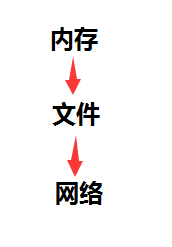 動手打造 Android 圖片三級緩存加載框架:原理與實作全解析
提到圖片加載的三級緩存,不少人第一反應就是「好難」。但其實只要靜下心來把流程拆開來看,親手寫上一兩遍,就會發現其中的邏輯相當清晰。本文就帶你從零梳理三級緩存的運作原理,並
 Android 6.0 Activity 與 WMS 通訊流程解析
Activity 與 WMS 的連線模型在 Android 系統中,Activity 並不是單獨負責畫面顯示的元件。當 Activity 建立視圖並準備顯示時,會透過 V
 Android 資料儲存之二:讀寫 SD 卡與圖片存取
在 Android 中,常見的資料儲存方式大致有四種:SharedPreferences、讀寫 SD 卡、SQLite 資料庫,以及 Content Provider 內
 Android 圖片水平重複平鋪(repeat x)的兩種做法
做法一:用 Bitmap 的 tileMode 屬性 先建立 wave_repeat.xml: <?xml version=1.0 encoding=utf-8?