

編輯:關於 Android 程式設計
Dialog 是一個用於向用戶反饋操作的彈窗,通常用來做一些簡單提示或讓用戶做簡單選擇。
2.1 AlertDialog 類:這是我們實際使用的窗口類,可通過它的相關方法設置 Dialog 的屬性並顯示。由於它的構造方法都是受保護的,通常我們通過其內部類 Builder 來構建實例。
2.2 AlertDialog.Builder 類:它是 AlertDialog 的內部類,用來實例化 Dialog,同時也能設置 AlertDialog 的屬性資源並負責顯示。
 package com.example.dialog;
 import android.content.DialogInterface;
 import android.support.v7.app.AlertDialog;
 import android.support.v7.app.AppCompatActivity;
 import android.os.Bundle;
 import android.view.LayoutInflater;
 import android.view.View;
 import android.widget.Button;
 import android.widget.EditText;
 import android.widget.Toast;
 public class MainActivity extends AppCompatActivity implements View.OnClickListener {
     private Button simpleButton, listButton, singleButton, multiButton, customButton;
     @Override
     protected void onCreate(Bundle savedInstanceState) {
         super.onCreate(savedInstanceState);
         setContentView(R.layout.activity_main);
         // 初始化控件
         simpleButton = (Button) findViewById(R.id.info_dg);
         listButton = (Button) findViewById(R.id.list_dg);
         singleButton = (Button) findViewById(R.id.single_dg);
         multiButton = (Button) findViewById(R.id.multi_dg);
         customButton = (Button) findViewById(R.id.custom_dg);
         // 設置監聽器
         simpleButton.setOnClickListener(this);
         listButton.setOnClickListener(this);
         singleButton.setOnClickListener(this);
         multiButton.setOnClickListener(this);
         customButton.setOnClickListener(this);
     }
     /* 彈出多選型彈框 */
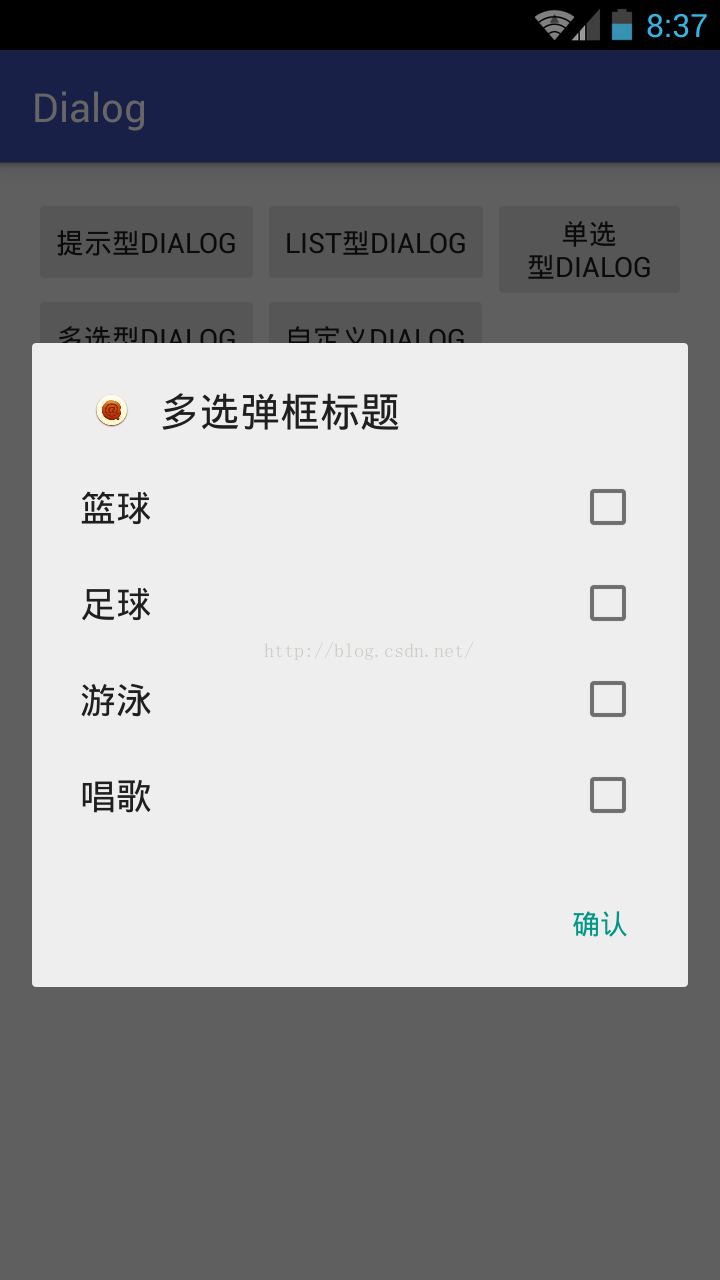
     public void showMultiDialog() {
         final CharSequence[] items = {"籃球", "足球", "游泳", "唱歌"};
         final StringBuilder checkedStr = new StringBuilder();
         AlertDialog.Builder builder = new AlertDialog.Builder(this);
         builder.setTitle("多選彈框標題");
         builder.setIcon(R.drawable.a12);
         builder.setMultiChoiceItems(items, null, new DialogInterface.OnMultiChoiceClickListener() {
             @Override
             public void onClick(DialogInterface dialog, int which, boolean isChecked) {
                 if (isChecked) {
                     checkedStr.append(items[which].toString());
                 }
             }
         });
         builder.setPositiveButton("確認", new DialogInterface.OnClickListener() {
             @Override
             public void onClick(DialogInterface dialog, int which) {
                 Toast.makeText(MainActivity.this, checkedStr, Toast.LENGTH_SHORT).show();
             }
         });
         builder.show();
     }
     /* 彈出單選型彈框 */
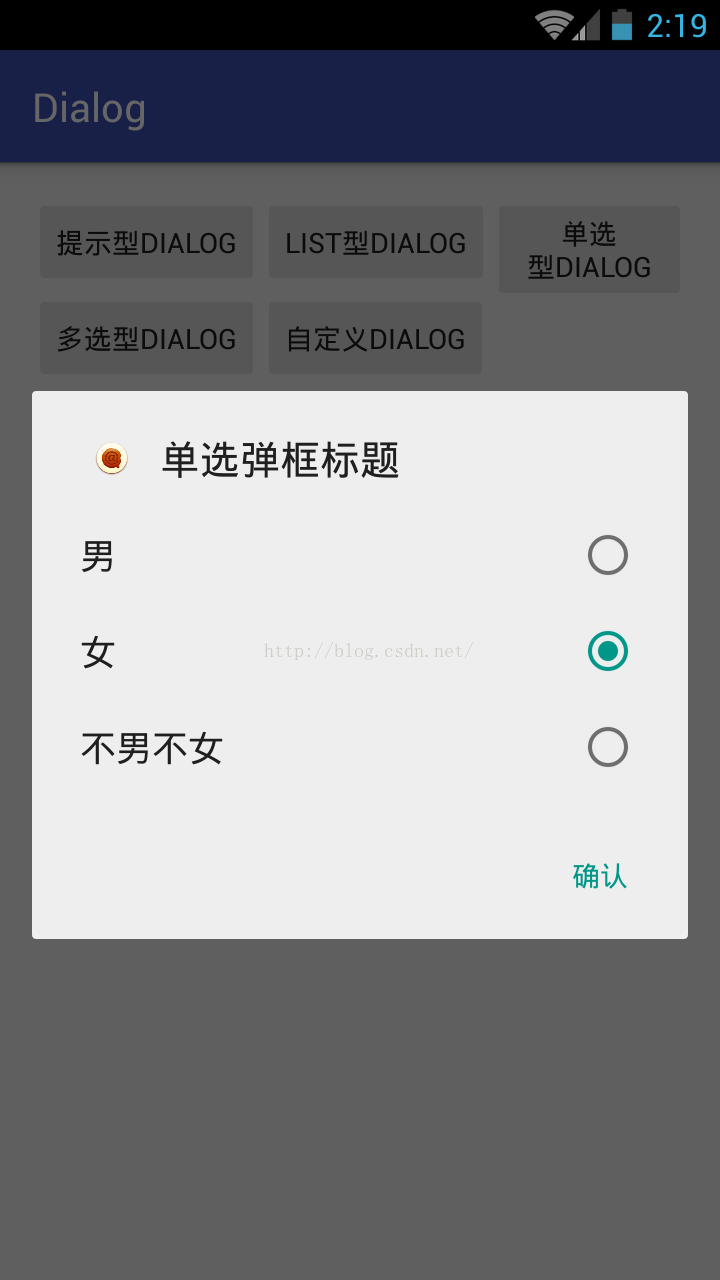
     public void showSingleDialog() {
         final CharSequence[] items = {"男", "女", "保密"};
         AlertDialog.Builder builder = new AlertDialog.Builder(this);
         builder.setTitle("單選彈框標題");
         builder.setIcon(R.drawable.a12);
         builder.setSingleChoiceItems(items, 1, new DialogInterface.OnClickListener() {
             @Override
             public void onClick(DialogInterface dialog, int which) {
                 String selectItem = items[which].toString();
                 Toast.makeText(MainActivity.this, selectItem, Toast.LENGTH_SHORT).show();
             }
         });
         builder.setPositiveButton("確認", new DialogInterface.OnClickListener() {
             @Override
             public void onClick(DialogInterface dialog, int which) {
                 Toast.makeText(MainActivity.this, "確認", Toast.LENGTH_SHORT).show();
             }
         });
         builder.show();
     }
     /* 彈出 list 型彈框 */
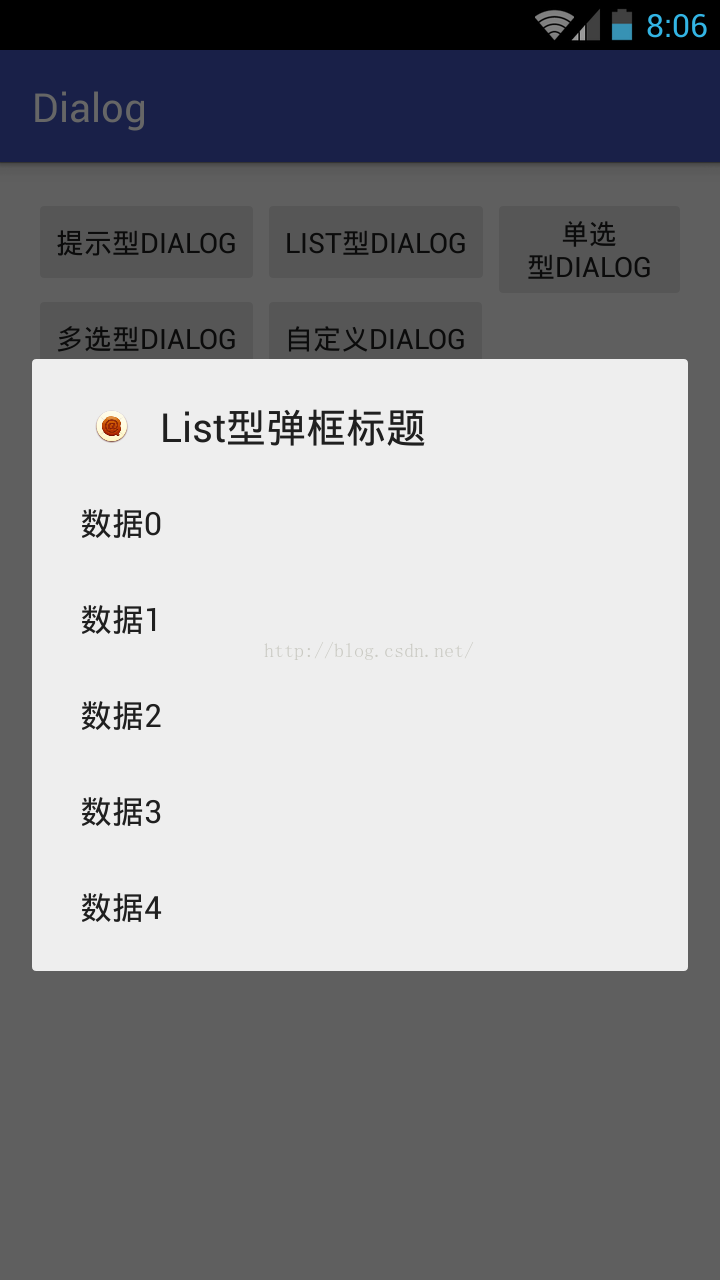
     public void showListDialog() {
         final CharSequence[] items = new CharSequence[5];
         for (int i = 0; i < 5; i++) {
             items[i] = "數據" + i;
         }
         AlertDialog.Builder builder = new AlertDialog.Builder(this);
         builder.setTitle("List 型彈框標題");
         builder.setIcon(R.drawable.a12);
         builder.setItems(items, new DialogInterface.OnClickListener() {
             @Override
             public void onClick(DialogInterface dialog, int which) {
                 String selectItem = items[which].toString();
                 Toast.makeText(MainActivity.this, selectItem, Toast.LENGTH_SHORT).show();
             }
         });
         builder.show();
     }
     /* 彈出簡單的彈框 */
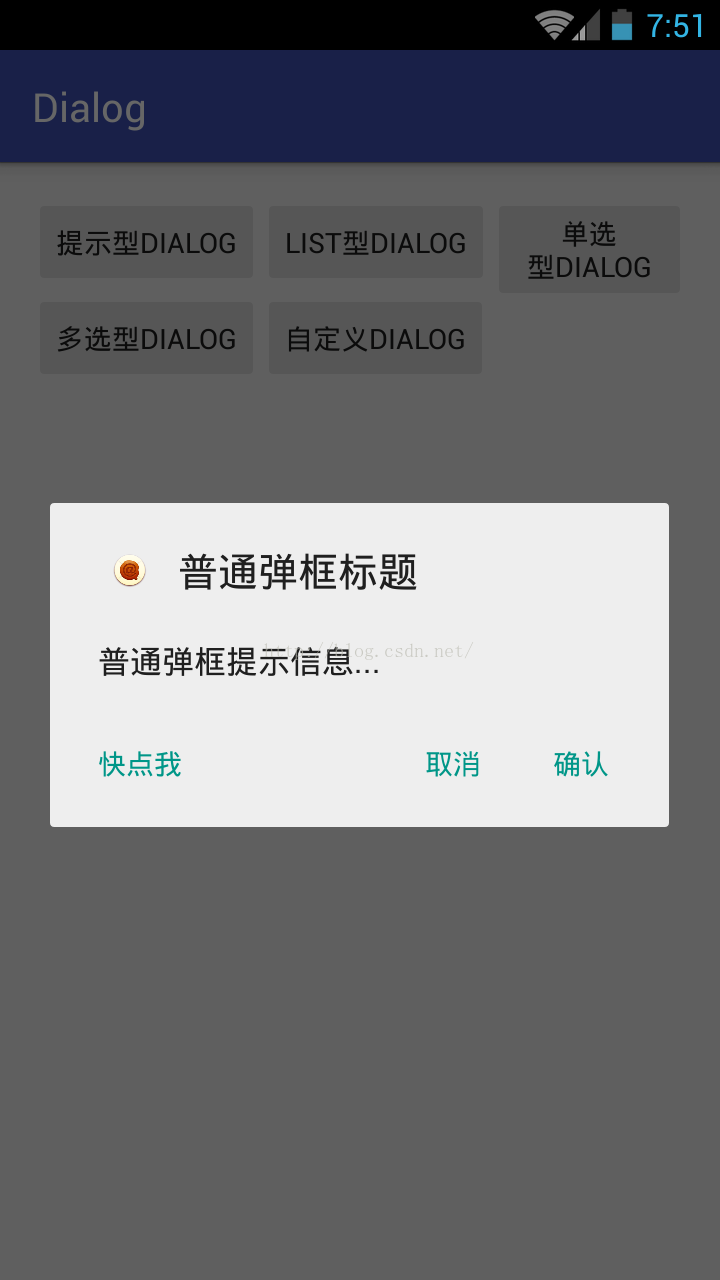
     public void showSimpleDialog() {
         AlertDialog.Builder builder = new AlertDialog.Builder(this);
         builder.setTitle("普通彈框標題");
         builder.setIcon(R.drawable.a12);
         builder.setMessage("普通彈框提示信息...");
         builder.setPositiveButton("確認", new DialogInterface.OnClickListener() {
             @Override
             public void onClick(DialogInterface dialog, int which) {
                 Toast.makeText(MainActivity.this, "確認", Toast.LENGTH_SHORT).show();
             }
         });
         builder.setNeutralButton("快點我", new DialogInterface.OnClickListener() {
             @Override
             public void onClick(DialogInterface dialog, int which) {
                 Toast.makeText(MainActivity.this, "我就知道你要點我", Toast.LENGTH_SHORT).show();
             }
         });
         builder.setNegativeButton("取消", new DialogInterface.OnClickListener() {
             @Override
             public void onClick(DialogInterface dialog, int which) {
                 Toast.makeText(MainActivity.this, "取消", Toast.LENGTH_SHORT).show();
             }
         });
         builder.show();
     }
     /* 彈出自定義的彈框 */
     public void showCustomDialog() {
         final EditText userName, passWord;
         LayoutInflater inflater = (LayoutInflater) getSystemService(LAYOUT_INFLATER_SERVICE);
         View view = inflater.inflate(R.layout.custom_dialog, null);
         userName = (EditText) view.findViewById(R.id.username_et);
         passWord = (EditText) view.findViewById(R.id.pas_et);
         AlertDialog.Builder builder = new AlertDialog.Builder(this);
         builder.setView(view);
         builder.setPositiveButton("登陸", new DialogInterface.OnClickListener() {
             @Override
             public void onClick(DialogInterface dialog, int which) {
                 String nameStr = userName.getText().toString();
                 String passStr = passWord.getText().toString();
                 Toast.makeText(MainActivity.this, "用戶名:" + nameStr + ",密碼:" + passStr, Toast.LENGTH_SHORT).show();
             }
         });
         builder.setNegativeButton("取消", new DialogInterface.OnClickListener() {
             @Override
             public void onClick(DialogInterface dialog, int which) {
                 Toast.makeText(MainActivity.this, "取消登錄", Toast.LENGTH_SHORT).show();
             }
         });
         builder.show();
     }
     /* 繼承實現監聽響應 */
     @Override
     public void onClick(View v) {
         switch (v.getId()) {
             case R.id.info_dg:
                 showSimpleDialog();
                 break;
             case R.id.list_dg:
                 showListDialog();
                 break;
             case R.id.single_dg:
                 showSingleDialog();
                 break;
             case R.id.multi_dg:
                 showMultiDialog();
                 break;
             case R.id.custom_dg:
                 showCustomDialog();
                 break;
         }
     }
 }
 <RelativeLayout xmlns:android="https://schemas.android.com/apk/res/android"
     xmlns:tools="https://schemas.android.com/tools"
     android:layout_width="match_parent"
     android:layout_height="match_parent"
     android:paddingBottom="@dimen/activity_vertical_margin"
     android:paddingLeft="@dimen/activity_horizontal_margin"
     android:paddingRight="@dimen/activity_horizontal_margin"
     android:paddingTop="@dimen/activity_vertical_margin"
     tools:context="com.example.dialog.MainActivity">
     <Button
         android:id="@+id/info_dg"
         android:layout_width="wrap_content"
         android:layout_height="wrap_content"
         android:layout_alignParentLeft="true"
         android:layout_alignParentStart="true"
         android:layout_alignParentTop="true"
         android:text="提示型Dialog" />
     <Button
         android:id="@+id/list_dg"
         android:layout_width="wrap_content"
         android:layout_height="wrap_content"
         android:layout_alignParentTop="true"
         android:layout_toEndOf="@+id/info_dg"
         android:layout_toRightOf="@+id/info_dg"
         android:text="List型Dialog" />
     <Button
         android:id="@+id/single_dg"
         android:layout_width="wrap_content"
         android:layout_height="wrap_content"
         android:layout_alignParentTop="@+id/list_dg"
         android:layout_toEndOf="@+id/list_dg"
         android:layout_toRightOf="@+id/list_dg"
         android:text="單選型Dialog" />
     <Button
         android:id="@+id/multi_dg"
         android:layout_width="wrap_content"
         android:layout_height="wrap_content"
         android:layout_alignParentLeft="true"
         android:layout_alignParentStart="true"
         android:layout_below="@+id/info_dg"
         android:text="多選型Dialog" />
     <Button
         android:id="@+id/custom_dg"
         android:layout_width="wrap_content"
         android:layout_height="wrap_content"
         android:layout_alignParentTop="@+id/multi_dg"
         android:layout_toEndOf="@+id/multi_dg"
         android:layout_toRightOf="@+id/multi_dg"
         android:text="自定義Dialog" />
 </RelativeLayout>
 <RelativeLayout xmlns:android="https://schemas.android.com/apk/res/android"
     android:layout_width="match_parent"
     android:layout_height="wrap_content"
     android:background="@color/colorAccent"
     android:padding="16dp">
     <TextView
         android:id="@+id/title_login"
         android:layout_width="wrap_content"
         android:layout_height="wrap_content"
         android:layout_alignParentTop="true"
         android:layout_centerHorizontal="true"
         android:layout_gravity="center_horizontal"
         android:text="登陸"
         android:textAppearance="?android:attr/textAppearanceLarge" />
     <RelativeLayout
         android:layout_width="wrap_content"
         android:layout_height="wrap_content"
         android:layout_alignParentEnd="true"
         android:layout_alignParentRight="true"
         android:layout_below="@+id/title_login"
         android:layout_marginTop="10dp">
         <TextView
             android:id="@+id/username"
             android:layout_width="wrap_content"
             android:layout_height="wrap_content"
             android:layout_alignBaseline="@+id/username_et"
             android:layout_alignParentLeft="true"
             android:layout_alignParentStart="true"
             android:layout_alignParentTop="true"
             android:text="用戶名:"
             android:textAppearance="?android:attr/textAppearanceLarge" />
         <EditText
             android:id="@+id/username_et"
             android:layout_width="wrap_content"
             android:layout_height="wrap_content"
             android:layout_alignParentEnd="true"
             android:layout_alignParentRight="true"
             android:layout_alignParentTop="true"
             android:layout_toEndOf="@+id/username"
             android:layout_toRightOf="@+id/username"
             android:ems="10"
             android:hint="請輸入用戶名"
             android:inputType="textPersonName" />
         <EditText
             android:id="@+id/pas_et"
             android:layout_width="wrap_content"
             android:layout_height="wrap_content"
             android:layout_alignLeft="@+id/username_et"
             android:layout_alignStart="@+id/username_et"
             android:layout_alignParentEnd="true"
             android:layout_alignParentRight="true"
             android:layout_below="@+id/username_et"
             android:ems="10"
             android:hint="請輸入密碼"
             android:inputType="textPassword" />
         <TextView
             android:id="@+id/password"
             android:layout_width="wrap_content"
             android:layout_height="wrap_content"
             android:layout_alignBaseline="@+id/pas_et"
             android:layout_alignParentLeft="true"
             android:layout_alignParentStart="true"
             android:layout_alignTop="@+id/pas_et"
             android:text="密碼:"
             android:textAppearance="?android:attr/textAppearanceLarge" />
     </RelativeLayout>
 </RelativeLayout>
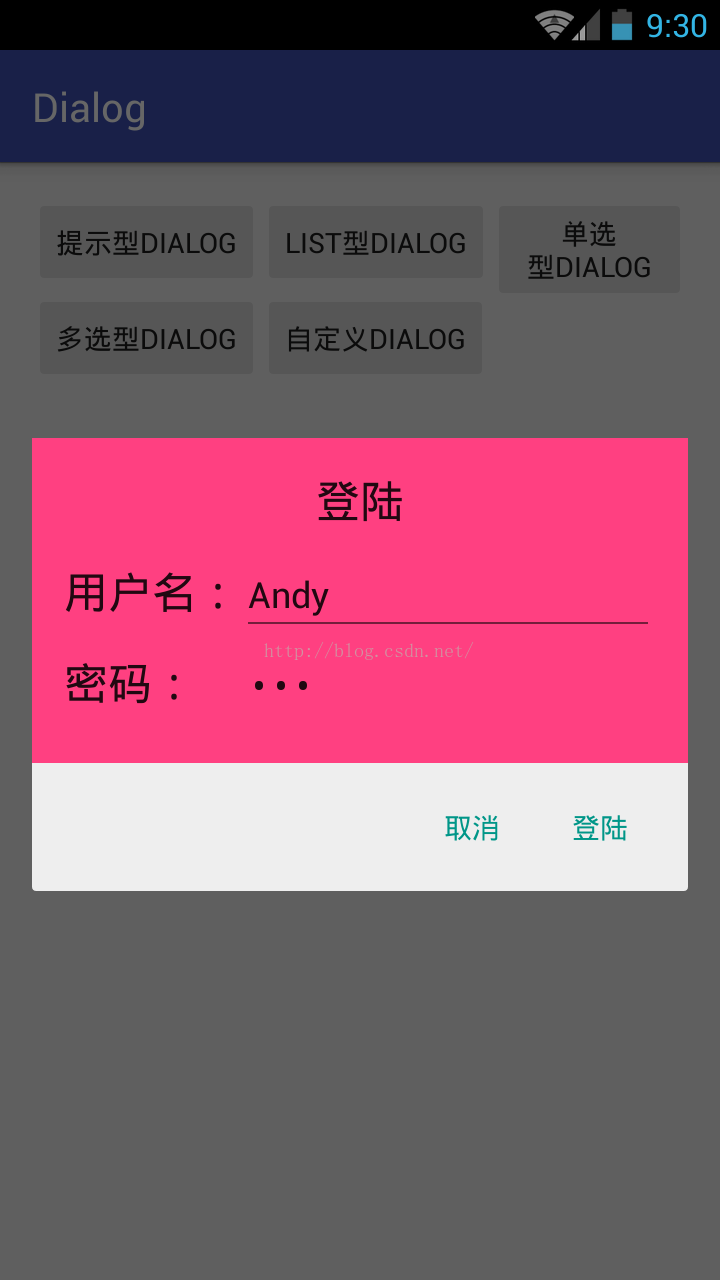
依次為:簡單 Dialog、List 型 Dialog、單選型 Dialog、多選型 Dialog、自定義 Dialog。
 Android Studio 搭配 MAT 分析記憶體洩漏實戰
什麼是記憶體洩漏記憶體洩漏指的是已經不再使用的物件仍然被某些參考鏈持有,導致垃圾回收機制無法回收它們。這會讓可用記憶體越來越少,最終造成效能下降,甚至引發 OOM。在 A
 Android 沉浸式狀態欄:讓狀態欄與頂部元件同色
這個特性從 Android 4.4 開始支援,最低需要 API 19。做法出乎意料地簡單,但真正要用得好看,還有幾個細節要處理。 兩行關鍵程式碼 public class
 Android 百度地圖定位並查詢周邊 POI 的完整實作
本文以一個實際案例,講解如何在 Android 中接入百度地圖 SDK,完成定位後再檢索周邊地點的完整流程,分享出來供大家參考。 效果預覽: 一、佈局規劃 <&
 12308 網上訂汽車票全攻略:春運返鄉輕鬆訂票
12308 全國汽車票網是由中國道路運輸協會與全國站場工作委員會攜手共建,是一個服務全國旅客公路客運出行的互聯網平台。臨近過年,返鄉人潮眾多,加上時間有限,越來越多人選擇