

編輯:關於 Android 程式設計
Google 基於安全考量,從 5.1 之後呼叫 ActivityManager.getRunningAppProcesses() 只會回傳自己應用的進程。那麼 5.1 以上要怎麼取得執行中的進程?一位國外開發者在 StackOverflow 上給出了答案,並把實作整理成開源庫。
如果你已經很熟練地會導入第三方庫,那看到這裡就可以停了;若還不熟悉,我會一步步示範。
先到該作者的 GitHub 下載專案(需要自备代理工具)。沒有條件的話也可以用我備份的百度雲:https://pan.baidu.com/s/1kVjjPsF 提取碼:ag6u
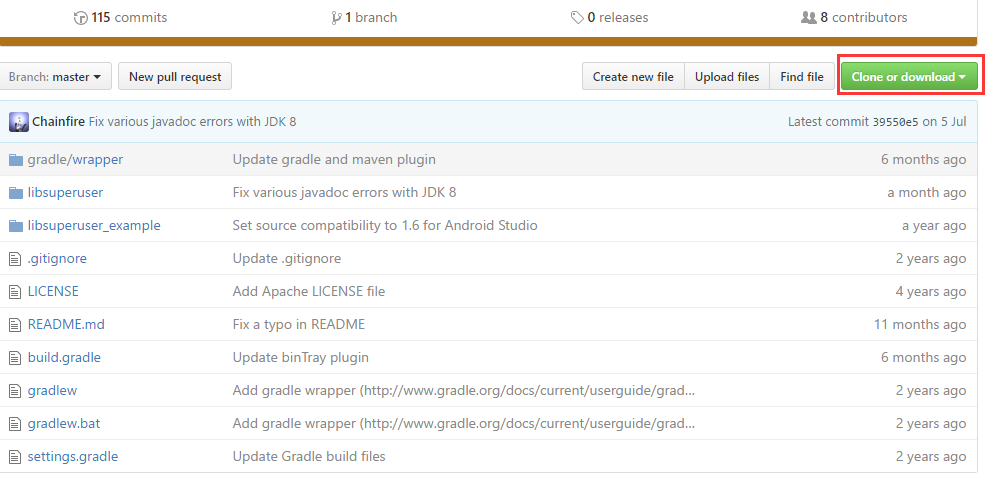
下載解壓後的目錄結構如下:
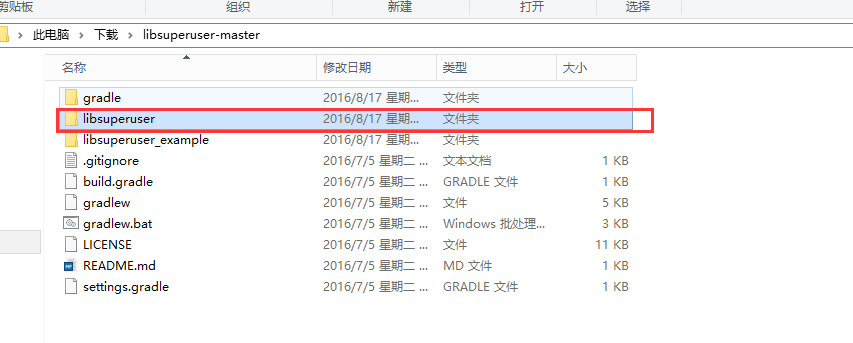
我們只需要其中紅框標示的部分。直接導入一定會遇到問題,先處理其中一部分——打開 libsuperuser:
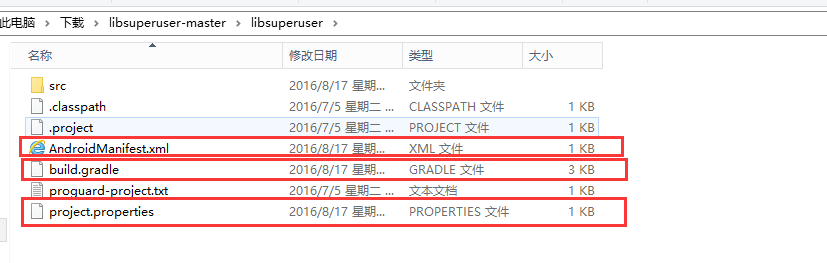
框選的三個檔案是重點。如果要導入的內容裡有 build.gradle、AndroidManifest.xml 或 project.properties,請用記事本打開,把裡面的 gradle 版本與 Android SDK 版本改成自己專案在用的。不確定的話,可以新建一個空專案或翻出舊專案的對應檔案做比對。
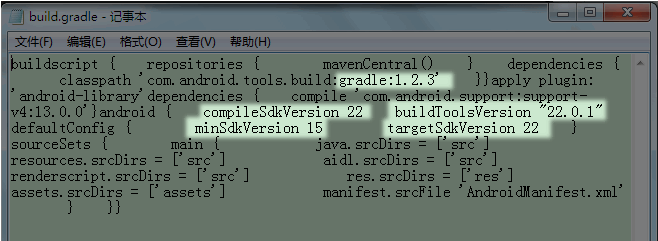
改好之後,回到 Android Studio 的 Project 視圖,把它貼上進去。
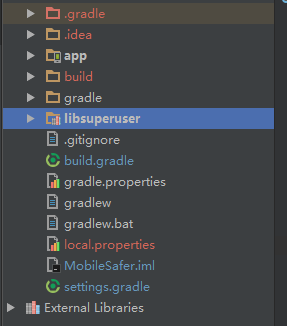
貼上後會提示同步,直接同步即可,但通常會看到這類錯誤:
Error:(2, 0) Plugin with id 'com.github.dcendents.android-maven' not found
Error:(2, 0) Plugin with id 'com.jfrog.bintray.gradle' not found
這是因為缺少兩個 gradle 插件。來到專案根目錄的 build.gradle,在 dependencies 中加入全域 classpath:
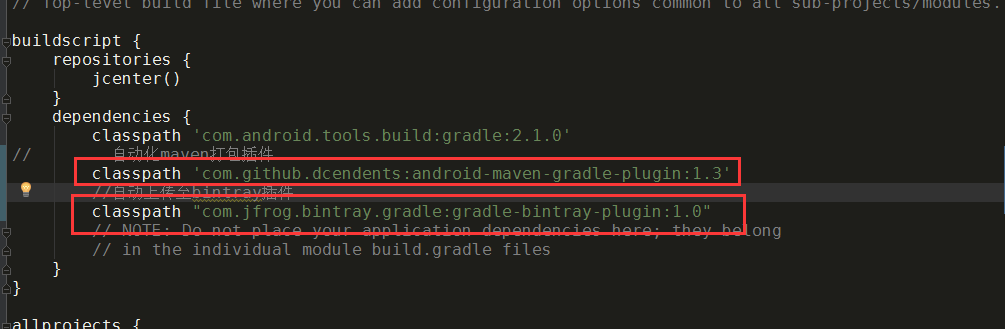
// 自動化 maven 打包插件
classpath 'com.github.dcendents:android-maven-gradle-plugin:1.3'
// 自動上傳至 bintray 的插件
classpath "com.jfrog.bintray.gradle:gradle-bintray-plugin:1.0"
建議分兩次填寫、各同步一次,因為第二次下載會需要比較長的時間。
編譯錯誤消失後,來到 Android 視圖下的 build.gradle (Module: app) 加入:
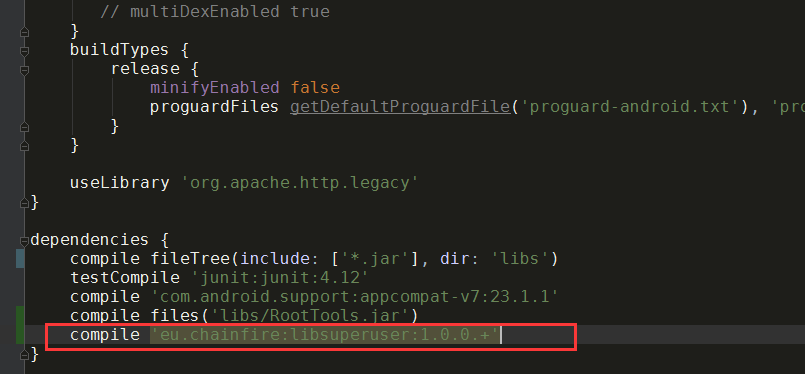
compile 'eu.chainfire:libsuperuser:1.0.0.+'
重新同步後就能呼叫裡面的方法了。新建一個 ProcessManager 類別:
import android.content.Context;
import android.content.pm.ApplicationInfo;
import android.content.pm.PackageInfo;
import android.content.pm.PackageManager;
import android.os.Build;
import android.os.Parcel;
import android.os.Parcelable;
import java.util.ArrayList;
import java.util.List;
import eu.chainfire.libsuperuser.Shell;

/**
 * @author Jared Rummler
 */
public class ProcessManager {
    private static final String TAG = "ProcessManager";
    private static final String APP_ID_PATTERN;

    static {
        if (Build.VERSION.SDK_INT >= Build.VERSION_CODES.JELLY_BEAN_MR1) {
            // Android 4.2 起為了支援多使用者,app 的 UID 名稱格式改變
            APP_ID_PATTERN = "u\\d+_a\\d+";
        } else {
            APP_ID_PATTERN = "app_\\d+";
        }
    }

    /** 取得所有執行中的進程 */
    public static List<Process> getRunningProcesses() {
        List<Process> processes = new ArrayList<>();
        List<String> stdout = Shell.SH.run("toolbox ps -p -P -x -c");
        for (String line : stdout) {
            try {
                processes.add(new Process(line));
            } catch (Exception e) {
                android.util.Log.d(TAG, "Failed parsing line " + line);
            }
        }
        return processes;
    }

    /** 只取得「應用」層級的進程 */
    public static List<Process> getRunningApps() {
        List<Process> processes = new ArrayList<>();
        List<String> stdout = Shell.SH.run("toolbox ps -p -P -x -c");
        int myPid = android.os.Process.myPid();
        for (String line : stdout) {
            try {
                Process process = new Process(line);
                if (process.user.matches(APP_ID_PATTERN)) {
                    if (process.ppid == myPid || process.name.equals("toolbox")) {
                        // 跳過我們為了取資料而建立的子進程
                        continue;
                    }
                    processes.add(process);
                }
            } catch (Exception e) {
                android.util.Log.d(TAG, "Failed parsing line " + line);
            }
        }
        return processes;
    }

    public static class Process implements Parcelable {
        public final String user;               // 使用者名稱
        public final int uid;                   // 使用者 ID
        public final int pid;                   // 進程 ID
        public final int ppid;                  // 父進程 ID
        public final long vsize;                // 虛擬記憶體大小(KiB)
        public final long rss;                  // 常駐記憶體(KiB)
        public final int cpu;
        public final int priority;
        public final int niceness;
        public final int realTimePriority;
        public final int schedulingPolicy;      // 0=sched_other, 1=sched_fifo, 2=sched_rr
        public final String policy;             // "bg"、"fg"、"un"、"er" 或 ""
        public final String wchan;              // 進程睡眠所在的核心函數位址
        public final String pc;
        /**
         * 可能的狀態:
         * "D" 不可中斷睡眠(通常是 IO)
         * "R" 執行中或可執行(在 run queue)
         * "S" 可中斷睡眠(等待事件完成)
         * "T" 已停止(job control 訊號或被 trace)
         * "W" paging(2.6.xx 之後無效)
         * "X" 已死(正常不該看到)
         * "Z" 屍體進程,已終止但尚未被父進程回收
         */
        public final String state;
        public final String name;               // 進程名稱
        public final long userTime;             // user time(毫秒)
        public final long systemTime;           // system time(毫秒)

        // 解析 toolbox ps 的單行輸出
        private Process(String line) throws Exception {
            String[] fields = line.split("\\s+");
            user = fields[0];
            uid = android.os.Process.getUidForName(user);
            pid = Integer.parseInt(fields[1]);
            ppid = Integer.parseInt(fields[2]);
            vsize = Integer.parseInt(fields[3]) * 1024;
            rss = Integer.parseInt(fields[4]) * 1024;
            cpu = Integer.parseInt(fields[5]);
            priority = Integer.parseInt(fields[6]);
            niceness = Integer.parseInt(fields[7]);
            realTimePriority = Integer.parseInt(fields[8]);
            schedulingPolicy = Integer.parseInt(fields[9]);

            if (fields.length == 16) {
                policy = "";
                wchan = fields[10];
                pc = fields[11];
                state = fields[12];
                name = fields[13];
                userTime = Integer.parseInt(fields[14].split(":")[1].replace(",", "")) * 1000;
                systemTime = Integer.parseInt(fields[15].split(":")[1].replace(")", "")) * 1000;
            } else {
                policy = fields[10];
                wchan = fields[11];
                pc = fields[12];
                state = fields[13];
                name = fields[14];
                userTime = Integer.parseInt(fields[15].split(":")[1].replace(",", "")) * 1000;
                systemTime = Integer.parseInt(fields[16].split(":")[1].replace(")", "")) * 1000;
            }
        }

        private Process(Parcel in) {
            user = in.readString();
            uid = in.readInt();
            pid = in.readInt();
            ppid = in.readInt();
            vsize = in.readLong();
            rss = in.readLong();
            cpu = in.readInt();
            priority = in.readInt();
            niceness = in.readInt();
            realTimePriority = in.readInt();
            schedulingPolicy = in.readInt();
            policy = in.readString();
            wchan = in.readString();
            pc = in.readString();
            state = in.readString();
            name = in.readString();
            userTime = in.readLong();
            systemTime = in.readLong();
        }

        /** 取得套件名稱;非應用進程回傳 null */
        public String getPackageName() {
            if (!user.matches(APP_ID_PATTERN)) {
                return null;
            } else if (name.contains(":")) {
                // 背景服務跑在與主進程不同的行程中
                return name.split(":")[0];
            }
            return name;
        }

        public PackageInfo getPackageInfo(Context context, int flags)
                throws PackageManager.NameNotFoundException {
            String packageName = getPackageName();
            if (packageName == null) {
                throw new PackageManager.NameNotFoundException(name + " is not an application process");
            }
            return context.getPackageManager().getPackageInfo(packageName, flags);
        }

        public ApplicationInfo getApplicationInfo(Context context, int flags)
                throws PackageManager.NameNotFoundException {
            String packageName = getPackageName();
            if (packageName == null) {
                throw new PackageManager.NameNotFoundException(name + " is not an application process");
            }
            return context.getPackageManager().getApplicationInfo(packageName, flags);
        }

        @Override
        public int describeContents() { return 0; }

        @Override
        public void writeToParcel(Parcel dest, int flags) {
            dest.writeString(user);
            dest.writeInt(uid);
            dest.writeInt(pid);
            dest.writeInt(ppid);
            dest.writeLong(vsize);
            dest.writeLong(rss);
            dest.writeInt(cpu);
            dest.writeInt(priority);
            dest.writeInt(niceness);
            dest.writeInt(realTimePriority);
            dest.writeInt(schedulingPolicy);
            dest.writeString(policy);
            dest.writeString(wchan);
            dest.writeString(pc);
            dest.writeString(state);
            dest.writeString(name);
            dest.writeLong(userTime);
            dest.writeLong(systemTime);
        }

        public static final Creator<Process> CREATOR = new Creator<Process>() {
            public Process createFromParcel(Parcel source) {
                return new Process(source);
            }
            public Process[] newArray(int size) {
                return new Process[size];
            }
        };
    }
}
有了這個類別,就能取得執行中的進程了:
// 取得執行中進程
List<ProcessManager.Process> runningProcesses = ProcessManager.getRunningProcesses();
但有不少進程是沒有名稱的。若要把列表呈現給使用者操作,需要過濾掉這些無名進程:
List<ProcessManager.Process> Processes = new ArrayList<>();
PackageManager pm = getPackageManager();
runningProcesses = ProcessManager.getRunningProcesses();

for (ProcessManager.Process runningProcesse : runningProcesses) {
    String packname = runningProcesse.getPackageName();
    try {
        ApplicationInfo applicationInfo = pm.getApplicationInfo(packname, 0);
    } catch (PackageManager.NameNotFoundException e) {
        e.printStackTrace();
        continue;   // 沒有對應套件的進程直接跳過
    }
    Processes.add(runningProcesse);
}
最後要提醒的是,這個方案的本質是呼叫 toolbox ps 並解析輸出,因此需要 root 權限(libsuperuser 的作用就是取得並管理 shell 權限)。在未 root 的裝置上,它無法繞過 5.1 以上的限制;若產品需要在一般使用者裝置上取得進程資訊,更合適的方向是使用 UsageStatsManager 搭配 PACKAGE_USAGE_STATS 權限,或退而求其次只顯示自家應用的進程狀態。
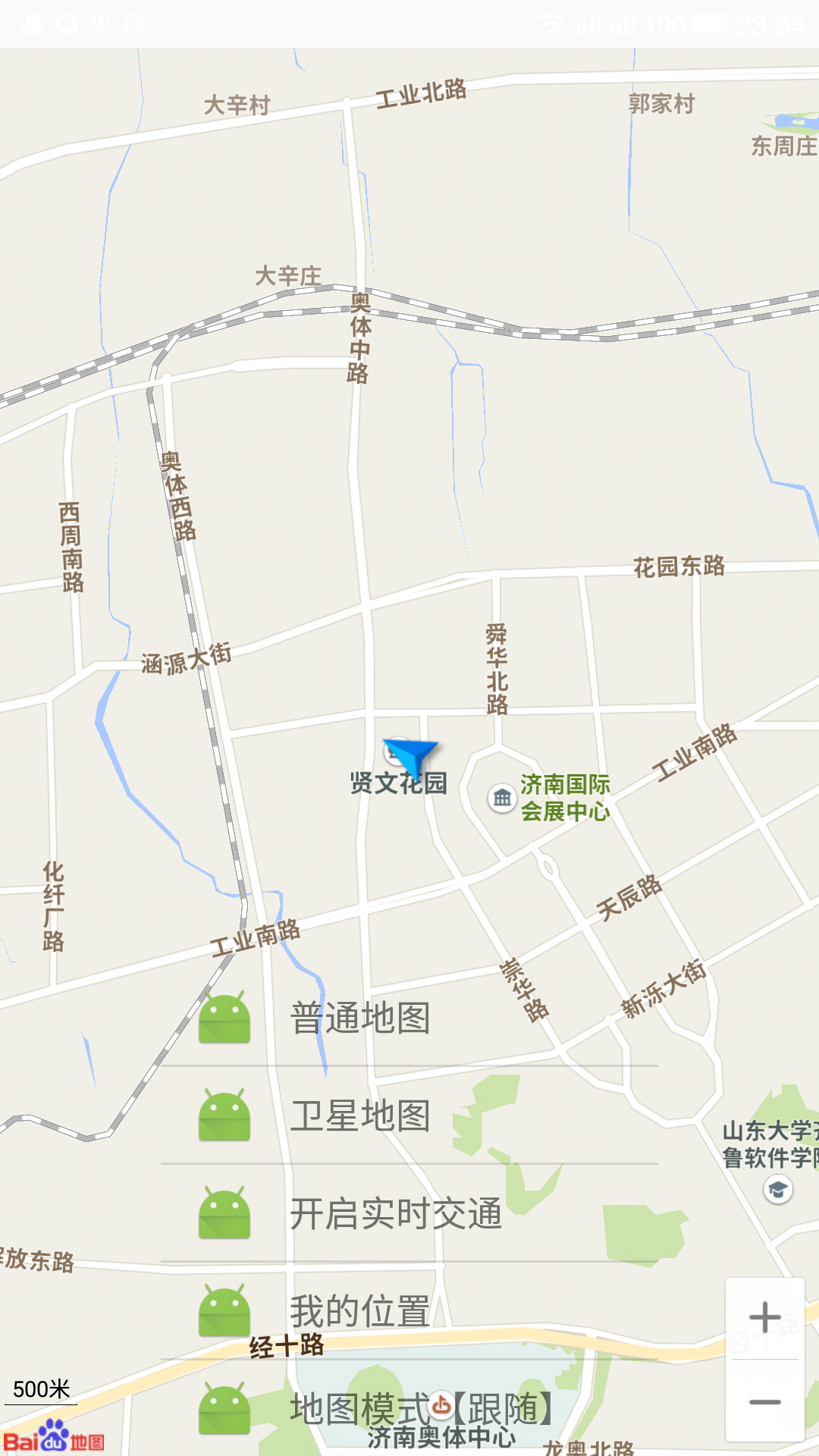 百度地圖進階玩法:結合方向傳感器,讓地圖跟著你轉
這一篇要替地圖補上兩件事:一是定位,二是結合方向傳感器,讓地圖能依手機的實際朝向確認方位。有了這兩項,地圖才真正開始「為我所用」。 動手要改的三個地方 整體改動其實集中
 Android 自定義控件實戰:手繪柱形圖與折線圖
概述 前幾天突然需要製作兩種圖表——柱形圖與折線圖,第一反應是先找現成的。網上雖然找得到,卻都不是想要的樣子,而且大多不是用純 Android 程式碼完成。HTML5 固
 OSGi ServiceListener實戰:動態監聽服務註冊與變更
前言 在OSGi的世界裡,動態性是最鮮明的特徵之一。Bundle可以在執行期安裝、啟動、停止、更新與移除,而服務也可能隨時被註冊、修改或取消註冊。若應用需要即時感知這些變
 Android Studio 中 jar 與 aar 的產生方式及 aar 本地導入
本文說明在 Android Studio 中如何產出 aar 檔,以及如何以本地方式把 aar 匯入專案使用。 產出位置 在 Android Studio 中對自己的