

編輯:關於 Android 程式設計
先看成效,雖然錄得有點卡:
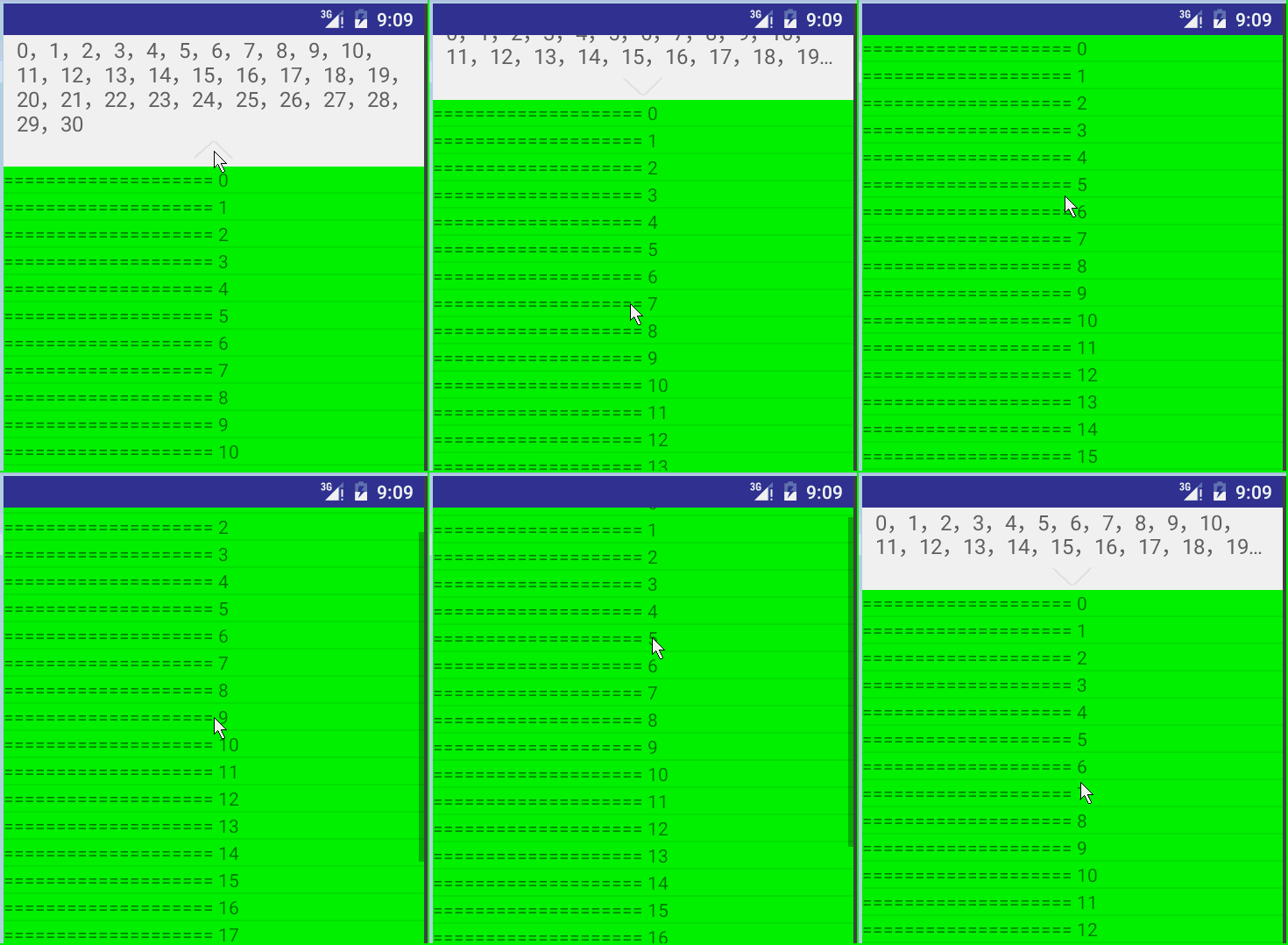
原始碼:https://github.com/dreamlizhengwei/DragTopLayout
GitHub 上流傳較廣的實作是 chenupt 的版本:https://github.com/chenupt/DragTopLayout。它功能齊全,但也比較重,而且存在一類難纏的問題:當頭部控件高度是動態變化的時候,滾動計算會出錯;使用時往往還得搭配 EventBus 才能正常運作,接入成本偏高。
於是就自己寫了一個,全文只有一個類,接入非常簡單。
DragTopLayout 裡面放兩個一級子佈局,第一個當頭部,第二個當內容。本例頭部使用可展開的 ExpandableTextView,內容放一個 ListView。
<com.test.dragtoplayout.DragTopLayout
    android:id="@+id/drag"
    android:layout_width="match_parent"
    android:layout_height="match_parent">

    <!-- 頭部 -->
    <LinearLayout
        android:layout_width="match_parent"
        android:layout_height="wrap_content"
        android:orientation="vertical">
        <TextView
            android:layout_width="match_parent"
            android:layout_height="wrap_content"
            android:ellipsize="end"
            android:paddingLeft="10dp"
            android:paddingRight="10dp"
            android:text="0,1,2,3 ..."
            android:textColor="#666666"
            android:textSize="16sp" />
    </LinearLayout>

    <!-- 內容 -->
    <LinearLayout
        android:id="@+id/content"
        android:layout_width="match_parent"
        android:layout_height="match_parent"
        android:orientation="vertical">
        <ListView
            android:id="@+id/lv"
            android:layout_width="match_parent"
            android:layout_height="match_parent" />
    </LinearLayout>

</com.test.dragtoplayout.DragTopLayout>
Activity 側只需要多呼叫一個 setTargetView(),告訴它誰是可滾動的內容:
drag = (DragTopLayout) findViewById(R.id.drag);
lv = (ListView) findViewById(R.id.lv);
drag.setTargetView(lv);
lv.setAdapter(new BaseAdapter() {
    @Override public int getCount() { return 50; }
    @Override public Object getItem(int position) { return null; }
    @Override public long getItemId(int position) { return 0; }
    @Override public View getView(int position, View convertView, ViewGroup parent) {
        TextView t = new TextView(MainActivity.this);
        t.setText("==================== " + position);
        return t;
    }
});
之所以要手動指定,是因為內容區不一定只有一個 View,框架無法自動判斷誰才是真正承載滾動的那一個;它可能是 ListView,也可能是 ScrollView、RecyclerView。
類本身的註釋寫得比較完整,這裡單獨提三處值得注意的設計:
canChildScrollUp():判斷內容 View 是否已經滾到頂部。這個判斷直接參考了 SwipeRefreshLayout 的做法,對 AbsListView 判斷 firstVisiblePosition 與首個子 View 的 top,對其他 View 則用 ViewCompat.canScrollVertically 向下探測,兼容性可靠。
requestDisallowInterceptTouchEvent():同樣沿用 SwipeRefreshLayout 的處理方式。當子 View 不支援嵌套滾動時,直接忽略這個請求,避免垂直滾動事件被父容器搶走。
ACTION_MOVE 中的距離計算:這段最容易看糊。核心思路是先算出手指位移 delta,再叠加當前 scrollY 得到目標位置 realDelt,然後夾在 [0, mHeadHeight] 區間內,超出邊界就換成「刚好抵達邊界」的距離。onInterceptTouchEvent 裡則根據移動方向與 mCollapsed 狀態決定要不要攔截:頭部已收起時向下滑要攔截,頭部仍顯示時向上滑要攔截,橫向位移大於縱向則一律放行。
松手後的 checkPosition() 以頭部高度的一半為分界,超過就吸附到關閉,否則吸附到展開,並用 Scroller 補一段收尾動畫:
private void checkPosition() {
    int offset = getScrollY();      // 先取值,避免在 if 中直接呼叫造成取值時機錯誤
    if (offset < mHeadHeight / 2) {
        open();
    } else {
        close();
    }
}

private void close() {
    mCollapsed = true;
    mScroller.startScroll(0, getScrollY(), 0, mHeadHeight - getScrollY());
    invalidate();
}

private void open() {
    mCollapsed = false;
    mScroller.startScroll(0, getScrollY(), 0, -getScrollY());
    invalidate();
}

@Override
public void computeScroll() {
    if (mScroller.computeScrollOffset()) {
        scrollTo(0, mScroller.getCurrY());
        invalidate();
    }
}
另外,onMeasure 中記下第一個子 View 的高度作為頭部高度,onLayout 中把第二個子 View 往下推一個頭部高度,並讓它多畫出 mHeadHeight 的區域,這樣上移時才不會露出空白。
這種效果其實也可以直接用 CoordinatorLayout 搭配 Behavior 來實現,代碼量甚至更少。自己寫一遍的好處是把事件分發、滑動衝突、Scroll 動畫這幾件事真正想清楚——這些底層功底換到任何自訂 View 場景都用得上。
目前版本應該沒有大問題,若有邊界 case 歡迎留言。
 GreenDao 3.2.0 的基本使用入門
前言 Android 開發中或多或少都會接觸到數據庫。系統自帶的 SQLite 是個佔用內存極小的關聯式數據庫,雖然提供了不少操作 API,但我們仍得親手編寫 SQL 語
 Android 自定義標題欄的實作方法
在 Android 中,自定義標題欄可以讓應用程式拥有更一致的視覺風格。透過獨立標題欄版面配置,可以方便在不同頁面重用,也能依需求加入按鈕與事件。 建立標題欄版面 首先在
 Android APK 反編譯詳解:取得 Java 原始碼
在此鄭重聲明,貼出這篇文章的目的不是為了破解他人軟體,而是抱持一種學習的態度;不過透過這種方式,確實也能用來漢化一些國外軟體。 準備工具 要反編譯 APK 取得 Jav
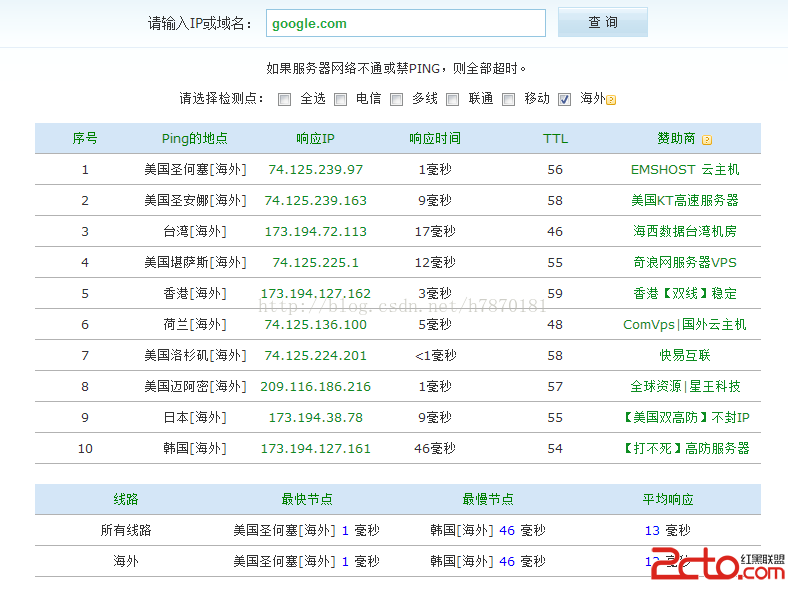 善用 hosts 檔解決 SDK 更新超時:原理、設定方式與 IP 失效的排查
做 Android 開發的人大概都遇過這件事:打開 SDK Manager 等半天,進度條卡在 0%;想看官方文件,頁面轉了兩分鐘還是白屏。這類問題的成因通常不是網路壞了