

編輯:關於 Android 程式設計
上一篇我們已經完成了視頻錄制控件的相關封裝,這一篇則聚焦在控件的具体使用。其實只要讀一遍控件源碼就會發現用法相當直觀,各位可以依自身需求調整參數,以下代碼僅供參考。
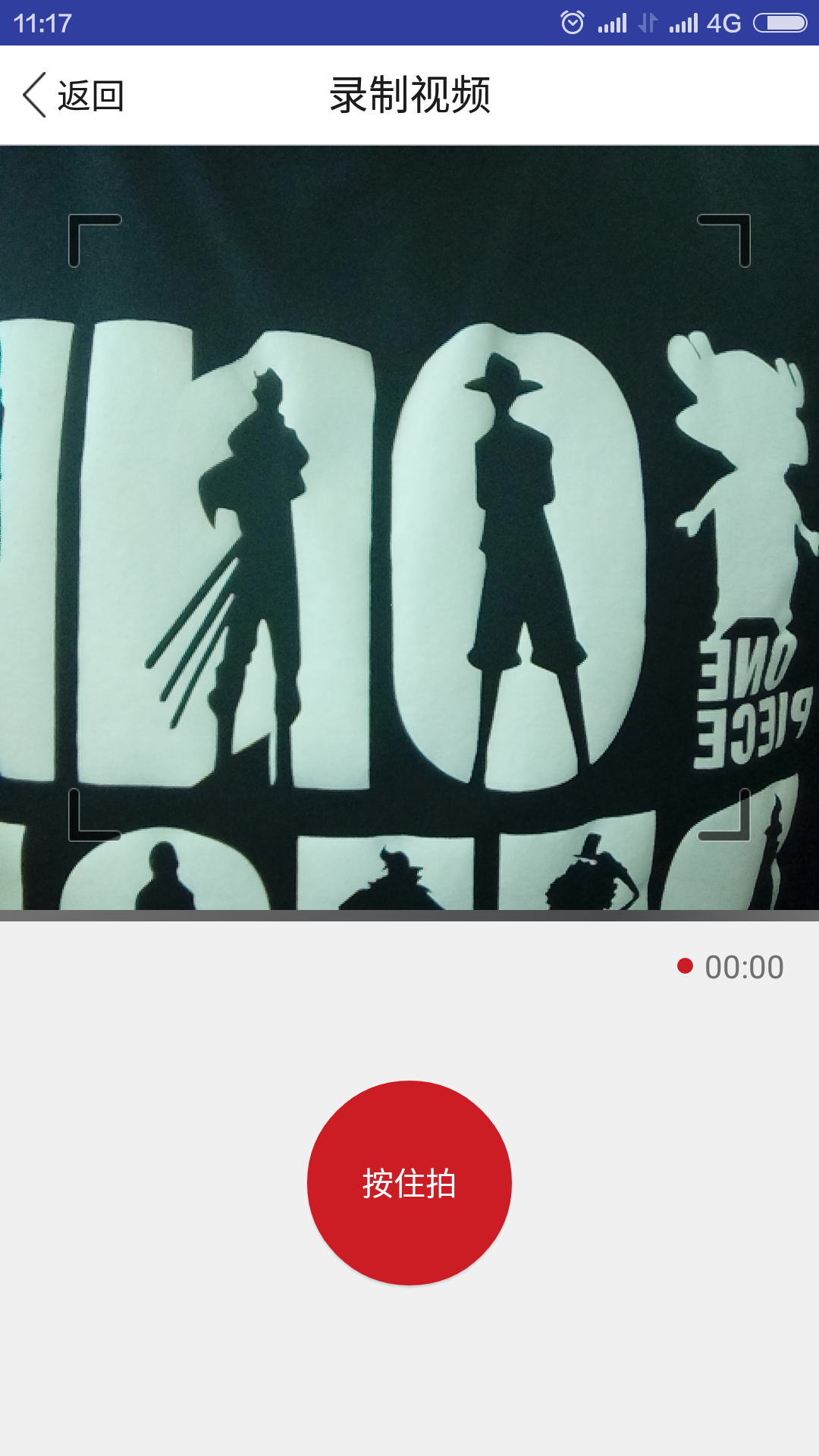
錄制頁面大致包含以下幾個功能點:
錄制預覽的尺寸必須正確設置,控件長寬比要與預覽尺寸相符,否則畫面會變形。由於本專案需要自拍,因此默認調用前置攝像頭,若需使用後置可在代碼中調整;切換攝像頭的需求本次沒有涉及,若有需要可自行擴充。此外,錄制前務必做好權限檢測。
import android.Manifest;
import android.app.Activity;
import android.content.Intent;
import android.content.pm.PackageManager;
import android.os.Bundle;
import android.os.Handler;
import android.os.Message;
import android.support.annotation.Nullable;
import android.support.v4.app.ActivityCompat;
import android.util.DisplayMetrics;
import android.util.Log;
import android.view.MotionEvent;
import android.view.View;
import android.widget.Button;
import android.widget.FrameLayout;
import android.widget.ProgressBar;
import android.widget.RelativeLayout;
import android.widget.TextView;
import android.widget.Toast;
import java.io.File;
import java.io.IOException;

/**
 * 視頻拍攝頁面
 */
public class RecordVideoActivity extends Activity implements View.OnClickListener {
    private static final String LOG_TAG = "RecordVideoActivity";
    private static final int REQ_CODE = 110;
    private static final int RES_CODE = 111;
    private static final int RECORD_PROGRESS = 100;
    private static final int RECORD_FINISH = 101;

    private MovieRecorderView movieRecorderView;
    private Button buttonShoot;
    private RelativeLayout rlBottomRoot;
    private ProgressBar progressVideo;
    private TextView textViewCountDown;
    private TextView textViewUpToCancel;
    private TextView textViewReleaseToCancel;

    private boolean isFinish = true;
    private boolean isTouchOnUpToCancel = false;
    private int currentTime = 0;
    private float startY;

    private Handler handler = new Handler() {
        @Override
        public void handleMessage(Message msg) {
            switch (msg.what) {
                case RECORD_PROGRESS:
                    progressVideo.setProgress(currentTime);
                    textViewCountDown.setText(currentTime < 10 ? "00:0" + currentTime : "00:" + currentTime);
                    break;
                case RECORD_FINISH:
                    if (isTouchOnUpToCancel) {
                        resetData();
                    } else {
                        isFinish = true;
                        buttonShoot.setEnabled(false);
                        finishActivity();
                    }
                    break;
            }
        }
    };

    @Override
    protected void onCreate(@Nullable Bundle savedInstanceState) {
        super.onCreate(savedInstanceState);
        setContentView(R.layout.activity_record_video);
        initView();
    }

    public void initView() {
        ((TextView) findViewById(R.id.title)).setText("錄制視頻");
        findViewById(R.id.title_left).setOnClickListener(this);
        movieRecorderView = (MovieRecorderView) findViewById(R.id.movieRecorderView);
        buttonShoot = (Button) findViewById(R.id.button_shoot);
        rlBottomRoot = (RelativeLayout) findViewById(R.id.rl_bottom_root);
        progressVideo = (ProgressBar) findViewById(R.id.progressBar_loading);
        textViewCountDown = (TextView) findViewById(R.id.textView_count_down);
        textViewCountDown.setText("00:00");
        textViewUpToCancel = (TextView) findViewById(R.id.textView_up_to_cancel);
        textViewReleaseToCancel = (TextView) findViewById(R.id.textView_release_to_cancel);

        DisplayMetrics dm = getApplicationContext().getResources().getDisplayMetrics();
        int width = dm.widthPixels;
        FrameLayout.LayoutParams lp = (FrameLayout.LayoutParams) movieRecorderView.getLayoutParams();
        lp.height = width * 4 / 3; // 依屏幕寬度設定預覽尺寸,避免拉伸
        movieRecorderView.setLayoutParams(lp);

        FrameLayout.LayoutParams bottomLp = (FrameLayout.LayoutParams) rlBottomRoot.getLayoutParams();
        bottomLp.height = width / 3 * 2;
        rlBottomRoot.setLayoutParams(bottomLp);

        buttonShoot.setOnTouchListener(new View.OnTouchListener() {
            @Override
            public boolean onTouch(View v, MotionEvent event) {
                if (event.getAction() == MotionEvent.ACTION_DOWN) {
                    textViewUpToCancel.setVisibility(View.VISIBLE);
                    isFinish = false;
                    startY = event.getY();
                    movieRecorderView.record(new MovieRecorderView.OnRecordFinishListener() {
                        @Override
                        public void onRecordFinish() {
                            handler.sendEmptyMessage(RECORD_FINISH);
                        }
                    });
                } else if (event.getAction() == MotionEvent.ACTION_UP) {
                    textViewUpToCancel.setVisibility(View.GONE);
                    textViewReleaseToCancel.setVisibility(View.GONE);
                    if (startY - event.getY() > 100) {
                        if (!isFinish) resetData();
                    } else {
                        if (movieRecorderView.getTimeCount() > 3) {
                            handler.sendEmptyMessage(RECORD_FINISH);
                        } else {
                            Toast.makeText(RecordVideoActivity.this, "視頻錄制時間太短", Toast.LENGTH_SHORT).show();
                            resetData();
                        }
                    }
                } else if (event.getAction() == MotionEvent.ACTION_MOVE) {
                    if (startY - event.getY() > 100) {
                        isTouchOnUpToCancel = true;
                        textViewUpToCancel.setVisibility(View.GONE);
                        textViewReleaseToCancel.setVisibility(View.VISIBLE);
                    } else {
                        isTouchOnUpToCancel = false;
                        textViewUpToCancel.setVisibility(View.VISIBLE);
                        textViewReleaseToCancel.setVisibility(View.GONE);
                    }
                } else if (event.getAction() == MotionEvent.ACTION_CANCEL) {
                    resetData();
                }
                return true;
            }
        });

        progressVideo.setMax(10);
        movieRecorderView.setOnRecordProgressListener(new MovieRecorderView.OnRecordProgressListener() {
            @Override
            public void onProgressChanged(int maxTime, int current) {
                currentTime = current;
                handler.sendEmptyMessage(RECORD_PROGRESS);
            }
        });
    }

    @Override
    public void onResume() {
        super.onResume();
        checkCameraPermission();
    }

    private void checkCameraPermission() {
        if (ActivityCompat.checkSelfPermission(this, Manifest.permission.CAMERA) != PackageManager.PERMISSION_GRANTED
                || ActivityCompat.checkSelfPermission(this, Manifest.permission.RECORD_AUDIO) != PackageManager.PERMISSION_GRANTED) {
            Toast.makeText(this, "視頻錄制和錄音沒有授權", Toast.LENGTH_LONG).show();
            this.finish();
        } else {
            resetData();
        }
    }

    private void resetData() {
        if (movieRecorderView.getRecordFile() != null) movieRecorderView.getRecordFile().delete();
        movieRecorderView.stop();
        isFinish = true;
        currentTime = 0;
        progressVideo.setProgress(0);
        textViewCountDown.setText("00:00");
        buttonShoot.setEnabled(true);
        textViewUpToCancel.setVisibility(View.GONE);
        textViewReleaseToCancel.setVisibility(View.GONE);
        try {
            movieRecorderView.initCamera();
        } catch (IOException e) {
            e.printStackTrace();
        }
    }

    @Override
    public void onDestroy() {
        // 退出界面時刪除文件,若要刪除文件夾需提供文件夾路徑
        if (movieRecorderView.getRecordFile() != null) {
            File file = new File(movieRecorderView.getRecordFile().getAbsolutePath());
            if (file != null && file.exists()) {
                Log.e(LOG_TAG, "file.exists():" + file.exists());
                file.delete();
            }
        }
        super.onDestroy();
    }

    private void finishActivity() {
        if (isFinish) {
            movieRecorderView.stop();
            Intent intent = new Intent(this, VideoPreviewActivity.class);
            intent.putExtra("path", movieRecorderView.getRecordFile().getAbsolutePath());
            startActivityForResult(intent, REQ_CODE);
        }
    }

    @Override
    public void onClick(View v) {
        if (v.getId() == R.id.title_left) finish();
    }

    @Override
    protected void onActivityResult(int requestCode, int resultCode, Intent data) {
        super.onActivityResult(requestCode, resultCode, data);
        if (requestCode == REQ_CODE && resultCode == RES_CODE) {
            setResult(RES_CODE);
            finish();
        }
    }
}
<?xml version="1.0" encoding="utf-8"?>
<LinearLayout xmlns:android="https://schemas.android.com/apk/res/android"
    android:layout_width="match_parent"
    android:layout_height="match_parent"
    android:background="#f0f0f0"
    android:orientation="vertical">

    <FrameLayout
        android:layout_width="match_parent"
        android:layout_height="0dp"
        android:layout_weight="1">

        <com.example.wood.samplevideo.MovieRecorderView
            android:id="@+id/movieRecorderView"
            android:layout_width="match_parent"
            android:layout_height="0dp" />

        <RelativeLayout
            android:layout_width="match_parent"
            android:layout_height="match_parent">

            <TextView
                android:id="@+id/textView_release_to_cancel"
                android:layout_width="wrap_content"
                android:layout_height="wrap_content"
                android:layout_alignParentBottom="true"
                android:layout_centerHorizontal="true"
                android:layout_marginBottom="50dp"
                android:background="#99b31921"
                android:padding="2dp"
                android:text="松開取消"
                android:textColor="#ffffff"
                android:visibility="gone" />
        </RelativeLayout>
    </FrameLayout>

    <FrameLayout
        android:layout_width="match_parent"
        android:layout_height="wrap_content"
        android:background="#f0f0f0">

        <RelativeLayout
            android:id="@+id/rl_bottom_root"
            android:layout_width="match_parent"
            android:layout_height="wrap_content">

            <TextView
                android:id="@+id/textView_up_to_cancel"
                android:layout_width="wrap_content"
                android:layout_height="wrap_content"
                android:layout_centerHorizontal="true"
                android:layout_marginTop="20dp"
                android:background="#33000000"
                android:text="上移取消"
                android:textColor="#ffffff"
                android:visibility="gone" />

            <ProgressBar
                android:id="@+id/progressBar_loading"
                android:layout_width="match_parent"
                android:layout_height="wrap_content"
                android:minHeight="5dp" />

            <Button
                android:id="@+id/button_shoot"
                android:layout_width="90dp"
                android:layout_height="90dp"
                android:layout_centerInParent="true"
                android:background="@drawable/button_bg_red"
                android:text="按住拍"
                android:textColor="#ffffff"
                android:textSize="14sp" />
        </RelativeLayout>
    </FrameLayout>
</LinearLayout>
整體而言,這個控件把「按住錄制、上劃取消、進度回調」等常用交互都封裝好了,你只要專注在頁面邏輯與權限處理上即可,非常適合快速搭建短視頻錄制場景。
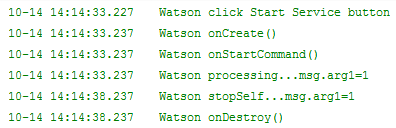 Android Service 全面解析:概念、生命週期與實作
Service 概念及用途 A service is an application component that can perform long-running ope
 Android SweepGradient 詳解:用掃描漸層畫出雷達光波效果
什麼是「掃描渲染」?想想安全軟體裡雷達掃描的那圈光波——顏色繞著一個中心點旋轉漸變,就是 SweepGradient 最典型的應用。 兩種建構方式 以顏色陣列建構
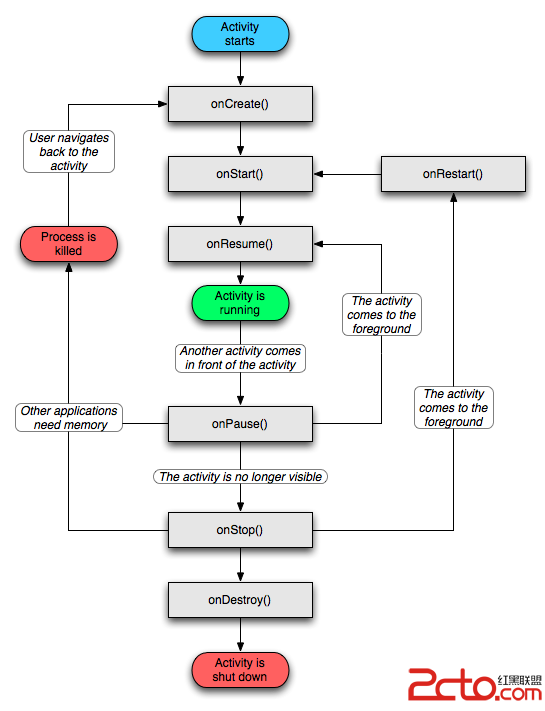 Activity 與 Fragment 生命週期完整對比
Fragment 是 Android 3.0 引入的元件,用來解決「同一套程式碼要同時適配手機與平板」的問題。但它的生命週期並不是 Activity 的子集,而是多出了幾
 Android OkHttp 實戰(二):接口請求、文件上傳與下載
上一篇《Android OkHttp(一)初識》最後提供了一個封裝 OkHttp 請求的工具類,今天就來看看它在項目中的實際用法。 一、簡單的接口請求。 接口請求需要一個