

編輯:關於 Android 程式設計
開發中,當我們需要一張大圖的同時還要用到若干小圖時,只需通過代碼對原圖做不同比例的縮放即可,這樣既節省資源,又能減小安裝包體積。除縮放外,我們還常常需要對圖片做裁剪、旋轉、存儲等操作。
把這些操作封裝成通用組件,能大大方便開發。下面分享一個圖片處理組件 BitmapUtil,案例界面如下:
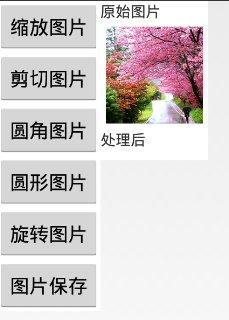
1、通過 BitmapFactory 取得 Bitmap:
Bitmap bm=BitmapFactory.decodeStream(InputStream is );
2、Bitmap 的 createBitmap() 方法:
Bitmap newbm = Bitmap.createBitmap( Bitmap s, int x, int y, int w, int h, Matrix m, boolean f);
該方法可實現位圖的縮放、裁剪、旋轉操作。
參數說明:
三、BitmapUtil 組件Bitmap s:要處理的原始位圖
int x, y:起始位置坐標
int w:要裁剪的圖的寬度
int h:要裁剪的圖的高度
Matrix m:矩陣,主要用於平面的縮放、平移、旋轉
boolean f:是否保持等比
返回值:處理後的 Bitmap
可實現按比例縮放、按比例裁剪、圓形圖片處理等方法,功能如下:
/** * 通過資源id轉化成Bitmap */ public static Bitmap readBitmapById(Context context, int resId){ BitmapFactory.Options opt = new BitmapFactory.Options(); opt.inPreferredConfig = Bitmap.Config.RGB_565; opt.inPurgeable = true; opt.inInputShareable = true; InputStream is = context.getResources().openRawResource(resId); return BitmapFactory.decodeStream(is, null, opt); }
執行效果如圖:
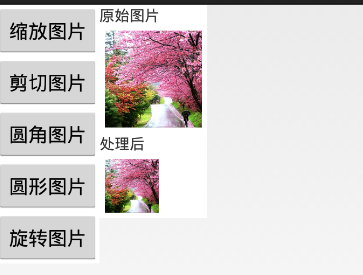
/** * 縮放圖片 */ public static Bitmap scaleImage(Bitmap bm, int newWidth, int newHeight){ if (bm == null){ return null; } int width = bm.getWidth(); int height = bm.getHeight(); float scaleWidth = ((float) newWidth) / width; float scaleHeight = ((float) newHeight) / height; Matrix matrix = new Matrix(); matrix.postScale(scaleWidth, scaleHeight); Bitmap newbm = Bitmap.createBitmap(bm, 0, 0, width, height, matrix,true); if (bm != null & !bm.isRecycled()){ bm.recycle(); bm = null; } return newbm; }
執行效果如圖:
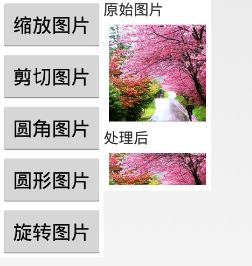
/** * 按照一定的寬高比例裁剪圖片 */ public static Bitmap imageCrop(Bitmap bitmap, int num1, int num2, boolean isRecycled){ if (bitmap == null){ return null; } int w = bitmap.getWidth(); int h = bitmap.getHeight(); int retX, retY; int nw, nh; if (w > h){ if (h > w * num2 / num1){ nw = w; nh = w * num2 / num1; retX = 0; retY = (h - nh) / 2; } else{ nw = h * num1 / num2; nh = h; retX = (w - nw) / 2; retY = 0; } } else{ if (w > h * num2 / num1){ nh = h; nw = h * num2 / num1; retY = 0; retX = (w - nw) / 2; } else{ nh = w * num1 / num2; nw = w; retY = (h - nh) / 2; retX = 0;} } Bitmap bmp = Bitmap.createBitmap(bitmap, retX, retY, nw, nh, null,false); if (isRecycled && bitmap != null && !bitmap.equals(bmp)&& !bitmap.isRecycled()){ bitmap.recycle(); bitmap = null; } return bmp; }
執行效果如圖:
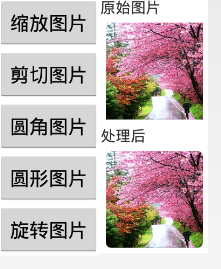
/** *圖片轉圓角 */ public static Bitmap toRoundCorner(Bitmap bitmap, int pixels) { Bitmap output = Bitmap.createBitmap(bitmap.getWidth(), bitmap.getHeight(), Config.ARGB_8888); Canvas canvas = new Canvas(output); final int color = 0xff424242; final Paint paint = new Paint(); final Rect rect = new Rect(0, 0, bitmap.getWidth(), bitmap.getHeight()); final RectF rectF = new RectF(rect); final float roundPx = pixels; paint.setAntiAlias(true); canvas.drawARGB(0, 0, 0, 0); paint.setColor(color); canvas.drawRoundRect(rectF, roundPx, roundPx, paint); paint.setXfermode(new PorterDuffXfermode(Mode.SRC_IN)); canvas.drawBitmap(bitmap, rect, rect, paint); if (bitmap != null && !bitmap.isRecycled()) { bitmap.recycle(); } return output; }
執行效果如圖:
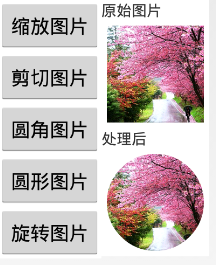
public static Bitmap toRoundBitmap(Bitmap bitmap){ if (bitmap == null){ return null; } int width = bitmap.getWidth(); int height = bitmap.getHeight(); float roundPx; float left, top, right, bottom, dst_left, dst_top, dst_right, dst_bottom; if (width <= height){ roundPx = width / 2; top = 0; bottom = width; left = 0; right = width; height = width; dst_left = 0; dst_top = 0; dst_right = width; dst_bottom = width; } else{ roundPx = height / 2; float clip = (width - height) / 2; left = clip; right = width - clip; top = 0; bottom = height; width = height; dst_left = 0; dst_top = 0; dst_right = height; dst_bottom = height; } Bitmap output = Bitmap.createBitmap(width, height, Config.ARGB_8888); Canvas canvas = new Canvas(output); final int color = 0xff424242; final Paint paint = new Paint(); final Rect src = new Rect((int) left, (int) top, (int) right, (int) bottom); final Rect dst = new Rect((int) dst_left, (int) dst_top, (int) dst_right, (int) dst_bottom); final RectF rectF = new RectF(dst); paint.setAntiAlias(true); canvas.drawARGB(0, 0, 0, 0); paint.setColor(color); canvas.drawRoundRect(rectF, roundPx, roundPx, paint); paint.setXfermode(new PorterDuffXfermode(Mode.SRC_IN)); canvas.drawBitmap(bitmap, src, dst, paint); if (bitmap != null && !bitmap.isRecycled()){ bitmap.recycle(); bitmap = null; } return output; }
執行效果如圖:
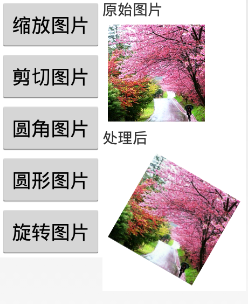
/** * 旋轉圖片 */ public static Bitmap rotaingImageView(int angle, Bitmap bitmap) { Matrix matrix = new Matrix(); matrix.postRotate(angle); Bitmap resizedBitmap = Bitmap.createBitmap(bitmap, 0, 0, bitmap.getWidth(), bitmap.getHeight(), matrix, true); if (resizedBitmap != bitmap && bitmap != null && !bitmap.isRecycled()){ bitmap.recycle(); bitmap = null; } return resizedBitmap; }
public static boolean saveBmpToSd(String dir, Bitmap bm, String filename, int quantity, boolean recyle) { boolean ret = true; if (bm == null) { return false;} File dirPath = new File(dir); if (!exists(dir)) { dirPath.mkdirs(); } if (!dir.endsWith(File.separator)) { dir += File.separator; } File file = new File(dir + filename); OutputStream outStream = null; try { file.createNewFile(); outStream = new FileOutputStream(file); bm.compress(Bitmap.CompressFormat.JPEG, quantity, outStream); } catch (Exception e) { e.printStackTrace(); ret = false; } finally { try { if (outStream != null) outStream.close(); } catch (IOException e) { e.printStackTrace(); } if (recyle && !bm.isRecycled()) { bm.recycle(); bm = null; } } return ret; }
 透過 ActionProvider 為 Toolbar 自訂帶小紅點的 Menu
今天要達成的幾個目標: 1. 自訂 ActionProvider 2. Toolbar ActionBar 自訂 Menu 3. 為 Toolbar ActionBar
 Android 專案自定義頂部標題欄
自定義標題欄的目的在 Android 專案中,頂部標題欄經常需要顯示返回按鈕、標題文字與提交按鈕。若每個頁面都重複撰寫標題欄邏輯,維護成本會很高。因此,可以將標題欄抽成獨
 Android開發:發送短信的小程式實作與廣播回調
用程式發簡訊是 Android 的經典入門練習,因為它同時涵蓋了權限申請、Intent、PendingIntent 與廣播接收四個觀念。本文從最基礎的版本開始,再補上發送
 Android Activity 啟動模式:singleInstance 是什麼?
singleInstance 的核心規則 singleInstance 表示該 Activity 在系統中只能有一個實例,並且這個實例會獨自運行在一個任務棧中。這個任務棧